
Swagger常用参数用法
1、常用参数
a、配置参数
 package com.mao.swagger.config;

 import org.springframework.context.annotation.Bean;

 import org.springframework.context.annotation.Configuration;

 import springfox.documentation.builders.PathSelectors;

 import springfox.documentation.builders.RequestHandlerSelectors;

 import springfox.documentation.spi.DocumentationType;

 import springfox.documentation.spring.web.plugins.Docket;

 import springfox.documentation.swagger2.annotations.EnableSwagger2;

 @Configuration

 @EnableSwagger2

 public class SwaggerConfig {

     @Bean

     public Docket userDocket() {

         return new Docket(DocumentationType.SWAGGER_2)

                 .groupName("商品接口文档")

                 .select()

                 .paths(PathSelectors.any())

                 .apis(RequestHandlerSelectors.basePackage("com.mao.swagger.goods.controller"))

                 .build();

     }

     @Bean

     public Docket deviceDocket() {

         return new Docket(DocumentationType.SWAGGER_2)

                 .groupName("用户接口文档")

                 .select()

                 .paths(PathSelectors.any())

                 .apis(RequestHandlerSelectors.basePackage("com.mao.swagger.user.controller"))

                 .build();

     }

 }
- .groupName("商品接口文档") 设置栏目名
- .select() 初始化并返回一个API选择构造器
- .paths(PathSelectors.any()) 设置路径筛选
- .apis(RequestHandlerSelectors.basePackage("com.mao.swagger.goods.controller")) 添加路径选择条件
- .build(); 构建
PathSelectors类的方法:
Predicate<String> any():满足条件的路径,该断言总为true
Predicate<String> none():不满足条件的路径,该断言总为false (生产环境可以屏蔽掉swagger:https://blog.csdn.net/goldenfish1919/article/details/78280051)
Predicate<String> regex(final String pathRegex):符合正则的路径
RequestHandlerSelectors类的方法:
Predicate<RequestHandler> any():返回包含所有满足条件的请求处理器的断言,该断言总为true
Predicate<RequestHandler> none():返回不满足条件的请求处理器的断言,该断言总为false
Predicate<RequestHandler> basePackage(final String basePackage):返回一个断言(Predicate),该断言包含所有匹配basePackage下所有类的请求路径的请求处理器
b、接口参数
- @Api()用于类; 表示标识这个类是swagger的资源 【参考code1,效果图1】
- @ApiOperation()用于方法; 表示一个http请求的操作 【参考code1,效果图1】
- @ApiParam()用于方法,参数,字段说明; 表示对参数的添加元数据(说明或是否必填等) 【暂时没用,当前使用SpringMVC@RequestParam】
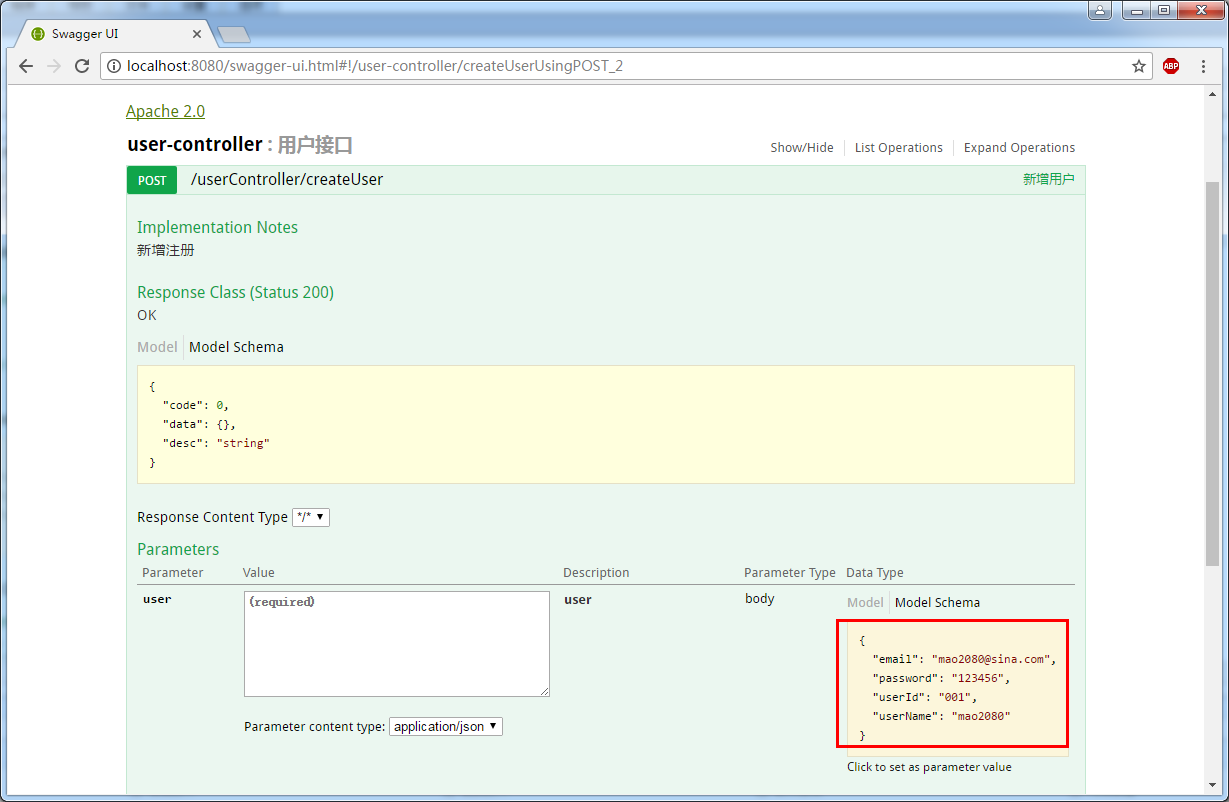
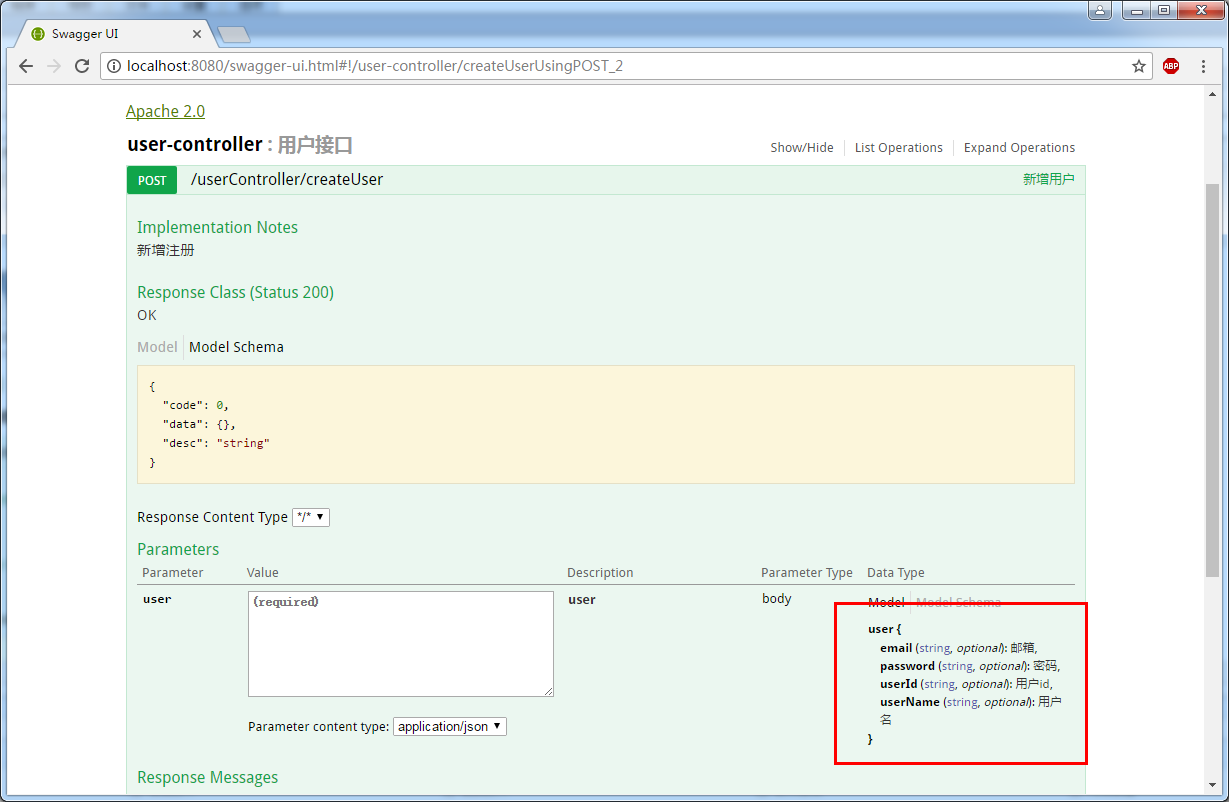
- @ApiModel()用于类 表示对类进行说明,用于参数用实体类接收 【参考code2,效果图2,3】
- @ApiModelProperty()用于方法,字段 表示对model属性的说明或者数据操作更改 【参考code2,效果图2,3】
- @ApiIgnore()用于类,方法,方法参数 表示这个方法或者类被忽略 【参考code1,效果图1】
- @ApiImplicitParam() 用于方法 表示单独的请求参数 【参考code1,效果图1】
- @ApiImplicitParams() 用于方法,包含多个 @ApiImplicitParam 【参考code1,效果图1】
code1
 package com.mao.swagger.user.controller;

 import org.springframework.http.HttpStatus;

 import org.springframework.http.MediaType;

 import org.springframework.web.bind.annotation.RequestBody;

 import org.springframework.web.bind.annotation.RequestMapping;

 import org.springframework.web.bind.annotation.RequestMethod;

 import org.springframework.web.bind.annotation.RequestParam;

 import org.springframework.web.bind.annotation.RestController;

 import com.mao.swagger.beans.ResObject;

 import com.mao.swagger.beans.User;

 import io.swagger.annotations.Api;

 import io.swagger.annotations.ApiImplicitParam;

 import io.swagger.annotations.ApiImplicitParams;

 import io.swagger.annotations.ApiOperation;

 import springfox.documentation.annotations.ApiIgnore;

 /**

  * Hello world!

  *

  */

 @Api(description = "用户接口")

 @RestController

 @RequestMapping("/userController")

 public class UserController {

     @ApiOperation(value = "新增用户" ,  notes="新增注册")

     @RequestMapping(value="/createUser",method=RequestMethod.POST,consumes= MediaType.APPLICATION_JSON_VALUE)

     public ResObject createUser(@RequestBody User user){

         System.out.println("createUser:::"+user.toString());

         return new ResObject(HttpStatus.OK.value(), "新增成功.");

     }

     @ApiOperation(value = "修改用户" ,  notes="修改用户")

     @RequestMapping(value="/updateUser",method=RequestMethod.POST,consumes= MediaType.APPLICATION_JSON_VALUE)

     public ResObject updateUser(@RequestBody User user){

         System.out.println("updateUser:::"+user.toString());

         return new ResObject(HttpStatus.OK.value(), "修改成功.");

     }

     @ApiOperation(value = "删除用户" ,  notes="删除用户")

     @ApiImplicitParams({

         @ApiImplicitParam(name = "userId", value = "用户标识", required = true, paramType = "query", dataType = "String")

     })

     @RequestMapping(value="/deleteUser",method=RequestMethod.DELETE)

     public ResObject deleteUser(@RequestParam("userId") String userId){

         System.out.println("deleteUser:::"+userId);

         return new ResObject(HttpStatus.OK.value(), "删除成功.");

     }

     @ApiOperation(value = "查询用户" ,  notes="查询用户")

     @ApiImplicitParam(name = "userId", value = "用户标识", required = true, paramType = "query", dataType = "String")

     @RequestMapping(value="/queryUser",method=RequestMethod.GET)

     public ResObject queryUser(@RequestParam("userId") String userId){

         System.out.println("queryUser:::"+userId);

         User user = new User(userId, "张三", "******", "mao2080@sina.com");

         return new ResObject(HttpStatus.OK.value(), user);

     }

     @ApiOperation(value = "被遗忘的方法" ,  notes="这个方法将被不会显示")

     @ApiIgnore

     @ApiImplicitParam(name = "userId", value = "用户标识", required = true, paramType = "query", dataType = "String")

     @RequestMapping(value="/queryUser1",method=RequestMethod.GET)

     public ResObject queryUser1(@RequestParam("userId") String userId){

         System.out.println("queryUser:::"+userId);

         User user = new User(userId, "张三", "******", "mao2080@sina.com");

         return new ResObject(HttpStatus.OK.value(), user);

     }

 }
效果图1

code2
 package com.mao.swagger.beans;

 import io.swagger.annotations.ApiModel;

 import io.swagger.annotations.ApiModelProperty;

 @ApiModel(value="user", description="用户对象")

 public class User {

     @ApiModelProperty(value="用户id",name="userId",example="001")

     private String userId;

     @ApiModelProperty(value="用户名",name="userName",example="mao2080")

     private String userName;

     @ApiModelProperty(value="密码",name="password",example="123456")

     private String password;

     @ApiModelProperty(value="邮箱",name="email",example="mao2080@sina.com")

     private String email;

     public User() {

         super();

     }

     public User(String userId, String userName, String password, String email) {

         super();

         this.userId = userId;

         this.userName = userName;

         this.password = password;

         this.email = email;

     }

     public String getUserId() {

         return userId;

     }

     public void setUserId(String userId) {

         this.userId = userId;

     }

     public String getUserName() {

         return userName;

     }

     public void setUserName(String userName) {

         this.userName = userName;

     }

     public String getPassword() {

         return password;

     }

     public void setPassword(String password) {

         this.password = password;

     }

     public String getEmail() {

         return email;

     }

     public void setEmail(String email) {

         this.email = email;

     }

     @Override

     public String toString() {

         return "User [userId=" + userId + ", userName=" + userName + ", password=" + password + ", email=" + email+"]";

     }

69

 }
效果图2
效果图3
2、参考网站
https://blog.csdn.net/z28126308/article/details/71126677
https://blog.csdn.net/u014231523/article/details/76522486
https://www.cnblogs.com/softidea/p/6251249.html
3、推广阅读
Swagger常用参数用法的更多相关文章
- C#中Messagebox.Show()常用参数用法详解
声明:IWin32Window owner , HelpNavigator navigator , string keyword 上面的三个参数类型不是很了解.没有做讨论. 等以后了解多了 ...
- maven用途、核心概念、用法、常用参数和命令、扩展
设置问题解决. http://trinea.iteye.com/blog/1290898 本文由浅入深,主要介绍maven的用途.核心概念(Pom.Repositories.Artifact.Buil ...
- Production环境中iptables常用参数配置
production环境中iptables常用参数配置 作者:尹正杰 版权声明:原创作品,谢绝转载!否则将追究法律责任. 我相信在实际生产环境中有很多运维的兄弟跟我一样,很少用到iptables的这个 ...
- cat常用参数详解
cat常用参数详解 作者:尹正杰 版权声明:原创作品,谢绝转载!否则将追究法律责任. 最近,我的一个朋友对linux特别感兴趣,于是我觉得每天交给他一个命令的使用,这样一个月下来也会使用30个命令,基 ...
- ls常用参数
ls常用参数详解 作者:尹正杰 版权声明:原创作品,谢绝转载!否则将追究法律责任. 玩Linux的老司机们每天都要敲的命令,但是这个鸡蛋的命令还有很多中玩法哟~跟着我一起敲一遍吧!在这里我就列举几个常 ...
- python笔记之常用模块用法分析
python笔记之常用模块用法分析 内置模块(不用import就可以直接使用) 常用内置函数 help(obj) 在线帮助, obj可是任何类型 callable(obj) 查看一个obj是不是可以像 ...
- mysql 常用命令用法总结积木学院整理版
一.启动与退出 1.进入MySQL:启动MySQL Command Line Client(MySQL的DOS界面),直接输入安装时的密码即可.此时的提示符是:mysql> 2.退出MySQL: ...
- DAX/PowerBI系列 - 查询参数用法详解(Query Parameter)
PowerBI - 查询参数用法详解(Query Parameter) 很多人都不知道查询参数用来干啥,下面总结一下日常项目中常用的几个查询参数的地方.(本人不太欢hardcode的东西) 使用查询 ...
- ansible常用模块用法
ansible常用模块用法 2015-07-21 10:25 24458人阅读 评论(1) 收藏 举报 分类: Linux(44) ansible 版权声明:本文为博主原创文章,未经博主允许不得 ...
随机推荐
- sql server concat()函数
concat()函数 --用于将两个字符串连接起来,形成一个单一的字符串 --SELECT CONCAT('FIRST ', 'SECOND') as a;
- SpringDataJpa实体类常用注解
最近公司在使用SpringDataJpa时,需要创建实体类,通过实体类来创建数据库表结构,生成数据库表. 下面我们就来看下在创建实体类时一些常用的注解吧!!! 1.实体类常用注解 @Entity 标识 ...
- LintCode 64---合并排序数组
public class Solution { /* * @param A: sorted integer array A which has m elements, but size of A is ...
- arcgisJs之底图切换插件
arcgisJs之底图切换插件 底图切换插件在arcgis中有两种表现,如下: 1.两张底图切换 2.多张底图切换 一.两张地图切换 let basemapToggle = new BasemapTo ...
- linux中查看文件夹结构的小工具
tree命令是Linux/UNIX系统中常用的命令,可以非常方便地查看文件夹的结构,并且以树形目录的形式展示 在Ubuntu中安装 sudo apt-get install tree 在CentOS中 ...
- ansible的基本学习-安装和简单的配置测试
当下有许多的运维自动化工具(配置管理),例如:ansible.saltstack.puppet.fabric等 ansible 是一种集成it系统的配置管理.应用部署.执行特定任务的开源平台,是ans ...
- IDEA等全家桶设置Ctrl+滚轮调整字体大小
File→Settings→General,勾选Change font size... 保存.
- python根据已有数据库生成model.py
有时我们需要根据已存在的数据库进行django开发时,手写model.py是不现实的 先执行下面的语句,在命令行终端会输出所有表的类 python .\manage.py inspectdb 检查无误 ...
- 2019-2020-1 20199319《Linux内核原理与分析》第四周作业
MenuOS的构造 基础知识 1.操作系统的两把宝剑:①中断上下文的切换:保存现场和恢复现场:②进程上下文的切换. 2.Linux内核以A.B.C.D方式命名:A和B变得无关紧要,C是内核的真实版本, ...
- 页面内置函数${fn:}
引入头文件<%@ taglib prefix="fn" uri="http://java.sun.com/jsp/jstl/functions " %&g ...