
Swagger常用参数用法
1、常用参数
a、配置参数
 package com.mao.swagger.config;

 import org.springframework.context.annotation.Bean;

 import org.springframework.context.annotation.Configuration;

 import springfox.documentation.builders.PathSelectors;

 import springfox.documentation.builders.RequestHandlerSelectors;

 import springfox.documentation.spi.DocumentationType;

 import springfox.documentation.spring.web.plugins.Docket;

 import springfox.documentation.swagger2.annotations.EnableSwagger2;

 @Configuration

 @EnableSwagger2

 public class SwaggerConfig {

     @Bean

     public Docket userDocket() {

         return new Docket(DocumentationType.SWAGGER_2)

                 .groupName("商品接口文档")

                 .select()

                 .paths(PathSelectors.any())

                 .apis(RequestHandlerSelectors.basePackage("com.mao.swagger.goods.controller"))

                 .build();

     }

     @Bean

     public Docket deviceDocket() {

         return new Docket(DocumentationType.SWAGGER_2)

                 .groupName("用户接口文档")

                 .select()

                 .paths(PathSelectors.any())

                 .apis(RequestHandlerSelectors.basePackage("com.mao.swagger.user.controller"))

                 .build();

     }

 }
- .groupName("商品接口文档") 设置栏目名
- .select() 初始化并返回一个API选择构造器
- .paths(PathSelectors.any()) 设置路径筛选
- .apis(RequestHandlerSelectors.basePackage("com.mao.swagger.goods.controller")) 添加路径选择条件
- .build(); 构建
PathSelectors类的方法:
Predicate<String> any():满足条件的路径,该断言总为true
Predicate<String> none():不满足条件的路径,该断言总为false (生产环境可以屏蔽掉swagger:https://blog.csdn.net/goldenfish1919/article/details/78280051)
Predicate<String> regex(final String pathRegex):符合正则的路径
RequestHandlerSelectors类的方法:
Predicate<RequestHandler> any():返回包含所有满足条件的请求处理器的断言,该断言总为true
Predicate<RequestHandler> none():返回不满足条件的请求处理器的断言,该断言总为false
Predicate<RequestHandler> basePackage(final String basePackage):返回一个断言(Predicate),该断言包含所有匹配basePackage下所有类的请求路径的请求处理器
b、接口参数
- @Api()用于类; 表示标识这个类是swagger的资源 【参考code1,效果图1】
- @ApiOperation()用于方法; 表示一个http请求的操作 【参考code1,效果图1】
- @ApiParam()用于方法,参数,字段说明; 表示对参数的添加元数据(说明或是否必填等) 【暂时没用,当前使用SpringMVC@RequestParam】
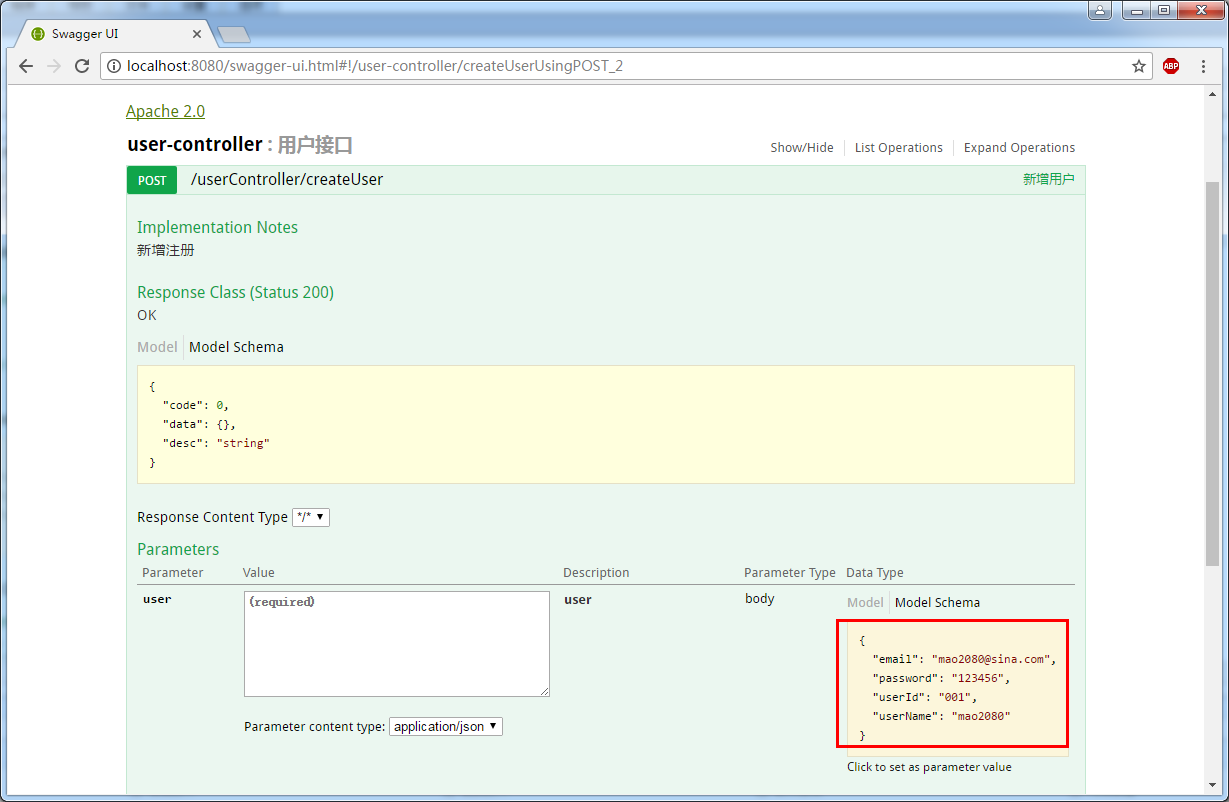
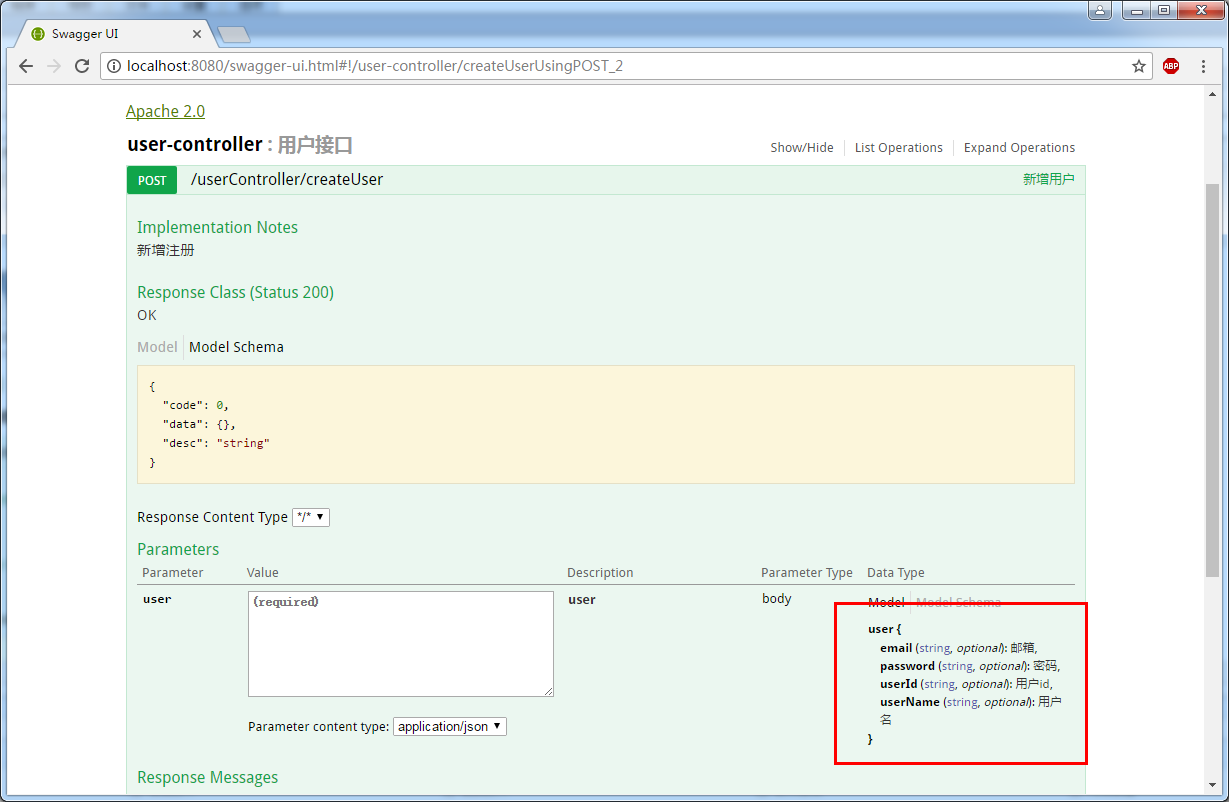
- @ApiModel()用于类 表示对类进行说明,用于参数用实体类接收 【参考code2,效果图2,3】
- @ApiModelProperty()用于方法,字段 表示对model属性的说明或者数据操作更改 【参考code2,效果图2,3】
- @ApiIgnore()用于类,方法,方法参数 表示这个方法或者类被忽略 【参考code1,效果图1】
- @ApiImplicitParam() 用于方法 表示单独的请求参数 【参考code1,效果图1】
- @ApiImplicitParams() 用于方法,包含多个 @ApiImplicitParam 【参考code1,效果图1】
code1
 package com.mao.swagger.user.controller;

 import org.springframework.http.HttpStatus;

 import org.springframework.http.MediaType;

 import org.springframework.web.bind.annotation.RequestBody;

 import org.springframework.web.bind.annotation.RequestMapping;

 import org.springframework.web.bind.annotation.RequestMethod;

 import org.springframework.web.bind.annotation.RequestParam;

 import org.springframework.web.bind.annotation.RestController;

 import com.mao.swagger.beans.ResObject;

 import com.mao.swagger.beans.User;

 import io.swagger.annotations.Api;

 import io.swagger.annotations.ApiImplicitParam;

 import io.swagger.annotations.ApiImplicitParams;

 import io.swagger.annotations.ApiOperation;

 import springfox.documentation.annotations.ApiIgnore;

 /**

  * Hello world!

  *

  */

 @Api(description = "用户接口")

 @RestController

 @RequestMapping("/userController")

 public class UserController {

     @ApiOperation(value = "新增用户" ,  notes="新增注册")

     @RequestMapping(value="/createUser",method=RequestMethod.POST,consumes= MediaType.APPLICATION_JSON_VALUE)

     public ResObject createUser(@RequestBody User user){

         System.out.println("createUser:::"+user.toString());

         return new ResObject(HttpStatus.OK.value(), "新增成功.");

     }

     @ApiOperation(value = "修改用户" ,  notes="修改用户")

     @RequestMapping(value="/updateUser",method=RequestMethod.POST,consumes= MediaType.APPLICATION_JSON_VALUE)

     public ResObject updateUser(@RequestBody User user){

         System.out.println("updateUser:::"+user.toString());

         return new ResObject(HttpStatus.OK.value(), "修改成功.");

     }

     @ApiOperation(value = "删除用户" ,  notes="删除用户")

     @ApiImplicitParams({

         @ApiImplicitParam(name = "userId", value = "用户标识", required = true, paramType = "query", dataType = "String")

     })

     @RequestMapping(value="/deleteUser",method=RequestMethod.DELETE)

     public ResObject deleteUser(@RequestParam("userId") String userId){

         System.out.println("deleteUser:::"+userId);

         return new ResObject(HttpStatus.OK.value(), "删除成功.");

     }

     @ApiOperation(value = "查询用户" ,  notes="查询用户")

     @ApiImplicitParam(name = "userId", value = "用户标识", required = true, paramType = "query", dataType = "String")

     @RequestMapping(value="/queryUser",method=RequestMethod.GET)

     public ResObject queryUser(@RequestParam("userId") String userId){

         System.out.println("queryUser:::"+userId);

         User user = new User(userId, "张三", "******", "mao2080@sina.com");

         return new ResObject(HttpStatus.OK.value(), user);

     }

     @ApiOperation(value = "被遗忘的方法" ,  notes="这个方法将被不会显示")

     @ApiIgnore

     @ApiImplicitParam(name = "userId", value = "用户标识", required = true, paramType = "query", dataType = "String")

     @RequestMapping(value="/queryUser1",method=RequestMethod.GET)

     public ResObject queryUser1(@RequestParam("userId") String userId){

         System.out.println("queryUser:::"+userId);

         User user = new User(userId, "张三", "******", "mao2080@sina.com");

         return new ResObject(HttpStatus.OK.value(), user);

     }

 }
效果图1

code2
 package com.mao.swagger.beans;

 import io.swagger.annotations.ApiModel;

 import io.swagger.annotations.ApiModelProperty;

 @ApiModel(value="user", description="用户对象")

 public class User {

     @ApiModelProperty(value="用户id",name="userId",example="001")

     private String userId;

     @ApiModelProperty(value="用户名",name="userName",example="mao2080")

     private String userName;

     @ApiModelProperty(value="密码",name="password",example="123456")

     private String password;

     @ApiModelProperty(value="邮箱",name="email",example="mao2080@sina.com")

     private String email;

     public User() {

         super();

     }

     public User(String userId, String userName, String password, String email) {

         super();

         this.userId = userId;

         this.userName = userName;

         this.password = password;

         this.email = email;

     }

     public String getUserId() {

         return userId;

     }

     public void setUserId(String userId) {

         this.userId = userId;

     }

     public String getUserName() {

         return userName;

     }

     public void setUserName(String userName) {

         this.userName = userName;

     }

     public String getPassword() {

         return password;

     }

     public void setPassword(String password) {

         this.password = password;

     }

     public String getEmail() {

         return email;

     }

     public void setEmail(String email) {

         this.email = email;

     }

     @Override

     public String toString() {

         return "User [userId=" + userId + ", userName=" + userName + ", password=" + password + ", email=" + email+"]";

     }

69

 }
效果图2
效果图3
2、参考网站
https://blog.csdn.net/z28126308/article/details/71126677
https://blog.csdn.net/u014231523/article/details/76522486
https://www.cnblogs.com/softidea/p/6251249.html
3、推广阅读
Swagger常用参数用法的更多相关文章
- C#中Messagebox.Show()常用参数用法详解
声明:IWin32Window owner , HelpNavigator navigator , string keyword 上面的三个参数类型不是很了解.没有做讨论. 等以后了解多了 ...
- maven用途、核心概念、用法、常用参数和命令、扩展
设置问题解决. http://trinea.iteye.com/blog/1290898 本文由浅入深,主要介绍maven的用途.核心概念(Pom.Repositories.Artifact.Buil ...
- Production环境中iptables常用参数配置
production环境中iptables常用参数配置 作者:尹正杰 版权声明:原创作品,谢绝转载!否则将追究法律责任. 我相信在实际生产环境中有很多运维的兄弟跟我一样,很少用到iptables的这个 ...
- cat常用参数详解
cat常用参数详解 作者:尹正杰 版权声明:原创作品,谢绝转载!否则将追究法律责任. 最近,我的一个朋友对linux特别感兴趣,于是我觉得每天交给他一个命令的使用,这样一个月下来也会使用30个命令,基 ...
- ls常用参数
ls常用参数详解 作者:尹正杰 版权声明:原创作品,谢绝转载!否则将追究法律责任. 玩Linux的老司机们每天都要敲的命令,但是这个鸡蛋的命令还有很多中玩法哟~跟着我一起敲一遍吧!在这里我就列举几个常 ...
- python笔记之常用模块用法分析
python笔记之常用模块用法分析 内置模块(不用import就可以直接使用) 常用内置函数 help(obj) 在线帮助, obj可是任何类型 callable(obj) 查看一个obj是不是可以像 ...
- mysql 常用命令用法总结积木学院整理版
一.启动与退出 1.进入MySQL:启动MySQL Command Line Client(MySQL的DOS界面),直接输入安装时的密码即可.此时的提示符是:mysql> 2.退出MySQL: ...
- DAX/PowerBI系列 - 查询参数用法详解(Query Parameter)
PowerBI - 查询参数用法详解(Query Parameter) 很多人都不知道查询参数用来干啥,下面总结一下日常项目中常用的几个查询参数的地方.(本人不太欢hardcode的东西) 使用查询 ...
- ansible常用模块用法
ansible常用模块用法 2015-07-21 10:25 24458人阅读 评论(1) 收藏 举报 分类: Linux(44) ansible 版权声明:本文为博主原创文章,未经博主允许不得 ...
随机推荐
- 110、通过案例学习Secret (Swarm17)
参考https://www.cnblogs.com/CloudMan6/p/8098761.html 在下面的例子中,我们会部署一个 WordPress 应用,WordPress 是流行的开源博客 ...
- wex5 baasData规则和绑定 学习
1 在baasData新建一个计算列 2 点击编辑规则,左边选择该计算列, 右边点击计算后面的设置 3 写规则的逻辑 好像不能用if 只能用三目运算符 4 绑定样式和文本的时候 这么用:
- 【版本控制工具】 Git基础
一.Git简介 Git 是一个开源的分布式版本控制系统,用于敏捷高效地处理任何或小或大的项目.于是Git 成了帮助管理 Linux 内核开发而开发的一个开放源码的版本控制软件. (Git目前使用率非常 ...
- Spring Boot整合actuator实现监控管理
Spring Boot使用actuator监控管理 1.在pom文件中导入相关的依赖 <dependency> <groupId>org.springframework.boo ...
- DedeAMPZ 网吧能安装却不能打开网站
只需把 监听IP的连接里的 LMHOSTS查询 禁用就行了. 方法: 连接属性-->TCP/IP 协议属性-->WINS 选项卡-->去掉 启用 LMHOSTS查询 前面的勾. by ...
- IE浏览器清除缓存及历史浏览数据
IE浏览器清除缓存方法如下: 打开IE浏览器,依次点击"工具-Internet选项-常规-删除",如下图所示, 有的时候发现你明明已经执行了删除,但是实际上还是有缓存数据,一般是因 ...
- 外星人电脑出现the system is running in low graphics mode的解决方法
问题现象: 执行删除GCC5.4.0: sudo apt-get remove gcc gcc-5重启电脑后,就显示the system is running in low graphics mod ...
- linux工具之pmap
1.pmap简介 pmap命令用来报告一个进程或多个进程的内存映射.可以使用这个工具确定系统是如何为服务器上的进程分配内存的. 例如查看ssh进程的内存映射:
- 关于STM32中printf函数的重定向问题
printf函数一般是打印到终端的,stm32芯片调试中经常需要用到串口来打印调试信息,那能不能用串口实现类似windows的Console中的printf呢? 答案是肯定的,那就是printf函数的 ...
- 你在和脚本谈恋爱(自动化在IM聊天中的应用)
谢谢打开这篇文章的每个你 测开之分层自动化(Python)招生简章 Python自动化测试报告美化 在python中进行数据驱动测试 太嚣张了!他竟用Python绕过了“验证码” 在网络世界里你不知道 ...