
HttpUrlConnection 基础使用
From https://developer.android.com/reference/java/net/HttpURLConnection.html
HttpUrlConnection:
A URLConnection with support for HTTP-specific features. See the specfor details.
Uses of this class follow a pattern:
- Obtain a new
HttpURLConnectionby callingURL.openConnection()and casting the result toHttpURLConnection. - Prepare the request. The primary property of a request is its URI. Request headers may also include metadata such as credentials, preferred content types, and session cookies.
- Optionally upload a request body. Instances must be configured with
setDoOutput(true)if they include a request body. Transmit data by writing to the stream returned bygetOutputStream(). - Read the response. Response headers typically include metadata such as the response body's content type and length, modified dates and session cookies. The response body may be read from the stream returned by
getInputStream(). If the response has no body, that method returns an empty stream. - Disconnect. Once the response body has been read, the
HttpURLConnectionshould be closed by callingdisconnect(). Disconnecting releases the resources held by a connection so they may be closed or reused.
中文释义:
一个支持HTTP特定功能的URLConnection。
使用这个类遵循以下模式:
1.通过调用URL.openConnection()来获得一个新的HttpURLConnection对象,并且将其结果强制转换为HttpURLConnection.
2.准备请求。一个请求主要的参数是它的URI。请求头可能也包含元数据,例如证书,首选数据类型和会话cookies.
3.可以选择性的上传一个请求体。HttpURLConnection实例必须设置setDoOutput(true),如果它包含一个请求体。通过将数据写入一个由getOutStream()返回的输出流来传输数据。
4.读取响应。响应头通常包含元数据例如响应体的内容类型和长度,修改日期和会话cookies。响应体可以被由getInputStream返回的输入流读取。如果响应没有响应体,则该方法会返回一个空的流。
5.关闭连接。一旦一个响应体已经被阅读后,HttpURLConnection 对象应该通过调用disconnect()关闭。断开连接会释放被一个connection占有的资源,这样它们就能被关闭或再次使用。
从上面的话以及最近的学习可以总结出:
关于HttpURLConnection的操作和使用,比较多的就是GET和POST两种了
主要的流程:
创建URL实例,打开URLConnection
URL url=new URL("http://www.baidu.com");

HttpURLConnection connection= (HttpURLConnection) url.openConnection();
设置连接参数
常用方法:
setDoInput
setDoOutput
setIfModifiedSince:设置缓存页面的最后修改时间(参考自:http://blog.csdn.net/stanleyqiu/article/details/7717235)
setUseCaches
setDefaultUseCaches
setAllowUserInteraction
setDefaultAllowUserInteraction
setRequestMethod:HttpURLConnection默认给使用Get方法
设置请求头参数
常用方法:
setRequestProperty(key,value)
addRequestProperty(key,value)
setRequestProperty和addRequestProperty的区别就是,setRequestProperty会覆盖已经存在的key的所有values,有清零重新赋值的作用。而addRequestProperty则是在原来key的基础上继续添加其他value。
常用设置:
设置请求数据类型:
connection.setRequestProperty("Content-type","application/x-javascript->json");//json格式数据

connection.addRequestProperty("Content-Type","application/x-www-form-urlencoded");//默认浏览器编码类型,http://www.cnblogs.com/taoys/archive/2010/12/30/1922186.html

connection.addRequestProperty("Content-Type","multipart/form-data;boundary="+boundary);//post请求,上传数据时的编码类型,并且指定了分隔符

Connection.setRequestProperty("Content-type", "application/x-java-serialized-object");// 设定传送的内容类型是可序列化的java对象(如果不设此项,在传送序列化对象时,当WEB服务默认的不是这种类型时可能抛java.io.EOFException)
connection.addRequestProperty("Connection","Keep-Alive");//设置与服务器保持连接

connection.addRequestProperty("Charset","UTF-8");//设置字符编码类型
连接并发送请求
connect
getOutputStream
在这里getOutStream会隐含的进行connect,所以也可以不调用connect
获取响应数据
getContent (https://my.oschina.net/zhanghc/blog/134591)
getHeaderField:获取所有响应头字段
getInputStream
getErrorStream:若HTTP响应表明发送了错误,getInputStream将抛出IOException。调用getErrorStream读取错误响应。
实例:
get请求:
public static String get(){

        String message="";

        try {

            URL url=new URL("http://www.baidu.com");

            HttpURLConnection connection= (HttpURLConnection) url.openConnection();

            connection.setRequestMethod("GET");

            connection.setConnectTimeout(5*1000);

            connection.connect();

            InputStream inputStream=connection.getInputStream();

            byte[] data=new byte[1024];

            StringBuffer sb=new StringBuffer();

            int length=0;

            while ((length=inputStream.read(data))!=-1){

                String s=new String(data, Charset.forName("utf-8"));

                sb.append(s);

            }

            message=sb.toString();

            inputStream.close();

            connection.disconnect();

        } catch (Exception e) {

            e.printStackTrace();

        }

        return message;

    }
post请求:
public static String post(){

        String message="";

        try {

            URL url=new URL("http://119.29.175.247/wikewechat/Admin/Login/login.html");

            HttpURLConnection connection= (HttpURLConnection) url.openConnection();

            connection.setRequestMethod("POST");

            connection.setDoOutput(true);

            connection.setDoInput(true);

            connection.setUseCaches(false);

            connection.setConnectTimeout(30000);

            connection.setReadTimeout(30000);

            connection.setRequestProperty("Content-type","application/x-javascript->json");

            connection.connect();

            OutputStream outputStream=connection.getOutputStream();

            StringBuffer sb=new StringBuffer();

            sb.append("email=");

            sb.append("409947972@qq.com&");

            sb.append("password=");

            sb.append("1234&");

            sb.append("verify_code=");

            sb.append("4fJ8");

            String param=sb.toString();

            outputStream.write(param.getBytes());

            outputStream.flush();

            outputStream.close();

            Log.d("ddddd","responseCode"+connection.getResponseCode());

            InputStream inputStream=connection.getInputStream();

            byte[] data=new byte[1024];

            StringBuffer sb1=new StringBuffer();

            int length=0;

            while ((length=inputStream.read(data))!=-1){

                String s=new String(data, Charset.forName("utf-8"));

                sb1.append(s);

            }

            message=sb1.toString();

            inputStream.close();

            connection.disconnect();

        } catch (Exception e) {

            e.printStackTrace();

        }

        return message;

    }
下载文件或图片到外部存储:
public boolean isExternalStorageWritable(){
    String state= Environment.getExternalStorageState();
    if (Environment.MEDIA_MOUNTED.equals(state)){
        return true;
    }
    return false;
}
    private void doSDCard(){
        if (isExternalStorageWritable()){
            new Thread(){
                @Override
                public void run() {
                    try {
                        File file=new File(Environment.getExternalStoragePublicDirectory(Environment.DIRECTORY_PICTURES).getPath());
                        if (!file.exists()){
                            file.mkdirs();
                        }
                        File newFile=new File(file.getPath(),System.currentTimeMillis()+".jpg");
//                        newFile.createNewFile();
                        URL url = new URL("http://images.csdn.net/20150817/1.jpg");
                        HttpURLConnection connection = (HttpURLConnection) url.openConnection();
                        InputStream inputStream = connection.getInputStream();
                        FileOutputStream fileOutputStream = new FileOutputStream(newFile.getAbsolutePath());
                        byte[] bytes = new byte[1024];
                        int len = 0;
                        while ((len = inputStream.read(bytes)) != -1) {
                            fileOutputStream.write(bytes);
                        }
                        inputStream.close();
                        fileOutputStream.close();
                        connection.disconnect();
                    } catch (Exception e) {
                        e.printStackTrace();
                    }
                }

            }.start();
        }else {
            AlertDialog.Builder builder=new AlertDialog.Builder(this);
            builder.setMessage("外部存储不可用!");
            builder.create().show();
        }
    }
post上传图片和表单数据:
public static String uploadFile(File file){
    String message="";
    String url="http://119.29.175.247/uploads.php";
    String boundary="7786948302";
    Map<String ,String> params=new HashMap<>();
    params.put("name","user");
    params.put("pass","123");
    try {
        URL url1=new URL(url);
        HttpURLConnection connection= (HttpURLConnection) url1.openConnection();
        connection.setRequestMethod("POST");
        connection.addRequestProperty("Connection","Keep-Alive");
        connection.addRequestProperty("Charset","UTF-8");
        connection.addRequestProperty("Content-Type","multipart/form-data;boundary="+boundary);
        // 设置是否向httpUrlConnection输出,因为这个是post请求,参数要放在
        // http正文内,因此需要设为true, 默认情况下是false;
        connection.setDoOutput(true);
        //设置是否从httpUrlConnection读入,默认情况下是true;
        connection.setDoInput(true);
        // Post 请求不能使用缓存  ?
        connection.setUseCaches(false);
        connection.setConnectTimeout(20000);
        DataOutputStream dataOutputStream=new DataOutputStream(connection.getOutputStream());
        FileInputStream fileInputStream=new FileInputStream(file);

        dataOutputStream.writeBytes("--"+boundary+"\r\n");
        // 设定传送的内容类型是可序列化的java对象
        // (如果不设此项,在传送序列化对象时,当WEB服务默认的不是这种类型时可能抛java.io.EOFException)
        dataOutputStream.writeBytes("Content-Disposition: form-data; name=\"file\"; filename=\""
                + URLEncoder.encode(file.getName(),"UTF-8")+"\"\r\n");
        dataOutputStream.writeBytes("\r\n");
        byte[] b=new byte[1024];
        while ((fileInputStream.read(b))!=-1){
            dataOutputStream.write(b);
        }
        dataOutputStream.writeBytes("\r\n");
        dataOutputStream.writeBytes("--"+boundary+"\r\n");
        try {
            Set<String > keySet=params.keySet();
            for (String param:keySet){
                dataOutputStream.writeBytes("Content-Disposition: form-data; name=\""
                        +encode(param)+"\"\r\n");
                dataOutputStream.writeBytes("\r\n");
                String value=params.get(param);
                dataOutputStream.writeBytes(encode(value)+"\r\n");
                dataOutputStream.writeBytes("--"+boundary+"\r\n");

            }
        }catch (Exception e){

        }

        InputStream inputStream=connection.getInputStream();
        byte[] data=new byte[1024];
        StringBuffer sb1=new StringBuffer();
        int length=0;
        while ((length=inputStream.read(data))!=-1){
            String s=new String(data, Charset.forName("utf-8"));
            sb1.append(s);
        }
        message=sb1.toString();
        inputStream.close();
        fileInputStream.close();
        dataOutputStream.close();
        connection.disconnect();
    } catch (Exception e) {
        e.printStackTrace();
    }
    return message;
}

private static String encode(String value) throws UnsupportedEncodingException {
    return URLEncoder.encode(value,"UTF-8");
}
这里需要指出:
通过chrome的开发工具截取的头信息可以看到:
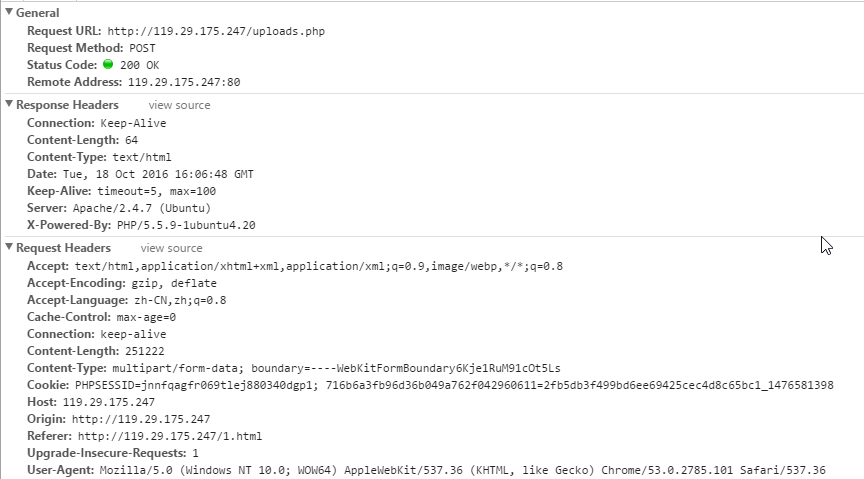
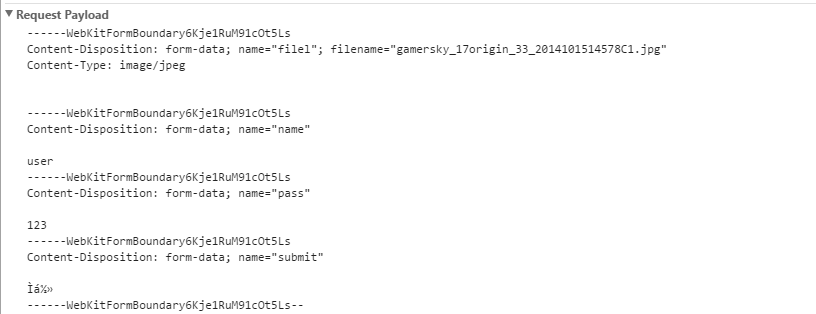
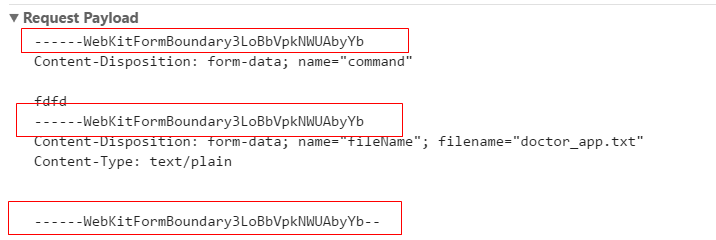
通过post上传数据时,若除了文本数据以外还要需要上传文件,则需要在指定每一条数据的Content-Disposition,name,若是文件还要指明filename,并在每条数据传输的后面用“--”加上boundary隔开,并且需要在第四行用“\r\n”换行符隔开,在最后一行也要用“--”加上boundary加上“--”隔开,否则会导致文件上传失败!
补充:
对于URLConnection,获取响应体数据的方法包括getContent和getInputStream
getInputStream上面已经提到,对于getContent的用法如下:
1、重写ContentHandler
2、实现ContentHandlerFactory接口,在createContentHandler方法中将重写的ContentHandler实例作为返回值返回
3、在HttpURLConnection.setContentHandlerFactory中实例化ContentHandlerFactory实例
代码如下:
public class ContentHandlerFactoryImpl implements ContentHandlerFactory {

    @Override

    public ContentHandler createContentHandler(String mimetype) {

        if (mimetype==null){

            return new ContentHandlerImpl(false);

        }

        return new ContentHandlerImpl(true);

    }

    class ContentHandlerImpl extends ContentHandler{

        private boolean transform=false;

        public ContentHandlerImpl(boolean transform){

            this.transform=transform;

        }

        @Override

        public Object getContent(URLConnection urlc) throws IOException {

            if (!transform){

                return urlc.getInputStream();

            }else {

                String encoding=getEncoding(urlc.getHeaderField("Content-Type"));

                if (encoding==null){

                    encoding="UTF-8";

                }

                BufferedReader reader=new BufferedReader(new InputStreamReader(urlc.getInputStream(),encoding));

                String tmp=null;

                StringBuffer content=new StringBuffer();

                while ((tmp=reader.readLine())!=null){

                    content.append(tmp);

                }

                return content.toString();

            }

        }

    }

    private String getEncoding(String contentType){

        String [] headers=contentType.split(";");

        for (String header:headers){

            String [] params=header.split("=");

            if (params.length==2){

                if (params[0].equals("charset")){

                    return params[1];

                }

            }

        }

        return null;

    }

}
public static String post(){

        String message="";

        URL url= null;

        try {

            url = new URL("http://127.0.0.1/test.php");

            HttpURLConnection connection= (HttpURLConnection) url.openConnection();

            connection.setDoInput(true);

            connection.setDoOutput(true);

            connection.setRequestMethod("POST");

            connection.setUseCaches(false);

            connection.setConnectTimeout(5*1000);

            HttpURLConnection.setContentHandlerFactory(new ContentHandlerFactoryImpl());

            connection.setRequestProperty("ContentType","application/x-www-form-urlencoded");

            OutputStream outputStream=connection.getOutputStream();

            StringBuffer stringBuffer=new StringBuffer();

            stringBuffer.append("user[name]=");

            stringBuffer.append("user");

            stringBuffer.append("&user[pass]=");

            stringBuffer.append("123");

            outputStream.write(stringBuffer.toString().getBytes());

            outputStream.flush();

            outputStream.close();

            Log.d("HttpUtil","responseMessage"+connection.getResponseMessage());

            Map<String ,List<String >> map=connection.getHeaderFields();

            Set<String> set=map.keySet();

            for (String  key:set){

                List<String > list=map.get(key);

                for (String  value:list){

                    Log.d("HttpUtil","key="+key+"  value="+value);

                }

            }

            message= (String) connection.getContent();

            connection.disconnect();

        } catch (Exception e) {

            e.printStackTrace();

        }

        return message;

    }
参考自:https://my.oschina.net/zhanghc/blog/134591
HttpUrlConnection 基础使用的更多相关文章
- Android --http请求之HttpURLConnection
参考博客:Android HttpURLConnection 基础使用 参考博客:Android访问网络,使用HttpURLConnection还是HttpClient? String getUrl ...
- Android开发面试经——6.常见面试官提问Android题②(更新中...)
版权声明:本文为寻梦-finddreams原创文章,请关注:http://blog.csdn.net/finddreams 关注finddreams博客:http://blog.csdn.net/fi ...
- 安卓面试题 Android interview questions
安卓面试题 Android interview questions 作者:韩梦飞沙 2017年7月3日,14:52:44 1. 要做一个尽可能流畅的ListView,你平时在 ...
- 纠错:Feign 没用 短连接
Feign 默认不是 短连接 疯狂创客圈 Java 高并发[ 亿级流量聊天室实战]实战系列 [博客园总入口 ] 疯狂创客圈(笔者尼恩创建的高并发研习社群)Springcloud 高并发系列文章,将为大 ...
- Post请求的两种编码格式:application/x-www-form-urlencoded和multipart/form-data
在常见业务开发中,POST请求常常在这些地方使用:前端表单提交时.调用接口代码时和使用Postman测试接口时.我们下面来一一了解: 一.前端表单提交时 application/x-www-form- ...
- HTTP POST 请求的两种编码格式:application/x-www-form-urlencoded 和 multipart/form-data
在常见业务开发中,POST 请求常常在这些地方使用:前端表单提交时.调用接口代码时和使用 Postman 测试接口时.我们下面来一一了解: 一.前端表单提交时 application/x-www-fo ...
- HTTP基础与Android之(安卓与服务器通信)——使用HttpClient和HttpURLConnection
查看原文:http://blog.csdn.net/sinat_29912455/article/details/51122286 1客户端连接服务器实现内部的原理 GET方式和POST方式的差别 H ...
- [Android基础]Android中使用HttpURLConnection
HttpURLConnection继承了URLConnection,因此也能够向指定站点发送GET请求.POST请求.它在URLConnetion的基础上提供了例如以下便捷的方法. int getRe ...
- crawler_基础之_java.net.HttpURLConnection 访问网络资源
java访问网络资源 由底层到封装 为 scoket==> java.net.HttpURLConnection==>HttpClient 这次阐述先 java.net.HttpURL ...
随机推荐
- Travis CI用来持续集成你的项目
这里持续集成基于GitHub搭建的博客为项目 工具: zqz@ubuntu:~$ node --version v4.2.6 zqz@ubuntu:~$ git --version git versi ...
- Intellij idea添加单元测试工具
1.idea 版本是14.0.0 ,默认带有Junit,但是不能自动生成单元测试,需要下载JunitGererator2.0插件 2.Settings -Plugins,下载 JunitGenerat ...
- 缓存工厂之Redis缓存
这几天没有按照计划分享技术博文,主要是去医院了,这里一想到在医院经历的种种,我真的有话要说:医院里的医务人员曾经被吹捧为美丽+和蔼+可亲的天使,在经受5天左右相互接触后不得不让感慨:遇见的有些人员在挂 ...
- 修改eclipse皮肤
习惯了vim黑色背景的程序猿们想必用eclipse时会倍感的不适应吧,不过没关系,因为eclipse的皮肤是可以自己定制的! 下面是我电脑上的eclipse界面,看到这个是不是找回了vim的感觉呢? ...
- 使用Git Bash远程添加分支和简单部署你的静态页面
新建一个分支:git branch mybranch(mybranch你的分支名字) 切换到你的新分支: git checkout mybranch 将新分支发布在github上: git push ...
- 简历生成平台项目开发-STEP1问卷设计
周五课程结束完后,小组建立QQ群和微信群,着手讨论项目问题.一开始的大概想法:就业信息平台,收集企业招聘信息和就业生资料,提供给学生和企业的校企对接平台.后来发现群里谭卓同学也有个相关的思路,经过商量 ...
- 用C++实现Linux中shell的ls功能
实现输出当前目录下的文件名 ls功能: 方法一: #include <iostream> #include <algorithm> #include <stdio.h&g ...
- 【一起学OpenFOAM】03 OpenFOAM基本使用流程
OpenFOAM初学者常常对于软件的使用流程感到很迷惑,与其他的具有GUI的CFD软件不同,OpenFOAM的所有操作均为基于文本操作,譬如说里面各种计算模型.计算参数.流程控制参数等,均为通过修改对 ...
- 归并排序的java实现
归并排序的优点不说了. 做归并排序之前,我先试着将两个有序数组进行排序,合并成一个有序数组. 思路:定义好两个有序数组,理解的时候我先思考了数组只有一个数组的排序,然后是两个元素的数组的排序,思路就有 ...
- Ubuntu部署python3.5的开发和运行环境
Ubuntu部署python3.5的开发和运行环境 1 概述 由于最近项目全部由python2.x转向 python3.x(使用目前最新的 python3.5.1) ,之前的云主机的的默认python ...