
Installing Eclipse Plug-ins from an Update Site with a self-signed certificate
If you try and connect to a p2 repository on a server with a self-signed cert, you will more than likely hit the following error.
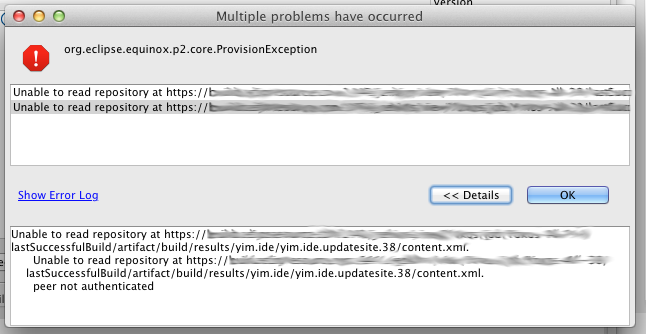
Looking closely at the log, and you will see:
javax.net.ssl.SSLPeerUnverifiedException: peer not authenticated

 at sun.security.ssl.SSLSessionImpl.getPeerCertificates(SSLSessionImpl.java:397)

 at org.apache.http.conn.ssl.AbstractVerifier.verify(AbstractVerifier.java:128)

 at org.apache.http.conn.ssl.SSLSocketFactory.connectSocket(SSLSocketFactory.java:397)

 at org.apache.http.impl.conn.DefaultClientConnectionOperator.openConnection(DefaultClientConnectionOperator.java:148)

 at org.apache.http.impl.conn.AbstractPoolEntry.open(AbstractPoolEntry.java:150)

 at org.apache.http.impl.conn.AbstractPooledConnAdapter.open(AbstractPooledConnAdapter.java:121)

 at org.apache.http.impl.client.DefaultRequestDirector.tryConnect(DefaultRequestDirector.java:575)

 at org.apache.http.impl.client.DefaultRequestDirector.execute(DefaultRequestDirector.java:425)

 at org.apache.http.impl.client.AbstractHttpClient.execute(AbstractHttpClient.java:820)

 at org.apache.http.impl.client.AbstractHttpClient.execute(AbstractHttpClient.java:754)

 at org.eclipse.ecf.provider.filetransfer.httpclient4.HttpClientFileSystemBrowser.runRequest(HttpClientFileSystemBrowser.java:263)

 at org.eclipse.ecf.provider.filetransfer.browse.AbstractFileSystemBrowser$DirectoryJob.run(AbstractFileSystemBrowser.java:69)

 at org.eclipse.core.internal.jobs.Worker.run(Worker:53)
Because this certificate was not issued by a ‘trusted’ source, and thus cannot be verified for authenticity, the transport layer rejects it.
Solution:
While Eclipse and p2 doesn’t offer any nice support out-of-the-box, you can easily get around this problem by installing the root certificate (or the certificate itself) into a truststore on your machine, and then use that truststore when starting Eclipse.
To install a certificate into a custom trust store, simply:
keytool -import -file D:\Goagent\local\CA.crt -storepass changeit -keystore D:\Java\jre\lib\security\cacerts -alias goagent
keytool -list -storepass changeit -keystore D:\Java\jre\lib\security\cacerts
Now, when you start Eclipse, add the following arguments to your eclipse.ini file.
-vm

D:/Java/bin/javaw.exe

-startup

plugins/org.eclipse.equinox.launcher_1.3.0.v20120522-1813.jar

--launcher.library

plugins/org.eclipse.equinox.launcher.win32.win32.x86_1.1.200.v20120522-1813

-showsplash

org.eclipse.platform

--launcher.defaultAction

openFile

-vmargs

-Xms512m

-Xmx512m

-XX:PermSize=256m

-XX:MaxPermSize=256m

-Dsun.lang.ClassLoader.allowArraySyntax=true

-Djavax.net.ssl.trustStore=D:\Java\jre\lib\security\cacerts

-Djavax.net.ssl.trustStorePassword=changeit
When you connect to the update site (p2 repository), the transport layer will be able to validate the self-signed certificate. If the site requires authentication you will even be prompted for a username / password:

Installing Eclipse Plug-ins from an Update Site with a self-signed certificate的更多相关文章
- Eclipse 发布到网站的附加产品的形式 Update Site
Eclipse 发布到网站的附加产品的形式 Update Site 通过Update Site Project项目将自己做的插件产品公布到公网上,给客户或其它測试人员下载和应用,这样自己的插件就以网站 ...
- download plugin update site for offline installation
Reference Eclipse Launcher Running update manager from command line 好多次为window下的eclipse不能拿到linux下直 ...
- Jenkins 插件升级时跳过 update site 的签名验证
当升级jenkins插件时,如果链接的update site用的自签名证书,可以用这个选项来启动Jenkins,来跳过签名验证: -Dhudson.model.DownloadService.noS ...
- jenkins报错 Upgrading Jenkins. Failed to update the default Update Site 'default'. Plugi
解决方案: jenkins\hudson.model.UpdateCenter.xml 文件, 将 url 中的 https://updates.jenkins.io/update-center.js ...
- Jenkins安装插件出现Signature verification failed in update site 'default' (show details)
这样启动 nohup java -Dhudson.model.DownloadService.noSignatureCheck=true -jar jenkins.war > jenkins.l ...
- Eclipse安装Ruby插件应该注意的几点
http://www.aptana.com/products/studio3/success_plugin.html Installing via Eclipse Please copy the fo ...
- eclipse 上安装systemgui
http://wiki.eclipse.org/Linux_Tools_Project/PluginInstallHelp http://wiki.eclipse.org/Linux_Tools_Pr ...
- 配置Openfire的eclipse项目
官方文档在这里 Install JDK Download JDK and install them. The least version should be 1.5. I use 1.6. Sorry ...
- Eclipse下PHP开发 插件安装
PHPeclipse是什么? PHPeclipse是Eclipse的一个插件,它为php开发人员提供了一个集成的开发环境.Eclipse官方下载地址:http://www.eclipse.org/ P ...
随机推荐
- 124. Binary Tree Maximum Path Sum *HARD* -- 二叉树中节点和最大的路径的节点和
Given a binary tree, find the maximum path sum. For this problem, a path is defined as any sequence ...
- Chrome插件(Extensions)开发实践
内容摘自:http://www.cnblogs.com/mfryf/p/3701801.html
- LocalStorage漏洞分析
之前LocalStorage爆出过一个漏洞,使用Chrome打开这个网站:http://filldisk.com,会将磁盘空间给撑爆,而且Chrome还会Crash.除了FireFox之外,其他浏览器 ...
- 判断是否是iPhone5
#define IS_IPHONE_5 ( fabs( ( double )[ [ UIScreen mainScreen ] bounds ].size.height - ( double )568 ...
- Python基础学习----异常
''' 异常: 程序在运行的时候,Python的解释器遇到一个错误会停止运行. 并且会提供错误的信息,这就是异常 抛出异常: 程序停止执行并且提示错误信息这个动作就是抛出异常(raise Except ...
- L177 Arctic ice brings an understanding of ancient Europe’s economy
Greenland's icy mountains are not an obvious place to search for an archive of economic history, but ...
- Yii 入门
跳转到不同module Redirect to module after login Yii $this->redirect( array('/tradesman/default/index') ...
- .net常用正则表达式小结
好久没有些博客了,今天就随便写点工作当中遇到的一些问题.正则表达式估计大家在开发的过程中都会遇到,下面是我平时用到的以及自己整理的一些常用的正则表达式,供大家学习和参考. "^\d+$&qu ...
- linux命令返回值的含义
linux命令执行后无论成功与否都有一个返回值: 如果为 0,则表示命令执行成功,其它值则表示错误, 具体的错误码含义如下: "OS error code 1: Operation not ...
- java面试题9
1.选择题 public class Test01 { public static void changeStr(String str) { str = "welcome"; } ...