
Hive(三)hive的高级操作
一、hive的各种join操作
语法结构:
join_table:
table_reference JOIN table_factor [join_condition]
| table_reference {LEFT|RIGHT|FULL} [OUTER] JOIN table_reference join_condition
| table_reference LEFT SEMI JOIN table_reference join_condition
Hive 支持等值连接( equality join)、外连接( outer join)和( left/right join)。 Hive 不支持非 等值的连接,因为非等值连接非常难转化到 map/reduce 任务。
另外, Hive 支持多于 2 个表的连接。
写查询时注意以下几点:
1、只支持等值连接
例如:
SELECT a.* FROM a JOIN b ON (a.id = b.id)
SELECT a.* FROM a JOIN b ON (a.id = b.id AND a.department = b.department) 是正确的,
然而:
SELECT a.* FROM a JOIN b ON (a.id>b.id) 是错误的。
2、可以join多于2个表
例如:
SELECT a.val, b.val, c.val FROM a JOIN b ON (a.key = b.key1) JOIN c ON (c.key = b.key2)
如果 join 中多个表的 join key 是同一个,则 join 会被转化为单个 map/reduce 任务,例如:
SELECT a.val, b.val, c.val FROM a JOIN b ON (a.key = b.key1) JOIN c ON (c.key = b.key1)
被转化为单个 map/reduce 任务,因为 join 中只使用了 b.key1 作为 join key。
SELECT a.val, b.val, c.val FROM a JOIN b ON (a.key = b.key1) JOIN c ON (c.key = b.key2)
而这一 join 被转化为 2 个 map/reduce 任务。因为 b.key1 用于第一次 join 条件,而
b.key2 用于第二次 join。
3、join 时,每次map /reduce的逻辑
reducer 会缓存 join 序列中除了最后一个表的所有表的记录,再通过最后一个表将结果序 列化到文件系统。这一实现有助于在 reduce 端减少内存的使用量。实践中,应该把最大的那个表写在最后(否则会因为缓存浪费大量内存)。
例如:
SELECT a.val, b.val, c.val FROM a JOIN b ON (a.key = b.key1) JOIN c ON (c.key = b.key1)
所有表都使用同一个 join key(使用 1 次 map/reduce 任务计算)。 Reduce 端会缓存 a 表
和 b 表的记录,然后每次取得一个 c 表的记录就计算一次 join 结果,类似的还有:
SELECT a.val, b.val, c.val FROM a JOIN b ON (a.key = b.key1) JOIN c ON (c.key = b.key2)
这里用了 2 次 map/reduce 任务。第一次缓存 a 表,用 b 表序列化;第二次缓存第一次
map/reduce 任务的结果,然后用 c 表序列化。
4、Outer Join: LEFT, RIGHT 和 FULL OUTER 关键字用于处理 join 中空记录的情况
(1)创建两张表
create table tablea (id int, name string) row format delimited fields terminated by ',';
create table tableb (id int, age int) row format delimited fields terminated by ',';
(2)准备数据
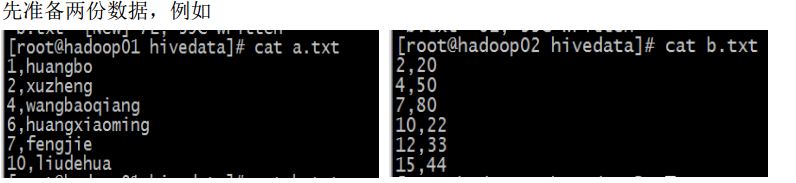
(3)分别导入数据a.txt 到tablea,b.txt到tableb
(4)数据准备完毕
(5)join 演示
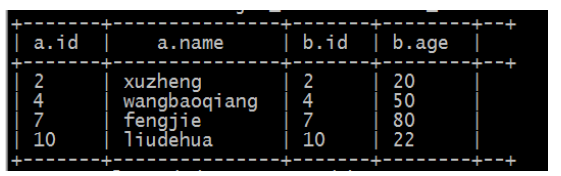
a、内连接(inner join):把符合两边连接条件的数据查询出啦
select * from tablea a inner join tableb b on a.id=b.id;
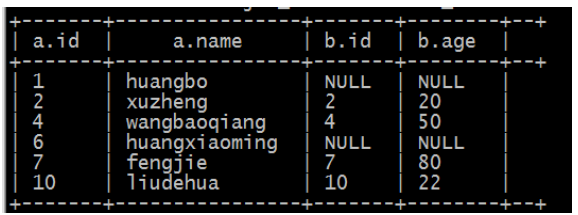
b、left join(左连接,等同于 left outer join)
1、 以左表数据为匹配标准,左大右小
2、 匹配不上的就是 null
3、 返回的数据条数与左表相同
HQL 语句: select * from tablea a left join tableb b on a.id=b.id;
c、right join(右连接,等同于right outer join)
1、 以右表数据为匹配标准,左小右大
2、匹配不上的就是 null
3、 返回的数据条数与右表相同
HQL 语句: select * from tablea a right join tableb b on a.id=b.id;

d、 left semi join( 左半连接)(因为 hive 不支持 in/exists 操作( 1.2.1 版本的 hive 开始支持 in 的操作),所以用该操作实现,并且是 in/exists 的高效实现)
select * from tablea a left semi join tableb b on a.id=b.id;

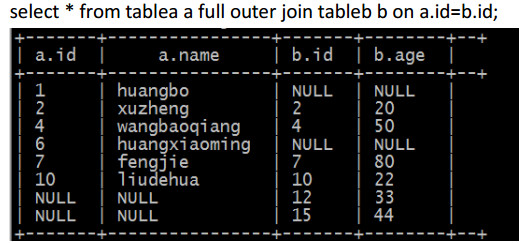
e、full outer join (完全外连接)
二、hive 的数据类型
hive 支持两种数据类型:一类叫原子数据类型,一类叫复杂数据类型
1、原子数据类型
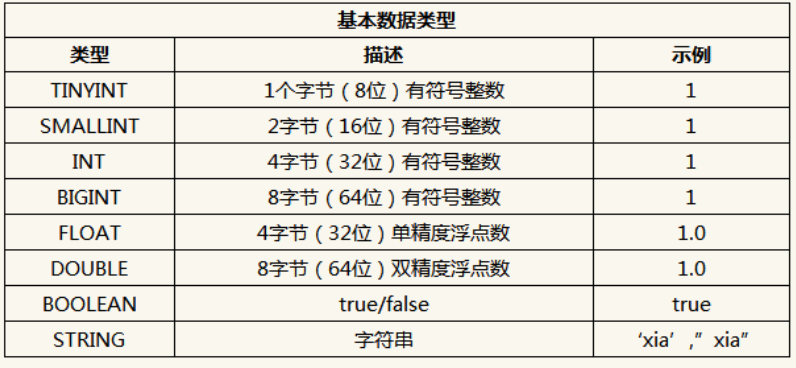
(1) Hive 不支持日期类型,在 Hive 里日期都是用字符串来表示的,而常用的日期格式转化操 作则是通过自定义函数进行操作。
(2) Hive 是用 Java 开发的, Hive 里的基本数据类型和 java 的基本数据类型也是一一对应的, 除了 String 类型。
(3) 有符号的整数类型: TINYINT、 SMALLINT、 INT 和 BIGINT 分别等价于 Java 的 Byte、 Short、 Int 和 Long 原子类型,它们分别为 1 字节、 2 字节、 4 字节和 8 字节有符号整数。
(4) Hive 的浮点数据类型 FLOAT 和 DOUBLE,对应于 Java 的基本类型 Float 和 Double 类型。
(5) Hive 的 BOOLEAN 类型相当于 Java 的基本数据类型 Boolean。
(6) Hive 的 String 类型相当于数据库的 Varchar 类型,该类型是一个可变的字符串,不过它不 能声明其中最多能存储多少个字符,理论上它可以存储 2GB 的字符数。
2、复杂数据类型
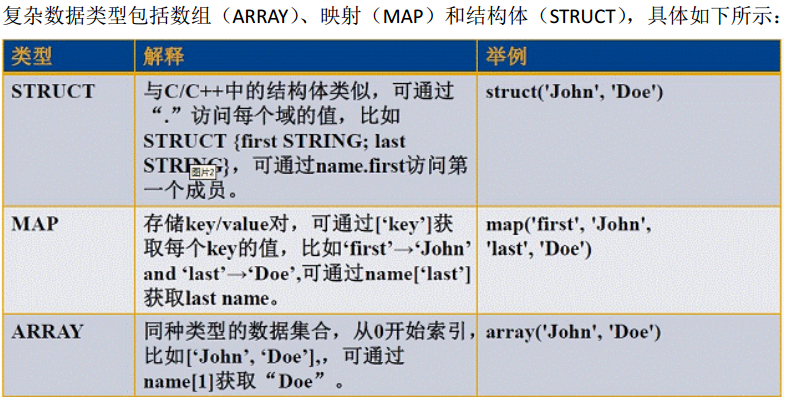
说明:
ARRAY: ARRAY 类型是由一系列相同数据类型的元素组成,这些元素可以通过下标来访问。 比如有一个 ARRAY 类型的变量 fruits,它是由['apple','orange','mango']组成,那么我 们可以通过 fruits[1]来访问元素 orange,因为 ARRAY 类型的下标是从 0 开始的;
MAP: MAP 包含 key->value 键值对,可以通过 key 来访问元素。比如” userlist”是一个 map 类型,其中 username 是 key, password 是 value;那么我们可以通过 userlist['username'] 来得到这个用户对应的 password;
STRUCT: STRUCT 可以包含不同数据类型的元素。这些元素可以通过”点语法”的方式来得 到所需要的元素,比如 user 是一个 STRUCT 类型,那么可以通过 user.address 得到 这个用户的地址。
示例:
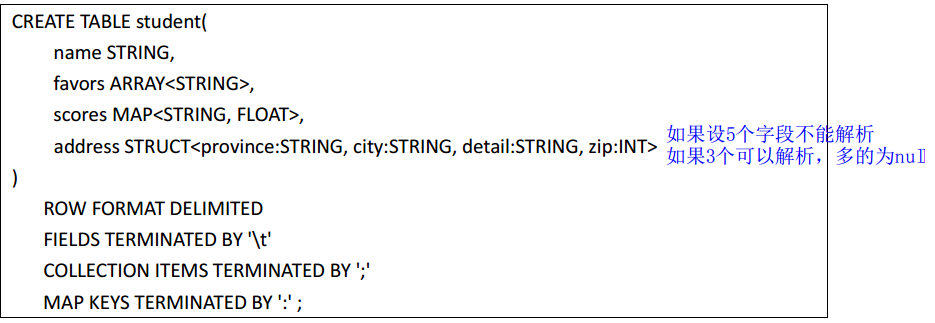
说明:
(1)字段 name 是基本类型, favors 是数组类型,可以保存很多爱好, scores 是映射类型,可 以保存多个课程的成绩, address 是结构类型,可以存储住址信息。
(2) ROW FORMAT DELIMITED 是指明后面的关键词是列和元素分隔符的。
(3) FIELDS TERMINATED BY 是字段分隔符,
(4) COLLECTION ITEMS TERMINATED BY 是元素分隔符( Array 中的各元素、 Struct 中的各元素、 Map 中的 key、 value 对之间),
(5)MAP KEYS TERMINATED BY 是 Map 中 key 与 value 的分隔符, LINES TERMINATED BY 是行之 间的分隔符, STORED AS TEXTFILE 指数据文件上传之后保存的格式。
总结: 在关系型数据库中,我们至少需要三张表来定义,包括学生基本表、爱好表、成绩表; 但在 Hive 中通过一张表就可以搞定了。也就是说,复合数据类型把多表关系通过一张表就 可以实现了。
3、示例演示:
(1)Array
建表语句:
create table person(name string,work_locations string)
row format delimited fields terminated by '\t';
create table person1(name string,work_locations array<string>)
row format delimited fields terminated by '\t'
collection items terminated by ',';
数据:
huangbo beijing,shanghai,tianjin,hangzhou
xuzheng changchu,chengdu,wuhan
wangbaoqiang dalian,shenyang,jilin
导入数据:
load data local inpath '/root/person.txt' into table person;
查询语句:
Select * from person;
Select name from person;
Select work_locations from person;
Select work_locations[0] from person;
(2)MAP(有三个分隔符需要处理,分隔符不能一样,否则解析出错)
建表语句:
create table score(name string, scores map<string,int>)
row format delimited fields terminated by '\t'
collection items terminated by ','
map keys terminated by ':';
数据:
huangbo yuwen:80,shuxue:89,yingyu:95
xuzheng yuwen:70,shuxue:65,yingyu:81
wangbaoqiang yuwen:75,shuxue:100,yingyu:75
导入数据:
load data local inpath '/root/score.txt' into table score;
查询语句:
Select * from score;
Select name from score;
Select scores from score;
Select s.scores['yuwen'] from score s;
(3)struct
建表语句:
create table structtable(id int,course struct<name:string,score:int>)
row format delimited fields terminated by '\t'
collection items terminated by ',';
数据:
1 english,80
2 math,89
3 chinese,95
导入数据:
load data local inpath '/root/ structtable.txt' into table structtable;
查询语句:
Select * from structtable;
Select id from structtable;
Select course from structtable;
Select t.course.name from structtable t;
Select t.course.score from structtable t;
补充:
// 按ID倒序取前三条记录

select id, name, sex ,age, department from studentss order by id desc limit 3;

// 局部排序

select id, name, sex ,age, department from studentss sort by id desc;

// distribute by

insert overwrite local directory '/home/hadoop/studentIndex'

select id, name ,sex, age, department from studentss distribute by id

sort by id desc;

insert overwrite local directory '/home/hadoop/studentIndex'

select id, name ,sex, age, department from studentss distribute by id

sort by age desc, id asc;

// cluster by

insert overwrite local directory '/home/hadoop/studentIndex1'

select id, name ,sex, age, department from studentss cluster by id;

// 链接查询准备表和数据

create table a(aid int, name string) row format delimited fields terminated by ',';

create table b(bid int, age int) row format delimited fields terminated by ',';

load data local inpath '/home/hadoop/a.txt' into table a;

load data local inpath '/home/hadoop/b.txt' into table b;

// 内连接

select a.*, b.* from a inner join b on a.aid = b.bid;

// 外链接

select a.*, b.* from a left join b on a.aid = b.bid;

select a.*, b.* from a right join b on a.aid = b.bid;

select a.*, b.* from a full join b on a.aid = b.bid;

// semi join

select a.* from a where a.aid in (select b.bid from b);

select a.* from a left semi join b on a.aid = b.bid;

// 复杂数据类型 array

create table arrayTable(id int, orderid array<int>, name string)

row format delimited fields terminated by '\t'

collection items terminated by ',';

load data local inpath '/home/hadoop/arrayData.txt' into table arrayTable;

select orderid[1] from arrayTable where name = 'huangbo';

// map类型数据

huangbo	yuwen:80,shuxue:89,yingyu:95

xuzheng	yuwen:70,shuxue:65,yingyu:81

wangbaoqiang	yuwen:75,shuxue:100,yingyu:75

// 建表语句

create table mapTable(name string, score map<string, int>)

row format delimited fields terminated by '\t'

collection items terminated by ','

map keys terminated by ':';

load data local inpath '/home/hadoop/mapdata.txt' into table mapTable;

// 从map结构中查询数据

select name, score['yuwen'] as yuwen, score['shuxue'] as shuxue, score['yingyu'] as yingyu from mapTable;

// 从map结构表中查出数据,然后存入新表

create table score_table as select name, score['yuwen'] as yuwen, score['shuxue'] as shuxue, score['yingyu'] as yingyu from mapTable;

1	english,80

2	math,89

3	chinese,95

id	subject	number

1	english	80

2	math	89

3	chinese	95

// struct类型数据结构

create table structTable(id int, score struct<subject:string, number:int>)

row format delimited fields terminated by '\t'

collection items terminated by ',';

load data local inpath '/home/hadoop/structdata.txt' into table structTable;

// 从struct结构表中查询数据,然后存入新表

create table struct_table as select score.subject as subject, score.number as number from structTable;

2017-01-12 14:45:23

2017-01-12/14:45:23

//  解析json格式字符串

{"movie":"1287","rate":"5","timeStamp":"978302039","uid":"1"}

{"movie":"2804","rate":"5","timeStamp":"978300719","uid":"1"}

{"movie":"594","rate":"4","timeStamp":"978302268","uid":"1"}

{"movie":"919","rate":"4","timeStamp":"978301368","uid":"1"}

// 创建表

create table json(linedata string);

load data local inpath '/home/hadoop/rating.json' into table json;

// 创建分桶表

create table bucket_student(id int, name string,  sex string, age int, department string)

clustered by(age) sorted by(id desc) into 4 buckets

row format delimited fields terminated by ',';

// 导入数据

insert into table bucket_student select * from studentss ;

以上语句执行的时候,bucket_student表当中的分桶数据并不会自己排序。

所以要让bucket_student表中的数据有顺序,改写导入语句:

insert into table bucket_student select * from studentss sort id desc;

但是并未解决bucket_student在创建的时候指定的 sorted by(id desc) 的问题。

待我弄清缘由之后告诉大家。

PS:用load的方式往分通表当中导入数据的时候,并不会对数据进行分桶。

load的方式只是移动数据,切记。

PS:关于分桶排序的四个by:

distribute by:只分桶,不排序

cluster by:分桶,并且排序

order by:全局排序

sort by:局部排序

经验点:这四个by在使用的时候的技巧:

在创建表的语句当中都带ed,也就是用clustered by

在查询的时候用不带ed, 也就是用cluster by
Hive(三)hive的高级操作的更多相关文章
- JavaScrip(三)JavaScrip变量高级操作(字符串,数组,日期)
一:字符串 charAt() 返回指定位置的字符 indexof() 返回指定字符串首次出现的位置 replace() 替换指定的字符 concat() 连接两个或多个字符串 substr(start ...
- 【转载】8天学通MongoDB——第三天 细说高级操作
今天跟大家分享一下mongodb中比较好玩的知识,主要包括:聚合,游标. 一: 聚合 常见的聚合操作跟sql server一样,有:count,distinct,group,mapReduce. &l ...
- 8天学通MongoDB——第三天 细说高级操作
原文地址:http://www.cnblogs.com/huangxincheng/archive/2012/02/21/2361205.html 今天跟大家分享一下mongodb中比较好玩的知识,主 ...
- hadoop之hive高级操作
在输出结果较多,需要输出到文件中时,可以在hive CLI之外执行hive -e "sql" > output.txt操作 但当SQL语句太长或太多时,这种方式不是很方便,可 ...
- 大数据【五】Hive(部署;表操作;分区)
一 概述 就像我们所了解的sql一样,Hive也是一种数据仓库,不同的是hive是在hadoop大数据生态圈中所用.这篇博客我主要介绍Hive的简单表运用. Hive是Hadoop 大数据生态圈中的数 ...
- HIVE中的order by操作
hive中常见的高级查询包括:group by.Order by.join.distribute by.sort by.cluster by.Union all.今天我们来看看order by操作,O ...
- Hive之 hive的三种使用方式(CLI、HWI、Thrift)
Hive有三种使用方式——CLI命令行,HWI(hie web interface)浏览器 以及 Thrift客户端连接方式. 1.hive 命令行模式 直接输入/hive/bin/hive的执行程 ...
- Hadoop Hive概念学习系列之hive三种方式区别和搭建、HiveServer2环境搭建、HWI环境搭建和beeline环境搭建(五)
说在前面的话 以下三种情况,最好是在3台集群里做,比如,master.slave1.slave2的master和slave1都安装了hive,将master作为服务端,将slave1作为服务端. 以 ...
- Hive三种不同的数据导出的方式
转自:http://blog.chinaunix.net/uid-27177626-id-4653808.html Hive三种不同的数据导出的方式,根据导出的地方不一样,将这些方法分为三类:(1)导 ...
随机推荐
- ffmpeg 压缩H265 Windows 硬件编码
硬件NVIDIA:ffmpeg.exe -i input.avi -c:v hevc_nvenc -preset:v fast output.mp4 软件 :ffmpeg.exe - ...
- 【UGUI】 (一)------- 放大镜
在许多游戏或应用中,我们常常看到放大镜的身影,而在Unity里面,制作一个简易的放大镜是非常简单的. 一. 创建一个3DObject 创建一个Cube或者 Cylinder,这里为了更像放大镜一 ...
- Siki_Unity_3-8_Lua编程(未完)
Unity 3-8 Lua编程 任务1&2&3:前言 课程内容: Lua从入门到掌握 为之后的xLua和其他热更新方案打下基础 任务4:Lua简介 Lua是轻量小巧的脚本语言--无需编 ...
- elasticsearch备份与恢复
备注:以下代码在kibana插件下运行: # 创建一个备份用的仓库# type:fs文件系统# 支持Shared filesystem, Amazon S3, HDFS和Azure #Cloud# l ...
- Memcached&PHP-Memcache安装配置
参考文档: memcache官网:https://memcached.org/ 参考:http://www.runoob.com/memcached/memcached-install.html 参考 ...
- shell基础 -- 入门篇
shell 英文含义是“壳”,这是相对于内核来说的,shell 也确实就像是内核的壳,通常来说,所有对内核的访问都要经由 shell .同时,shell 还是一门功能强大的编程语言.shell 是 L ...
- IT视频课程集
马哥Linux培训视频课程:http://pan.baidu.com/s/1pJwk7dp Oracle.大数据系列课程:http://pan.baidu.com/s/1bnng3yZ 天善智能BI培 ...
- 在windows和unbuntu上安装octave
windows安装octave 安装wiki Octave ftp库 从上述的库中可以找到对应的版本的octave的exe安装程序,或者是zip等的压缩包,建议直接下载对应系统的exe执行文件.安装. ...
- 论文爬取 & 词频统计2.0
一.Github地址 课程项目要求 队友博客 二.具体分工 031602225 林煌伟 :负责C++部分主要功能函数的编写,算法的设计以及改进优化 031602230 卢恺翔 : 爬虫 ...
- QJsonDocument实现Qt下JSON文档读写
版权声明:若无来源注明,Techie亮博客文章均为原创. 转载请以链接形式标明本文标题和地址: 本文标题:QJsonDocument实现Qt下JSON文档读写 本文地址:http://tech ...