
Docker入门篇(二)之docker的单主机网络
Docker 安装时会自动在host上创建三个网络,我们可用 docker network ls命令查看:
[root@localhost ~]# docker network ls

NETWORK ID          NAME                DRIVER              SCOPE

0164da7ee66a        bridge              bridge              local

a4a5d0b84564        host                host                local

df2c5c066a6a        none                null                local
1、host模式
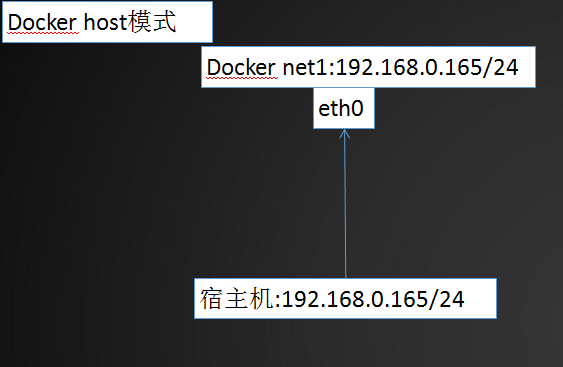
host模式,使用docker run 时,使用--net=host指定docker使用的网络实际上和宿主机一样,启动容器的时候使用host模式,那么这个容器将不会获得一个独立的Network Namespace,而是和宿主机共用一个Network Namespace。容器将不会虚拟出自己的网卡,配置自己的IP等,而是使用宿主机的IP和端口。但是,容器的其他方面,如文件系统、进程列表等还是和宿主机隔离的。
演示:

[root@localhost ~]# docker run -it --rm --net=host --name net1 centos_1 bash

[root@localhost /]# ifconfig

docker0: flags=<UP,BROADCAST,MULTICAST>  mtu

        inet 172.17.0.1  netmask 255.255.0.0  broadcast 0.0.0.0

        inet6 fe80:::5aff:fe52:25a9  prefixlen   scopeid 0x20<link>

        ether ::5a:::a9  txqueuelen   (Ethernet)

        RX packets   bytes  (43.7 MiB)

        RX errors   dropped   overruns   frame

        TX packets   bytes  (291.6 MiB)

        TX errors   dropped  overruns   carrier   collisions

enp0s3: flags=<UP,BROADCAST,RUNNING,MULTICAST>  mtu

        inet 192.168.0.165  netmask 255.255.255.0  broadcast 192.168.0.255

        inet6 fe80::71bd::36ed:a5df  prefixlen   scopeid 0x20<link>

        ether :::::d8  txqueuelen   (Ethernet)

        RX packets   bytes  (257.4 MiB)

        RX errors   dropped   overruns   frame

        TX packets   bytes  (82.9 MiB)

        TX errors   dropped  overruns   carrier   collisions

lo: flags=<UP,LOOPBACK,RUNNING>  mtu

        inet 127.0.0.1  netmask 255.0.0.0

        inet6 ::  prefixlen   scopeid 0x10<host>

        loop  txqueuelen   (Local Loopback)

        RX packets   bytes  (259.5 KiB)

        RX errors   dropped   overruns   frame

        TX packets   bytes  (259.5 KiB)

        TX errors   dropped  overruns   carrier   collisions
2、container模式
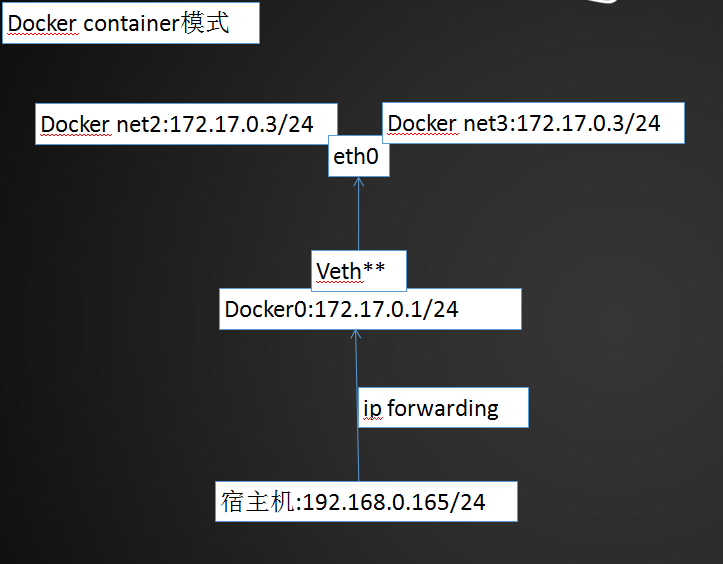
container模式,使用--net=container:container_id/container_name多个容器使用共同的网络,这个模式指定新创建的容器和已经存在的一个容器共享一个 Network Namespace,而不是和宿主机共享。新创建的容器不会创建自己的网卡,配置自己的IP,而是和一个指定的容器共享 IP、端口范围等。同样,两个容器除了网络方面,其他的如文件系统、进程列表等还是隔离的。两个容器的进程可以通过lo网卡设备通信。
演示:

①创建一个net2的容器,并查看ip为172.17.0.

[root@localhost ~]# docker run -itd --name net2 centos_1 bash

b8a14e5e8a670d5680aae830f79267257143397c124d011fbf09b71c59b37e5d

[root@localhost ~]# docker exec -it net2 bash

[root@b8a14e5e8a67 /]# ifconfig

eth0: flags=<UP,BROADCAST,RUNNING,MULTICAST>  mtu

        inet 172.17.0.2  netmask 255.255.0.0  broadcast 0.0.0.0

        inet6 fe80:::acff:fe11:  prefixlen   scopeid 0x20<link>

        ether ::ac:::  txqueuelen   (Ethernet)

        RX packets   bytes  (648.0 B)

        RX errors   dropped   overruns   frame

        TX packets   bytes  (648.0 B)

        TX errors   dropped  overruns   carrier   collisions

lo: flags=<UP,LOOPBACK,RUNNING>  mtu

        inet 127.0.0.1  netmask 255.0.0.0

        inet6 ::  prefixlen   scopeid 0x10<host>

        loop  txqueuelen   (Local Loopback)

        RX packets   bytes  (0.0 B)

        RX errors   dropped   overruns   frame

        TX packets   bytes  (0.0 B)

        TX errors   dropped  overruns   carrier   collisions

②创建容器net3,并指定使用container网络模式,查看net3容器的ip为:172.17.0.2

[root@localhost ~]# docker run -it --net=container:net2 --name net3 centos_1 bash

[root@b8a14e5e8a67 /]# ifconfig

eth0: flags=<UP,BROADCAST,RUNNING,MULTICAST>  mtu

        inet 172.17.0.2  netmask 255.255.0.0  broadcast 0.0.0.0

        inet6 fe80:::acff:fe11:  prefixlen   scopeid 0x20<link>

        ether ::ac:::  txqueuelen   (Ethernet)

        RX packets   bytes  (648.0 B)

        RX errors   dropped   overruns   frame

        TX packets   bytes  (648.0 B)

        TX errors   dropped  overruns   carrier   collisions

lo: flags=<UP,LOOPBACK,RUNNING>  mtu

        inet 127.0.0.1  netmask 255.0.0.0

        inet6 ::  prefixlen   scopeid 0x10<host>

        loop  txqueuelen   (Local Loopback)

        RX packets   bytes  (0.0 B)

        RX errors   dropped   overruns   frame

        TX packets   bytes  (0.0 B)

        TX errors   dropped  overruns   carrier   collisions

③查看运行的net2,net3容器,两者id并不相同,但使用container网络模式,进入到net3时,net3容器id会和net2相同

[root@localhost ~]# docker ps

CONTAINER ID        IMAGE               COMMAND             CREATED             STATUS              PORTS               NAMES

a795f6825e1e        centos_1            "bash"               minutes ago       Up  seconds                            net3

b8a14e5e8a67        centos_1            "bash"               minutes ago       Up  minutes                            net2

[root@localhost ~]# docker exec -it net3 bash

[root@b8a14e5e8a67 /]# ifconfig

eth0: flags=<UP,BROADCAST,RUNNING,MULTICAST>  mtu

        inet 172.17.0.2  netmask 255.255.0.0  broadcast 0.0.0.0

        inet6 fe80:::acff:fe11:  prefixlen   scopeid 0x20<link>

        ether ::ac:::  txqueuelen   (Ethernet)

        RX packets   bytes  (648.0 B)

        RX errors   dropped   overruns   frame

        TX packets   bytes  (648.0 B)

        TX errors   dropped  overruns   carrier   collisions

lo: flags=<UP,LOOPBACK,RUNNING>  mtu

        inet 127.0.0.1  netmask 255.0.0.0

        inet6 ::  prefixlen   scopeid 0x10<host>

        loop  txqueuelen   (Local Loopback)

        RX packets   bytes  (0.0 B)

        RX errors   dropped   overruns   frame

        TX packets   bytes  (0.0 B)

        TX errors   dropped  overruns   carrier   collisions
3、none模式
none模式,使用--net=none指定这种模式下,不会配置任何网络。使用none模式,Docker容器拥有自己的Network Namespace,但是,并不为Docker容器进行任何网络配置。也就是说,这个Docker容器没有网卡、IP、路由等信息。需要我们自己为Docker容器添加网卡、配置IP等。
演示:

[root@localhost ~]# docker run -it --net=none --name net4 centos_1 bash

[root@b12e7ad03af2 /]# ifconfig

lo: flags=<UP,LOOPBACK,RUNNING>  mtu

        inet 127.0.0.1  netmask 255.0.0.0

        inet6 ::  prefixlen   scopeid 0x10<host>

        loop  txqueuelen   (Local Loopback)

        RX packets   bytes  (0.0 B)

        RX errors   dropped   overruns   frame

        TX packets   bytes  (0.0 B)

        TX errors   dropped  overruns   carrier   collisions
4、bridge模式
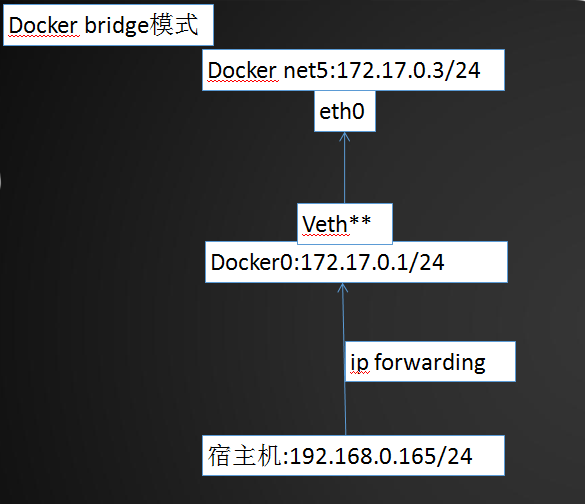
bridge模式,使用--net=bridge指定默认模式,当Docker进程启动时,会在主机上创建一个名为docker0的虚拟网桥,此主机上启动的Docker容器会连接到这个虚拟网桥上。虚拟网桥的工作方式和物理交换机类似,这样主机上的所有容器就通过交换机连在了一个二层网络中。
从docker0子网中分配一个IP给容器使用,并设置docker0的IP地址为容器的默认网关。在主机上创建一对虚拟网卡veth pair设备,Docker将veth pair设备的一端放在新创建的容器中,并命名为eth0(容器的网卡),另一端放在主机中,以vethxxx这样类似的名字命名,并将这个网络设备加入到docker0网桥中。可以通过brctl show命令查看。
bridge模式是docker的默认网络模式,不写--net参数,就是bridge模式。使用docker run -p时,docker实际是在iptables做了DNAT规则,实现端口转发功能。可以使用iptables -t nat -vnL查看。
演示:

①查看宿主机docker0的虚拟网桥ip为:172.17.0.1

[root@localhost ~]# ifconfig

docker0: flags=<UP,BROADCAST,RUNNING,MULTICAST>  mtu

        inet 172.17.0.1  netmask 255.255.0.0  broadcast 0.0.0.0

        inet6 fe80:::5aff:fe52:25a9  prefixlen   scopeid 0x20<link>

        ether ::5a:::a9  txqueuelen   (Ethernet)

        RX packets   bytes  (43.7 MiB)

        RX errors   dropped   overruns   frame

        TX packets   bytes  (291.6 MiB)

        TX errors   dropped  overruns   carrier   collisions

enp0s3: flags=<UP,BROADCAST,RUNNING,MULTICAST>  mtu

        inet 192.168.0.165  netmask 255.255.255.0  broadcast 192.168.0.255

        inet6 fe80::71bd::36ed:a5df  prefixlen   scopeid 0x20<link>

        ether :::::d8  txqueuelen   (Ethernet)

        RX packets   bytes  (258.7 MiB)

        RX errors   dropped   overruns   frame

        TX packets   bytes  (83.1 MiB)

        TX errors   dropped  overruns   carrier   collisions

②创建net5容器,并使用bridge网络模式。查看ip和网关

[root@localhost ~]# docker run -it --name net5 --net=bridge centos_1 bash

[root@a3a6416d08c0 /]# ifconfig

eth0: flags=<UP,BROADCAST,RUNNING,MULTICAST>  mtu

        inet 172.17.0.3  netmask 255.255.0.0  broadcast 0.0.0.0

        inet6 fe80:::acff:fe11:  prefixlen   scopeid 0x20<link>

        ether ::ac:::  txqueuelen   (Ethernet)

        RX packets   bytes  (508.0 B)

        RX errors   dropped   overruns   frame

        TX packets   bytes  (508.0 B)

        TX errors   dropped  overruns   carrier   collisions

lo: flags=<UP,LOOPBACK,RUNNING>  mtu

        inet 127.0.0.1  netmask 255.0.0.0

        inet6 ::  prefixlen   scopeid 0x10<host>

        loop  txqueuelen   (Local Loopback)

        RX packets   bytes  (0.0 B)

        RX errors   dropped   overruns   frame

        TX packets   bytes  (0.0 B)

        TX errors   dropped  overruns   carrier   collisions

[root@a3a6416d08c0 /]# route -n

Kernel IP routing table

Destination     Gateway         Genmask         Flags Metric Ref    Use Iface

0.0.0.0         172.17.0.1      0.0.0.0         UG                   eth0

172.17.0.0      0.0.0.0         255.255.0.0     U                    eth0
5、如何自定义docker网络?
我们可通过bridge驱动创建类似前面默认的bridge网络,例如:
[root@localhost ~]# docker network create --driver bridge my_net  #创建桥接网络my_net

afb854fd239b26f95265002190f9df88f8b7f66c204085bfd16c6a2b4932f5d9

[root@localhost ~]# brctl show   查看一下当前 host 的网络结构变化

bridge name bridge          id      STP enabled interfaces

br-afb854fd239b     .02422702f1bc   no

docker0             .0242646f882f   no      veth211fb49

                                                veth709c331

                                                veth8069764

                                                vethfa120d8
[root@localhost ~]# docker network inspect my_net

[

    {

        "Name": "my_net",

        "Id": "afb854fd239b26f95265002190f9df88f8b7f66c204085bfd16c6a2b4932f5d9",

        "Created": "2018-04-21T14:14:15.479906429+08:00",

        "Scope": "local",

        "Driver": "bridge",

        "EnableIPv6": false,

        "IPAM": {

            "Driver": "default",

            "Options": {},

            "Config": [

                {

                    "Subnet": "172.18.0.0/16",  #这里 172.18.0.0/ 是 Docker 自动分配的 IP 网段。

                    "Gateway": "172.18.0.1"

                }

            ]

        },

        "Internal": false,

        "Attachable": false,

        "Containers": {},

        "Options": {},

        "Labels": {}

    }

]
指定 --subnet 和--gateway参数自定义ip网段:
[root@localhost ~]# docker network create --driver bridge --subnet 192.168.100.0/ --gateway 192.168.100.1 my_net2

889ba4ceb97290e440db559e104db2bf9273854fd789322aaea30b3c76937af6

[root@localhost ~]# docker network inspect my_net2

[

    {

        "Name": "my_net2",

        "Id": "889ba4ceb97290e440db559e104db2bf9273854fd789322aaea30b3c76937af6",

        "Created": "2018-04-21T14:19:15.730480499+08:00",

        "Scope": "local",

        "Driver": "bridge",

        "EnableIPv6": false,

        "IPAM": {

            "Driver": "default",

            "Options": {},

            "Config": [

                {

                    "Subnet": "192.168.100.0/24",

                    "Gateway": "192.168.100.1"

                }

            ]

        },

        "Internal": false,

        "Attachable": false,

        "Containers": {},

        "Options": {},

        "Labels": {}

    }

]
创建了新的 bridge 网络 my_net2,网段为 192.168.100.0/24,网关为 192.168.100.1。与前面一样,网关在 my_net2 对应的网桥 br-889ba4ceb972 上:
[root@localhost ~]# brctl show

bridge name bridge          id          STP enabled         interfaces

br-889ba4ceb972     .02424b2256df       no

br-afb854fd239b     .02422702f1bc       no

docker0             .0242646f882f       no              veth211fb49

                                                            veth709c331

                                                            veth8069764

                                                            vethfa120d8

[root@localhost ~]# ifconfig br-889ba4ceb972

br-889ba4ceb972: flags=<UP,BROADCAST,MULTICAST>  mtu

        inet 192.168.100.1  netmask 255.255.255.0  broadcast 0.0.0.0

        ether ::4b:::df  txqueuelen   (Ethernet)

        RX packets   bytes  (0.0 B)

        RX errors   dropped   overruns   frame

        TX packets   bytes  (0.0 B)

        TX errors   dropped  overruns   carrier   collisions
容器要使用新的网络,需要在启动时通过 --network指定,并且还可以使用--ip参数直接指定一个静态ip:
[root@localhost ~]# docker run -it --network=my_net2 busybox

/ # ip a

: lo: <LOOPBACK,UP,LOWER_UP> mtu  qdisc noqueue qlen

    link/loopback ::::: brd :::::

    inet 127.0.0.1/ scope host lo

       valid_lft forever preferred_lft forever

    inet6 ::/ scope host

       valid_lft forever preferred_lft forever

: eth0@if117: <BROADCAST,MULTICAST,UP,LOWER_UP,M-DOWN> mtu  qdisc noqueue

    link/ether ::c0:a8:: brd ff:ff:ff:ff:ff:ff

    inet 192.168.100.2/ scope global eth0   ##容器被分配的ip为192.168.100.

       valid_lft forever preferred_lft forever

    inet6 fe80:::c0ff:fea8:/ scope link

       valid_lft forever preferred_lft forever

[root@localhost ~]# docker run -it --network=my_net2 --ip 192.168.100.100 busybox

/ # ip a

: lo: <LOOPBACK,UP,LOWER_UP> mtu  qdisc noqueue qlen

    link/loopback ::::: brd :::::

    inet 127.0.0.1/ scope host lo

       valid_lft forever preferred_lft forever

    inet6 ::/ scope host

       valid_lft forever preferred_lft forever

: eth0@if119: <BROADCAST,MULTICAST,UP,LOWER_UP,M-DOWN> mtu  qdisc noqueue

    link/ether ::c0:a8:: brd ff:ff:ff:ff:ff:ff

    inet 192.168.100.100/ scope global eth0    ##容器被分配的ip为192.168.100.

       valid_lft forever preferred_lft forever

    inet6 fe80:::c0ff:fea8:/ scope link

       valid_lft forever preferred_lft forever

注:只有使用 --subnet 创建的网络才能指定静态 IP。

my_net 创建时没有指定 --subnet,如果指定静态 IP 报错如下:

[root@localhost ~]# docker run -it --rm --network=my_net --ip 172.18.0.100 busybox

/usr/bin/docker-current: Error response from daemon: User specified IP address is supported only when connecting to networks with user configured subnets.
6、Docker使用pipework配置容器与宿主机在同一网段
为了使本地网络中的机器和Docker容器更方便的通信,我们经常会有将Docker容器配置到和主机同一网段的需求。这个需求其实很容易实现,我们只要将Docker容器和宿主机的网卡桥接起来,再给Docker容器配上IP就可以了。
(1)新建桥接网卡br0,并进行修改宿主机网卡enp0s3以及br0
[root@localhost network-scripts]# cp ifcfg-enp0s3 ifcfg-br0

[root@localhost network-scripts]# vim ifcfg-br0

注:修改TYPE=Bridge,DEVICE=br0,NAME=br0

TYPE=Bridge

BOOTPROTO=static

DEFROUTE=yes

PEERDNS=yes

PEERROUTES=yes

IPV4_FAILURE_FATAL=no

IPV6INIT=yes

IPV6_AUTOCONF=yes

IPV6_DEFROUTE=yes

IPV6_PEERDNS=yes

IPV6_PEERROUTES=yes

IPV6_FAILURE_FATAL=no

IPV6_ADDR_GEN_MODE=stable-privacy

NAME=br0

#UUID=faa61166-b507--b055-2c6284de3981

DEVICE=br0

ONBOOT=yes

IPADDR=192.168.0.165

GATEWAY=192.168.0.1

NATMASK=255.255.255.0

DNS1=8.8.8.8

#NM_CONTROLLED=no

[root@localhost network-scripts]# vim ifcfg-enp0s3

注:增加BRIDGE=br0,删除IPADDR,GATEWAY,NETMASK,DNS

TYPE=Ethernet

BOOTPROTO=static

DEFROUTE=yes

PEERDNS=yes

PEERROUTES=yes

IPV4_FAILURE_FATAL=no

IPV6INIT=yes

IPV6_AUTOCONF=yes

IPV6_DEFROUTE=yes

IPV6_PEERDNS=yes

IPV6_PEERROUTES=yes

IPV6_FAILURE_FATAL=no

IPV6_ADDR_GEN_MODE=stable-privacy

NAME=enp0s3

#UUID=faa61166-b507--b055-2c6284de3981

DEVICE=enp0s3

ONBOOT=yes

#IPADDR=192.168.0.165

#GATEWAY=192.168.0.1

#NATMASK=255.255.255.0

#DNS1=8.8.8.8

#NM_CONTROLLED=no

BRIDGE=br0
(2)重启网络,查看br0的ip地址,以及enp0s3是否未分配ip地址,表示成功
[root@localhost network-scripts]# systemctl restart network

[root@localhost network-scripts]# ifconfig

br0: flags=<UP,BROADCAST,RUNNING,MULTICAST>  mtu

        inet 192.168.0.165  netmask 255.255.255.0  broadcast 192.168.0.255

        inet6 fe80::ca01:a411:fb77:c348  prefixlen   scopeid 0x20<link>

        ether :::::d8  txqueuelen   (Ethernet)

        RX packets   bytes  (3.4 KiB)

        RX errors   dropped   overruns   frame

        TX packets   bytes  (2.2 KiB)

        TX errors   dropped  overruns   carrier   collisions

docker0: flags=<UP,BROADCAST,MULTICAST>  mtu

        inet 172.17.0.1  netmask 255.255.0.0  broadcast 0.0.0.0

        ether ::7e:ec:e1:e6  txqueuelen   (Ethernet)

        RX packets   bytes  (0.0 B)

        RX errors   dropped   overruns   frame

        TX packets   bytes  (0.0 B)

        TX errors   dropped  overruns   carrier   collisions

enp0s3: flags=<UP,BROADCAST,RUNNING,MULTICAST>  mtu

        ether :::::d8  txqueuelen   (Ethernet)

        RX packets   bytes  (314.1 KiB)

        RX errors   dropped   overruns   frame

        TX packets   bytes  (178.2 KiB)

        TX errors   dropped  overruns   carrier   collisions

lo: flags=<UP,LOOPBACK,RUNNING>  mtu

        inet 127.0.0.1  netmask 255.0.0.0

        inet6 ::  prefixlen   scopeid 0x10<host>

        loop  txqueuelen   (Local Loopback)

        RX packets   bytes  (7.7 KiB)

        RX errors   dropped   overruns   frame

        TX packets   bytes  (7.7 KiB)

        TX errors   dropped  overruns   carrier   collisions
(3)下载pipework
[root@localhost ~]# git clone https://github.com/jpetazzo/pipework

Cloning into 'pipework'...

remote: Counting objects: , done.

remote: Total  (delta ), reused  (delta ), pack-reused

Receiving objects: % (/), 172.97 KiB | 4.00 KiB/s, done.

Resolving deltas: % (/), done.
(4)拷贝pipework二进制文件到/usr/local/bin下,运行一个容器并使用none网络模式
[root@localhost ~]# cp pipework/pipework /usr/local/bin/

[root@localhost ~]# docker run -itd --net=none --name pipework centos_nginx bash

ab88e2159ce32408154a776c1c62cf1af170fa8ce4d01908da6175f01b6c787d

[root@localhost ~]# docker ps

CONTAINER ID        IMAGE               COMMAND             CREATED             STATUS              PORTS               NAMES

ab88e2159ce3        centos_nginx        "bash"               seconds ago       Up  seconds                            pipework

[root@localhost ~]# docker exec -it pipework bash

[root@ab88e2159ce3 /]# ifconfig

lo: flags=<UP,LOOPBACK,RUNNING>  mtu

        inet 127.0.0.1  netmask 255.0.0.0

        inet6 ::  prefixlen   scopeid 0x10<host>

        loop  txqueuelen   (Local Loopback)

        RX packets   bytes  (0.0 B)

        RX errors   dropped   overruns   frame

        TX packets   bytes  (0.0 B)

        TX errors   dropped  overruns   carrier   collisions

[root@ab88e2159ce3 /]# exit

exit
(5)使用pipework进行配置容器pipework的ip地址,166为容器的ip地址,@后面的ip为容器网关,配置完毕进入容器进行查看
[root@localhost ~]# pipework br0 pipework 192.168.0.166/@192.168.0.1

[root@localhost ~]# docker exec -it pipework bash

[root@ab88e2159ce3 /]# ifconfig

eth1: flags=<UP,BROADCAST,RUNNING,MULTICAST>  mtu

        inet 192.168.0.166  netmask 255.255.255.0  broadcast 192.168.0.255

        inet6 fe80::340c:ebff:fe50:1ba3  prefixlen   scopeid 0x20<link>

        ether :0c:eb::1b:a3  txqueuelen   (Ethernet)

        RX packets   bytes  (10.2 KiB)

        RX errors   dropped   overruns   frame

        TX packets   bytes  (732.0 B)

        TX errors   dropped  overruns   carrier   collisions

lo: flags=<UP,LOOPBACK,RUNNING>  mtu

        inet 127.0.0.1  netmask 255.0.0.0

        inet6 ::  prefixlen   scopeid 0x10<host>

        loop  txqueuelen   (Local Loopback)

        RX packets   bytes  (0.0 B)

        RX errors   dropped   overruns   frame

        TX packets   bytes  (0.0 B)

        TX errors   dropped  overruns   carrier   collisions
(6)windows和linux下验证容器pipework的网络连通性
[root@ab88e2159ce3 /]# ping www.baidu.com

PING www.a.shifen.com (14.215.177.39) () bytes of data.

 bytes from 14.215.177.39 (14.215.177.39): icmp_seq= ttl= time=8.29 ms

 bytes from 14.215.177.39 (14.215.177.39): icmp_seq= ttl= time=8.09 ms

 bytes from 14.215.177.39 (14.215.177.39): icmp_seq= ttl= time=8.43 ms

 bytes from 14.215.177.39 (14.215.177.39): icmp_seq= ttl= time=8.12 ms

 bytes from 14.215.177.39 (14.215.177.39): icmp_seq= ttl= time=8.80 ms

 bytes from 14.215.177.39 (14.215.177.39): icmp_seq= ttl= time=8.51 ms

^C

--- www.a.shifen.com ping statistics ---

 packets transmitted,  received, % packet loss, time 5007ms

rtt min/avg/max/mdev = 8.094/8.378/8.805/0.249 ms
(7)通过pipework配置网络,配置web服务
[root@localhost ~]# docker run -itd --privileged -e "container=docker" --name pipework --net=none centos_nginx /usr/sbin/init

aa85a59dc347633fcd9a2b5206eaed619451c52f299d2505c32df2b6d1ce7521

[root@localhost ~]# pipework br0 pipework 192.168.0.166/@192.168.0.1

[root@localhost ~]# docker exec -it pipework bash

[root@aa85a59dc347 /]# ifconfig

eth1: flags=<UP,BROADCAST,RUNNING,MULTICAST>  mtu

        inet 192.168.0.166  netmask 255.255.255.0  broadcast 192.168.0.255

        inet6 fe80::a00d:aff:fec2:a59d  prefixlen   scopeid 0x20<link>

        ether a2:0d:0a:c2:a5:9d  txqueuelen   (Ethernet)

        RX packets   bytes  (20.6 KiB)

        RX errors   dropped   overruns   frame

        TX packets   bytes  (774.0 B)

        TX errors   dropped  overruns   carrier   collisions

lo: flags=<UP,LOOPBACK,RUNNING>  mtu

        inet 127.0.0.1  netmask 255.0.0.0

        inet6 ::  prefixlen   scopeid 0x10<host>

        loop  txqueuelen   (Local Loopback)

        RX packets   bytes  (0.0 B)

        RX errors   dropped   overruns   frame

        TX packets   bytes  (0.0 B)

        TX errors   dropped  overruns   carrier   collisions

[root@aa85a59dc347 /]# systemctl start nginx

[root@aa85a59dc347 /]# netstat -tulnp |grep nginx

tcp               0.0.0.0:              0.0.0.0:*               LISTEN      /nginx: master pr

tcp6              :::                   :::*                    LISTEN      /nginx: master pr

[root@aa85a59dc347 /]# ps -ef |grep nginx

root                : ?        :: nginx: master process /usr/sbin/nginx

nginx              : ?        :: nginx: worker process

root               : ?        :: grep --color=auto nginx
Docker入门篇(二)之docker的单主机网络的更多相关文章
- 【实战】Docker入门实践二:Docker服务基本操作 和 测试Hello World
操作环境 操作系统:CentOS7.2 内存:1GB CPU:2核 Docker服务常用命令 docker服务操作命令如下 service docker start #启动服务 service doc ...
- 【Docker】(1)---Docker入门篇
Docker入门篇 简单一句话: Docker 是一个便携的应用容器. 一.Docker的作用 网上铺天盖地的是这么说的: (1) Docker 容器的启动可以在秒级实现,这相比传统的虚拟机方式要快得 ...
- Docker入门篇(一)安装docker
Docker入门篇(一)安装docker Docker的来源 由dotCloud公司首创及正式命名,但是企业规模小,影响力不够,所以在快要坚持不住的时候,开始吃百家饭--开源了.不开则已,一开惊人.越 ...
- Docker入门(二):安装/卸载
这个<Docker入门系列>文档,是根据Docker官网(https://docs.docker.com)的帮助文档大致翻译而成.主要是作为个人学习记录.有错误的地方,Robin欢迎大家指 ...
- Docker 单主机网络
PS:欢迎大家关注我的公众号:aCloudDeveloper,专注技术分享,努力打造干货分享平台,二维码在文末可以扫,谢谢大家. 当容器逐步向容器集群,容器云技术演进的时候,一个不得不面对的问题就是各 ...
- Docker入门之 - 如何安装Docker CE
原文:Docker入门之 - 如何安装Docker CE 版权声明:本文为博主原创文章,未经博主允许不得转载. https://blog.csdn.net/u012055638/article/det ...
- Docker入门 .Net Core 使用Docker全程记录
https://www.cnblogs.com/flame7/p/9210986.html Docker入门 第一课 --.Net Core 使用Docker全程记录 微服务架构无疑是当前最火热的 ...
- 【SSRS】入门篇(二) -- 建立数据源
原文:[SSRS]入门篇(二) -- 建立数据源 通过 [SSRS]入门篇(一) -- 创建SSRS项目 这篇,我们建立了一个SSRS项目: 接下来,我们以 AdventureWorks2012 示例 ...
- Docker 入门篇
Docker 简介 作为一种新兴的虚拟化方式,Docker 跟传统的虚拟化方式相比具有众多的优势. 更高效的利用系统资源 更快速的启动时间 一致的运行环境 持续交付和部署 更轻松的迁移 更轻松的维护和 ...
随机推荐
- KMP算法模板&&扩展
很不错的学习链接:https://blog.csdn.net/v_july_v/article/details/7041827 具体思路就看上面的链接就行了,这里只放几个常用的模板 问题描述: 给出字 ...
- CNN识别验证码2
获得验证码图片的俩个来源: 1.有网站生成验证码图片的源码 2.通过python的requests下载验证码图片当我们的训练样本 我们通过第一种方式来得到训练样本,下面是生成验证码的php程序: &l ...
- 随手练——S(n)=O(1),判断一个链表是否为“回文”
方法一:T(n)=O(n),S(n)=O(n) 走完一遍链表,每个值入栈,之后再走一遍链表,和每次弹出的栈顶进行比较. 核心: LNode *p = l->next; while (p) { s ...
- [Python web开发] Web框架开发基础 (一)
Python WEB框架 WSGI,WEB Server Gateway Interface,可以看做是一种底层协议,它规定了服务器程序和应用程序各自实现上面接口.Python的实现称为wsgiref ...
- PHP扩展功能 ---- 页面静态化(OB缓冲)
一.入门三部曲 1.什么是页面静态化 百度百科介绍: 静态页面是网页的代码都在页面中,不需要执行asp,php,jsp,.net等程序生成客户端网页代码的网页,静态页面网址中一般不含"?&q ...
- Dubbo实践(二)架构
架构 节点角色说明 节点 角色说明 Provider 暴露服务的服务提供方 Consumer 调用远程服务的服务消费方 Registry 服务注册与发现的注册中心 Monitor 统计服务的调用次数和 ...
- IntelliJ IDEA隐藏不想看到的文件或文件夹
打开IntelliJ IDEA,File -> Settings -> Editor -> File Types 在红框部分加上你想过滤的文件或文件夹名
- 生产者-消费者模型-线程安全队列Queue
#python3 #product new data into the queue #comsume data from the queue from queue import Queue impor ...
- Docker permission denied
Issue: Got permission denied while trying to connect to the Docker daemon socket at unix:///var/run/ ...
- .net core 实践笔记(一)--开篇
** 温馨提示:如需转载本文,请注明内容出处.** 本文链接:https://www.cnblogs.com/grom/p/9902000.html 最近无聊自己设计了一个小项目,基本都使用想用没用 ...