
超全面的JavaWeb笔记day19<Service>
今日内容
l Service事务
l 客户关系管理系统
Service事务
在Service中使用ThreadLocal来完成事务,为将来学习Spring事务打基础!
1 DAO中的事务
在DAO中处理事务真是“小菜一碟”。
|
public void xxx() { Connection con = null; try { con = JdbcUtils.getConnection(); con.setAutoCommitted(false); QueryRunner qr = new QueryRunner(); String sql = …; Object[] params = …; qr.update(con, sql, params); sql = …; Object[] params = …; qr.update(con, sql, params); con.commit(); } catch(Exception e) { try { if(con != null) {con.rollback();} } catch(Exception e) {} } finally { try { con.close(); } catch(Exception e) {} } } |
2 Service才是处理事务的地方
我们要清楚一件事,DAO中不是处理事务的地方,因为DAO中的每个方法都是对数据库的一次操作,而Service中的方法才是对应一个业务逻辑。也就是说我们需要在Service中的一方法中调用DAO的多个方法,而这些方法应该在一起事务中。
怎么才能让DAO的多个方法使用相同的Connection呢?方法不能再自己来获得Connection,而是由外界传递进去。
|
public void daoMethod1(Connection con, …) { } public void daoMethod2(Connection con, …) { } |
在Service中调用DAO的多个方法时,传递相同的Connection就可以了。
|
public class XXXService() { private XXXDao dao = new XXXDao(); public void serviceMethod() { Connection con = null; try { con = JdbcUtils.getConnection(); con.setAutoCommitted(false); dao.daoMethod1(con, …); dao.doaMethod2(con, …); com.commint(); } catch(Exception e) { try { con.rollback(); } catch(Exception e) {} } finally { try { con.close(); } catch(Exception e) {} } } } |
但是,在Service中不应该出现Connection,它应该只在DAO中出现,因为它是JDBC的东西,JDBC的东西是用来连接数据库的,连接数据库是DAO的事儿!!!但是,事务是Service的事儿,不能放到DAO中!!!
3 修改JdbcUtils
我们把对事务的开启和关闭放到JdbcUtils中,在Service中调用JdbcUtils的方法来完成事务的处理,但在Service中就不会再出现Connection这一“禁忌”了。
DAO中的方法不用再让Service来传递Connection了。DAO会主动从JdbcUtils中获取Connection对象,这样,JdbcUtils成为了DAO和Service的中介!
我们在JdbcUtils中添加beginTransaction()和rollbackTransaction(),以及commitTransaction()方法。这样在Service中的代码如下:
|
public class XXXService() { private XXXDao dao = new XXXDao(); public void serviceMethod() { try { JdbcUtils.beginTransaction(); dao.daoMethod1(…); dao.daoMethod2(…); JdbcUtils.commitTransaction(); } catch(Exception e) { JdbcUtils.rollbackTransaction(); } } } |
DAO
|
public void daoMethod1(…) { Connection con = JdbcUtils.getConnection(); } public void daoMethod2(…) { Connection con = JdbcUtils.getConnection(); } |
在Service中调用了JdbcUtils.beginTransaction()方法时,JdbcUtils要做准备好一个已经调用了setAuthCommitted(false)方法的Connection对象,因为在Service中调用JdbcUtils.beginTransaction()之后,马上就会调用DAO的方法,而在DAO方法中会调用JdbcUtils.getConnection()方法。这说明JdbcUtils要在getConnection()方法中返回刚刚准备好的,已经设置了手动提交的Connection对象。

在JdbcUtils中创建一个Connection con属性,当它为null时,说明没有事务!当它不为null时,表示开启了事务。
l 在没有开启事务时,可以调用“开启事务”方法;
l 在开启事务后,可以调用“提交事务”和“回滚事务”方法;
l getConnection()方法会在con不为null时返回con,再con为null时,从连接池中返回连接。
beginTransaction()
判断con是否为null,如果不为null,就抛出异常!
如果con为null,那么从连接池中获取一个Connection对象,赋值给con!然后设置它为“手动提交”。
getConnection()
判断con是否为null,如果为null说明没有事务,那么从连接池获取一个连接返回;
如果不为null,说明已经开始了事务,那么返回con属性返回。这说明在con不为null时,无论调用多少次getConnection()方法,返回的都是同个Connection对象。
commitTransaction()
判断con是否为null,如果为null,说明没有开启事务就提交事务,那么抛出异常;
如果con不为null,那么调用con的commit()方法来提交事务;
调用con.close()方法关闭连接;
con = null,这表示事务已经结束!
rollbackTransaction()
判断con是否为null,如果为null,说明没有开启事务就回滚事务,那么抛出异常;
如果con不为null,那么调用con的rollback()方法来回滚事务;
调用con.close()方法关闭连接;
con = null,这表示事务已经结束!
JdbcUtils.java
|
public class JdbcUtils { private static DataSource dataSource = new ComboPooledDataSource(); private static Connection con = null; public static DataSource getDataSource() { return dataSource; } public static Connection getConnection() throws SQLException { if(con == null) { return dataSource.getConnection(); } return con; } public static void beginTranscation() throws SQLException { if(con != null) { throw new SQLException("事务已经开启,在没有结束当前事务时,不能再开启事务!"); } con = dataSource.getConnection(); con.setAutoCommit(false); } public static void commitTransaction() throws SQLException { if(con == null) { throw new SQLException("当前没有事务,所以不能提交事务!"); } con.commit(); con.close(); con = null; } public static void rollbackTransaction() throws SQLException { if(con == null) { throw new SQLException("当前没有事务,所以不能回滚事务!"); } con.rollback(); con.close(); con = null; } } |
4 再次修改JdbcUtils
现在JdbcUtils有个问题,如果有两个线程!第一个线程调用了beginTransaction()方法,另一个线程再调用beginTransaction()方法时,因为con已经不再为null,所以就会抛出异常了。
我们希望JdbcUtils可以多线程环境下被使用!这说明最好的方法是为每个线程提供一个Connection,这样每个线程都可以开启自己的事务了。
还记得ThreadLocal类么?
|
public class JdbcUtils { private static DataSource dataSource = new ComboPooledDataSource(); private static ThreadLocal<Connection> tl = new ThreadLocal<Connection>(); public static DataSource getDataSource() { return dataSource; } public static Connection getConnection() throws SQLException { Connection con = tl.get(); if(con == null) { return dataSource.getConnection(); } return con; } public static void beginTranscation() throws SQLException { Connection con = tl.get(); if(con != null) { throw new SQLException("事务已经开启,在没有结束当前事务时,不能再开启事务!"); } con = dataSource.getConnection(); con.setAutoCommit(false); tl.set(con); } public static void commitTransaction() throws SQLException { Connection con = tl.get(); if(con == null) { throw new SQLException("当前没有事务,所以不能提交事务!"); } con.commit(); con.close(); tl.remove(); } public static void rollbackTransaction() throws SQLException { Connection con = tl.get(); if(con == null) { throw new SQLException("当前没有事务,所以不能回滚事务!"); } con.rollback(); con.close(); tl.remove(); } } |
5 转账示例
|
public class AccountDao { public void updateBalance(String name, double balance) throws SQLException { String sql = "update account set balance=balance+? where name=?"; Connection con = JdbcUtils.getConnection(); QueryRunner qr = new QueryRunner(); qr.update(con, sql, balance, name); } } |
|
public class AccountService { private AccountDao dao = new AccountDao(); public void transfer(String from, String to, double balance) { try { JdbcUtils.beginTranscation(); dao.updateBalance(from, -balance); dao.updateBalance(to, balance); JdbcUtils.commitTransaction(); } catch(Exception e) { try { JdbcUtils.rollbackTransaction(); } catch (SQLException e1) { throw new RuntimeException(e); } } } } |
|
AccountService as = new AccountService(); as.transfer("zs", "ls", 100); |
客户关系管理系统
1. 项目框架搭建
l 导入原型(只有页面,但没有功能的一个项目,功能都是直接跳转)!
l 功能分析:
Ø 添加客户;
Ø 查询所有客户
Ø 编辑客户:
¨ 加载这个客户到表单中显示
¨ 修改客户
Ø 删除客户(你们的)
Ø 多条件组合查询
l 创建表
l 创建包:公司名.项目名.分层,
Ø cn.itcast.cstm.domain:Customer,它与表单和t_customer表对应
Ø cn.itcast.cstm.dao:CustomerDao
Ø cn.itcast.cstm.service:CustomerService,它没有业务,其实它不存在都可以!
Ø cn.itcast.cstm.web.servlet:CustomerServlet
l 导包:
Ø mysql驱动
Ø c3p0(两个,一个配置文件)
Ø dbutils
Ø 自己的工具JdbcUtils,它在itcast-tools.jar
Ø beantuils、logging
添加客户
l add.jsp à CustomerServlet#add()à显示添加成功!

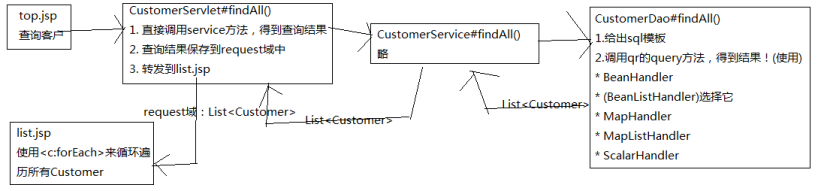
查询客户
l top.jsp(查询客户) à CustomerServlet#findAll() à list.jsp(循环显示)
编辑客户
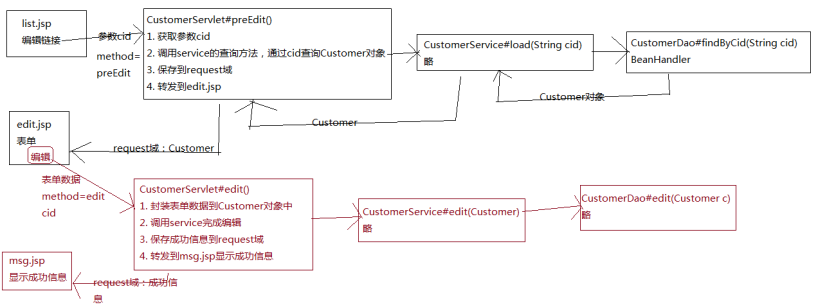
编辑分为两步:
1. 通过cid查询
l list.jsp(编辑链接) à CustomerServlet#preEdit() à edit.jsp(把查询出的结果显示到表单中)
l edit.jsp(表单页面) à CustomerServlet#edit() à msg.jsp(显示成功信息)
删除客户
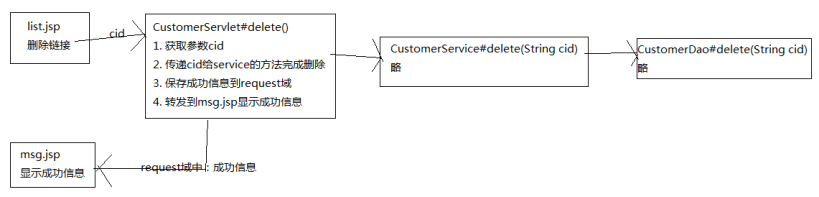
l list.jsp(删除链接)à CustomerServlet#delete() à msg.jsp
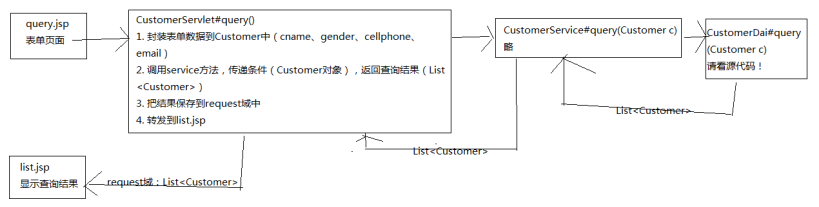
多条件组合查询
l query.jsp à CustomerServlet#query() à list.jsp
1功能内容
l 添加客户
l 修改客户
l 删除客户
l 查看客户
2 演示
添加客户
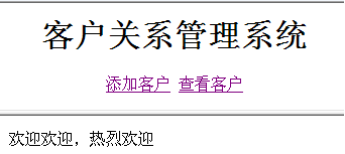


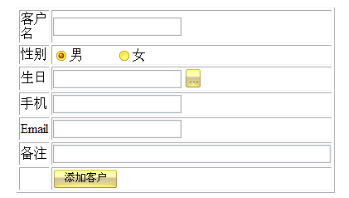


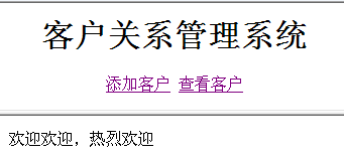
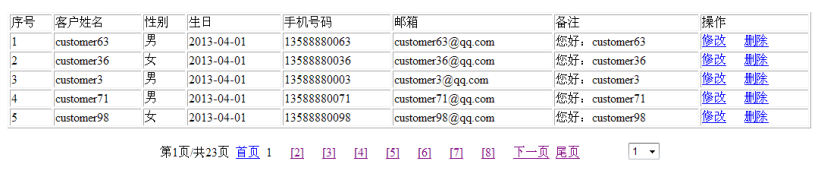
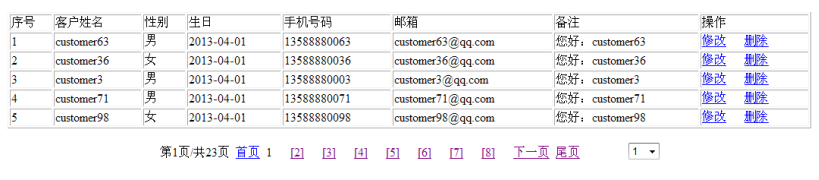
查看客户

修改客户


删除客户

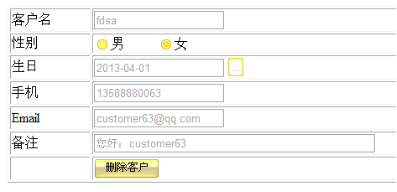

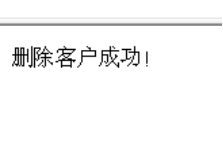
3 搭建环境
1. 创建一个空项目,例如为customer
2. 导入jar包:
l itcast.jar
l mysql.jar
l dbutil.jar、logging.jar
l beanutils.jar
l c3p0.jar,…
3. 页面搭建
l index.jsp(forward到main.jsp)
l main.jsp(框架页,两帧,对应top.jsp和body.jsp)
l top.jsp(logo和两个链接:“添加客户”和“查看客户”)
l body.jsp(只有欢迎信息)
l add.jsp(添加客户表单)
l mod.jsp(修改客户表单)
l del.jsp(删除客户表)
4. 处理页面跳转问题
编写CustomerServlet,处理页面跳转问题!
4 创建表和类
customer
|
customer |
||
|
字段 |
类型 |
说明 |
|
cid |
char(32) |
主键 |
|
cname |
varchar(30) |
客户姓名 |
|
gender |
varchar(6) |
客户性别 |
|
birthday |
date |
客户生日 |
|
cellphone |
varchar(20) |
客户手机 |
|
|
varchar(30) |
客户邮箱 |
|
description |
varchar(200) |
客户描述 |
|
CREATE TABLE customer( cid CHAR(32) PRIMARY KEY, cname VARCHAR(30) NOT NULL, gender VARCHAR(6) NOT NULL, birthday DATE, cellphone VARCHAR(20) NOT NULL, email VARCHAR(30), description VARCHAR(200) ); |
Customer类这里就省略了!
5 添加客户分析
1. 当用户点击“添加客户”链接时,通过CustomerServlet的addPre转发到add.jsp
2. 在add.jsp中提交表单时,由CustomerServlet来处理请求:
l 获取表单数据,封装到Customer对象中;
l 调用CustomerService代码,把Customer添加到数据库;
l 向页面输出“添加成功”。
6 查看客户分析
1. 当用户点击“查看客户”链接时,通过CustomerServlet的list方法来处理:
l 通过CustomerService获取所有客户信息;
l 保存到request中;
l 转发到list.jsp
l list.jsp使用<c:forEach>查看信息
7 修改客户
1. 当用户在list.jsp页面中点击“修改”时,通过CustomerServlet的modPre方法来处理:
l 获取cid,即要修改的客户的cid;
l 通过cid来获取Customer对象
l 把Customer对象保存到request中
l 转发到mod.jsp
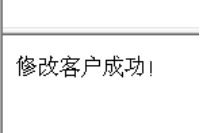
2. 当用户在mod.jsp提交表单时,通过Customer的mod方法来处理:
l 获取表单数据,封装到Customer对象中;
l 调用CustomerService的方法完成修改;
l 向页面输出“修改成功”。
8 删除客户
1. 当用户在list.jsp页面中点击“删除”时,通过CustomerServlet的delPre方法来处理:
l 获取cid;
l 通过cid获取Customer对象;
l 把Customer对象保存到request中
l 转发到del.jsp
2. 当用户在del.jsp页面点击删除时,通过Customer的del广场来处理:
1. 获取cid
2. 通过CustomerService来完成删除
3. 向页面输出“删除成功”
分页
1 分页数据分析
页面需要什么数据:
l 当前页页码(currPageCode):Servlet提供;
l 共几页(totalPage):Servlet提供;
l 当前页数据(datas):Servlet提供;
Servlet需要什么数据:
l 当前页页码(currPageCode):页面提供,如果页面没有提供,那么默认为1;
l 总记录数(totalRecord):通过数据库来查询;
l 每页记录数(pagesize):系统数据;
l 共几页(totalPage):通过totalRecord和pagesize来计算;
l 当前页第一行记录位置(currPageBeginIndex):通过currPageCode和pagesize计算;
l 当前页数据(datas):通过currPageBginIndex和pagesize查询数据库;
2 PageBean
把分布数据封装成PageBean类对象
|
public class PageBean<T> { private List<T> datas;// 当前页记录数, 需要传递 private int totalRecord;// 总记录数, 需要传递 private int currPageCode;// 当前页码, 需要传递 private int pagesize;// 每页记录数, 需要传递 private int totalPage;// 总页数, 计算 private int currPageBeginIndex; //需要计算 public PageBean(int currPageCode, int totalRecord, int pagesize) { this.currPageCode = currPageCode; this.totalRecord = totalRecord; this.pagesize = pagesize; init(); } private void init() { this.totalPage = totalRecord / pagesize; if(totalRecord % pagesize != 0) { this.totalPage++; } this.currPageBeginIndex = (this.currPageCode-1) * this.pagesize; } ... } |
3 分页分析

4 页码列表

其中红框中的就是页码列表!
4.1 页面需要的数据:
l 列表的开始页码(beginIndex);
l 列表的结束页码(endIndex)。
例如开始页码为11,结束页码为18,那么就显示:

对于页面,它只需要beginIndex和endIndex,然后使用<c:forEach>就可以循环显示了!然后再判断一下遍历的数字如果与pageBean.currPageCode相等,那么就不要显示为链接即可。
4.2 PageBean
页面需要的数据由PageBean来提供,即为pageBean添加两个方法:
l int getBeginIndex()
l int getEndIndex()
但是,PageBean想计算这两个值,也要需要两个系统数据:
l pageCodeListSize:页码列表长度,下图中的列表长度为8,即最多显示8个页码;
l currPageCodeListIndex:当前页码在列表中的位置,下图中当前页码的位置为4,位置是从1开始计算。

4.3 计算beginIndex
计算beginIndex分为4步:
1. 如果总页数(totalPage)小于列表长度(pageCodeListSize),那么beginIndex为1;
例如,当前数据一共5页,那么列表的开始页码一定是1。

2. 当上面条件不成立时,使用当前页码在列表中的位置(currPageCodeListIndex),以及当前页码(currPageCode)来推算出beginIndex。

上图中当前页码(currPageCode)为14,当前页码位置为4(currPageCodeListIndex),推算出beginIndex为11,即beginIndex = currPageCode- currPageCodeListIndex+1;
3. 第2步计算出的beginIndex如果小于1,即让beginIndex=1。
第2步的计算可能会出现问题,例如在当前页码(currPageCode)为1时,那么上面的计算就会出现beginIndex小于1的情况!这种beginIndex小于1的情况,只有在currPageCode为1、2、3时会出现。你可以去套用一下第2步的公式,会发现这个问题的!



也就是说,beginIndex的最小值就是1
4. 第2步计算出的beginIndex可能会导致列表长度不正确
当cuarrPageCode为30时,那么通过第2步计算出的beginIndex为27,但是如果totalPage为30呢?因为一共就30页,总不能显示31出来吧。那么显示:27、28、29、30,这就只有4个页码,但列表长度应该为8,所以出错。
我们为了验证第2步是否出现这个错误,需要通过得到的beginIndex来推算endIndex。例如currPageCode为30,计算出beginIndex为27,再通过beginIndex计算出endIndex为34。然后查看endIndex是否大于totalPage,如果大于了totalPage,那么应该使用totalPage减去pageCodeListSize再加1,得到正确的beginIndex。
int endIndex = beginIndex+pageCodeListSize-1;
if(endIndex > totalPage) beginIndex = totalPage-pageCodeListSize + 1;
|
public int getBeginIndex() { if(totalPage <= pageCodeListSize) return 1; int begin = currPageCode – currPageCodeListIndex+1; if(begin < 1) begin = 1; int end = begin + pageCodeListSize-1; if(end > totalPage) begin = totalPage – pageCodeListSize+1; return begin; } |
4.4 计算endIndex
计算endIndex也是分为4步
1. 如果totalPage小于pageCodeListSize,那么endIndex为totalPage
2. 通过pageCodeListSize、currPageCode、currPageCodeListIndex来推出endIndex。

currPageCode=14,pageCodeListSize=8,currPageCodeListIndex=4,所以
endIndex = currPageCode+(pageCodeListSize=currPagecodeListIndex)=18。
3. 第2步的计算结果可能会大于totalPage,那么就重置endIndex为totalPage
如果currPageCode为30,那么通过第2步计算出的endIndex为34,但是如果totalPage为30呢?那么就让endIndex=totalPage。




当currPageCode为27、28、29、30时,如果totalPage=30,那么第2步都会计算出错。这时就把endIndex=totalPage
4. 第2步的计算结果可能会导致错误的列表长度
当currPageCode为1时,那么通过第2步计算的endIndex为5,即列表为1、2、3、4、5,但列表长度应该为8,所以当第2步计算出的endIndex< pageCodeListSize,那么让endIndex等于列表长度。
|
public int getEndIndex() { if(totalPage <= pageCodeListSize) return totalPage; int end = currPageCode + (pageCodeListSize-currPageCodeListIndex); if(end > totalPage) end = totalPage; if(end < pageCodeListSize) end = pageCodeListSize; return end; } |
超全面的JavaWeb笔记day19<Service>的更多相关文章
- 超全面的JavaWeb笔记day03<JS对象&函数>
1.js的String对象(****) 2.js的Array对象 (****) 3.js的Date对象 (****) 获取当前的月 0-11,想要得到准确的月 +1 获取星期时候,星期日是 0 4.j ...
- 超全面的JavaWeb笔记day13<JSTL&自定义标签>
1.JSTL标签库(重点) core out set remove url if choose when otherwise forEach fmt formatDate formatNumber 2 ...
- 超全面的JavaWeb笔记day10<Response&Request&路径&编码>
1.Response 2.Request 3.路径 4.编码 请求响应流程图 response 1.response概述 response是Servlet.service方法的一个参数,类型为java ...
- 超全面的JavaWeb笔记day17<JDBC>
1.JDBC的原理 是由JavaEE提供的连接数据库的规范 需要由各大数据库的厂商提供对JDBC的实现类 2.四大核心类 3.四大参数 driverClassName url username pas ...
- 超全面的JavaWeb笔记day15<mysql数据库>
1.数据库的概述 2.SQL 3.DDL 4.DML 5.DCL 6.DQL MySQL 数据库 1 数据库概念(了解) 1.1 什么是数据库 数据库就是用来存储和管理数据的仓库! 数据库存储数据的优 ...
- 超全面的JavaWeb笔记day12<Jsp&JavaBean&El表达式>
1.JSP三大指令 page include taglib 2.9个内置对象 out page pageContext request response session application exc ...
- 超全面的JavaWeb笔记day11<JSP&Session&Cookie&HttpSession>
1.JSP 2.回话跟踪技术 3.Cookie 4.HttpSession JSP入门 1 JSP概述 1.1 什么是JSP JSP(Java Server Pages)是JavaWeb服务器端的动态 ...
- 超全面的JavaWeb笔记day09<Servlet&GenericServlet&HttpServlet&ServletContext>
1.Servlet概述 2.Servlet接口 3.GenericServlet 4.HttpServlet 5.Servlet细节 6.ServletContext(重要) Servlet概述 生命 ...
- 超全面的JavaWeb笔记day08<Tomcat&Web应用&HTTP协议>
1.常用软件体系结构 BS:浏览器/服务器 CS:客户端/服务器 WEB资源 动态资源 JSP Servlet 静态资源 html 常用服务器 Tomcat Weblogic Resin JBOSS ...
随机推荐
- iOS-ARC-环境下如何查看引用计数的变化
iOS-ARC-环境下如何查看引用计数的变化 一,新建立一个工程,用于测试引用计数的变化. 二,找到如下路径Build Phases---->Compile Sources---->App ...
- .net core相关博客
http://www.cnblogs.com/artech/蒋金楠,网名Artech,知名IT博主, 微软多领域MVP,畅销IT图书作者,著<WCF全面解析>.<ASP.NET MV ...
- JDBC的介绍
JDBC详解 1.JDBC是什么? JDBC(JAVA DataBase Connection)即JAVA数据库连接技术,JDBC API是一个Java API,可以访问任何类型表列数据,特别是存 ...
- Windows获取线程起始地址
typedef enum _THREADINFOCLASS { ThreadBasicInformation, ThreadTimes, ThreadPriority, ThreadBasePrior ...
- QT 5.7.0 交叉编译记录
这一篇记录 Qt 5.x cross-compiler with eglfs , 平台是 TI-AM3354, 上一篇SGX的移植就是为了这一次的交叉编译. 一. 下载QT的源码: 地址: http: ...
- pthread_cond_wait()函数的详解
http://hi.baidu.com/tjuer/item/253cc6d66b921317d90e4483 了解 pthread_cond_wait() 的作用非常重要 -- 它是 POSIX 线 ...
- shell命令之根据字符串查询文件对应行记录
显示xxx字符串对应的行数,并向前打印3行,向后打印2行,查找对应文件为filename.txt 命令:grep -n 'xxx' -A3 -B2 --color=auto filename.txt ...
- Logrotate日志轮巡missingok: 在日志轮循期间,任何错误将被忽略
Linux日志文件总管——logrotate 编译自:http://xmodulo.com/2014/09/logrotate-manage-log-files-linux.html ...
- Oracle重置序列
oracle序列创建以后,如果想重置序列从 0 开始,逐渐递增1,可以采用如下存储过程: create or replace procedure reset_seq( p_seq_name in va ...
- OSX下git diff/merge 可视化工具 P4Merge 环境配置步骤
先下载 step1:首先,把要运行的命令放入外部包装脚本中,创建一个merge包装脚本,名字叫做extMerge,让它带参数调用P4Merge. $ cat >> /usr/local/b ...