
1.6 安全认证与授权(springboot与安全)
引言:以下文档是学习尚硅谷关于springboot教学视频后整理而来!
一、安全
认证(Authentication):证明你是谁?
授权(Authorization):你能干什么?
参考资料:
Spring Boot+Spring Security+Thymeleaf 简单教程
Spring Security 参考手册 (中文api)
Spring Security (英语api)
Spring Security是针对Spring项目的安全框架,也是Spring Boot底层安全模块默认的技术选型。他可以实现强大的web安全控制。
对于安全控制,我们仅需引入spring-boot-starter-security模块,进行少量的配置,即可实现强大的安全管理。几个类:
WebSecurityConfigurerAdapter:自定义Security策略
AuthenticationManagerBuilder:自定义认证策略
@EnableWebSecurity:开启WebSecurity模式
二、Web&安全
1、登陆/注销
HttpSecurity配置登陆、注销功能
2、Thymeleaf提供的SpringSecurity标签支持
需要引入thymeleaf-extras-springsecurity4 (thymeleaf与springsecurity的整合模块)
sec:authentication=“name”获得当前用户的用户名
sec:authorize=“hasRole(‘ADMIN’)”当前用户必须拥有ADMIN权限时才会显示标签内容
3、remember me
表单添加remember-me的checkbox
配置启用remember-me功能
4、CSRF(Cross-site request forgery)跨站请求伪造
HttpSecurity启用csrf功能,会为表单添加_csrf的值,提交携带来预防CSRF;
使用步骤:
/**
 * 1、引入SpringSecurity;
 * 2、编写SpringSecurity的配置类;
 *         @EnableWebSecurity   extends WebSecurityConfigurerAdapter
 * 3、控制请求的访问权限:
 *         configure(HttpSecurity http) {
 *              http.authorizeRequests().antMatchers("/").permitAll()
 *                  .antMatchers("/level1/**").hasRole("VIP1")
 *         }
 * 4、定义认证规则:
 *         configure(AuthenticationManagerBuilder auth){
 *              auth.inMemoryAuthentication()
 *                  .withUser("zhangsan").password("123456").roles("VIP1","VIP2")
 *         }
 * 5、开启自动配置的登陆功能:
 *         configure(HttpSecurity http){
 *              http.formLogin();
 *         }
 * 6、注销:http.logout();
 * 7、记住我:Remeberme();
 */
1、pom.xml架包
<?xml version="1.0" encoding="UTF-8"?>
<project xmlns="http://maven.apache.org/POM/4.0.0" xmlns:xsi="http://www.w3.org/2001/XMLSchema-instance"
    xsi:schemaLocation="http://maven.apache.org/POM/4.0.0 http://maven.apache.org/xsd/maven-4.0.0.xsd">
    <modelVersion>4.0.0</modelVersion>

    <groupId>com.atguigu</groupId>
    <artifactId>springboot-05-security</artifactId>
    <version>0.0.1-SNAPSHOT</version>
    <packaging>jar</packaging>

    <name>springboot-05-security</name>
    <description>Demo project for Spring Boot</description>

    <parent>
        <groupId>org.springframework.boot</groupId>
        <artifactId>spring-boot-starter-parent</artifactId>
        <version>1.5.12.RELEASE</version>
        <relativePath/> <!-- lookup parent from repository -->
    </parent>

    <properties>
        <project.build.sourceEncoding>UTF-8</project.build.sourceEncoding>
        <project.reporting.outputEncoding>UTF-8</project.reporting.outputEncoding>
        <java.version>1.8</java.version>
        <thymeleaf.version>3.0.9.RELEASE</thymeleaf.version>
        <thymeleaf-layout-dialect.version>2.3.0</thymeleaf-layout-dialect.version>
        <thymeleaf-extras-springsecurity4.version>3.0.2.RELEASE</thymeleaf-extras-springsecurity4.version>
    </properties>

    <dependencies>
        <!-- https://mvnrepository.com/artifact/org.thymeleaf.extras/thymeleaf-extras-springsecurity4 -->
        <!--thymeleaf与springsecurity4的整合包-->
        <dependency>
            <groupId>org.thymeleaf.extras</groupId>
            <artifactId>thymeleaf-extras-springsecurity4</artifactId>
        </dependency>
        <dependency>
            <groupId>org.springframework.boot</groupId>
            <artifactId>spring-boot-starter-thymeleaf</artifactId>
        </dependency>
        <!--SpringSecurity包-->
        <dependency>
            <groupId>org.springframework.boot</groupId>
            <artifactId>spring-boot-starter-security</artifactId>
        </dependency>
        <dependency>
            <groupId>org.springframework.boot</groupId>
            <artifactId>spring-boot-starter-web</artifactId>
        </dependency>

        <dependency>
            <groupId>org.springframework.boot</groupId>
            <artifactId>spring-boot-starter-test</artifactId>
            <scope>test</scope>
        </dependency>
    </dependencies>

    <build>
        <plugins>
            <plugin>
                <groupId>org.springframework.boot</groupId>
                <artifactId>spring-boot-maven-plugin</artifactId>
            </plugin>
        </plugins>
    </build>

</project>
2、编写springsecurity配置类
package com.atguigu.security.config;

import org.springframework.security.config.annotation.authentication.builders.AuthenticationManagerBuilder;
import org.springframework.security.config.annotation.web.builders.HttpSecurity;
import org.springframework.security.config.annotation.web.configuration.EnableWebSecurity;
import org.springframework.security.config.annotation.web.configuration.WebSecurityConfigurerAdapter;

@EnableWebSecurity
public class MySecurityConfig extends WebSecurityConfigurerAdapter {

    /**
     * 定义授权规则
     * @param http
     * @throws Exception
     */
    @Override
    protected void configure(HttpSecurity http) throws Exception {
        //super.configure(http);
        //定制请求的授权规则
        http.authorizeRequests().antMatchers("/").permitAll() //所有人都能访问
                .antMatchers("/level1/**").hasRole("VIP1") //只有角色为VIP1的用户才能访问,才能访问路径/level1/**下的所有资源
                .antMatchers("/level2/**").hasRole("VIP2")
                .antMatchers("/level3/**").hasRole("VIP3");

        //开启自动配置的登陆功能,效果,如果没有登陆,没有权限就会来到登陆页面
        //1、/login来到登陆页
        //2、重定向到/login?error表示登陆失败
        //3、更多详细规定
        //4、默认post形式的 /login代表处理登陆
        //5、一但定制loginPage;那么 loginPage的post请求就是登陆
        http.formLogin().usernameParameter("user").passwordParameter("pwd")
                .loginPage("/userlogin");

        //开启自动配置的注销功能。
        //1、访问 /logout 表示用户注销,清空session
        //2、注销成功会返回 /login?logout 页面;
        http.logout().logoutSuccessUrl("/");//注销成功以后来到首页

        //开启记住我功能
        //登陆成功以后,将cookie发给浏览器保存,以后访问页面带上这个cookie,只要通过检查就可以免登录
        //点击注销会删除cookie
        http.rememberMe().rememberMeParameter("remeber");
    }

    /**
     * 定义认证规则
     */
    @Override
    protected void configure(AuthenticationManagerBuilder auth) throws Exception {
        //super.configure(auth);
        auth.inMemoryAuthentication() //在内存里面查用户
                .withUser("zhangsan").password("123456").roles("VIP1","VIP2")
                .and()
                .withUser("lisi").password("123456").roles("VIP2","VIP3")
                .and()
                .withUser("wangwu").password("123456").roles("VIP1","VIP3");

    }
}
controller层:(不是主要的)
package com.atguigu.security.controller;

import org.springframework.stereotype.Controller;
import org.springframework.web.bind.annotation.GetMapping;
import org.springframework.web.bind.annotation.PathVariable;

@Controller
public class KungfuController {
    private final String PREFIX = "pages/";
    /**
     * 欢迎页
     * @return
     */
    @GetMapping("/")
    public String index() {
        return "welcome";
    }

    /**
     * 登陆页
     * @return
     */
    @GetMapping("/userlogin")
    public String loginPage() {
        return PREFIX+"login";
    }

    /**
     * level1页面映射
     * @param path
     * @return
     */
    @GetMapping("/level1/{path}")
    public String level1(@PathVariable("path")String path) {
        return PREFIX+"level1/"+path;
    }

    /**
     * level2页面映射
     * @param path
     * @return
     */
    @GetMapping("/level2/{path}")
    public String level2(@PathVariable("path")String path) {
        return PREFIX+"level2/"+path;
    }

    /**
     * level3页面映射
     * @param path
     * @return
     */
    @GetMapping("/level3/{path}")
    public String level3(@PathVariable("path")String path) {
        return PREFIX+"level3/"+path;
    }

}
thymeleaf模板:
<!DOCTYPE html>
<html xmlns:th="http://www.thymeleaf.org"
      xmlns:sec="http://www.thymeleaf.org/thymeleaf-extras-springsecurity4">
<head>
<meta http-equiv="Content-Type" content="text/html; charset=UTF-8">
<title>Insert title here</title>
</head>
<body>
<h1 align="center">欢迎光临武林秘籍管理系统</h1>
<!--如果没有被认证这显示以下div-->
<div sec:authorize="!isAuthenticated()">
    <h2 align="center">游客您好,如果想查看武林秘籍 <a th:href="@{/userlogin}">请登录</a></h2>
</div>
<!--如果用户已经被认证-->
<div sec:authorize="isAuthenticated()">
    <!--用户的名字-->
    <h2><span sec:authentication="name"></span>,您好,您的角色有:
        <!--用户所拥有的角色-->
        <span sec:authentication="principal.authorities"></span></h2>
    <form th:action="@{/logout}" method="post">
        <input type="submit" value="注销"/>
    </form>
</div>

<hr>

<div sec:authorize="hasRole('VIP1')">
    <h3>普通武功秘籍</h3>
    <ul>
        <li><a th:href="@{/level1/1}">罗汉拳</a></li>
        <li><a th:href="@{/level1/2}">武当长拳</a></li>
        <li><a th:href="@{/level1/3}">全真剑法</a></li>
    </ul>

</div>

<div sec:authorize="hasRole('VIP2')">
    <h3>高级武功秘籍</h3>
    <ul>
        <li><a th:href="@{/level2/1}">太极拳</a></li>
        <li><a th:href="@{/level2/2}">七伤拳</a></li>
        <li><a th:href="@{/level2/3}">梯云纵</a></li>
    </ul>

</div>

<div sec:authorize="hasRole('VIP3')">
    <h3>绝世武功秘籍</h3>
    <ul>
        <li><a th:href="@{/level3/1}">葵花宝典</a></li>
        <li><a th:href="@{/level3/2}">龟派气功</a></li>
        <li><a th:href="@{/level3/3}">独孤九剑</a></li>
    </ul>
</div>

</body>
</html>
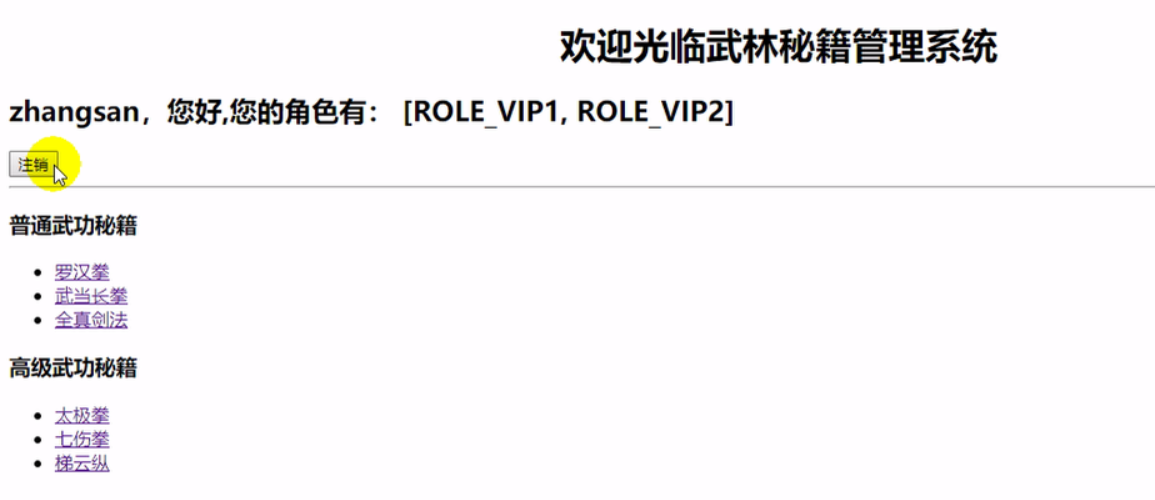
页面效果:
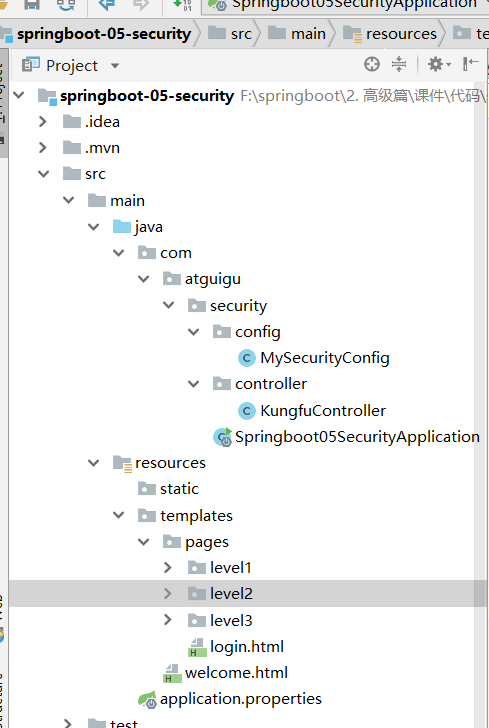
项目结构:
1.6 安全认证与授权(springboot与安全)的更多相关文章
- Shiro集成web环境[Springboot]-认证与授权
Shiro集成web环境[Springboot]--认证与授权 在登录页面提交登陆数据后,发起请求也被ShiroFilter拦截,状态码为302 <form action="${pag ...
- 使用Shiro实现认证和授权(基于SpringBoot)
Apache Shiro是一个功能强大且易于使用的Java安全框架,它为开发人员提供了一种直观,全面的身份验证,授权,加密和会话管理解决方案.下面是在SpringBoot中使用Shiro进行认证和授权 ...
- SpringBoot + SpringSecurity + Mybatis-Plus + JWT实现分布式系统认证和授权
1. 简介 Spring Security是一个功能强大且易于扩展的安全框架,主要用于为Java程序提供用户认证(Authentication)和用户授权(Authorization)功能. ...
- SpringBoot + SpringSecurity + Mybatis-Plus + JWT + Redis 实现分布式系统认证和授权(刷新Token和Token黑名单)
1. 前提 本文在基于SpringBoot整合SpringSecurity实现JWT的前提中添加刷新Token以及添加Token黑名单.在浏览之前,请查看博客: SpringBoot + Sp ...
- Shiro+springboot+mybatis+EhCache(md5+salt+散列)认证与授权-03
从上文:Shiro+springboot+mybatis(md5+salt+散列)认证与授权-02 当每次进行刷新时,都会从数据库重新查询数据进行授权操作,这样无疑给数据库造成很大的压力,所以需要引入 ...
- Shiro+springboot+mybatis(md5+salt+散列)认证与授权-02
代码延续地址:Shiro+springboot+mybatis(md5+salt+散列)认证与授权-01 1.创建t_role角色表(比如管理员admin,普通用户user等),创建t_pers权限表 ...
- Shiro+springboot+mybatis(md5+salt+散列)认证与授权-01
这个小项目包含了注册与登录,使用了springboot+mybatis+shiro的技术栈:当用户在浏览器登录时发起请求时,首先这一系列的请求会被拦截器进行拦截(ShiroFilter),然后拦截器根 ...
- SpringBoot日记——Spring的安全配置-登录认证与授权
安全是每个项目开发中都需要考虑的,比如权限控制,安全认证,防止漏洞攻击等. 比较常见的安全框架有:Apache的shiro.Spring Security等等,相信用shiro的用户群体更多,而sec ...
- 基于SpringSecurity和JWT的用户访问认证和授权
发布时间:2018-12-03 技术:springsecurity+jwt+java+jpa+mysql+mysql workBench 概述 基于SpringSecurity和JWT的用户访 ...
随机推荐
- HTML、CSS知识点,面试开发都会需要--No.4 内容布局
No.4 内容布局 1.列举场景 同一行布局三个元素.三个元素等比显示,并且其他元素不会围绕这三个元素.如下要让下面的三个column等比显示在一行: 2.通过Float属性实现 (1)float:l ...
- 自定制property
class Lazyproperty: def __init__(self, func): self.func = func def __get__(self, instance, owner): p ...
- 20165311 ch02 课下作业
补充完成课上测试(不能只有截图,要有分析,问题解决过程,新学到的知识点) 完成教材 p97 2.96 2.97,要有完备的
- day15,内置函数一
1,复习,如何从生成器里面取值,next(每次取一个值),send(不可以用在第一个,取下一个的时候,给上一个地方传一个值),for(没有break会一直取,直到取完),强制转换(会一次性把数据加载到 ...
- 对text字段聚合,没有设置fielddate所以出错
http://192.168.60.26:9200/linewell_assets_mgt_es_yh_test/lw_devices/ _mapping { "properties&quo ...
- python摸爬滚打之day21---- 模块
1.MD5加密模块 MD5是一种不可逆的加密算法, 是安全而且可靠的. 在某些网站上能够搜到MD5解密工具, 其实并没有解密工具, 而是"撞库"的方式. 网站将一些MD5数据保存 ...
- 1: unit test
1: se01 进入到TR包里面,创建自己的包.(开发过程中,每个人创建一个包,最后每个包合成一个team的TR包.整个产品将所有的TR包合成,发布. 2:向cds view里面插入假数据 3:使用 ...
- linear-gradient常用实现效果
之前也研究过css3的这个属性,感觉没什么大用,一般的开发不会用到,毕竟调出来的渐变不专业,不如找一个好看的图片,其实很多时候还是有用的,偷来三个例子. 一.控制虚线 一般写虚线都用dashed,但有 ...
- window中普通用户无法登录远程桌面
解决方案就是将该用户加到 Remote Desktop Users 这个用户组中. 使用命令 net localgroup "Remote Desktop Users" 用户名 / ...
- Java IO--NIO(一)
一.基本概念描述 1.1 I/O简介 I/O即输入输出,是计算机与外界世界的一个接口.IO操作的实际主题是操作系统.在java编程中,一般使用流的方式来处理IO,所有的IO都被视作是单个字节的移动,通 ...