
登录服务器失败 IP 统计和处理方法
一、登录ssh失败次数统计
1)错误的打开方式
awk '/Failed password/ {print $(NF-3)}' secure |sort -n |uniq -c|sort -n |tail /var/log/secure

2)拷贝文件,再查看失败
cp /var/log/secure .
awk '/Failed password/ {print $(NF-3)}' secure |sort -n |uniq -c|sort -n |tail
3)直接查看失败

$ awk '/Failed password/ {print $(NF-3)}' /var/log/secure |sort -n |uniq -c|sort -n
4)查看最近失败的时间
less /var/log/secure
按G
二、对于防破解问题的处理
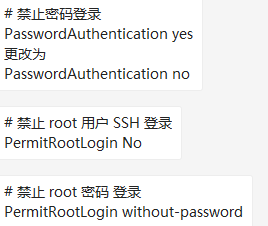
1)禁止密码登录方式
vi /etc/ssh/sshd_config
2)禁止失败的IP登录的方式
#

# hosts.deny    This file contains access rules which are used to

#               deny connections to network services that either use

#               the tcp_wrappers library or that have been

#               started through a tcp_wrappers-enabled xinetd.

#

#               The rules in this file can also be set up in

#               /etc/hosts.allow with a 'deny' option instead.

#

#               See 'man 5 hosts_options' and 'man 5 hosts_access'

#               for information on rule syntax.

#               See 'man tcpd' for information on tcp_wrappers

#

sshd:192.168.2.41:deny
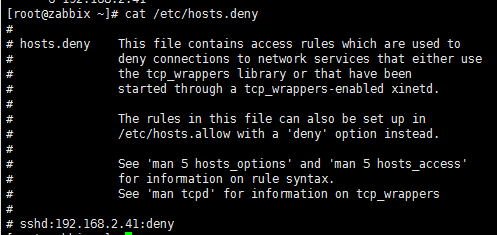
/etc/hosts.deny
在/etc/hosts.deny文件下面
添加 sshd:192.168.2.41:deny
重启sshd
三、实现python自动化写入文件
1)获取到失败IP的文件
awk '/Failed password/ {print $(NF-3)}' /var/log/secure |sort -n |uniq -c|sort -n > ip_fail.txt

2)查看原有的被限制IP的文件
3)执行python脚本文件
def ip_index():

    #读取文件获取到已经有被限制的IP

    ip_list = set()

    with open('hosts.deny',mode='r',encoding='utf-8') as f_log:

        for line in f_log:

            line = line.split('\n')[].split(' ')[]

            if len(line) != and not line[].startswith("#"):

                line = line.split(":")

                ip_list.add(line[])

    return ip_list

def write():

    # 写入失败的IP到配置文件中

    with open('ip_fail.txt',mode='r',encoding='utf-8') as f:

        for line in f:

            line = line.split('\n')[].split(' ')

            if int(line[]) > :

                print('登录失败次数大于2的IP',line[])

                with open('hosts.deny',mode='a',encoding='utf-8') as f:

                    if line[] not in ip_list:

                        f.write('sshd:%s:deny\n'%line[])

if __name__ == '__main__':

    ip_list = ip_index()

    write()
ip_add=>hosts.deny
四、定时任务自动写入hosts.deny配置文件的脚本
1)该脚本以失败次数大于3的进行测试(执行环境python3)
import subprocess

command = "awk '/Failed password/ {print $(NF-3)}' /var/log/secure |sort -n |uniq -c|sort -n"

def result(command):

    # 获取命令结果

    obj=subprocess.Popen(command,

                     shell=True,

                     stdout=subprocess.PIPE,

                     stderr=subprocess.PIPE

                     )

    return obj.stdout

def ip_list(result):

    # 根据命令结果获取到失败IP的字典

    ip_set={}

    for line in result:

        line=str(line)

        ip = line.split(' ')[-].split('\\n')[]

        count = line.split(' ')[-]

        # 失败次数大于3的

        if int(count) > :

            ip_set[count]=ip

    return ip_set

def ip_index():

    #读取文件获取到已经有被限制的IP

    out_ip = set()

    with open('/etc/hosts.deny',mode='r',encoding='utf-8') as f_log:

        for line in f_log:

            line = line.split('\n')[].split(' ')[]

            if len(line) != and not line[].startswith("#"):

                line = line.split(":")

                out_ip.add(line[])

    return out_ip

def write(out_ip,in_ip):

    with open('/etc/hosts.deny',mode='a',encoding='utf-8') as f:

        for ip in out_ip:

            if out_ip[ip] not in in_ip:

                f.write('sshd:%s:deny\n'%out_ip[ip])

if __name__ == '__main__':

    in_ip = ip_index()  # 获取已有被限制的IP

    result = result(command)    # 得到命令结果

    out_ip=ip_list(result)     # 根据命令结果获取IP列表

    write(out_ip,in_ip)
2) centos6默认的python2.6执行环境
import subprocess

command = "awk '/Failed password/ {print $(NF-3)}' /var/log/secure |sort -n |uniq -c|sort -n"

def result(command):

    obj=subprocess.Popen(command,

                     shell=True,

                     stdout=subprocess.PIPE,

                     stderr=subprocess.PIPE

                     )

    return obj.stdout

def ip_list(result):

    ip_set={}

    for line in result:

        line=str(line)

        ip = line.split(' ')[-].split('\\n')[]

        count = line.split(' ')[-]

        if int(count) > :

            ip_set[count]=ip

    return ip_set

def ip_index():

    out_ip = set()

    with open('/etc/hosts.deny',mode='r') as f_log:

        for line in f_log:

            line = line.split('\n')[].split(' ')[]

            if len(line) != and not line[].startswith("#"):

                line = line.split(":")

                out_ip.add(line[])

    return out_ip

def write(out_ip,in_ip):

    with open('/etc/hosts.deny',mode='a') as f:

        for ip in out_ip:

            if out_ip[ip] not in in_ip:

                f.write('sshd:%s:deny\n'%out_ip[ip])

if __name__ == '__main__':

    in_ip = ip_index()

    result = result(command)

    out_ip=ip_list(result)

    write(out_ip,in_ip)
3)修改bug。(以IP为key),前面是以次数为key。
import subprocess

command = "awk '/Failed password/ {print $(NF-3)}' /var/log/secure |sort -n |uniq -c|sort -n"

def result(command):

    # 获取命令结果

    obj=subprocess.Popen(command,

                     shell=True,

                     stdout=subprocess.PIPE,

                     stderr=subprocess.PIPE

                     )

    return obj.stdout

def ip_list(result):

    # 根据命令结果获取到失败IP的字典

    ip_set={}

    for line in result:

        line=str(line)

        ip = line.split(' ')[-].split('\\n')[]

        count = line.split(' ')[-]

        # 失败次数大于3的

        if int(count) > :

            ip_set[ip]=count

    return ip_set

def ip_index():

    #读取文件获取到已经有被限制的IP

    out_ip = set()

    with open('/etc/hosts.deny',mode='r',encoding='utf-8') as f_log:

        for line in f_log:

            line = line.split('\n')[].split(' ')[]

            if len(line) != and not line[].startswith("#"):

                line = line.split(":")

                out_ip.add(line[])

    return out_ip

def write(out_ip,in_ip):

    with open('/etc/hosts.deny',mode='a',encoding='utf-8') as f:

        for ip in out_ip:

            print(ip)

            if ip not in in_ip:

                f.write('sshd:%s:deny\n'%ip)

if __name__ == '__main__':

    in_ip = ip_index()  # 获取已有被限制的IP

    result = result(command)    # 得到命令结果

    out_ip=ip_list(result)     # 根据命令结果获取IP列表

    write(out_ip,in_ip)
登录服务器失败 IP 统计和处理方法的更多相关文章
- linux ssh 登录服务器失败,密码明明没错【解决】
本来这样登录的: $ ssh 123.123.123.123 //ssh + IP 然后输入密码就是登录不了,显示permision denied 后来使用如下方式登录,成功! $ ssh -v us ...
- MySQL无法登录服务器解决方法
提示:#2000 无法登录 MySQL 服务器 今天用本机装了个phpMyAdmin,版本3.4.8,想用它来连一台内网服务器上的Mysql,于是乎修改phpMyAdmin配置文件config.inc ...
- Ubuntu下通过SSH远程登录服务器的方法
1. 首先在服务器上安装ssh的服务器端.$ sudo aptitude install openssh-server 2. 启动ssh-server.$ /etc/init.d/ssh restar ...
- TFS 改服务器IP 域名 端口方法
长春电信伴随着开始的严打,所有未备案的80,8080等常用web端口都被封,使得原用8080作为服务端口的tfs代码服务器无法使用,现提供方法如下: 1.关掉VS 2.去掉要改的解决方案的sln文件的 ...
- 登录Linux服务器显示IP和自定义备注
默认搭建好的Linux服务器,使用Xshell登录的窗口如下所示: 可根据需要执行如上代码,再重新登录服务器,效果如下图所示: 代码片段:echo "export PS1='\u@\[\e[ ...
- 域名做CDN来通过隐藏服务器真实IP的方法来防止DDoS攻击(转)
隐藏服务器真实IP是解决问题最好和最快的方法,但只针对小流量,大流量同样会扛不住. 服务器前端加CDN中转,比如阿里云.百度云加速.360网站卫士.加速乐.安全宝等,如果资金充裕的话,可以购买高防的盾 ...
- 隐藏服务器真实IP的方法来防止DDOS攻击
2017-08-22 作者:小唐 点击: 10,500次 在无盘系统的环境下,服务器软件存在漏洞,就容易受到DDOS攻击,隐藏服务器真实IP是解决问题最好的方法,下面小编与大家分享一下隐藏服务器真实I ...
- 防止DDOS攻击有效方法:隐藏服务器真实IP
如今,网站服务器的安全受到越来越多的重视,但是难免会遇到黑客使用DDoS攻击网站,为了网站的安全通常都会做好防御,其中防止DDoS攻击有效方法:隐藏服务器真实IP ,该技术能够有效地保护网站的安全. ...
- centos linux ip地址无法连接数据库,ssh登录服务器时必须使用22端口
问题一:连接数据库时直接使用ip地址无法连接,必须使用ssh方式才能连接? 问题二:ssh登录服务器时必须使用22端口,在/etc/ssh/sshd_config中添加了10086端口,防火墙中已开启 ...
随机推荐
- python网页爬虫开发之六-Selenium使用
chromedriver禁用图片,禁用js,切换UA selenium 模拟chrome浏览器,此时就是一个真实的浏览器,一个浏览器该加载的该渲染的它都加载都渲染,所以爬取网页的速度很慢.如果可以不加 ...
- DevExpress的42种窗体样式
在Winform环境下DevExpress标题栏皮肤 第一步:引用DLL文件,安装DevExpress后在引用>程序集>扩展: DevExpress.BonusSkins.v12.2.dl ...
- vue展示dicom文件,医疗系统。
环境:vue.webpack.constone 资料来源及文件:https://github.com/GleasonBian/CornerstoneVueWADO 需要下载的模块:cornerston ...
- Flask-在Flask中跨请求传递数据资源
利用 Flask的底层Werkzeug是有缓存支持的,不用使用redis等第三方. 原文地址如下: https://blog.csdn.net/yannanxiu/article/details/52 ...
- 第二章 Java内存区域与内存溢出异常
运行时数据区域: 程序计数器(Program Counter Register):当前线程执行码行号指示器,属于线程私有内存.字节码解释器工作时就是通过调整这个计数器的值来选取下一条需要执行字节码指令 ...
- HTTP的长连接(持久连接)和短连接
HTTP的长连接和短连接 本文总结&分享网络编程中涉及的长连接.短连接概念. 关键字:Keep-Alive,并发连接数限制,TCP,HTTP 一.什么是长连接 HTTP1.1规定了默认保持 ...
- mysql数据库存中文字段
mysql数据默认编码是拉丁,而我们更多的使用utf8, 在创建库的时候执行参数即可: CREATE DATABASE IF NOT EXISTS yourdbname DEFAULT CHARSET ...
- 批量IP自动ping脚本
批量IP自动ping脚本ping.sh 在同一目录新建一个名为pingip的文件,并以每行一个IP的方式罗列.使用sh命令执行ping.sh #!/bin/bash IP_LIST=`cat ping ...
- 59.纯 CSS 创作彩虹背景文字
原文地址:https://segmentfault.com/a/1190000015352436 修改后地址:https://scrimba.com/c/cqK3LaTQ 感想: 又一次见识到CSS的 ...
- JavaScript学习-1
本章目录: --------①数据类型. --------②定义变量. --------③类型转换. --------④运算符. --------⑤比较符. --------⑥if语句. ------ ...