
登录服务器失败 IP 统计和处理方法
一、登录ssh失败次数统计
1)错误的打开方式
awk '/Failed password/ {print $(NF-3)}' secure |sort -n |uniq -c|sort -n |tail /var/log/secure

2)拷贝文件,再查看失败
cp /var/log/secure .
awk '/Failed password/ {print $(NF-3)}' secure |sort -n |uniq -c|sort -n |tail
3)直接查看失败

$ awk '/Failed password/ {print $(NF-3)}' /var/log/secure |sort -n |uniq -c|sort -n
4)查看最近失败的时间
less /var/log/secure
按G
二、对于防破解问题的处理
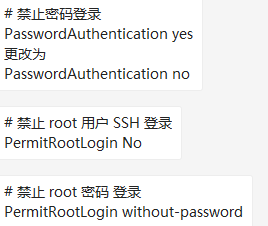
1)禁止密码登录方式
vi /etc/ssh/sshd_config
2)禁止失败的IP登录的方式
#

# hosts.deny    This file contains access rules which are used to

#               deny connections to network services that either use

#               the tcp_wrappers library or that have been

#               started through a tcp_wrappers-enabled xinetd.

#

#               The rules in this file can also be set up in

#               /etc/hosts.allow with a 'deny' option instead.

#

#               See 'man 5 hosts_options' and 'man 5 hosts_access'

#               for information on rule syntax.

#               See 'man tcpd' for information on tcp_wrappers

#

sshd:192.168.2.41:deny
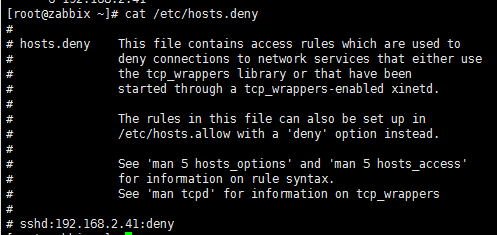
/etc/hosts.deny
在/etc/hosts.deny文件下面
添加 sshd:192.168.2.41:deny
重启sshd
三、实现python自动化写入文件
1)获取到失败IP的文件
awk '/Failed password/ {print $(NF-3)}' /var/log/secure |sort -n |uniq -c|sort -n > ip_fail.txt

2)查看原有的被限制IP的文件
3)执行python脚本文件
def ip_index():

    #读取文件获取到已经有被限制的IP

    ip_list = set()

    with open('hosts.deny',mode='r',encoding='utf-8') as f_log:

        for line in f_log:

            line = line.split('\n')[].split(' ')[]

            if len(line) != and not line[].startswith("#"):

                line = line.split(":")

                ip_list.add(line[])

    return ip_list

def write():

    # 写入失败的IP到配置文件中

    with open('ip_fail.txt',mode='r',encoding='utf-8') as f:

        for line in f:

            line = line.split('\n')[].split(' ')

            if int(line[]) > :

                print('登录失败次数大于2的IP',line[])

                with open('hosts.deny',mode='a',encoding='utf-8') as f:

                    if line[] not in ip_list:

                        f.write('sshd:%s:deny\n'%line[])

if __name__ == '__main__':

    ip_list = ip_index()

    write()
ip_add=>hosts.deny
四、定时任务自动写入hosts.deny配置文件的脚本
1)该脚本以失败次数大于3的进行测试(执行环境python3)
import subprocess

command = "awk '/Failed password/ {print $(NF-3)}' /var/log/secure |sort -n |uniq -c|sort -n"

def result(command):

    # 获取命令结果

    obj=subprocess.Popen(command,

                     shell=True,

                     stdout=subprocess.PIPE,

                     stderr=subprocess.PIPE

                     )

    return obj.stdout

def ip_list(result):

    # 根据命令结果获取到失败IP的字典

    ip_set={}

    for line in result:

        line=str(line)

        ip = line.split(' ')[-].split('\\n')[]

        count = line.split(' ')[-]

        # 失败次数大于3的

        if int(count) > :

            ip_set[count]=ip

    return ip_set

def ip_index():

    #读取文件获取到已经有被限制的IP

    out_ip = set()

    with open('/etc/hosts.deny',mode='r',encoding='utf-8') as f_log:

        for line in f_log:

            line = line.split('\n')[].split(' ')[]

            if len(line) != and not line[].startswith("#"):

                line = line.split(":")

                out_ip.add(line[])

    return out_ip

def write(out_ip,in_ip):

    with open('/etc/hosts.deny',mode='a',encoding='utf-8') as f:

        for ip in out_ip:

            if out_ip[ip] not in in_ip:

                f.write('sshd:%s:deny\n'%out_ip[ip])

if __name__ == '__main__':

    in_ip = ip_index()  # 获取已有被限制的IP

    result = result(command)    # 得到命令结果

    out_ip=ip_list(result)     # 根据命令结果获取IP列表

    write(out_ip,in_ip)
2) centos6默认的python2.6执行环境
import subprocess

command = "awk '/Failed password/ {print $(NF-3)}' /var/log/secure |sort -n |uniq -c|sort -n"

def result(command):

    obj=subprocess.Popen(command,

                     shell=True,

                     stdout=subprocess.PIPE,

                     stderr=subprocess.PIPE

                     )

    return obj.stdout

def ip_list(result):

    ip_set={}

    for line in result:

        line=str(line)

        ip = line.split(' ')[-].split('\\n')[]

        count = line.split(' ')[-]

        if int(count) > :

            ip_set[count]=ip

    return ip_set

def ip_index():

    out_ip = set()

    with open('/etc/hosts.deny',mode='r') as f_log:

        for line in f_log:

            line = line.split('\n')[].split(' ')[]

            if len(line) != and not line[].startswith("#"):

                line = line.split(":")

                out_ip.add(line[])

    return out_ip

def write(out_ip,in_ip):

    with open('/etc/hosts.deny',mode='a') as f:

        for ip in out_ip:

            if out_ip[ip] not in in_ip:

                f.write('sshd:%s:deny\n'%out_ip[ip])

if __name__ == '__main__':

    in_ip = ip_index()

    result = result(command)

    out_ip=ip_list(result)

    write(out_ip,in_ip)
3)修改bug。(以IP为key),前面是以次数为key。
import subprocess

command = "awk '/Failed password/ {print $(NF-3)}' /var/log/secure |sort -n |uniq -c|sort -n"

def result(command):

    # 获取命令结果

    obj=subprocess.Popen(command,

                     shell=True,

                     stdout=subprocess.PIPE,

                     stderr=subprocess.PIPE

                     )

    return obj.stdout

def ip_list(result):

    # 根据命令结果获取到失败IP的字典

    ip_set={}

    for line in result:

        line=str(line)

        ip = line.split(' ')[-].split('\\n')[]

        count = line.split(' ')[-]

        # 失败次数大于3的

        if int(count) > :

            ip_set[ip]=count

    return ip_set

def ip_index():

    #读取文件获取到已经有被限制的IP

    out_ip = set()

    with open('/etc/hosts.deny',mode='r',encoding='utf-8') as f_log:

        for line in f_log:

            line = line.split('\n')[].split(' ')[]

            if len(line) != and not line[].startswith("#"):

                line = line.split(":")

                out_ip.add(line[])

    return out_ip

def write(out_ip,in_ip):

    with open('/etc/hosts.deny',mode='a',encoding='utf-8') as f:

        for ip in out_ip:

            print(ip)

            if ip not in in_ip:

                f.write('sshd:%s:deny\n'%ip)

if __name__ == '__main__':

    in_ip = ip_index()  # 获取已有被限制的IP

    result = result(command)    # 得到命令结果

    out_ip=ip_list(result)     # 根据命令结果获取IP列表

    write(out_ip,in_ip)
登录服务器失败 IP 统计和处理方法的更多相关文章
- linux ssh 登录服务器失败,密码明明没错【解决】
本来这样登录的: $ ssh 123.123.123.123 //ssh + IP 然后输入密码就是登录不了,显示permision denied 后来使用如下方式登录,成功! $ ssh -v us ...
- MySQL无法登录服务器解决方法
提示:#2000 无法登录 MySQL 服务器 今天用本机装了个phpMyAdmin,版本3.4.8,想用它来连一台内网服务器上的Mysql,于是乎修改phpMyAdmin配置文件config.inc ...
- Ubuntu下通过SSH远程登录服务器的方法
1. 首先在服务器上安装ssh的服务器端.$ sudo aptitude install openssh-server 2. 启动ssh-server.$ /etc/init.d/ssh restar ...
- TFS 改服务器IP 域名 端口方法
长春电信伴随着开始的严打,所有未备案的80,8080等常用web端口都被封,使得原用8080作为服务端口的tfs代码服务器无法使用,现提供方法如下: 1.关掉VS 2.去掉要改的解决方案的sln文件的 ...
- 登录Linux服务器显示IP和自定义备注
默认搭建好的Linux服务器,使用Xshell登录的窗口如下所示: 可根据需要执行如上代码,再重新登录服务器,效果如下图所示: 代码片段:echo "export PS1='\u@\[\e[ ...
- 域名做CDN来通过隐藏服务器真实IP的方法来防止DDoS攻击(转)
隐藏服务器真实IP是解决问题最好和最快的方法,但只针对小流量,大流量同样会扛不住. 服务器前端加CDN中转,比如阿里云.百度云加速.360网站卫士.加速乐.安全宝等,如果资金充裕的话,可以购买高防的盾 ...
- 隐藏服务器真实IP的方法来防止DDOS攻击
2017-08-22 作者:小唐 点击: 10,500次 在无盘系统的环境下,服务器软件存在漏洞,就容易受到DDOS攻击,隐藏服务器真实IP是解决问题最好的方法,下面小编与大家分享一下隐藏服务器真实I ...
- 防止DDOS攻击有效方法:隐藏服务器真实IP
如今,网站服务器的安全受到越来越多的重视,但是难免会遇到黑客使用DDoS攻击网站,为了网站的安全通常都会做好防御,其中防止DDoS攻击有效方法:隐藏服务器真实IP ,该技术能够有效地保护网站的安全. ...
- centos linux ip地址无法连接数据库,ssh登录服务器时必须使用22端口
问题一:连接数据库时直接使用ip地址无法连接,必须使用ssh方式才能连接? 问题二:ssh登录服务器时必须使用22端口,在/etc/ssh/sshd_config中添加了10086端口,防火墙中已开启 ...
随机推荐
- VS2010自定义添加创建者、创建时间等个人信息新建文件模版
不知不觉VS2010已经成为.NET开发人员的必备工具,相比经典版VS2005,到过渡版vs2008,2010在性能稳定性和易用性上都得到很大的提高. 结合VS工具,其下的插件也层出不穷.今天重点给大 ...
- python数据处理 pandas用法大全
一.生成数据表 1.首先导入pandas库,一般都会用到numpy库,所以我们先导入备用: import numpy as np import pandas as pd 1 2 2.导入CSV ...
- 第17课 类型萃取(1)_基本的type_traits
1. type_traits类型萃取 (1)type_traits通过定义一些结构体或类,并利用模板类特化和偏特化的能力,给类型赋予一些特性,这些特性根据类型的不同而异.在程序设计中可以使用这些tra ...
- 如何让大小一定的span能够包含“容不下”的内容
overflow: hidden; text-overflow: ellipsis; width: 70px;(长度随意) 给span加上面的代码
- leetcode7. 整数反转
给出一个 32 位的有符号整数,你需要将这个整数中每位上的数字进行反转. 示例 1: 输入: 123 输出: 321 示例 2: 输入: -123 输出: -321 示例 3: 输入: 120 输出: ...
- kettle实现多表同步
本样例实现源库的所有表到目标库的同步sqlserver=>mysql(目标表存在表结构则同步),总调度如下: 由于复制记录到结果保存了多个表名,存在多个值,在高级选择对每个输入行执行一次进行循环 ...
- css学习2
1.垂直居中 -父元素高度确定的单行文本: 设置父元素的 height 和 line-height 高度一致来实现的.(height: 该元素的高度:line-height: 行高(行间距),指在文 ...
- leetcode208
class TrieNode { public: // Initialize your data structure here. TrieNode() { words=; prefixs=; ;i&l ...
- 一次sendmsg的改造过程
比较蛋疼的一个改造过程,简单记录一下. 场景:用户态使用sendmsg发包,tcp报文,由于内核实现过程中存在一次kernel_read,也就是存在将pagecache中的内容拷贝一次的问题. 为了减 ...
- ELK收集Nginx|Tomcat日志
1.Nginx 日志收集,先安装Nginx cd /usr/local/logstash/config/etc/,创建如下配置文件,代码如下 Nginx.conf input { file { typ ...