
Android 动态渐变按钮
先上个图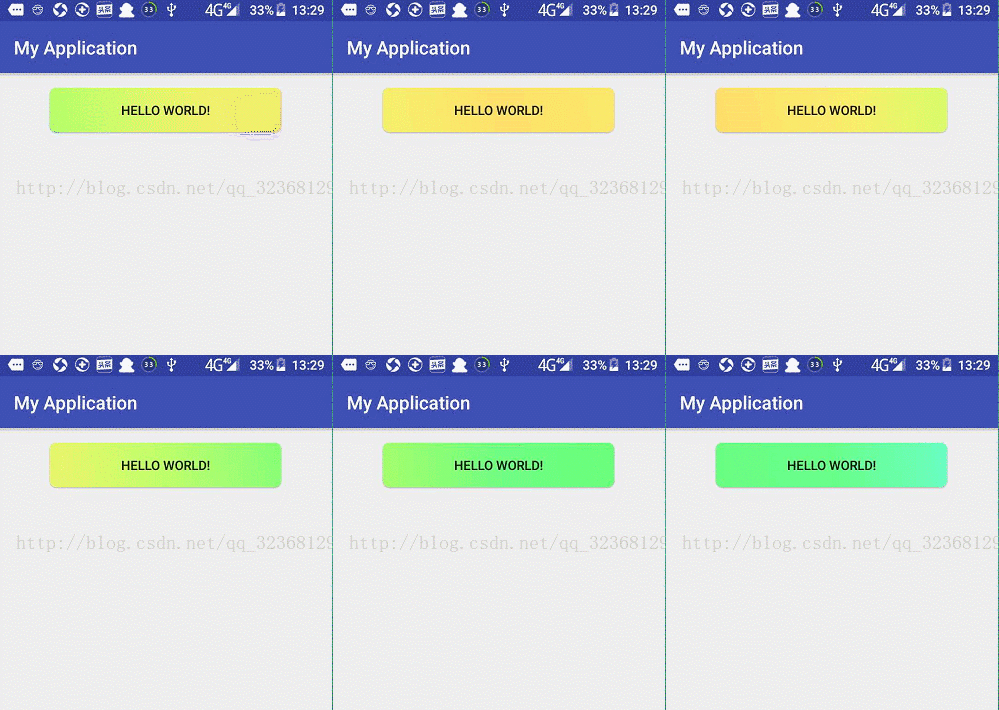
看着特别炫酷吧
其实就是自定义颜色两秒轮播
动画
AnimationDrawable animationDrawable = (AnimationDrawable) button.getBackground();
// animationDrawable.setEnterFadeDuration(2000);
animationDrawable.setExitFadeDuration(2000);
animationDrawable.start();
xml
long_button_gradient
<animation-list xmlns:android="http://schemas.android.com/apk/res/android">
<item
android:drawable="@drawable/long_color_gradient1"
android:duration="2000" />
<item
android:drawable="@drawable/long_color_gradient2"
android:duration="2000" />
<item
android:drawable="@drawable/long_color_gradient3"
android:duration="2000" />
<item
android:drawable="@drawable/long_color_gradient4"
android:duration="2000" />
<item
android:drawable="@drawable/long_color_gradient5"
android:duration="2000" />
<item
android:drawable="@drawable/long_color_gradient6"
android:duration="2000" />
<item
android:drawable="@drawable/long_color_gradient7"
android:duration="2000" />
<item
android:drawable="@drawable/long_color_gradient8"
android:duration="2000" />
<item
android:drawable="@drawable/long_color_gradient9"
android:duration="2000" />
<item
android:drawable="@drawable/long_color_gradient10"
android:duration="2000" />
<item
android:drawable="@drawable/long_color_gradient11"
android:duration="2000" />
<item
android:drawable="@drawable/long_color_gradient12"
android:duration="2000" />
<item
android:drawable="@drawable/long_color_gradient13"
android:duration="2000" />
<item
android:drawable="@drawable/long_color_gradient14"
android:duration="2000" />
<item
android:drawable="@drawable/long_color_gradient15"
android:duration="2000" />
<item
android:drawable="@drawable/long_color_gradient16"
android:duration="2000" />
<item
android:drawable="@drawable/long_color_gradient17"
android:duration="2000" />
<item
android:drawable="@drawable/long_color_gradient18"
android:duration="2000" />
</animation-list>
long_color_gradient1-long_color_gradientN(渐变一到渐变N)
<shape xmlns:android="http://schemas.android.com/apk/res/android">
<corners android:radius="@dimen/button_gradient_fillet" />
<gradient
android:angle="45"
android:centerColor="@color/color_gradient_2"
android:endColor="@color/color_gradient_3"
android:startColor="@color/color_gradient_1"
android:type="linear" />
</shape>
color
<!--++++++++++++++渐变button+++++++++++++++++-->
<color name="color_gradient_1">#ffdc6b</color>
<color name="color_gradient_2">#ffe96b</color>
<color name="color_gradient_3">#daff6b</color>
<color name="color_gradient_4">#9fff6b</color>
<color name="color_gradient_5">#6aff84</color>
<color name="color_gradient_6">#69ff79</color>
<color name="color_gradient_7">#6affb5</color>
<color name="color_gradient_8">#6bffee</color>
<color name="color_gradient_9">#69cdff</color>
<color name="color_gradient_X">#6ac6ff</color>
<color name="color_7FC13F">#7FC13F</color>
<color name="color_E9E9E9">#e9e9e9</color>
<color name="color_777777">#777777</color>
dimens
<dimen name="button_gradient_fillet">7dp</dimen>
Android 动态渐变按钮的更多相关文章
- Android动态换肤(二、apk免安装插件方式)
在上一篇文章Android动态换肤(一.应用内置多套皮肤)中,我们了解到,动态换肤无非就是调用view的setBackgroundResource(R.drawable.id)等方法设置控件的背景或者 ...
- android 动态壁纸开发
转:http://www.eoeandroid.com/thread-100389-1-1.html android 动态壁纸开发参考:http://www.ophonesdn.com/article ...
- [转载] Android动态加载Dex机制解析
本文转载自: http://blog.csdn.net/wy353208214/article/details/50859422 1.什么是类加载器? 类加载器(class loader)是 Java ...
- Android 动态加载 (二) 态加载机制 案例二
探秘腾讯Android手机游戏平台之不安装游戏APK直接启动法 重要说明 在实践的过程中大家都会发现资源引用的问题,这里重点声明两点: 1. 资源文件是不能直接inflate的,如果简单的话直接在程序 ...
- Android 动态加载 (一) 态加载机制 案例一
在目前的软硬件环境下,Native App与Web App在用户体验上有着明显的优势,但在实际项目中有些会因为业务的频繁变更而频繁的升级客户端,造成较差的用户体验,而这也恰恰是Web App的优势.本 ...
- 深入浅出Android动态载入jar包技术
在实际项目中.因为某些业务频繁变更而导致频繁升级client的弊病会造成较差的用户体验,而这也恰是Web App的优势,于是便衍生了一种思路.将核心的易于变更的业务封装在jar包里然后通过网络下载下来 ...
- Android动态加载技术初探
一.前言: 现在,已经有实力强大的公司用这个技术开发应用了,比如淘宝,大众点评,百度地图等,之所以采用这个技术,实际上,就是方便更新功能,当然,前提是新旧功能的接口一致,不然会报Not Found等错 ...
- MFC动态创建按钮,并在按钮上实现位图的切换显示
动态创建按钮,并在按钮中添加位图,通过单击按钮显示不同的位图,可设置为显示按钮按下和弹起两种状态.只要判断a值从而输入不同的响应代码. 1.在头文件中添加: CButton *pBtn; 2.在初始化 ...
- Android应用开发提高系列(4)——Android动态加载(上)——加载未安装APK中的类
前言 近期做换肤功能,由于换肤程度较高,受限于平台本身,实现起来较复杂,暂时搁置了该功能,但也积累了一些经验,将分两篇文章来写这部分的内容,欢迎交流! 关键字:Android动态加载 声明 欢迎转载, ...
随机推荐
- Java学习笔记41(Properties类)
Properties可以做到集合的数据持久存储 它是map接口的一个实现类,可以使用map类的方法, 不过存在区别:它没有泛型,规定键类型为字符串 这个集合在以后的开发中会经常用到,比如连接数据库等 ...
- 谈谈 JavaScript 的正则表达式
一.背景 最近在做 CMS 系统中不同身份登录用户的权限管理,涉及到对 api 路径的识别去判断是否放行.以前对正则表达式都是敬而远之,要用到的话都是直接复制粘贴现成网上的表达式,看也看不太懂,借这次 ...
- 分享一个windows下检测硬件信息的bat脚本
文件名必须以.bat结尾,如果出现闪退,请右击鼠标,以管理身份运行即可 @echo offcolor 0atitle 硬件检测 mode con cols=90sc config winmgmt st ...
- Xamarin.Android 无法检索到 Resource 问题
错误提示:当前上下文中不存在名称"Resource" 解决方法: 1.看是否有其他错误,如果有其他错误优先解决.(其他错误导致无法感知到Resource) 2.重新生成解决方案.( ...
- Asp.net core 跨域设置
验证环境: dotnet core 2.1/Asp.net core2.1 一.作用域在中间件层 配置的方式是在startup.cs文件Configure(IApplicationBuilder a ...
- gulp和grunt 分享ppt
gulp是前端开发过程中对代码进行构建的工具,是自动化项目的构建利器:她不仅能对网站资源进行优化,而且在开发过程中很多重复的任务能够使用正确的工具自动完成:使用她,我们不仅可以很愉快的编写代码,而且大 ...
- struts2 拦截器弊端
struts2 怎样在action内获得fielderror
- XOR+base64加密
1.xor运算 1^0=1 0^0=0 1^1=0 23^32=55 55^32=23 23对32进行异或两次运算结果为23 2.XOR加密 设key=[]byte{1,2,3,4,5,6},src= ...
- SpringMVC入门学习(一)
SpringMVC入门学习(一) ssm框架 spring SpringMVC是一个Java WEB框架,现在我们知道Spring了,那么,何为MVC呢? MVC是一种设计模式,其分为3个方面 mo ...
- 设计模式-----Builder模式
前言 近日,看到Myabtis中组件中SqlSessionFactory由SqlSessionFactoryBuilder().build()生成时,且采用Builder模式,遂记录学习之. SqlS ...