
nodejs -- fs模块 ---> readFile 函数 1) fs.readFile(filename, "binary", function(error, file) 2) response.write(file, "binary");
一:代码:
1.1 入口文件: index.js
 var server          = require('./server');

 var router          = require("./router");

 var requestHandlers = require("./requestHandlers");

 var handle        = {};

 handle["/"]       = requestHandlers.start;

 handle["/start"]  = requestHandlers.start;

 handle["/upload"] = requestHandlers.upload;

 handle["/show"]   = requestHandlers.show;

 server.start(router.route, handle);
1.2 服务器文件: server.js
 var http = require("http");

 var url = require("url");

 function start(route, handle){

     http.createServer(function(request, response) {

         // console.log(url.parse(request.url));

         // console.log(url.parse(request.url).query);

         var pathname = url.parse(request.url).pathname;

         console.log('request for [' +pathname+ "] received.");

         //接收请求数据:

         var postData = "";

         request.setEncoding("utf8");

         request.on("data", function(chunk){

             postData += chunk;

             console.log("Received POST data chunk '" +chunk+"'");

         });

         request.on("end", function(){

             route(handle, pathname, response, postData);

         });

     }).listen(8888);

     console.log("server has started.");

 }

 exports.start = start;
1.3 路由文件: router.js
 function route(handle, pathname, response, postData){

     console.log("About to route a request for " +pathname);

     if (typeof handle[pathname] === 'function') {

         //调用函数:

         handle[pathname](response, postData);

     } else{

         console.log("No request handler found for " + pathname);

         response.writeHead(404, {"Content-Type": "text/plain"});

         response.write("404 Not found");

         response.end();

     }

 }

 exports.route = route;
1.4 请求处理程序文件: requestHandles.js
 var querystring = require("querystring");

 var fs = require("fs");

 function start(response, postData) {

   console.log("Request handler 'start' was called.");

   var body = '<html>'+

     '<head>'+

     '<meta http-equiv="Content-Type" content="text/html; '+

     'charset=UTF-8" />'+

     '</head>'+

     '<body>'+

     '<form action="/upload" method="post">'+

     '<input type="text" value="" name="userName"/>'+

     '<textarea name="text" rows="20" cols="60"></textarea>'+

     '<input type="submit" value="Submit text" />'+

     '</form>'+

     '</body>'+

     '</html>';

     response.writeHead(200, {"Content-Type": "text/html"});

     response.write(body);

     response.end();

 }

 function upload(response, postData) {

   console.log("Request handler 'upload' was called.");

   response.writeHead(200, {"Content-Type": "text/plain"});

   response.write("You've sent allData: " +querystring.parse(postData)+ "\n");

   response.write("You've sent userName: " +querystring.parse(postData).userName+ "\n");

   response.write("You've sent text: " +querystring.parse(postData).text+ "\n");

   response.end();

 }

 function show(response, postData){

     console.log("Request handle 'show' was called.");

39     var filename = "C:/Users/dc5yy/Desktop/图片_1/06.jpg";

40     fs.readFile(filename, "binary", function(error, file){

         if (error) {

42             response.writeHead(500, {"Content-Type": "text/plain"});

             response.write(error + "\n");

             response.end();

         } else{

46             response.writeHead(200, {"Content-Type": "image/jpg"});

47             response.write(file, "binary");

             response.end();

         }

     });

 }

 exports.start  = start;

 exports.upload = upload;

 exports.show   = show;
1.5 结果:
1)要读取的图片 地址:
var filename = "C:/Users/dc5yy/Desktop/图片_1/06.jpg";
2) 启动服务器:

3) http访问:
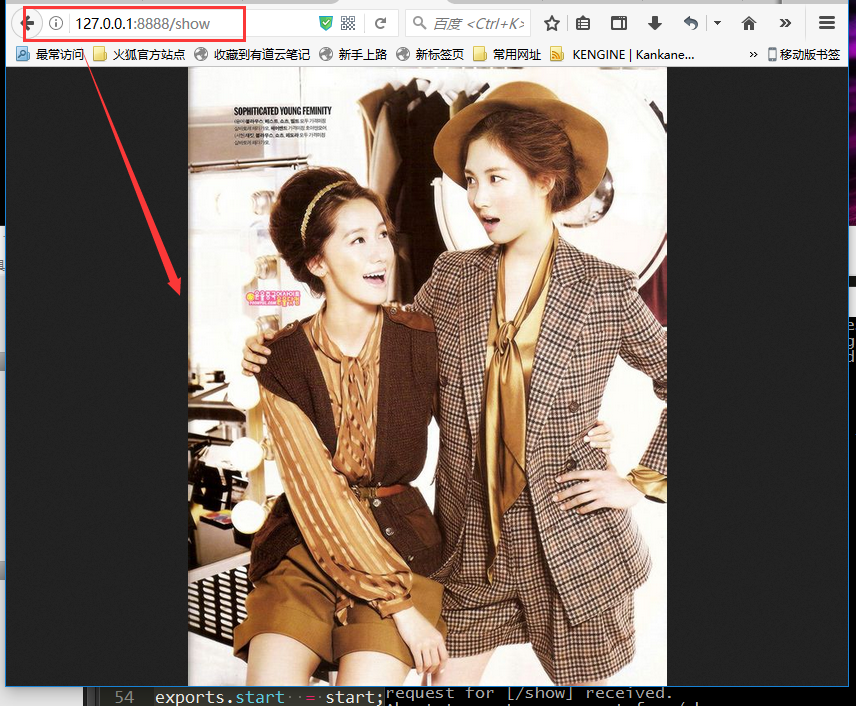
1.6 参考链接:
nodejs -- fs模块 ---> readFile 函数 1) fs.readFile(filename, "binary", function(error, file) 2) response.write(file, "binary");的更多相关文章
- nodejs模块——fs模块
fs模块用于对系统文件及目录进行读写操作. 一.同步和异步 使用require('fs')载入fs模块,模块中所有方法都有同步和异步两种形式. 异步方法中回调函数的第一个参数总是留给异常参数(exce ...
- node.js http模块和fs模块上机实验·
httpserver const httpserver = require('http'); var server = httpserver.createServer(function (req,re ...
- nodejs读取文件时相对路径的正确写法(使用fs模块)
在开发nodejs中,我们往往需要读取文件或者写入文件,最常用的模块就是fs核心模块.一个最简单的写入文件的代码如下(暂时不考虑回调函数): fs.readFile("./test.txt& ...
- [Nodejs] node的fs模块
fs 模块 Node.js 提供一组类似 UNIX(POSIX)标准的文件操作 API. Node 导入文件系统模块(fs).Node.js 文件系统(fs 模块)模块中的方法均有异步和同步版本,例如 ...
- nodejs学习笔记一( sublime、atom开发环境,http模块,fs模块的初识)
http服务 let server = http.createServer(function(req,res){ }); 监听: server.listen(8080); re ...
- nodejs之fs模块
nodejs中的file system文件系统模块 1.文件的读取readFile //引入文件系统模块 const fs = require('fs'); //文件读取是异步操作 fs.readFi ...
- nodejs入门API之fs模块
fs模块下的类与FS常量 fs模块下的主要方法 fs的Promise API与FileHandle类 一.fs模块下的类 1.1 fs.Dir:表示目录流的类,由 fs.opendir().fs.op ...
- nodejs之fs 模块
1.fs模块函数 * .fs.stat 检测是文件还是目录 * .fs.mkdir 创建目录 * .fs.writeFile 创建写入文件 * .fs.appendFile 追加文件 * .fs.re ...
- nodejs中的fs模块中的方法
nodejs中的fs模块 引入模块 const fs =require("fs") 检测文件是否存在fs.stat(path,callback) fs.stat("./n ...
随机推荐
- Applet程序组件与AJAX技术
Applet 定义 Applet是一种运行于Web客户端环境下的Java程序组件. 工作原理 Applet以代码的形式嵌入Web页面中,用标签<applet></applet> ...
- 自制电脑usb红外遥控键盘
2010-08-08 19:20:00 看个ppt,还要一直按键盘或鼠标,能不能拿个遥控器控制一下. 动动脑,自己做一个吧. 电路分2部分,遥控器为发射部分,单片机为解码部分并且包含usb键盘功能. ...
- DataTables页面列点击排序
<!-- DataTables --> <script type="text/javascript" charset="utf8" src=& ...
- Kafka学习之(二)Centos下安装Kafka
环境:Centos6.4,官方下载地址:http://kafka.apache.org/downloads ,前提是还需要安装了Java环境,本博客http://www.cnblogs.com/wt ...
- Python socket文件传送md5校验
soket_server import socket,os,hashlib server = socket.socket() server.bind(('0.0.0.0',9999)) server. ...
- shell-awk详细笔记
shell # var="hexiaoqiang" # ${var//PATTERN/SUBSTI}:查找var所表示的字符串中,所有被PATTERN所匹配到的字符串,并将其全部替 ...
- CSS常用伪类
css伪类 :after 在元素后面插入内容 :hover 鼠标移入时进行 :before 在元素前面插入内容 :link 未选中的链接 :active 点击后产生什么变化 :nth-child 匹配 ...
- DDD 之 Multiple Canonical Models
MultipleCanonicalModels Scratch any large enterprise and you'll usually find some kind of group focu ...
- python腾讯语音合成
一.腾讯语音合成介绍 腾讯云语音合成技术(TTS)可以将任意文本转化为语音,实现让机器和应用张口说话. 腾讯TTS技术可以应用到很多场景,比如,移动APP语音播报新闻:智能设备语音提醒:依靠网上现有节 ...
- 第 8 章 容器网络 - 070 - 如何定制 Calico 网络 Policy?
定制 Calico 网络 Policy Calico 默认的 policy 规则是:容器只能与同一个 calico 网络中的容器通信. Calico 能够让用户定义灵活的 policy 规则,精细化控 ...