
4、订单详情 /items/order/detail?orderNo=201903251750380001
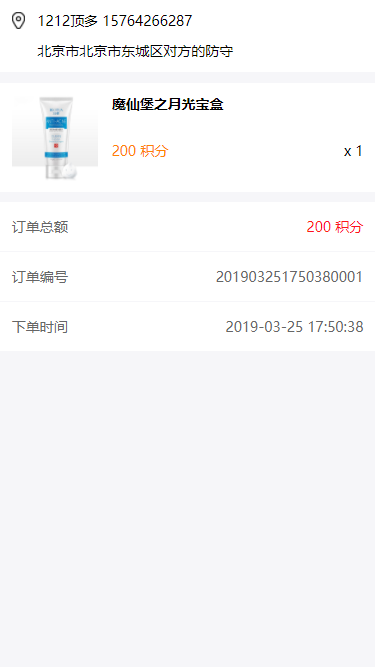
<template>

    <div class="write">

        <div class="adr">

            <div class="top">

                <img src="../../../assets/images/icon-adr.png" alt="" srcset="">

                {{detail.memberName}} {{detail.memberPhone}}

            </div>

            <div class="btm">

                <!-- 山东省 青岛市 市南区 香港中路2号海航万邦中心33楼微众控股集团 -->

                {{replace(detail.memberAddress)}}

            </div>

        </div>

        <ul class="list">

            <li @click="goto(detail.productId)">

                <a href="" class="pic_thumb">

                    <img :src="detail.productUrl" alt="" srcset="">

                </a>

                <div class="cont">

                    <div class="title">

                        {{detail.productTitle}}

                    </div>

                    <p class="desc">

                        <!-- 深空灰色 -->

                    </p>

                    <div class="btm">

                        <span>{{detail.pointPrice}} 积分</span>

                        <i>x {{detail.count}}</i>

                    </div>

                </div>

            </li>

        </ul>

        <ul class="od_list">

            <li> <span class="red">{{detail.total}} 积分</span> 订单总额</li>

            <li> <span>{{detail.orderNo}}</span> 订单编号</li>

            <li> <span>{{detail.submitTime}}</span> 下单时间</li>

        </ul>

    </div>

</template>

<script>

import { Card } from 'vant';

export default {

    data() {

        return {

            orderNo: '',

            detail: {},

            imageURL: 'https://img.yzcdn.cn/upload_files/2017/07/02/af5b9f44deaeb68000d7e4a711160c53.jpg'

        }

    },

    components: {

        [Card.name]: Card,

    },

    mounted() {

        var that = this

        this.orderNo = this.$route.query.orderNo;

        this.$reqPost('/order/get-order-detail',{orderNo:this.orderNo}).then(function(res) {

            that.detail = res.data.body[0]

        }).catch(function(err) {

            console.log(err)

        })

    },

    methods: {

        goto(productId) {

            this.$router.push('/items/detail/'+productId)

            // this.$router.go(-1)

        },

        replace(str) {

            if(str) {

                return str.replace(/\@/g,' ');

            }

        }

    }

}

</script>

<style scoped>

.write .adr {

    padding: 0.35rem;

    background: #fff;

    margin-bottom: 0.3rem;

    font-size: 0.42rem;

}

.write .adr .top {

    height: 0.53rem;

    line-height: 0.53rem;

    margin-bottom: 0.35rem;

}

.write .adr img {

    display: block;

    float: left;

    width: 0.41rem;

    height: 0.53rem;

    margin-right: 0.36rem;

}

.write .adr .btm {

    padding-left: 0.77rem;

}

.write ul.list{

    background: #fff;

}

.write ul.list li{

    padding: 0.35rem;

    border-top:1px solid #f6f6f9;

    height: 3.3rem;

    position: relative;

}

.write .pic_thumb{

    width: 2.6rem;

    height: 2.6rem;

    top: 0.35rem;

    left: 0.35rem;

    position: absolute;

}

.write .pic_thumb img{

    max-width: 100%;

    max-height: 100%;

    border: none;

}

.write .cont {

    padding-left: 3rem;

    height: 2.6rem;

}

.write .cont .title {

    font-size: 0.42rem;

    font-weight: bold;

    padding-bottom: 0.2rem;

    height: 0.9rem;

    overflow: hidden;

}

.write .cont .desc {

    margin: 0px;

    color: #b4b4b9;

}

.write .cont .btm {

    padding-top: 0.5rem;

    font-size: 0.42rem;

}

.write .cont .btm span {

    color: #ff8400;

}

.write .cont .btm i {

    float: right;

    font-style: normal;

}

.write .fixed-btm{

    position: fixed;

    bottom: 0;

    left: 0;

    right: 0;

    background: #fff;

    height: 50px;

    line-height: 50px;

    padding: 0 0.35rem;

}

.write .fixed-btm i {

    font-size: 0.42rem;

    color: #fd141d;

    font-style: normal;

}

.write .fixed-btm span {

    display: block;

    float: right;

    width: 4.29rem;

    height: 1.2rem;

    line-height: 1.2rem;

    text-align: center;

    color: #fff;

    background: #fd141d;

    border-radius: 0.6rem;

    margin-top: 0.15rem;

}

.write .od_list {

    margin-top: 0.3rem;

}

.write .od_list li{

    height: 1.5rem;

    line-height: 1.5rem;

    padding: 0 0.35rem;

    font-size: 0.42rem;

    color: #666;

    background: #fff;

    border-bottom:1px solid #f6f6f9;

}

.write .od_list li span{

    float: right;

}

.write .od_list li span.red{

    color:#fd141d;

}

</style>
4、订单详情 /items/order/detail?orderNo=201903251750380001的更多相关文章
- Luffy之结算订单页面(订单模型表的创建,订单的生成,以及订单详情展示等)
订单页面 在前面我们已经构建了,购物车的页面,接下来到了结算页面 1.首先,在购物车页面点击去结算按钮时,我们需要做如下动作 .前端发送生成订单的请求,点击标签内触发事件 create_order t ...
- iOS实现时间线列表效果(例如订单详情页面的效果)
之前看到美团的订单详情页面很有特色,于是决定模仿一下这个效果. 其实就是简单的 TableView 技巧,下面我们就来一步一步实现它. 设计 TableViewCell 原型 子类化一个新的 UITa ...
- 微信小程序(六) 文章详情静态页面detail
文章详情静态页面detail:
- sell 项目 订单详情表 设计 及 创建
1.数据库设计 2.订单详情表 创建 /** * 订单详情表 */ create table `order_detail` ( `detail_id` varchar(32) not null, `o ...
- 修改ecshop让订单详情里将会员地址详情全部显示
$sql = "SELECT concat(IFNULL(c.region_name, ''), ' ', IFNULL(p.region_name, ''), " . &quo ...
- ecshop用户中心订单详情增加快递单物流信息查询显示的功能
1,themes\default\user_transaction.dwt 找到: <!--{if $action eq order_detail} --> 在下面一行加入: <st ...
- Ajax案例:异步加载后台订单详情信息
- 用 Go 快速开发一个 RESTful API 服务
何时使用单体 RESTful 服务 对于很多初创公司来说,业务的早期我们更应该关注于业务价值的交付,而单体服务具有架构简单,部署简单,开发成本低等优点,可以帮助我们快速实现产品需求.我们在使用单体服务 ...
- 3、支付结果 /items/result?point=1&orderNo=201903211035400001
<template> <div> <div class="toppic"> <img src="../../../assets/ ...
随机推荐
- flask自定义处理错误方法
自定义错误处理方法: 当客户端访问浏览器是,得到相对应的状态码,服务器通过状态码给用户相对应的页面. @app.errorhandler(404) def handle_404_error(err): ...
- Codeforces1062D. Fun with Integers(埃氏筛)
题目链接:传送门 题目: D. Fun with Integers time limit per test seconds memory limit per test megabytes input ...
- solr增加中文分析器
我的solr版本是5.3.0 1将jar包ik-analyzer-solr5-5.x.jar放入sor的web-inf的lib里面 2 在web-inf下面新建classes目录,再新增三个配置文件: ...
- Ubuntu16.04安装YouCompleteMe
1.要求vim的版本在7.4.143以上,支持python2/3,通过vim --version查看. 2.下载源码: https://github.com/Valloric/YouComplete ...
- 使用samba或NFS实现文件共享
- xamarin android 报错 Could not load assembly 'Xamarin.Android.Support.v7.AppCompat
严重性 代码 说明 项目 文件 行 禁止显示状态 错误 Exception while loading assemblies: System.IO.FileNotFoundException: Cou ...
- python 【winerror2】系统找不到指定的路径
# _*_ coding:utf-8_*_from selenium import webdriver driver = webdriver.Firefox()driver.get("htt ...
- python中的is和==
is和== Python中的对象包含三要素:id.type.value id方法的返回值就是对象的内存地址其中id用来唯一标识一个对象,type标识对象的类型,value是对象的值 is 判断的是a对 ...
- grafna与饼状图
官网: https://grafana.com/plugins/grafana-piechart-panel/installation https://grafana.com/p ...
- Flume调优
这是一个关于池子的故事.有一个池子,它一头进水,另一头出水,进水口可以配置各种管子,出水口也可以配置各种管子,可以有多个进水口.多个出水口.水术语称为Event,进水口术语称为Source.出水口术语 ...