
发布本地项目和源码到maven私服中
有时候我们会使用第三方包到我们的项目中,但是想看源码的时候,需要下载源码查看,十分麻烦。
不如把源码上传到maven私服中,这样查看源码的时候就可以直接从mvaen nexus下载直接查看了。
方法如下:
1、在setting.xml文件中增加用户名和密码配置(特别注意这里的ID)
    <servers>

        <!-- 用于发布正式版本 -->

        <server>

            <id>maven-repository-releases</id>

            <username>admin</username>

            <password>admin123</password>

        </server>

        <!-- 用于发布快照版本 -->

        <server>

            <id>maven-repository-snapshots</id>

            <username>admin</username>

            <password>admin123</password>

        </server>

    </servers>
2、在项目的pom.xml中增加以下内容
    <build>

        <plugins>

            <!-- 要将源码放上去,需要加入这个插件 -->

            <plugin>

                <artifactId>maven-source-plugin</artifactId>

                <version>2.1</version>

                <configuration>

                    <attach>true</attach>

                </configuration>

                <executions>

                    <execution>

                        <phase>compile</phase>

                        <goals>

                            <goal>jar</goal>

                        </goals>

                    </execution>

                </executions>

            </plugin>

        </plugins>

    </build>

    <distributionManagement>

        <repository>

            <!-- 这里的ID要和setting的id一致 -->

            <id>maven-repository-releases</id>

            <url>http://ip:8081/nexus/content/repositories/thirdparty/</url>

        </repository>

        <!--这是打成快照版本的配置,如果不用这个snapshotRepository标签,打包失败,会报权限问题 -->

        <snapshotRepository>

            <id>maven-repository-snapshots</id>

            <url>http://ip:8081/nexus/content/repositories/thirdparty</url>

        </snapshotRepository>

    </distributionManagement>
3.执行Maven build的deploy命令
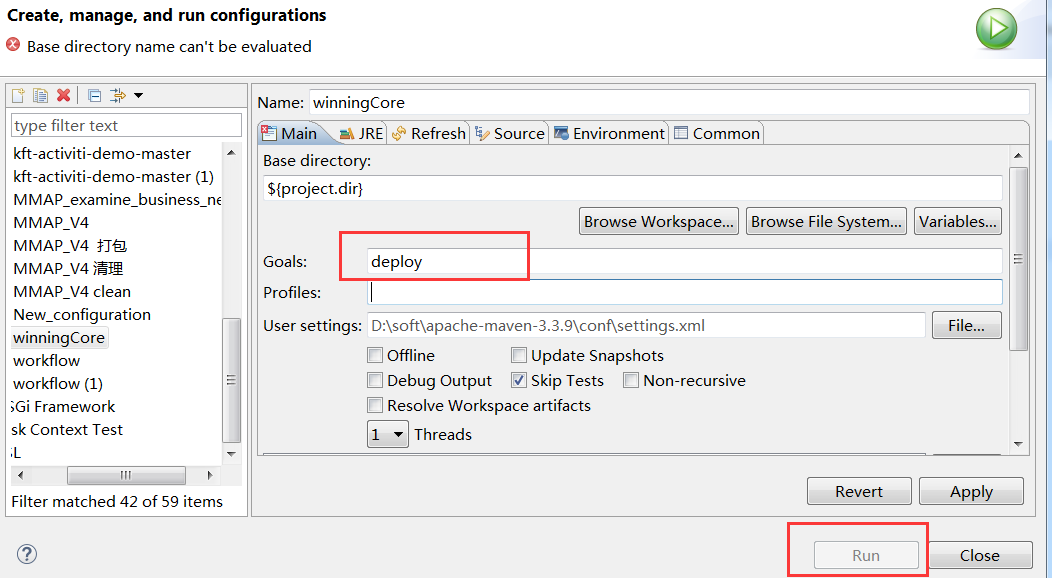
正常情况下,如果是发布新版本的话,一切是ok的。
4.如果是替换老版本,可能会出现如下错误
[ERROR] Failed to execute goal org.apache.maven.plugins:maven-deploy-plugin:2.7:deploy (default-deploy) on project YourProject: Failed to deploy artifacts: Could not transfer artifact YourProject:jar:3.0.1 from/to maven-repository-releases (http://ip:8081/nexus/content/repositories/thirdparty/): Failed to transfer file: http://192.168.16.204:8081/nexus/content/repositories/thirdparty/../../YourProject.jar. Return code is: 400, ReasonPhrase: Bad Request. -> [Help 1]
[ERROR]
[ERROR] To see the full stack trace of the errors, re-run Maven with the -e switch.
[ERROR] Re-run Maven using the -X switch to enable full debug logging.
[ERROR]
[ERROR] For more information about the errors and possible solutions, please read the following articles:
[ERROR] [Help 1] http://cwiki.apache.org/confluence/display/MAVEN/MojoExecutionException
这是maven deploy 已存在的包的时候出现400错误,原因是 release 默认库是不允许重复部署的。
解决: 修改maven 私服配置.
修改图中配置就可以重复部署了:Deployment Policy:Allow Redeploy
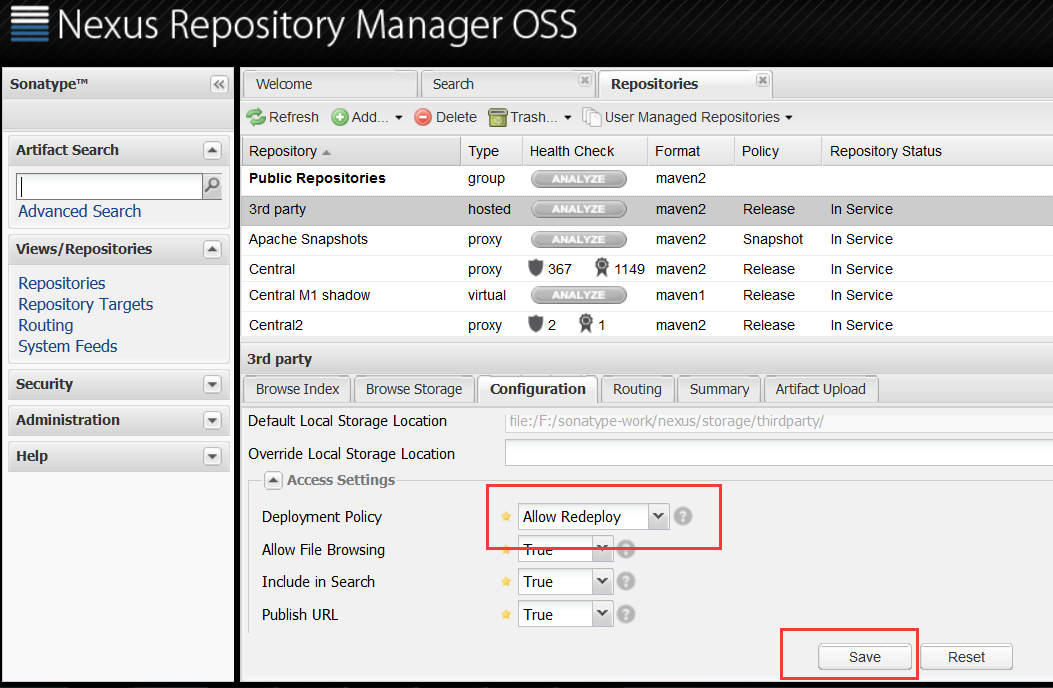
然后,重新deploy,既可以将源码和jar包一并上传到maven私服了。
5.其他可能遇到的问题
用户权限问题,可能导致发布失败。
本文参考:http://blog.csdn.net/lzzyok/article/details/25626583f
http://blog.csdn.net/lulongzhou_llz/article/details/42869785
发布本地项目和源码到maven私服中的更多相关文章
- maven项目的运行方式,maven私服的上传下载
一.maven项目父子工程的运行方式 1.通过父项目的plugin下集成的tomacat run启动 2.通过自身项目的tomcat plugin启动,但前提是所依赖的项目必须全部都install(将 ...
- 怎么将本地项目放到码云(gitee)上面?图文详解
git的好处什么的,在此就不多赘述.现在很多公司都在用git了. 那么怎么将本地已经有的项目放到码云(gitee)上呢? 前置条件说明: 1:原来项目所在位置:D:\workspace01\class ...
- Git上传本地项目到码云
前提:本地安装git.注册码云 1.进入本地项目文件夹,鼠标右键代开 Git Bash Here 2.输入命令 初始化库管理文件 git init 3.输入命名 修改Git的全局配置 git conf ...
- 将github上的项目源码导入到eclipse中
1.注册github帐号 在github上注册一个自己的帐号. 2.安装git插件egit 在eclipse中安装git插件egit,安装方法可以参考这篇文章: http://www.cnblogs. ...
- 利用git把本地项目传到github+将github中已有项目从本地上传更新
利用git把本地项目传到github中 1.打开git bash命令行,进入到要上传的项目中,比如Spring项目,在此目录下执行git init 的命令,会发下在当前目录中多了一个.git的文件夹( ...
- PM2自动发布本地项目到服务器
(一)开发环境 本地服务器 Ubunt14.04 远程服务器Ubuntu16.04 发布软件PM 2 (二)发布介绍 本地和我们的远程服务器,必须都安装有git,pm2,以及nodejs环境.实际上配 ...
- 码云git使用一(上传本地项目到码云git服务器上)
主要讲下如果将项目部署到码云git服务器上,然后使用studio导入git项目,修改本地代码后,并同步到码云git上面. 首先:我们在码云上注册账号并登陆.官网(https://git.oschina ...
- Git发布本地项目至仓库命令行操作流程
1.初始化项目 git init 2.创建名称为 gh-pages 新分支(若直接发布至master分支,忽略此步) git checkout --orphan gh-pages 3.把所有内容加入本 ...
- 上传本地项目到码云(gitee)
1.码云上创建一个项目比如zhirong 2.本地创建一个文件夹F:\workspace\zhirong-items,进入zhirong-items打开git bash 3.执行git init ,这 ...
随机推荐
- 网页提示504 gateway time-out是什么意思?如何解决?
大家在访问网站的时候通常会遇到502错误.404错误等,很少会遇到504错误.但是在我们去访问大流量或者内容数据量较多的网站时,打开网页偶尔就会出现504 gateway time-out,这到底是什 ...
- 利用SharpZipLib进行字符串的压缩和解压缩
http://www.izhangheng.com/sharpziplib-string-compression-decompression/ 今天搞了一晚上压缩和解压缩问题,java压缩的字符串,用 ...
- eclipse常用快捷键整理
Ctrl + F11 按上次方式执行 Ctrl + Shift + / 加上注释/**/ Ctrl + Shift + \ 取消注释/**/ Ctrl + / 加上或消除行注释 Ctrl + D 删除 ...
- git中提交了想要忽略的文件,如何在删除
我们在用git的时候,有时会不小心将不需要文件跟踪的文件(如.classpath文件.project等)提交到git的服务器,这时候要忽略这些文件的做法是: 1.修改.gitignore文件 按照规则 ...
- python大法好——递归、内置函数、函数进阶
1.递归(自己干自己) def fun(n): n=n/2 print(n) if(n>2) fun(n) #函数调用 fun(10) 结果是5 2 1 0 递归的执行过程:递归执行到最里面一层 ...
- Week__8
Monday_ 今晚补了扔鸡蛋问题的动态规划问题,补了这道题,感觉视野又开阔了些. 写了一道思维题cf 1066A 数字逻辑后半节听得打脑壳,现在很晚了,明天再看叭. Tuesday_ 今晚补了 ad ...
- html 跳转页面传参、点击获取DOM参数
虽然现在前端框架已经很多,尤其是几大流行框架,比如Vue,React,Angular 等,已经去DOM化,但是还是有很多公司仍在使用 HTML + CSS + JS . 这里记载一下用到的HTML传参 ...
- JAVA类与类之间的全部关系简述+代码详解
本文转自: https://blog.csdn.net/wq6ylg08/article/details/81092056类和类之间关系包括了 is a,has a, use a三种关系(1)is a ...
- vue 根据接口返回的状态码判断用户登录状态并跳转登录页,登录后回到上一个页面(http拦截器)
背景:后台接口返回code==501表示用户是未登录状态,需要登录才可访问: 通过http拦截做路由跳转 第一步:src目录下新建http.js文件,内容如下: import Axios from ' ...
- Django的rest_framework认证组件之局部设置源码解析
前言: Django的rest_framework组件的功能很强大,今天来我来给大家剖析一下认证组件 下面进入正文分析,我们从视图开始,一步一步来剖析认证组件 1.进入urls文件 url(r'^lo ...