
Mybatis中输入输出映射和动态Sql
一、输入映射
我们通过配置parameterType的值来指定输入参数的类型,这些类型可以是简单数据类型、POJO、HashMap等数据类型
1、简单类型

2、POJO包装类型
①这是单表查询的时候传入的POJO包装类型,即可以直接传入实体类,但是当多表查询的时候,就需要自定义POJO类型

②我们使用自定义POJO类型来具体的了解一下
先设计 包装类型如下,其中UserPOJO是除了User本身之外的添加的其他跟User相关的属性的包装类,UserVo是用于视图层面的包装类型,同样也是作为Mapper配置文件的输入类型
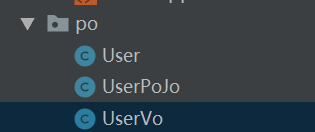
其中User文件同上一篇Mybatis简单入门中的User,包括数据表部分也一样。这里给出UserPoJO和UserVo文件
 package cn.mybatis.po;

 public class UserPoJo extends User{

     private User user;

     public void setUser(User user) {

         this.user = user;

     }

     public User getUser() {

         return user;

     }

 }
UserPOJO
 package cn.mybatis.po;

 public class UserVo {

     private UserPoJo userPoJo;

     public UserPoJo getUserPoJo() {

         return userPoJo;

     }

     public void setUserPoJo(UserPoJo userPoJo) {

         this.userPoJo = userPoJo;

     }

 }
UserVo
然后我们配置UserMapper.xml文件

然后在UserMapper接口文件中添加
    //测试包装类型的查询

    public List<UserPoJo> findUserList(UserVo userVo) throws Exception;
使用Junit测试刚刚做的配置
     @Test

     public void testFindUserList() throws Exception {

         SqlSession sqlSession = sqlSessionFactory.openSession();

         UserMapper userMapper = sqlSession.getMapper(UserMapper.class);

         UserPoJo userPoJo = new UserPoJo();

         UserVo userVo = new UserVo();

         userPoJo.setSex("男");

         userPoJo.setUsername("u");

         userVo.setUserPoJo(userPoJo);

         List<UserPoJo> userPoJoList = userMapper.findUserList(userVo);

         System.out.println(userPoJoList);

     }
最后结果如下

二、输出映射
1、resultType
①在使用resultType进行映射的时候,只有查询出来的列名和包装类型中的属性名一致的时候,才会映射成功
②当使用简单类型作为输出映射的时候,我们需要保证Sql查询的结果只有一行一列,这样就可以使用简单类型
如下所示示例
SELECT COUNT(*) FROM t_user

SELECT username FROM t_user WHERE id = 2
2、resultMap
查询出来的列名和包装类型的属性名不一致的时候,可以使用resultMap来进行相应的映射(具体在使用中来说就是:定义resultMap中和属性的映射关系,然后将输出结果设置为resultMap的类型)
下面我们使用一个例子来进行具体的测试
①首先编写mapper配置文件,其中需要加上resultMap的配置
 <?xml version="1.0" encoding="UTF-8" ?>

 <!DOCTYPE mapper

         PUBLIC "-//mybatis.org//DTD Mapper 3.0//EN"

         "http://mybatis.org/dtd/mybatis-3-mapper.dtd">

 <mapper namespace="cn.mybatis.mapper.UserMapper">

     <!--定义resultMap

         type:resultMap最终映射的Java对象类型

         id:对resultMap的标识

     -->

     <resultMap id="userResultMap" type="user">

         <!--id:标识查询结果集中的唯一标识-->

         <id column="_id" property="id"></id>

         <!--result:标识查询结果集中其他列的标识-->

         <result column="_username" property="username"></result>

         <result column="_password" property="password"></result>

         <result column="_sex" property="sex"></result>

         <result column="_address" property="address"></result>

     </resultMap>

     <select id="findUserById_resultMap" parameterType="int" resultMap="userResultMap">

         SELECT id _id, username _username, PASSWORD _password, address _address, sex _sex FROM t_user WHERE id = #{id}

     </select>

 </mapper>
②然后在Mapper接口中添加方法
    //测试resultMap

    public User findUserById_resultMap(int id) throws Exception;
③ 测试方法
     @Test

     public void testFindUserById_resultMap() throws Exception {

         SqlSession sqlSession = sqlSessionFactory.openSession();

         UserMapper userMapper = sqlSession.getMapper(UserMapper.class);

         User user = userMapper.findUserById_resultMap(2);

         System.out.println(user);

     }
④可以发现,使用resultMap的方式跟直接查询的结果是一致的

三、动态Sql
1、if判断
我们在上面使用包装类查询的用例的时候,考虑到可能出现userPoJo会是null的情况,以及其相应的属性也可能是null的情况,这样的话,如果我们直接在Sql中进行拼接而不做判断的话,可能会出现一些错误,所以我们使用if来进行动态的拼接。
    <select id="findUserList" parameterType="cn.mybatis.po.UserVo" resultType="cn.mybatis.po.UserPoJo">

        SELECT * FROM t_user

        <where>

            <if test="userPoJo != null">

                <if test="userPoJo.sex != null and userPoJo.sex != ''">

                    AND sex = #{userPoJo.sex}

                </if>

                <if test="userPoJo.username != null and userPoJo.username != ''">

                    AND username LIKE '%${userPoJo.username}%'

                </if>

            </if>

        </where>

    </select>

2.Sql片段
上面的例子中,我们可以将if判断抽取出来作为一个Sql片段,这样做的好处是,可能再进行别的单表查询User信息的时候可以重复使用这些Sql。
     <!--定义Sql片段-->

     <sql id="query_user_info">

         <if test="userPoJo != null">

             <if test="userPoJo.sex != null and userPoJo.sex != ''">

                 AND sex = #{userPoJo.sex}

             </if>

             <if test="userPoJo.username != null and userPoJo.username != ''">

                 AND username LIKE '%${userPoJo.username}%'

             </if>

         </if>

     </sql>
然后在别的Sql中将上面的Sql片段引入拼接即可
     <select id="findUserList" parameterType="cn.mybatis.po.UserVo" resultType="cn.mybatis.po.UserPoJo">

         SELECT * FROM t_user

         <where>

             <include refid="query_user_info"></include>

         </where>

     </select>
3.foreach
当我们需要一种同样的查询方式只是参数不同的时候:SELECT * FROM t_user WHERE 1=1 AND (id = 1 OR id =2 OR id = 3),可以使用foreach来记性sql拼接
    <sql id="query_ids">

        <if test="ids != null">

            <!--

                SELECT * FROM t_user WHERE 1=1 AND (id = 1 OR id =2 OR id = 3)

                cilleation: 指定的是输入参数集合的属性名

                item:每次遍历的名称

                open:开始遍历时拼接串

                close:结束遍历时候拼接的串

                separator:遍历的两个对象中间需要拼接的串

            -->

            <foreach collection="ids" item="item_id" open="AND (" close=")" separator=" OR ">

                id=#{item_id}

            </foreach>

        </if>

    </sql>
然后将上面的Sql片段加入响应的statment中
    <select id="findUserByIds" parameterType="userVo" resultType="userPoJo">

        SELECT * FROM t_user

        <where>

            <include refid="query_ids"></include>

        </where>

    </select>
测试结果如下

Mybatis中输入输出映射和动态Sql的更多相关文章
- Mybatis学习第三天——输入输出映射以及动态SQL
注意:以下传入数据与输出数据类型部分使用别名的方式,别名在SqlMapConfig.xml核心文件中配置 1.输入映射 1.1 传递简单数据类型 1.2 传递pojo中的类类型 1.3 传递Query ...
- MyBatis的关联映射和动态SQL
CREATE TABLE tb_card ( id INT PRIMARY KEY AUTO_INCREMENT, CODE ) ); '); CREATE TABLE tb_person ( id ...
- Mybatis输入输出映射_动态sql_关联关系(一对一、一对多、多对多)
Mybatis输入输出映射_动态sql_关联关系(一对一.一对多.多对多)输入输出映射parameterType完成输入映射parameterType可以传入的参数有,基本数据类型(根据id查询用户的 ...
- MyBatis框架之SQL映射和动态SQL
使用MyBatis实现条件查询 1.SQL映射文件: MyBatis真正的强大之处就在于SQL映射语句,MyBatis专注于SQL,对于开发人员来说也是极大限度的进行SQL调优,以保证性能.下面是SQ ...
- 【长文】Spring学习笔记(七):Mybatis映射器+动态SQL
1 概述 本文主要讲述了如何使用MyBatis中的映射器以及动态SQL的配置. 2 MyBatis配置文件概览 MyBatis配置文件主要属性如下: <settings>:相关设置,键值对 ...
- 小峰mybatis(5)mybatis使用注解配置sql映射器--动态sql
一.使用注解配置映射器 动态sql: 用的并不是很多,了解下: Student.java 实体bean: package com.cy.model; public class Student{ pri ...
- MyBatis学习 之 三、动态SQL语句
目录(?)[-] 三动态SQL语句 selectKey 标签 if标签 if where 的条件判断 if set 的更新语句 if trim代替whereset标签 trim代替set choose ...
- Mybatis之关联查询及动态SQL
前言 实际开发项目中,很少是针对单表操作,基本都会联查多表进行操作,尤其是出一些报表的内容.此时,就可以使用Mybatis的关联查询还有动态SQL.前几篇文章已经介绍过了怎么调用及相关内容,因此这里只 ...
- Mybatis中输出映射resultType与resultMap的区别
Mybatis中输出映射resultType与resultMap的区别 (原文地址:http://blog.csdn.net/acmman/article/details/46509375) 一.re ...
随机推荐
- leetcode136
public class Solution { public int SingleNumber(int[] nums) { Dictionary<int, int> dic = new D ...
- Mysql 日期加减
mysql表中有一些字段是显示日期的.因为各种需要,需要将它时间往后调整1年. mysql 日期增加一年的更新语句更新的语句如下: UPDATE table SET date = DATE_A ...
- TCC细读 - 1 例子流程
http://www.iocoder.cn/categories/TCC-Transaction/ https://github.com/changmingxie/tcc-transaction 细读 ...
- UNITY 打包时提示sdk tools 或 sdk build tools版本低时可以直接点update 按钮进行更新
如题.如果不更新,而选择 : use newest version installed ,打包到结尾时可能会报错,莫名其妙的java错误 而且,SDK一旦被更新后,其所在目录的 SDK MANAGER ...
- vue.js+SSH添加和查询
Vue.js 是一套构建用户界面的渐进式框架.与其他重量级框架不同的是,Vue 采用自底向上增量开发的设计.Vue 的核心库只关注视图层,它不仅易于上手,还便于与第三方库或既有项目整合.另一方面,当与 ...
- (转).net反编译工具JustDecompile
开源的反编译工具 JustDecompile https://www.telerik.com/blogs/justdecompile-engine-becomes-open-source https ...
- 记账本,C,Github,service
package service; import java.util.Collections; import java.util.List; import dao.CategoryDAO; import ...
- 云笔记项目-AOP知识简单学习
在云笔记项目的过程中,需要检查各个业务层的执行快慢,如登录.注册.展示笔记本列表,展示笔记列表等,如果在每个业务层方法里都写一段代码用来检查时间并打印,不仅仅显得代码重复,而且当项目很大的时候,将大大 ...
- cdn是否缓存了网站内容,如何查看
查看网站是否缓存,本例以cdnbest的节点程序,浏览器是firefox为例 打开浏览器后按 F12键,再打开网站,如下图显示 HIT就表示有缓存,没有缓存就会显示MISS
- vue获取后台图片验证码,并点击刷新验证码
<--url为需要访问的接口地址--> <span style="display: inline-block;width: 130px;height: 53px;borde ...