
SpringBoot2.x版本整合SpringSecurity、Oauth2进行password认证
很多人在进行项目开发时都会用到Oauth2.0结合SpringSecurity或者Shiro进行权限拦截以及用户验证,网上也有很多的案例,前几天项目里边需要用到,顺便整合了进来,特此写篇博客,记录下过程。
项目结构如下:

首先准备pom.xml
<?xml version="1.0" encoding="UTF-8"?>

<project xmlns="http://maven.apache.org/POM/4.0.0" xmlns:xsi="http://www.w3.org/2001/XMLSchema-instance"

	xsi:schemaLocation="http://maven.apache.org/POM/4.0.0 http://maven.apache.org/xsd/maven-4.0.0.xsd">

	<modelVersion>4.0.0</modelVersion>

	<parent>

		<groupId>org.springframework.boot</groupId>

		<artifactId>spring-boot-starter-parent</artifactId>

		<version>2.0.3.RELEASE</version>

		<relativePath /> <!-- lookup parent from repository -->

	</parent>

	<groupId>com.xz.springcloud</groupId>

	<artifactId>f-oauth2-pwd-mode</artifactId>

	<version>0.0.1-SNAPSHOT</version>

	<name>f-oauth2-pwd-mode</name>

	<description>Demo project for Spring Boot</description>

	<properties>

		<project.build.sourceEncoding>UTF-8</project.build.sourceEncoding>

		<project.reporting.outputEncoding>UTF-8</project.reporting.outputEncoding>

		<java.version>1.8</java.version>

		<spring-cloud.version>Finchley.RELEASE</spring-cloud.version>

		<oauth.version>2.3.3.RELEASE</oauth.version>

	</properties>

	<dependencies>

        <dependency>

            <groupId>org.springframework.boot</groupId>

            <artifactId>spring-boot-starter-web</artifactId>

        </dependency>

        <dependency>

            <groupId>org.springframework.security.oauth</groupId>

            <artifactId>spring-security-oauth2</artifactId>

            <version>2.2.1.RELEASE</version>

        </dependency>

         <dependency>

            <groupId>org.springframework.boot</groupId>

            <artifactId>spring-boot-starter-security</artifactId>

        </dependency>

        <dependency>

            <groupId>org.springframework.boot</groupId>

            <artifactId>spring-boot-starter-test</artifactId>

            <scope>test</scope>

        </dependency>

    </dependencies>

	<dependencyManagement>

		<dependencies>

			<dependency>

				<groupId>org.springframework.cloud</groupId>

				<artifactId>spring-cloud-dependencies</artifactId>

				<version>${spring-cloud.version}</version>

				<type>pom</type>

				<scope>import</scope>

			</dependency>

		</dependencies>

	</dependencyManagement>

	<build>

		<plugins>

			<plugin>

				<groupId>org.springframework.boot</groupId>

				<artifactId>spring-boot-maven-plugin</artifactId>

			</plugin>

		</plugins>

	</build>

</project>
MyUserDetailService.java
package com.oauth.config;

import java.util.ArrayList;

import java.util.List;

import org.springframework.security.core.GrantedAuthority;

import org.springframework.security.core.authority.SimpleGrantedAuthority;

import org.springframework.security.core.userdetails.User;

import org.springframework.security.core.userdetails.UserDetails;

import org.springframework.security.core.userdetails.UserDetailsService;

import org.springframework.security.core.userdetails.UsernameNotFoundException;

import org.springframework.stereotype.Component;

/**

 *

 * @author yuxuan

 *

 */

@Component

public class MyUserDetailsService implements UserDetailsService {

    @Override

    public UserDetails loadUserByUsername(String username) throws UsernameNotFoundException {

        // TODO 这个地方可以通过username从数据库获取正确的用户信息,包括密码和权限等。

        List<GrantedAuthority> grantedAuthorityList = new ArrayList<>();

        grantedAuthorityList.add(new SimpleGrantedAuthority("ROLE_USER"));

        grantedAuthorityList.add(new SimpleGrantedAuthority("ROLE_ADMIN"));

        return new User(username, "{noop}123456", grantedAuthorityList);

    }

}
OAuth2ServerConfig.java
package com.oauth.config;

import org.springframework.beans.factory.annotation.Autowired;

import org.springframework.context.annotation.Configuration;

import org.springframework.http.HttpMethod;

import org.springframework.security.authentication.AuthenticationManager;

import org.springframework.security.oauth2.config.annotation.configurers.ClientDetailsServiceConfigurer;

import org.springframework.security.oauth2.config.annotation.web.configuration.AuthorizationServerConfigurerAdapter;

import org.springframework.security.oauth2.config.annotation.web.configuration.EnableAuthorizationServer;

import org.springframework.security.oauth2.config.annotation.web.configurers.AuthorizationServerEndpointsConfigurer;

import org.springframework.security.oauth2.config.annotation.web.configurers.AuthorizationServerSecurityConfigurer;

@Configuration

@EnableAuthorizationServer

public class OAuth2ServerConfig extends AuthorizationServerConfigurerAdapter {

	 @Override

	    public void configure(AuthorizationServerSecurityConfigurer oauthServer) throws Exception {

	        oauthServer

	                .tokenKeyAccess("permitAll()") //url:/oauth/token_key,exposes public key for token verification if using JWT tokens

	                .checkTokenAccess("isAuthenticated()") //url:/oauth/check_token allow check token

	                .allowFormAuthenticationForClients();

	    }

	    /**

	     * 注入authenticationManager

	     * 来支持 password grant type

	     */

	    @Autowired

	    private AuthenticationManager authenticationManager;

	    @Override

	    public void configure(AuthorizationServerEndpointsConfigurer endpoints) throws Exception {

	        endpoints.authenticationManager(authenticationManager);

	        endpoints.allowedTokenEndpointRequestMethods(HttpMethod.GET, HttpMethod.POST);

	    }

	    @Override

	    public void configure(ClientDetailsServiceConfigurer clients) throws Exception {

	        clients.inMemory()

	                .withClient("client")

	                .secret("{noop}secret")

	                .authorizedGrantTypes("client_credentials", "password", "refresh_token")

	                .scopes("all")

	                .resourceIds("resourcesId")

	                .accessTokenValiditySeconds(1200)

	                .refreshTokenValiditySeconds(50000);

	}

}
ResourceServerConfig.java
package com.oauth.config;

import org.springframework.context.annotation.Configuration;

import org.springframework.security.config.annotation.web.builders.HttpSecurity;

import org.springframework.security.oauth2.config.annotation.web.configuration.EnableResourceServer;

import org.springframework.security.oauth2.config.annotation.web.configuration.ResourceServerConfigurerAdapter;

import org.springframework.security.oauth2.config.annotation.web.configurers.ResourceServerSecurityConfigurer;

@Configuration

@EnableResourceServer

public class ResourceServerConfig extends ResourceServerConfigurerAdapter {

	@Override

	public void configure(HttpSecurity http) throws Exception {

		http.requestMatchers().antMatchers("/api/**").and().authorizeRequests().antMatchers("/api/**").authenticated();

	}

	@Override

	public void configure(ResourceServerSecurityConfigurer resources) throws Exception {

		resources.resourceId("resourcesId").stateless(true);

	}

}
WebConfig.java
package com.oauth.config;

import org.springframework.context.annotation.Bean;

import org.springframework.security.authentication.AuthenticationManager;

import org.springframework.security.config.annotation.method.configuration.EnableGlobalMethodSecurity;

import org.springframework.security.config.annotation.web.builders.HttpSecurity;

import org.springframework.security.config.annotation.web.configuration.EnableWebSecurity;

import org.springframework.security.config.annotation.web.configuration.WebSecurityConfigurerAdapter;

@EnableWebSecurity

@EnableGlobalMethodSecurity(prePostEnabled = true, proxyTargetClass = true)

public class WebConfig extends WebSecurityConfigurerAdapter {

	 @Override

	 protected void configure(HttpSecurity http) throws Exception {

		 http.csrf().disable();

	    http.requestMatchers().antMatchers("/oauth/**")

	    .and()

	    .authorizeRequests()

	    .antMatchers("/oauth/**").authenticated();

	 }

	/**

	 * 需要配置这个支持password模式 support password grant type

	 * @return

	 * @throws Exception

	 */

	@Override

	@Bean

	public AuthenticationManager authenticationManagerBean() throws Exception {

		return super.authenticationManagerBean();

	}

}
IndexCtrl.java
package com.oauth.ctrl;

import org.springframework.web.bind.annotation.GetMapping;

import org.springframework.web.bind.annotation.RestController;

@RestController

public class IndexCtrl {

	@GetMapping("hello")

	public String hello() {

		return "Hello World";

	}

	@GetMapping("api/hello")

	public String apiHello() {

		return "Hello World";

	}

}
App.java
package com.oauth;

import org.springframework.boot.SpringApplication;

import org.springframework.boot.autoconfigure.SpringBootApplication;

@SpringBootApplication

public class App {

	public static void main(String[] args) {

		SpringApplication.run(App.class, args);

	}

}
以上就是一个代码的配置,下面启动App类,运行main函数。项目启动完成后用rest client访问hello接口
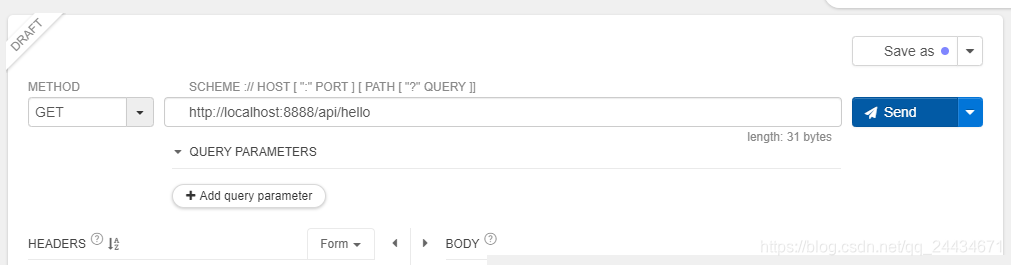

可以看到提示无效的token,接下我们请求获取token。利用CURL命令请求如下:
curl -i -X POST -d "username=admin&password=123456&grant_type=password&client_id=client&client_secret=secret" http://localhost:8888/oauth/token
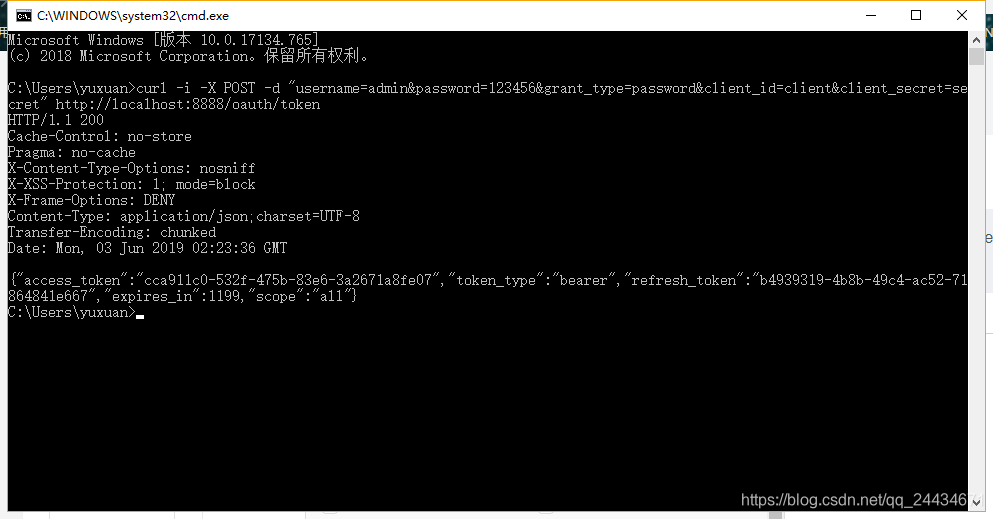


可以看到,至此已经访问成功了。
也可以利用GET方式直接访问,如下:
http://localhost:8888/api/hello?access_token=cca911c0-532f-475b-83e6-3a2671a8fe07

有问题可以在下面评论,技术问题可以私聊我。
SpringBoot2.x版本整合SpringSecurity、Oauth2进行password认证的更多相关文章
- springboot2.x版本整合redis(单机/集群)(使用lettuce)
在springboot1.x系列中,其中使用的是jedis,但是到了springboot2.x其中使用的是Lettuce. 此处springboot2.x,所以使用的是Lettuce.关于jedis跟 ...
- SpringBoot2.0整合SpringSecurity实现WEB JWT认证
相信很多做技术的朋友都做过前后端分离项目,项目分离后认证就靠JWT,费话不多说,直接上干活(写的不好还请多多见谅,大牛请绕行) 直接上代码,项目为Maven项目,结构如图: 包分类如下: com.ap ...
- SpringBoot整合Thymeleaf-基于SpringBoot2.X版本
1.为啥要用Thymeleaf模板引擎?现在不都前后端分离了么? 熊dei们,别着急,我们先来谈谈为啥开始用Thymeleaf模板引擎,先照顾照顾下我们这些可爱的小白童鞋.... 为啥开始用Thyme ...
- 使用Spring Security Oauth2完成RESTful服务password认证的过程
摘要:Spring Security与Oauth2整合步骤中详细描述了使用过程,但它对于入门者有些重量级,比如将用户信息.ClientDetails.token存入数据库而非内存.配置 ...
- 厉害!我带的实习生仅用四步就整合好SpringSecurity+JWT实现登录认证!
小二是新来的实习生,作为技术 leader,我还是很负责任的,有什么锅都想甩给他,啊,不,一不小心怎么把心里话全说出来了呢?重来! 小二是新来的实习生,作为技术 leader,我还是很负责任的,有什么 ...
- Springboot2+SpringSecurity+Oauth2+Mysql数据库实现持久化客户端数据
目录 介绍 建表,初始化数据 工程配置 Authorization Server - Spring Security配置 Authorization Server - 授权服务器 Resource S ...
- java框架之SpringBoot(15)-安全及整合SpringSecurity
SpringSecurity介绍 Spring Security 是针对 Spring 项目的安全框架,也是 Spring Boot 底层安全模块默认的技术选型.它可以实现强大的 Web 安全控制.对 ...
- springboot2.1.7整合mybati3.5.2与mysql8.0.13
springboot2.x已经发布一段时间,博主在这里使用springboot2.1.7整合mybatis3.5.2,使用的数据库为mysql8.0.13 1. 导入依赖 <!--mysql-- ...
- SpringBoot:整合SpringSecurity
目录 SpringSecurity(安全) 搭建环境 使用 用户认证和授权 注销及权限控制 记住我及登录页面定制 SpringBoot 整合 SpringSecurity: 用户认证和授权.注销及权限 ...
随机推荐
- jsp学习之如何在web层创建Servlet
jsp动态网页的文件目录结构如下: 1.src下存放java代码 2.包web_xx为web层 3.webcontent里面是jsp文件 jsp页面中的请求交付给servlet处理,在实际中 jsp的 ...
- oracle10g_v$sqltext之对等视图v$sqltext_with_newlines
--v$sqltext_with_newlines是v$sqltext等同体,较之易读性强(由sql_address及sql_hash_value唯一确认一个cached cursor中的sql)SQ ...
- C++字符串读入
int read() { ,f=;char ch=getchar(); ;ch=getchar();} +ch-';ch=getchar();} return x*f; } int main() { ...
- 【重要】MySQL常见面试题
1. 主键 超键 候选键 外键 主 键: 数据库表中对储存数据对象予以唯一和完整标识的数据列或属性的组合.一个数据列只能有一个主键,且主键的取值不能缺失,即不能为空值(Null). 超 键: 在关系中 ...
- 洛谷——P1044 栈
P1044 栈——卡特兰数 题目背景 栈是计算机中经典的数据结构,简单的说,栈就是限制在一端进行插入删除操作的线性表. 栈有两种最重要的操作,即pop(从栈顶弹出一个元素)和push(将一个元素进栈) ...
- 洛谷 P1555 尴尬的数字
P1555 尴尬的数字 题目背景 Bessie刚刚学会了不同进制数之间的转换,但是她总是犯错误,因为她的两个前蹄不能轻松的握住钢笔. 题目描述 每当Bessie将一个数转换成新的进制时,她总会写错一位 ...
- 分享最近抽空写的一个代码生成器,集成EasyDBUtility数据库访问帮助类
一直想写一个自己的代码生成器,但是因为工作事情多,一直搁置下来,最近下决心终于利用下班时间写完了,现在分享给有需要的朋友,代码生成器集成EasyDBUtility数据库访问帮助类,暂时只支持sqlse ...
- 智能眼镜技术科普:VR、AR、MR的区别
前段时间, 获得谷歌5亿美元融资的技术公司Magic Leap在WSJD展会中放出了一段实录视频,引起不小骚动.如今,也有媒体称他们为MR公司,那么VR.AR.MR之间到底有什么区别呢. VR.AR. ...
- python比较大小
1.python的比较总是检查复合对象的所有部分,直到可以得出结果为止. 2.会自动遍历嵌套的所有数据结构,有多深走多深,首次发现的差值将决定比较的结果 3.== :操作符测试值的相等性 4.is : ...
- TCP打洞与UDP打洞的差别
为什么网上讲到的P2P打洞基本上都是基于UDP协议的打洞?难道TCP不可能打洞?还是TCP打洞难于实现? 如果如今有内网clientA和内网clientB.有公网服务端S. 如果A和B ...