
kafka的server.properties配置文件参考示范(图文详解)(多种方式)
简单点的,就是
kafka_2.11-0.8.2.2.tgz的3节点集群的下载、安装和配置(图文详解)
但是呢,大家在实际工作中,会一定要去牵扯到调参数和调优问题的。以下,是我给大家分享的kafka的server.properties配置文件参考示范。
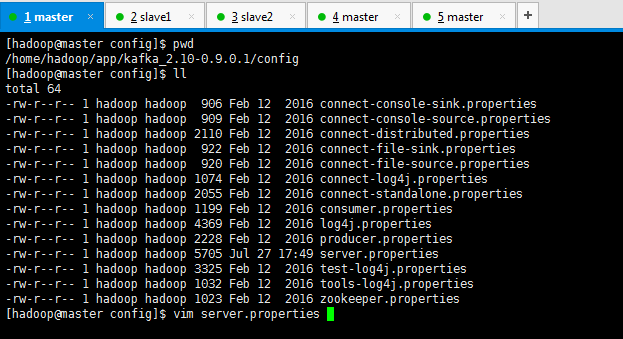
[hadoop@master config]$ pwd

/home/hadoop/app/kafka_2.10-0.9.0.1/config

[hadoop@master config]$ ll

total 64

-rw-r--r-- 1 hadoop hadoop  906 Feb 12  2016 connect-console-sink.properties

-rw-r--r-- 1 hadoop hadoop  909 Feb 12  2016 connect-console-source.properties

-rw-r--r-- 1 hadoop hadoop 2110 Feb 12  2016 connect-distributed.properties

-rw-r--r-- 1 hadoop hadoop  922 Feb 12  2016 connect-file-sink.properties

-rw-r--r-- 1 hadoop hadoop  920 Feb 12  2016 connect-file-source.properties

-rw-r--r-- 1 hadoop hadoop 1074 Feb 12  2016 connect-log4j.properties

-rw-r--r-- 1 hadoop hadoop 2055 Feb 12  2016 connect-standalone.properties

-rw-r--r-- 1 hadoop hadoop 1199 Feb 12  2016 consumer.properties

-rw-r--r-- 1 hadoop hadoop 4369 Feb 12  2016 log4j.properties

-rw-r--r-- 1 hadoop hadoop 2228 Feb 12  2016 producer.properties

-rw-r--r-- 1 hadoop hadoop 5705 Jul 27 17:49 server.properties

-rw-r--r-- 1 hadoop hadoop 3325 Feb 12  2016 test-log4j.properties

-rw-r--r-- 1 hadoop hadoop 1032 Feb 12  2016 tools-log4j.properties

-rw-r--r-- 1 hadoop hadoop 1023 Feb 12  2016 zookeeper.properties

[hadoop@master config]$ vim server.properties
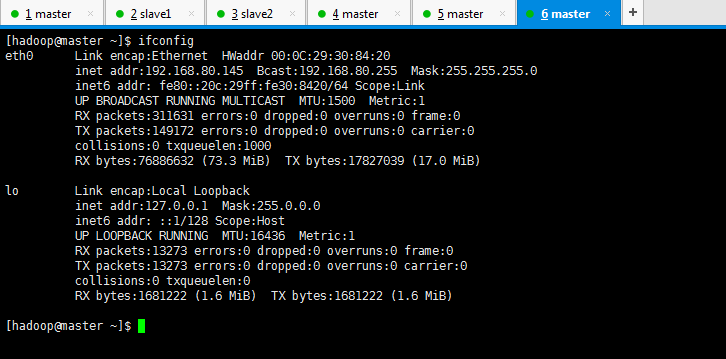
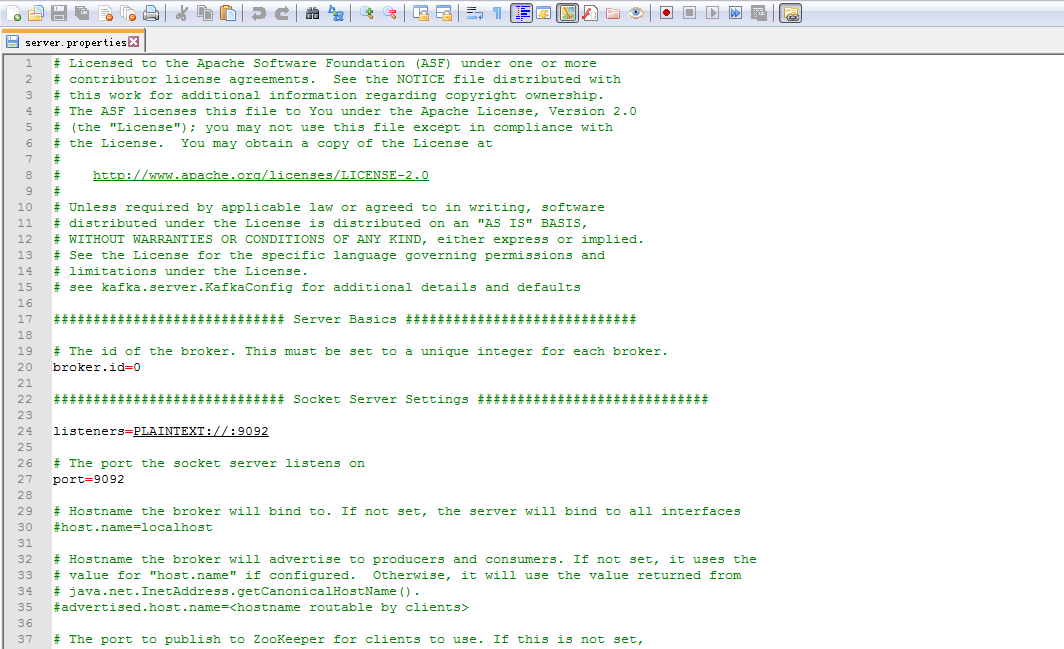
master节点上
# Licensed to the Apache Software Foundation (ASF) under one or more

# contributor license agreements.  See the NOTICE file distributed with

# this work for additional information regarding copyright ownership.

# The ASF licenses this file to You under the Apache License, Version 2.0

# (the "License"); you may not use this file except in compliance with

# the License.  You may obtain a copy of the License at

#

#    http://www.apache.org/licenses/LICENSE-2.0

#

# Unless required by applicable law or agreed to in writing, software

# distributed under the License is distributed on an "AS IS" BASIS,

# WITHOUT WARRANTIES OR CONDITIONS OF ANY KIND, either express or implied.

# See the License for the specific language governing permissions and

# limitations under the License.

# see kafka.server.KafkaConfig for additional details and defaults

############################# Server Basics #############################

# The id of the broker. This must be set to a unique integer for each broker.

broker.id=


############################# Socket Server Settings #############################

listeners=PLAINTEXT://:9092

# The port the socket server listens on

port=

# Hostname the broker will bind to. If not set, the server will bind to all interfaces

host.name=master

# Hostname the broker will advertise to producers and consumers. If not set, it uses the

# value for "host.name" if configured.  Otherwise, it will use the value returned from

# java.net.InetAddress.getCanonicalHostName().

#advertised.host.name=<hostname routable by clients>

# The port to publish to ZooKeeper for clients to use. If this is not set,

# it will publish the same port that the broker binds to.

#advertised.port=<port accessible by clients>

# The number of threads handling network requests

#num.network.threads=

# The number of threads doing disk I/O

#num.io.threads=

# The send buffer (SO_SNDBUF) used by the socket server

#socket.send.buffer.bytes=

# The receive buffer (SO_RCVBUF) used by the socket server

#socket.receive.buffer.bytes=

# The maximum size of a request that the socket server will accept (protection against OOM)

#socket.request.max.bytes=

# 是否允许自动创建topic ,若是false,就需要通过命令创建topic

auto.create.topics.enable =false

############################# Log Basics #############################

# A comma seperated list of directories under which to store log files

log.dirs=/data/kafka-log/log/

# The default number of log partitions per topic. More partitions allow greater

# parallelism for consumption, but this will also result in more files across

# the brokers.

num.partitions=

# The number of threads per data directory to be used for log recovery at startup and flushing at shutdown.

# This value is recommended to be increased for installations with data dirs located in RAID array.

num.recovery.threads.per.data.dir=


############################# Log Flush Policy #############################

# Messages are immediately written to the filesystem but by default we only fsync() to sync

# the OS cache lazily. The following configurations control the flush of data to disk.

# There are a few important trade-offs here:

#    . Durability: Unflushed data may be lost if you are not using replication.

#    . Latency: Very large flush intervals may lead to latency spikes when the flush does occur as there will be

a lot of data to flush

#    . Throughput: The flush is generally the most expensive operation, and a small flush interval may lead to ex

ceessive seeks.

# The settings below allow one to configure the flush policy to flush data after a period of time or

# every N messages (or both). This can be done globally and overridden on a per-topic basis.

# The number of messages to accept before forcing a flush of data to disk

log.flush.interval.messages=

# The maximum amount of time a message can sit in a log before we force a flush

log.flush.interval.ms=


############################# Log Retention Policy #############################

# The following configurations control the disposal of log segments. The policy can

# be set to delete segments after a period of time, or after a given size has accumulated.

# A segment will be deleted whenever *either* of these criteria are met. Deletion always happens

# from the end of the log.

# The minimum age of a log file to be eligible for deletion

log.retention.hours=

# A size-based retention policy for logs. Segments are pruned from the log as long as the remaining

# segments don't drop below log.retention.bytes.

log.retention.bytes=

# The maximum size of a log segment file. When this size is reached a new log segment will be created.

log.segment.bytes=

# The interval at which log segments are checked to see if they can be deleted according

# to the retention policies

log.retention.check.interval.ms=

log.cleaner.enable=false

############################# Zookeeper #############################

# Zookeeper connection string (see zookeeper docs for details).

# This is a comma separated host:port pairs, each corresponding to a zk

# server. e.g. "127.0.0.1:3000,127.0.0.1:3001,127.0.0.1:3002".

# You can also append an optional chroot string to the urls to specify the

# root directory for all kafka znodes.

zookeeper.connect=master:,slave1:,slave2:

# Timeout in ms for connecting to zookeeper

offsets.commit.timeout.ms=

request.timeout.ms=

zookeeper.connection.timeout.ms=300000
export HBASE_MANAGES_ZK=false

############################# zhouls add #############################

num.replica.fetchers=

replica.fetch.max.bytes=

replica.fetch.wait.max.ms=

replica.high.watermark.checkpoint.interval.ms=

replica.socket.timeout.ms=

replica.socket.receive.buffer.bytes=

replica.lag.time.max.ms=

controller.socket.timeout.ms=

controller.message.queue.size=

message.max.bytes=

num.io.threads=

num.network.threads=

socket.request.max.bytes=

socket.receive.buffer.bytes=

socket.send.buffer.bytes=

queued.max.requests=

fetch.purgatory.purge.interval.requests=

producer.purgatory.purge.interval.requests=

group.max.session.timeout.ms=
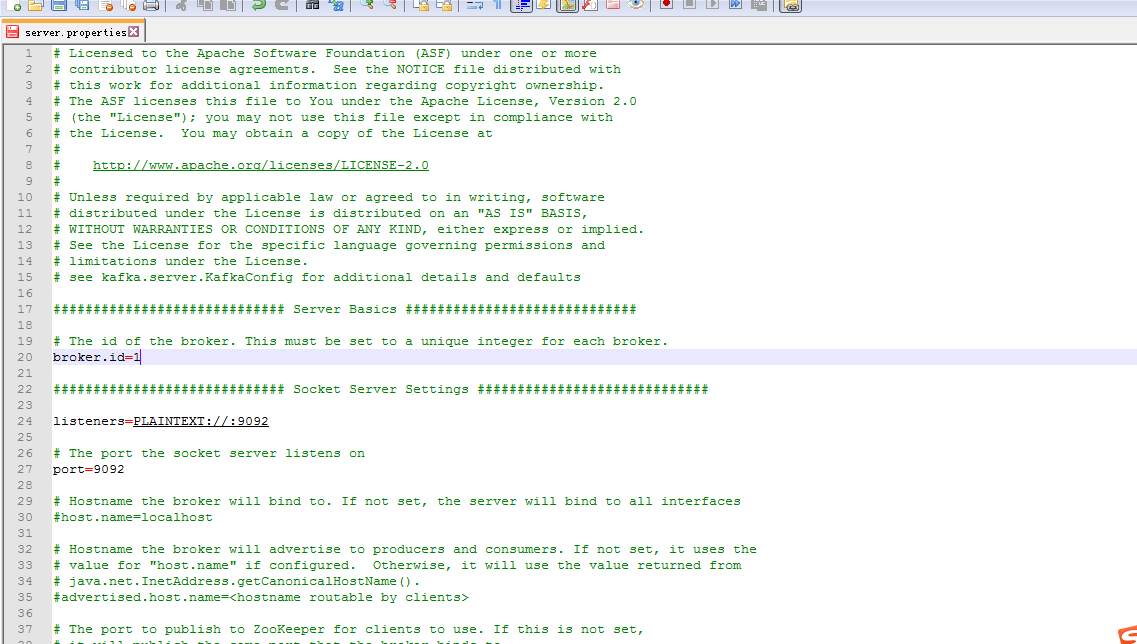
slave1上

# Licensed to the Apache Software Foundation (ASF) under one or more

# contributor license agreements.  See the NOTICE file distributed with

# this work for additional information regarding copyright ownership.

# The ASF licenses this file to You under the Apache License, Version 2.0

# (the "License"); you may not use this file except in compliance with

# the License.  You may obtain a copy of the License at

#

#    http://www.apache.org/licenses/LICENSE-2.0

#

# Unless required by applicable law or agreed to in writing, software

# distributed under the License is distributed on an "AS IS" BASIS,

# WITHOUT WARRANTIES OR CONDITIONS OF ANY KIND, either express or implied.

# See the License for the specific language governing permissions and

# limitations under the License.

# see kafka.server.KafkaConfig for additional details and defaults

############################# Server Basics #############################

# The id of the broker. This must be set to a unique integer for each broker.

broker.id=


############################# Socket Server Settings #############################

listeners=PLAINTEXT://:9092

# The port the socket server listens on

port=

# Hostname the broker will bind to. If not set, the server will bind to all interfaces

#host.name=localhost

# Hostname the broker will advertise to producers and consumers. If not set, it uses the

# value for "host.name" if configured.  Otherwise, it will use the value returned from

# java.net.InetAddress.getCanonicalHostName().

#advertised.host.name=<hostname routable by clients>

# The port to publish to ZooKeeper for clients to use. If this is not set,

# it will publish the same port that the broker binds to.

#advertised.port=<port accessible by clients>

# The number of threads handling network requests

#num.network.threads=

# The number of threads doing disk I/O

#num.io.threads=

# The send buffer (SO_SNDBUF) used by the socket server

#socket.send.buffer.bytes=

# The receive buffer (SO_RCVBUF) used by the socket server

#socket.receive.buffer.bytes=

# The maximum size of a request that the socket server will accept (protection against OOM)

#socket.request.max.bytes=

# 是否允许自动创建topic ,若是false,就需要通过命令创建topic

auto.create.topics.enable =false

############################# Log Basics #############################

# A comma seperated list of directories under which to store log files

log.dirs=/data/kafka-log/log/

# The default number of log partitions per topic. More partitions allow greater

# parallelism for consumption, but this will also result in more files across

# the brokers.

num.partitions=

# The number of threads per data directory to be used for log recovery at startup and flushing at shutdown.

# This value is recommended to be increased for installations with data dirs located in RAID array.

num.recovery.threads.per.data.dir=

############################# Log Flush Policy #############################

# Messages are immediately written to the filesystem but by default we only fsync() to sync

# the OS cache lazily. The following configurations control the flush of data to disk.

# There are a few important trade-offs here:

#    . Durability: Unflushed data may be lost if you are not using replication.

#    . Latency: Very large flush intervals may lead to latency spikes when the flush does occur as there will be

a lot of data to flush

#    . Throughput: The flush is generally the most expensive operation, and a small flush interval may lead to ex

ceessive seeks.

# The settings below allow one to configure the flush policy to flush data after a period of time or

# every N messages (or both). This can be done globally and overridden on a per-topic basis.

# The number of messages to accept before forcing a flush of data to disk

log.flush.interval.messages=

# The maximum amount of time a message can sit in a log before we force a flush

log.flush.interval.ms=


############################# Log Retention Policy #############################

# The following configurations control the disposal of log segments. The policy can

# be set to delete segments after a period of time, or after a given size has accumulated.

# A segment will be deleted whenever *either* of these criteria are met. Deletion always happens

# from the end of the log.

# The minimum age of a log file to be eligible for deletion

log.retention.hours=

# A size-based retention policy for logs. Segments are pruned from the log as long as the remaining

# segments don't drop below log.retention.bytes.

log.retention.bytes=

# The maximum size of a log segment file. When this size is reached a new log segment will be created.

log.segment.bytes=

# The interval at which log segments are checked to see if they can be deleted according

# to the retention policies

log.retention.check.interval.ms=

log.cleaner.enable=false


############################# Zookeeper #############################

# Zookeeper connection string (see zookeeper docs for details).

# This is a comma separated host:port pairs, each corresponding to a zk

# server. e.g. "127.0.0.1:3000,127.0.0.1:3001,127.0.0.1:3002".

# You can also append an optional chroot string to the urls to specify the

# root directory for all kafka znodes.

zookeeper.connect=master:,slave1:,slave2:

# Timeout in ms for connecting to zookeeper

offsets.commit.timeout.ms=

request.timeout.ms=

zookeeper.connection.timeout.ms=300000

export HBASE_MANAGES_ZK=false

############################# zhouls add #############################

num.replica.fetchers=

replica.fetch.max.bytes=

replica.fetch.wait.max.ms=

replica.high.watermark.checkpoint.interval.ms=

replica.socket.timeout.ms=

replica.socket.receive.buffer.bytes=

replica.lag.time.max.ms=

controller.socket.timeout.ms=

controller.message.queue.size=

message.max.bytes=

num.io.threads=

num.network.threads=

socket.request.max.bytes=

socket.receive.buffer.bytes=

socket.send.buffer.bytes=

queued.max.requests=

fetch.purgatory.purge.interval.requests=

producer.purgatory.purge.interval.requests=

group.max.session.timeout.ms=
slave2上

# Licensed to the Apache Software Foundation (ASF) under one or more

# contributor license agreements.  See the NOTICE file distributed with

# this work for additional information regarding copyright ownership.

# The ASF licenses this file to You under the Apache License, Version 2.0

# (the "License"); you may not use this file except in compliance with

# the License.  You may obtain a copy of the License at

#

#    http://www.apache.org/licenses/LICENSE-2.0

#

# Unless required by applicable law or agreed to in writing, software

# distributed under the License is distributed on an "AS IS" BASIS,

# WITHOUT WARRANTIES OR CONDITIONS OF ANY KIND, either express or implied.

# See the License for the specific language governing permissions and

# limitations under the License.

# see kafka.server.KafkaConfig for additional details and defaults

############################# Server Basics #############################

# The id of the broker. This must be set to a unique integer for each broker.

broker.id=

############################# Socket Server Settings #############################

listeners=PLAINTEXT://:9092

# The port the socket server listens on

port=

# Hostname the broker will bind to. If not set, the server will bind to all interfaces

#host.name=localhost

# Hostname the broker will advertise to producers and consumers. If not set, it uses the

# value for "host.name" if configured.  Otherwise, it will use the value returned from

# java.net.InetAddress.getCanonicalHostName().

#advertised.host.name=<hostname routable by clients>

# The port to publish to ZooKeeper for clients to use. If this is not set,

# it will publish the same port that the broker binds to.

#advertised.port=<port accessible by clients>

# The number of threads handling network requests

#num.network.threads=

# The number of threads doing disk I/O

#num.io.threads=

# The send buffer (SO_SNDBUF) used by the socket server

#socket.send.buffer.bytes=

# The receive buffer (SO_RCVBUF) used by the socket server

#socket.receive.buffer.bytes=

# The maximum size of a request that the socket server will accept (protection against OOM)

#socket.request.max.bytes=

# 是否允许自动创建topic ,若是false,就需要通过命令创建topic

auto.create.topics.enable =false

############################# Log Basics #############################

# A comma seperated list of directories under which to store log files

log.dirs=/data/kafka-log/log/

# The default number of log partitions per topic. More partitions allow greater

# parallelism for consumption, but this will also result in more files across

# the brokers.

num.partitions=

# The number of threads per data directory to be used for log recovery at startup and flushing at shutdown.

# This value is recommended to be increased for installations with data dirs located in RAID array.

num.recovery.threads.per.data.dir=

############################# Log Flush Policy #############################

# Messages are immediately written to the filesystem but by default we only fsync() to sync

# the OS cache lazily. The following configurations control the flush of data to disk.

# There are a few important trade-offs here:

#    . Durability: Unflushed data may be lost if you are not using replication.

#    . Latency: Very large flush intervals may lead to latency spikes when the flush does occur as there will be

a lot of data to flush

#    . Throughput: The flush is generally the most expensive operation, and a small flush interval may lead to ex

ceessive seeks.

# The settings below allow one to configure the flush policy to flush data after a period of time or

# every N messages (or both). This can be done globally and overridden on a per-topic basis.

# The number of messages to accept before forcing a flush of data to disk

log.flush.interval.messages=

# The maximum amount of time a message can sit in a log before we force a flush

log.flush.interval.ms=

############################# Log Retention Policy #############################

# The following configurations control the disposal of log segments. The policy can

# be set to delete segments after a period of time, or after a given size has accumulated.

# A segment will be deleted whenever *either* of these criteria are met. Deletion always happens

# from the end of the log.

# The minimum age of a log file to be eligible for deletion

log.retention.hours=

# A size-based retention policy for logs. Segments are pruned from the log as long as the remaining

# segments don't drop below log.retention.bytes.

log.retention.bytes=

# The maximum size of a log segment file. When this size is reached a new log segment will be created.

log.segment.bytes=

# The interval at which log segments are checked to see if they can be deleted according

# to the retention policies

log.retention.check.interval.ms=

log.cleaner.enable=false

############################# Zookeeper #############################

# Zookeeper connection string (see zookeeper docs for details).

# This is a comma separated host:port pairs, each corresponding to a zk

# server. e.g. "127.0.0.1:3000,127.0.0.1:3001,127.0.0.1:3002".

# You can also append an optional chroot string to the urls to specify the

# root directory for all kafka znodes.

zookeeper.connect=master:,slave1:,slave2:

# Timeout in ms for connecting to zookeeper

offsets.commit.timeout.ms=

request.timeout.ms=

zookeeper.connection.timeout.ms=

export HBASE_MANAGES_ZK=false

############################# zhouls add #############################

num.replica.fetchers=

replica.fetch.max.bytes=

replica.fetch.wait.max.ms=

replica.high.watermark.checkpoint.interval.ms=

replica.socket.timeout.ms=

replica.socket.receive.buffer.bytes=

replica.lag.time.max.ms=

controller.socket.timeout.ms=

controller.message.queue.size=

message.max.bytes=

num.io.threads=

num.network.threads=

socket.request.max.bytes=

socket.receive.buffer.bytes=

socket.send.buffer.bytes=

queued.max.requests=

fetch.purgatory.purge.interval.requests=

producer.purgatory.purge.interval.requests=

group.max.session.timeout.ms=
当然,大家也可以把master的broker.id=1开始。这个随意!
master的broker.id=0 slave1的broker.id=0 slave2的broker.id=0
master的broker.id=1 slave1的broker.id=2 slave2的broker.id=3
kafka的server.properties配置文件参考示范(图文详解)(多种方式)的更多相关文章
- ambari-server启动报错500 status code received on GET method for API:/api/v1/stacks/HDP/versions/2.4/recommendations Error message : Server Error解决办法(图文详解)
问题详情 来源是,我在Ambari集群里,安装Hue. 给Ambari集群里安装可视化分析利器工具Hue步骤(图文详解 所遇到的这个问题. 然后,去ambari-server的log日志,查看,如下 ...
- kafka中server.properties配置文件参数说明
转自:http://blog.csdn.net/lizhitao/article/details/25667831 参数 说明(解释) broker.id =0 每一个broker在集群中的唯一表示, ...
- ES配置文件参考与参数详解
cluster.name: data-cluster node.name: "data-es-05" #node.data: false # Indexing & Cach ...
- kafka启动时出现FATAL Fatal error during KafkaServer startup. Prepare to shutdown (kafka.server.KafkaServer) java.io.IOException: Permission denied错误解决办法(图文详解)
首先,说明,我kafk的server.properties是 kafka的server.properties配置文件参考示范(图文详解)(多种方式) 问题详情 然后,我启动时,出现如下 [hadoop ...
- kafka_2.11-0.8.2.2.tgz的3节点集群的下载、安装和配置(图文详解)
kafka_2.10-0.8.1.1.tgz的1或3节点集群的下载.安装和配置(图文详细教程)绝对干货 一.安装前准备 1.1 示例机器 二. JDK7 安装 1.1 下载地址 下载地址: http: ...
- 给Ambari集群里安装可视化分析利器工具Hue步骤(图文详解)
扩展博客 以下,是我在手动的CDH版本平台下,安装Hue. CDH版本大数据集群下搭建Hue(hadoop-2.6.0-cdh5.5.4.gz + hue-3.9.0-cdh5.5.4.tar.gz) ...
- spark最新源码下载并导入到开发环境下助推高质量代码(Scala IDEA for Eclipse和IntelliJ IDEA皆适用)(以spark2.2.0源码包为例)(图文详解)
不多说,直接上干货! 前言 其实啊,无论你是初学者还是具备了有一定spark编程经验,都需要对spark源码足够重视起来. 本人,肺腑之己见,想要成为大数据的大牛和顶尖专家,多结合源码和操练编程. ...
- 基于Web的Kafka管理器工具之Kafka-manager的编译部署详细安装 (支持kafka0.8、0.9和0.10以后版本)(图文详解)(默认端口或任意自定义端口)
不多说,直接上干货! 至于为什么,要写这篇博客以及安装Kafka-manager? 问题详情 无奈于,在kafka里没有一个较好自带的web ui.启动后无法观看,并且不友好.所以,需安装一个第三方的 ...
- neo4j的配置文件(图文详解)
不多说,直接上干货! 前期博客 Ubuntu16.04下Neo4j图数据库官网安装部署步骤(图文详解)(博主推荐) Ubuntu14.04下Neo4j图数据库官网安装部署步骤(图文详解)(博主推荐) ...
随机推荐
- ****Call to a member function item() on a non-object
A PHP Error was encountered Severity: Error Message: Call to a member function item() on a non-objec ...
- Help Jimmy DP
Help Jimmy" 是在下图所示的场景上完成的游戏. 场景中包括多个长度和高度各不相同的平台.地面是最低的平台,高度为零,长度无限. Jimmy老鼠在时刻0从高于所有平台的某处开始下落, ...
- POJ 3233_Matrix Power Series
题意: 求n*n矩阵的幂和 分析: 逐个加起来时间复杂度太高,通过在矩阵中套个矩阵和,再利用矩阵快速幂,最后时间复杂度为O(n3logn) 代码: #include<cstdio> #in ...
- Servlet开发(2)
Jsp&Servlet用户登录功能实现(采用MVC模式) 我们使用Jsp&Servlet开发一个用户登录功能的小项目(麻雀大小,但是五脏俱全呦,关键是技术问题!). 数据库:mysql ...
- P1028 数的计算 洛谷
https://www.luogu.org/problem/show?pid=1028 题目描述 我们要求找出具有下列性质数的个数(包含输入的自然数n): 先输入一个自然数n(n<=1000), ...
- oracle删除表前先判断表是否存在
DECLARE numbe NUMBER;BEGIN SELECT COUNT(1) INTO numbe FROM USER_TABLES WHERE TABLE_NAME = ...
- Redis官方文档资源
官方文档: 如果要深入研究时,官方提供的文档是最权威的. 英文: https://redis.io/documentation 中文: http://www.redis.cn/documentatio ...
- JSP的表单处理
以下内容引用自http://wiki.jikexueyuan.com/project/jsp/form-processing.html: 当需要从浏览器向Web服务器传递一些信息并最终将信息返回到后端 ...
- Ganglia API安装与使用
Ganglia监控本身没有提供API可供外部程序调用,只是依据ganglia监控的原理,能够通过分析gmetad的port的xml来直接获取metrics. Guardian已经在Github上公布了 ...
- hdu 1565 方格取数(1)(状态压缩dp)
方格取数(1) Time Limit: 10000/5000 MS (J ...