
Python爬虫常用库安装
建议更换pip源到国内镜像,下载会快很多:https://www.cnblogs.com/believepd/p/10499844.html
requests
pip3 install requests
selenium
pip3 install selenium
安装好后,测试一下:
from selenium import webdriver

driver = webdriver.Chrome()
执行后报错了:

需要安装chromedriver才能完成chrome浏览器的驱动。
可以从这里下载适合自己的chromedriver(需要对应自己的chrome版本!!!):https://npm.taobao.org/mirrors/chromedriver
比如我的是windows,解压后将chromedriver.exe放到某个配置好环境变量的目录下。
运行:
from selenium import webdriver

driver = webdriver.Chrome()

driver.get("https://www.baidu.com")

print(driver.page_source)
可以看到,自动打开百度并获取到了源代码。
但是,在做爬虫的时候,一直打开浏览器是不方便的,这时就需要一个没有界面的"浏览器"----phantomjs。
下载phantomjs:http://phantomjs.org/download.html
解压后,将bin目录配置到环境变量中。
from selenium import webdriver

driver = webdriver.PhantomJS(executable_path=r"D:\phantomjs-2.1.1-windows\bin\phantomjs.exe")

driver.get("https://www.baidu.com")

print(driver.page_source)
lxml
pip3 install lxml
beautifulsoup
pip3 install beautifulsoup4
from bs4 import BeautifulSoup

soup = BeautifulSoup("<html></html>", "lxml")
pyquery
pip3 install pyquery
from pyquery import PyQuery as pq

doc = pq("<html>hello!</html>")

result = doc("html").text()

print(result)  # hello!
pymongo
pip3 install pymongo
import pymongo

client = pymongo.MongoClient("localhost")

db = client["test_db"]

db["table"].insert({"name": "pd"})

result = db["table"].find_one({"name": "pd"})

print(result)
jupyter
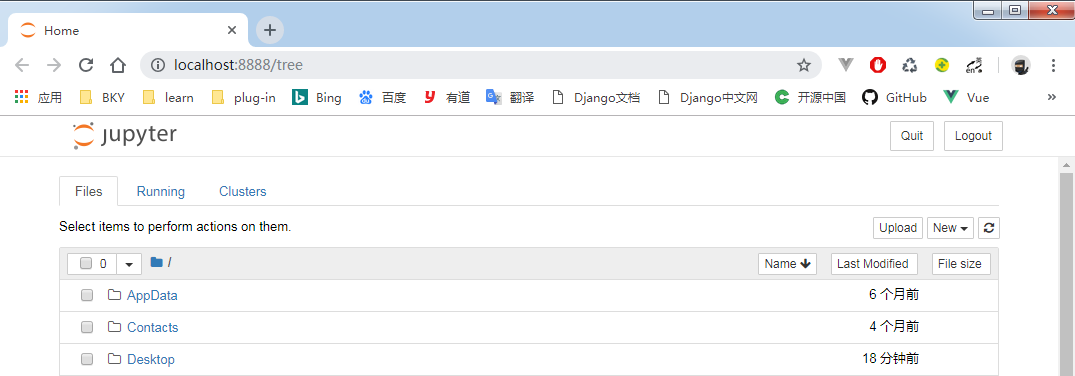
pip3 install jupyter
相当于一个记事本,它是运行在网页端的。
在cmd中输入:jupyter notebook,就会自动打开浏览器。点击new python3,即可在网页上运行代码。
Python爬虫常用库安装的更多相关文章
- 爬虫-Python爬虫常用库
一.常用库 1.requests 做请求的时候用到. requests.get("url") 2.selenium 自动化会用到. 3.lxml 4.beautifulsoup 5 ...
- python爬虫常用库和安装 -- windows7环境
1:urllib python自带 2:re python自带 3:requests pip install requests 4:selenium 需要依赖chrome ...
- Python爬虫常用模块安装
安装:pip3 install requestspip3 install seleniumpip3 install bs4pip3 install pyquerypip3 install pymysq ...
- Python 爬虫常用库(九)
- python常用库安装网址
python常用库安装网址如下: http://pypi.python.org/pypi
- Python爬虫—requests库get和post方法使用
目录 Python爬虫-requests库get和post方法使用 1. 安装requests库 2.requests.get()方法使用 3.requests.post()方法使用-构造formda ...
- python爬虫---selenium库的用法
python爬虫---selenium库的用法 selenium是一个自动化测试工具,支持Firefox,Chrome等众多浏览器 在爬虫中的应用主要是用来解决JS渲染的问题. 1.使用前需要安装这个 ...
- Python爬虫Urllib库的高级用法
Python爬虫Urllib库的高级用法 设置Headers 有些网站不会同意程序直接用上面的方式进行访问,如果识别有问题,那么站点根本不会响应,所以为了完全模拟浏览器的工作,我们需要设置一些Head ...
- Python爬虫Urllib库的基本使用
Python爬虫Urllib库的基本使用 深入理解urllib.urllib2及requests 请访问: http://www.mamicode.com/info-detail-1224080.h ...
随机推荐
- VC/MFC列表CListCtrl类的LVCOLUMN和LVITEM详解
列表视图控件(List Control)列表视图控件是一种非常常用的控件,在需要以报表形式显示数据时,列表控件通常是最好的选择,许多专用的数据报表控件,也是在它的基础上派生而来.与树视图类似,列表 ...
- 转 source insight 复制后光标在前面
source insight 里编辑的时候,每次粘贴后,光标停留在粘贴内容的前面. 我想把它设定为 粘贴后,光标移动倒粘贴内容的后面. 怎么做? 这是个设置问题,按照下面的步骤设定就可以了. Opti ...
- 基于Spark的GBDT + LR模型实现
目录 基于Spark的GBDT + LR模型实现 数据预处理部分 GBDT模型部分(省略调参部分) GBDT与LR混合部分 基于Spark的GBDT + LR模型实现 测试数据来源http://arc ...
- Java DOM方式解析XML(模板)
//创建一个DocumentBuilderFactory工厂实例 DocumentBuilderFactory DBF=DocumentBuilderFactory.newInstance(); // ...
- bzoj 1654: [Usaco2006 Jan]The Cow Prom 奶牛舞会【tarjan】
几乎是板子,求有几个size>1的scc 直接tarjan即可 #include<iostream> #include<cstdio> #include<cstri ...
- bzoj 1664: [Usaco2006 Open]County Fair Events 参加节日庆祝【dp+树状数组】
把长度转成右端点,按右端点排升序,f[i]=max(f[j]&&r[j]<l[i]),因为r是有序的,所以可以直接二分出能转移的区间(1,w),然后用树状数组维护区间f的max, ...
- Hadoop回收站及fs.trash参数详解
前言: Linux系统里,个人觉得最大的不方便之一就是没有回收站的概念.rm -rf很容易造成极大的损失.而在Hadoop或者说HDFS里面,有trash(回收站)的概念,可以使得数据被误删以后,还可 ...
- mycat查表报错Invalid DataSource:0解决方法
报错时机 登录没问题 use库没问题 select任意一张表均报错 报错信息 mysql> select * from mydb.tb_user; ERROR 3009 (HY000): jav ...
- redis存储对象(转)
原文地址:http://www.cnblogs.com/JKayFeng/p/5911544.html 为什么要实现序列化接口 当一个类实现了Serializable接口(该接口仅为标记接口,不包含任 ...
- SQL 经典语句大全
原地址:http://www.cnblogs.com/yubinfeng/archive/2010/11/02/1867386.html 一.基础 1.说明:创建数据库 CREATE DATABASE ...