
vue中手机号,邮箱正则验证以及60s发送验证码
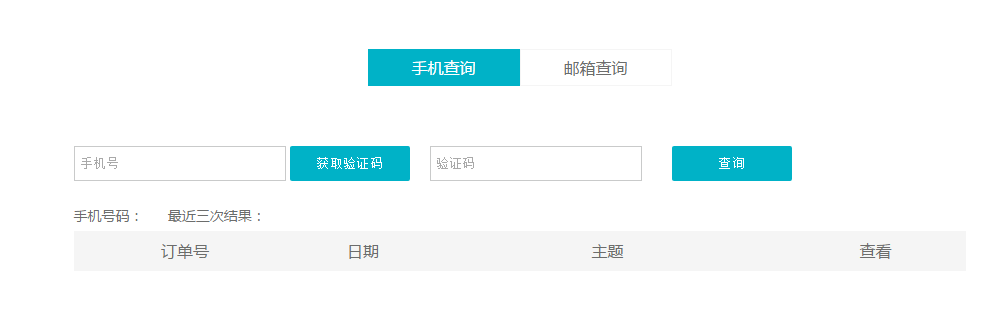
今天写了一个简单的验证,本来前面用的组件,但是感觉写的组件在此项目不是很好用,由于用到的地方比较少,所以直接写在了页面中。页面展示如图
- <div>
- <p class="fl">
- <input name="phone" type="number" placeholder="手机号" v-model="phone"/>
- <button type="button" :disabled="disabled" @click="sendcode" class="btns">{{btntxt}}</button>
- </p>
- <p class="fl" style="margin-left: 20px;">
- <input type="text" placeholder="验证码"/>
- </p>
- </div>
- <input type="button" value="查询" class="btns search" @click="query"/>
这里是script里的内容
- export default {
- data: function () {
- return {
- disabled:false,
- time:0,
- btntxt:"获取验证码",
- formMess:{
- email:this.email,
- phone:this.phone
- }
- }
- },
- mounted: function () {
- },
- methods:{
- //验证手机号码部分
- sendcode(){
- var reg=11 && /^((13|14|15|17|18)[0-9]{1}\d{8})$/;
- //var url="/nptOfficialWebsite/apply/sendSms?mobile="+this.ruleForm.phone;
- if(this.phone==''){
- alert("请输入手机号码");
- }else if(!reg.test(this.phone)){
- alert("手机格式不正确");
- }else{
- this.time=60;
- this.disabled=true;
- this.timer();
- /*axios.post(url).then(
- res=>{
- this.phonedata=res.data;
- })*/
- }
- },
- timer() {
- if (this.time > 0) {
- this.time--;
- this.btntxt=this.time+"s后重新获取";
- setTimeout(this.timer, 1000);
- } else{
- this.time=0;
- this.btntxt="获取验证码";
- this.disabled=false;
- }
- },
- query(){
- var formMess=this.formMess
- Axios.post(api+"/order/select/reception", formMess)
- .then(function (res) {
- if(res.data.code==200){
- console.log(res.data.data);
- this.productResult=res.data.data;
- this.productResult.length=3;
- }else if(res.data.code==400){
- alert(res.data.message)
- }
- }.bind(this))
- },
- //邮箱验证
- sendEmail(){
- var regEmail= /^([a-zA-Z0-9]+[_|\_|\.]?)*[a-zA-Z0-9]+@([a-zA-Z0-9]+[_|\_|\.]?)*[a-zA-Z0-9]+\.[a-zA-Z]{2,3}$/;
- if(this.email==''){
- alert("请输入邮箱");
- }else if(!regEmail.test(this.email)){
- alert("邮箱格式不正确");
- }
- }
- }
- }
vue中手机号,邮箱正则验证以及60s发送验证码的更多相关文章
- vue中的表单验证
http://www.cnblogs.com/luoxuemei/p/9295506.html /*是否合法IP地址*/ export function validateIP(rule, value, ...
- winform 学习之qq邮箱正则验证及常用正则
这段时间一直再做winform相关的项目,记录了一些东西 qq邮箱正则表达式: 第一种:字母和数字组合邮箱判断 string str = "justin1107@qq.com"; ...
- php email邮箱正则验证
国际域名格式如下: 域名由各国文字的特定字符集.英文字母.数字及“-”(即连字符或减号)任意组合而成, 但开头及结尾均不能含有“-”,“-”不能连续出现 . 域名中字母不分大小写.域名最长可达60个字 ...
- Vue中Form表单验证无法消除验证问题
iView的表单api给出了一个resetFields方法,用于重置整个表单输入的内容并清除验证提示. 但是有时候需要只消除部分的iview的resetFields方法源码是这样的resetField ...
- java邮箱正则验证
import java.util.*; import java.util.regex.Matcher; import java.util.regex.Pattern; public class tes ...
- 邮箱、手机号、中文 js跟php正则验证
邮箱正则: jS: var regEmail = /^([a-zA-Z0-9_-])+@([a-zA-Z0-9_-])+(\.[a-zA-Z0-9_-])+/; //验证 if(regEmail.te ...
- ASP.NET中 RegularExpressValidator(正则验证)的使用
原文:ASP.NET中 RegularExpressValidator(正则验证)的使用 ylbtech-ASP.NET-Control-Validator: RegularExpressValida ...
- 在js中实现邮箱格式的验证
在js中实现邮箱格式的验证 <!DOCTYPE HTML PUBLIC "-//W3C//DTD HTML 4.01 Transitional//EN"><htm ...
- JavaScript正则验证邮箱
正则表达式/^正则$/.test() <html> <head> <title>JavaScript</title> <meta charset= ...
随机推荐
- 洛谷 [P3834] 可持久化线段树(主席树)
主席树可以存储线段树的历史状态,空间消耗很大,一般开45n即可 #include <iostream> #include <cstdio> #include <cstri ...
- openSUSE Leap 15.0 初始配置
添加源: # 禁用原有软件源 sudo zypper mr -da # 添加阿里镜像源 sudo zypper ar -fc https://mirrors.aliyun.com/opensuse/d ...
- eopkg命令
#命令: add-repo (ar) ---添加存储库 blame (bl) ---包所有者和发布信息 build (bi) ---建立eopkg包 check ---验证安装 clean ...
- Oracle 12c PDB和CDB全局用户权限问题
Oracle12c版本中引入了新的CDB和PDB 默认登陆CDB后创建的用户为全局用户必须以c##开头 如果要访问CDB中的表,可以用GRANT命令赋权 但是上面的赋权并不会再PDB中生效 如果要这个 ...
- T1063 合并果子 codevs
http://codevs.cn/problem/1063/ 时间限制: 1 s 空间限制: 128000 KB 题目等级 : 钻石 Diamond 题目描述 Description 在一个 ...
- Windows下配置scrapy需要MVC的14.0版本(转载)
转载于--http://blog.csdn.net/MrWilliamVs/article/details/77130965 杨煜冬煜杨的博客,他的博客比较杂,Java.Python都有--http: ...
- Python资料大全
说明:以下文章为转载,有英文原文和中文整理翻译,对原作者和译者的工作表示极大感谢!!! 英文原文:https://github.com/vinta/awesome-python 中文译文:https: ...
- Setup and Teardown Thread Group in Jmeter
setup和teardown有点类似于每个测试用例开始和结束时要做的动作 A Thread Group is the starting point of any Jmeter Test Plan. A ...
- android官方Api 理解Activity生命周期的回调机制(适合有基础的人看)
原文地址:http://www.android-doc.com/training/basics/activity-lifecycle/starting.html#lifecycle-states 此处 ...
- [Binary Hacking] ABI and EABI
Following are some general papers about ABI and EABI. Entrance https://en.wikipedia.org/wiki/Applica ...