
iOS Programming View and View Hierarchy 视图和视图等级
iOS Programming View and View Hierarchy 视图和视图等级
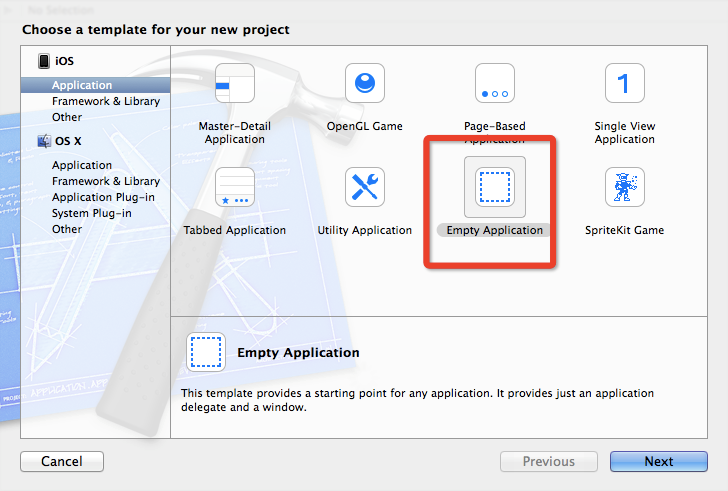
1.1(1)File → New → Project..
From the iOS section, select Application, choose the Empty Application template, and click Next.
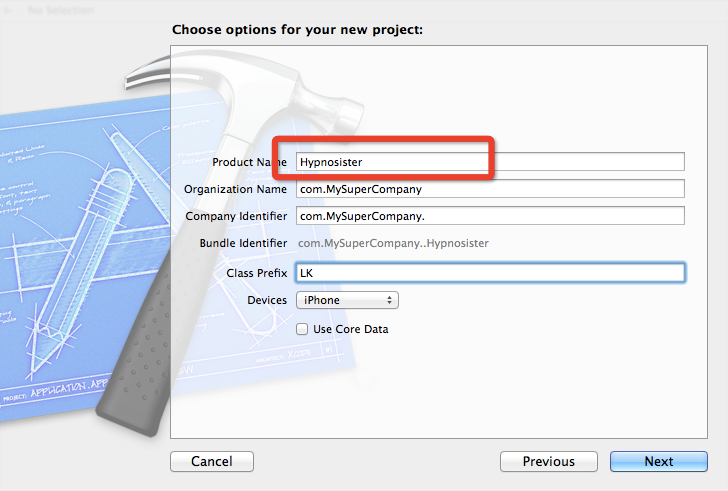
1.2 View Basics
(1)A view is an instance of UIView or one of its subclasses.
一个视图是UIView 或是它的子类的一个实例。
(2)A view knows how to draw itself.一个view 知道如何画自己。
(3)A view handles events, like touches.
view 处理events,例如触摸。
(4)A view exists within a hierarchy of views. The root of this hierarchy is the application's window.
一个View存在在一个views的树中。这个树的根是应用程序的window.
In Hypnosister, you will create views programmatically.
在这个程序中,你将用程序创建一个视图。
1.3 The View Hierarchy视图等级
Every application has a single instance of UIWindow that serves as the container for all the views in the application.
每个application 有一个单例的UIWindow 。 它充当这个application里所有view 的容器。
The window is created when the application launches. Once the window is created, you can add other views to it.
程序启动时,窗口就被创建了。一旦window创建成功,你可以添加其他的view到window上。
When a view is added to the window, it is said to be a subview of the window. Views that are subviews of the window can also have subviews,
当你添加一个view 到window,该view也就是window的subview。 当然window的subview 仍然可以有subview。 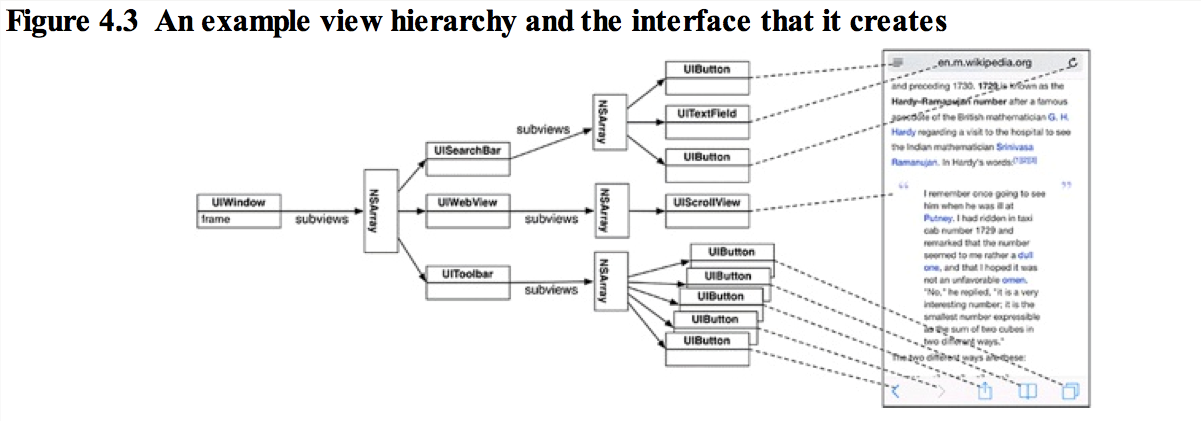
Once the view hierarchy has been created, it will be drawn to the screen.
创建好view hierarchy后,就可以画到屏幕上了。
This process can be broken into two steps:
该进程可以分为两步:
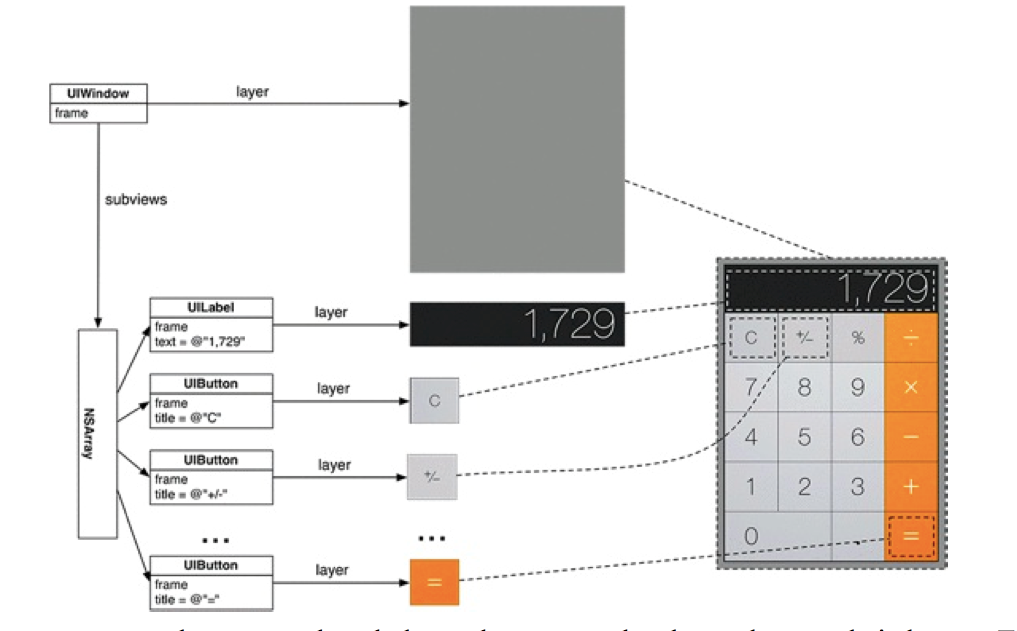
(1)Each view in the hierarchy, including the window, draws itself. It renders itself to its layer, which is an instance of CALayer. (You can think of a view's layer as a bitmap image.)
每个视图都是自己画自己。它展现自己到自己的layer。layer是CALayer的一个实例。(你可以想象一个view layer是一个位图图片)
(2)The layers of all the views are composited together on the screen.
所有的view的layers 组合在屏幕上。
Views render themselves and then are composited together
Classes like UIButton and UILabel already know how to render themselves to their layers.
1.4
像UIButton and UILabel 已经知道如何把它们自己展现到它们自己的layer上了。但是有一些没有。 需要我么自己写,如何展现。
(1)select File → New → File... (or press Command-N).
From the iOS section,
select Cocoa Touch and then choose Objective-C class
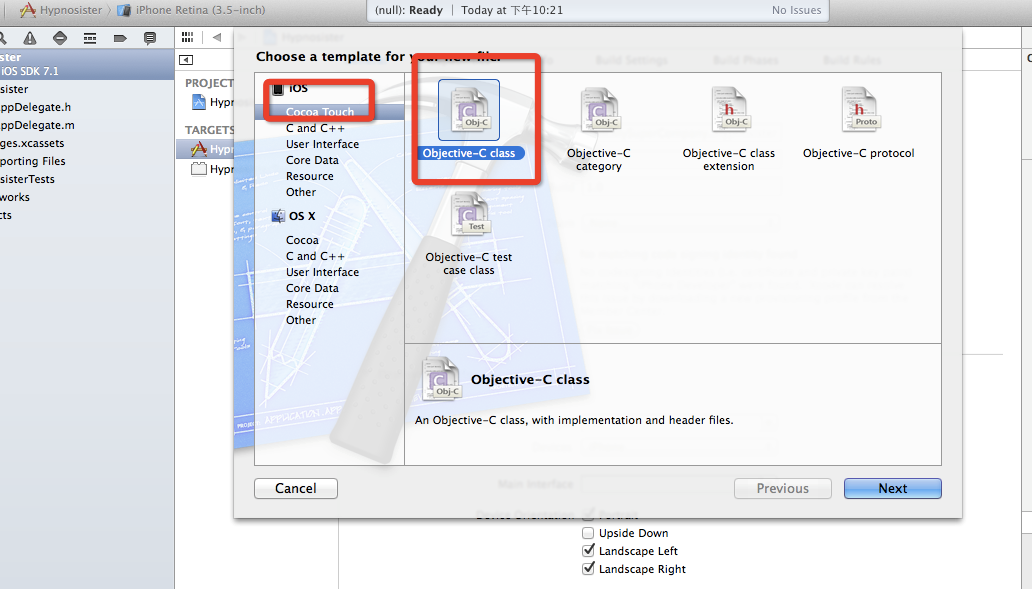
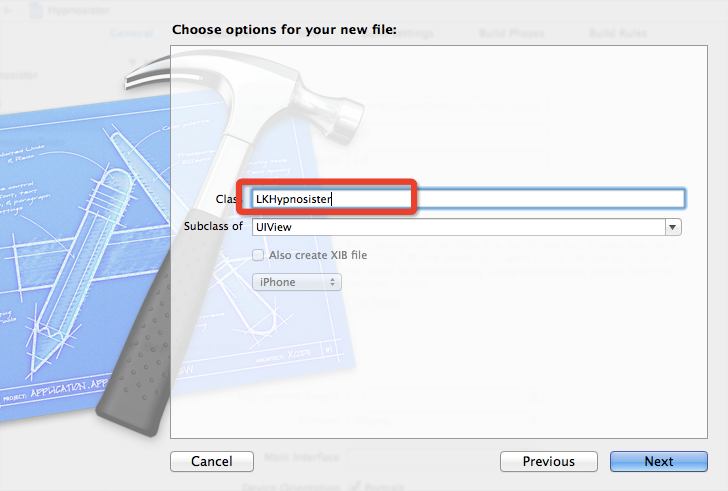
1.4.1

CGRect firstFrame=CGRectMake(100, 140, 100, 150);
LKHypnosister *firstView=[[LKHypnosister alloc] initWithFrame:firstFrame];
firstView.backgroundColor=[UIColor redColor];
[self.window addSubview:firstView];
these values are in points, not pixels.
这些值都是点,而不是像素。
If the values were in pixels, then they would not be consistent across displays of different resolutions (i.e., Retina vs. non-Retina).
如果是像素,那么在不同的设备中,将得到不同的结果。
A single point is a relative unit of a measure; it will be a different number of pixels depending on how many pixels there are in the display.
单点是一个相对单位。它因显示器中得像素数不同而不同。
On a Retina Display, a pixel is half a point tall and half a point wide by default. On a non-Retina Display, one pixel is one point tall and one point wide by default. When printing to paper, an inch is 72 points long.
不同屏幕像素不同。
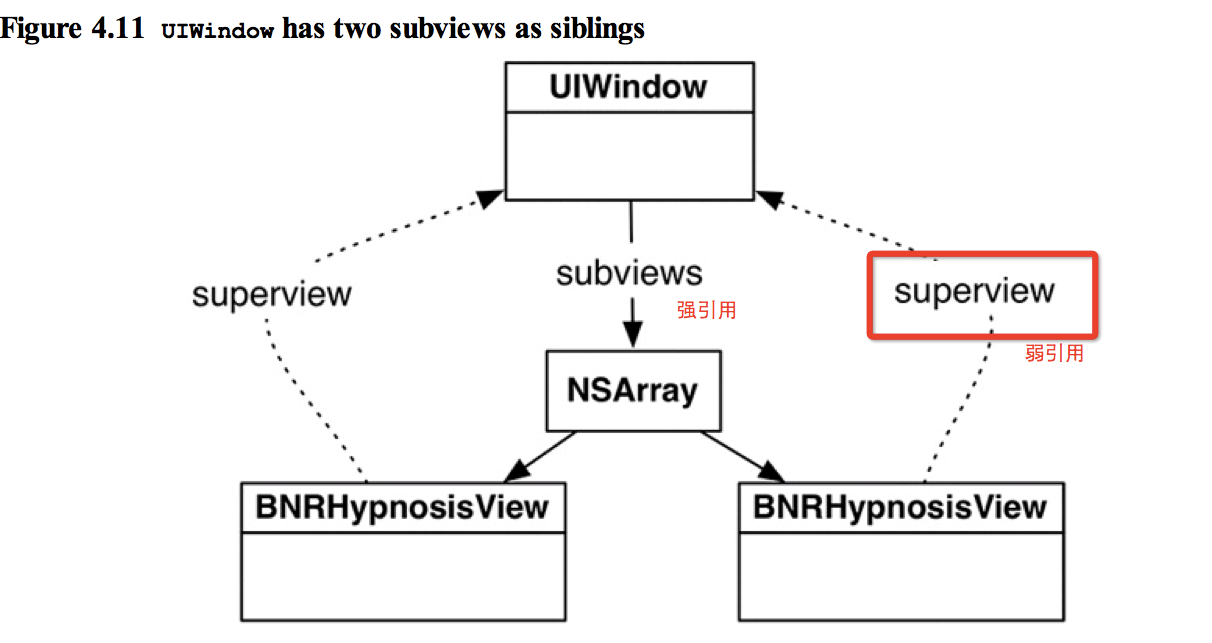
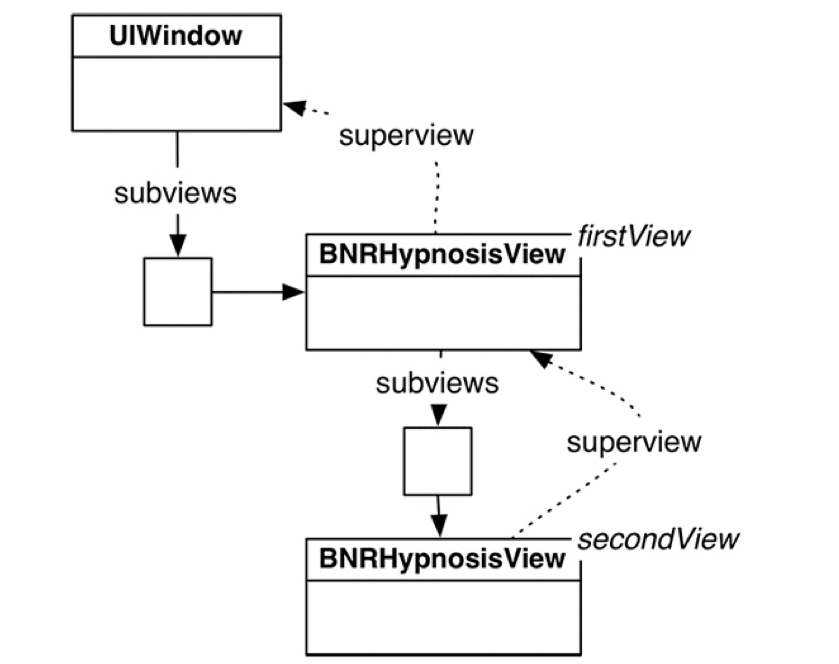
Every instance of UIView has a superview property. When you add a view as a subview of another view, the inverse relationship is automatically established.
每个视图在建立的时候就有一个superview的属性。
2 Custom Drawing in drawRect:
在drawRect中通用绘画
The drawRect: method is the rendering step where a view draws itself onto its layer.
drawRect 是展示步骤,一个视图绘自己到layer层。
The first thing that you typically do when overriding drawRect: is get the bounds rectangle of the view. The bounds property, inherited from UIView, is the rectangle that defines the area where the view will draw itself.
overriding drawRect的第一件事是找到bounds。bounds属性继承自UIView,是一个定义了view在哪里画自己的矩形。
2.2 The bounds is a view's rectangle in its own coordinate system. The frame is the same rectangle in its superview's coordinate system.
bounds是在view自己坐标系的矩形。
而frame是在view的superview坐标系的矩形。
The frame and bounds rectangles have distinct purposes.
两者目的不同。
A view's frame rectangle is used during compositing to lay out the view's layer relative to the rest of the view hierarchy.
view's frame rectangle 用来组合view的layer 和其他的view hierarchy内的view。
The bounds rectangle is used during the rendering step to lay out detailed drawing within the boundaries of the view's layer.
bounds rectangle 是用来rendering step 来放置该view's layer 边界的 细节的。

2.3 drawing a single circle 画个圆
-(void)drawRect:(CGRect)rect{
CGRect bounds=self.bounds;
CGPoint center;
center.x=bounds.origin.x+bounds.size.width/2.0;
center.y=bounds.origin.y+bounds.size.height/2.0;
float radius=MIN(bounds.size.width/2.0, bounds.size.height/2.0);
}
2.4UIBezierPath 贝瑟尔曲线
The next step is to draw the circle using the UIBezierPath class. Instances of this class define and draw lines and curves that you can use to make shapes, like circles.
UIBezierPath class的实例 定义了如何画你想要的图形。
UIBezierPath *path=[[UIBezierPath alloc]init];
[path addArcWithCenter:center radius:radius startAngle:0 endAngle:M_PI*2.0 clockwise:YES];
查询Apple api得到的方法。有什么不会的,知道了一点,就可以查api 。最快。
You have defined a path, but you have not drawn anything yet.
做好了路径,就要画出来。
a view's backgroundColor is drawn regardless of what drawRect: does.
一个view的backgroundColor 绘制不管drawRect是什么。
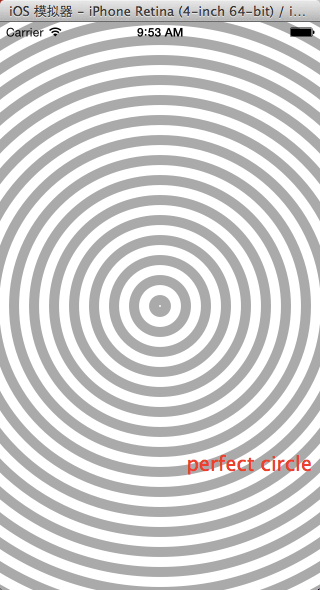
2.5Drawing concentric circles
画同心圆
Think of a UIBezierPath object as a pencil on a piece of paper – when you go to draw another circle, the pencil stays on the piece of paper. You need to lift the pencil off the piece of paper before drawing a new circle.
当你在纸上画圆的时候,每每画个圆,就提一下笔。在UIBezierPath 也是一样。
[path moveToPoint:CGPointMake(center.x + currentRadius, center.y)];
2.6 draw an image
得到image ,然后该image 画出来。
UIImage *shopImage=[UIImage imageNamed:@"shop.png"];
[shopImage drawInRect:self.bounds];
2.7core graphic
UIBezierPath, wrap Core Graphics code into their methods to ease drawing for the programmer.
UIBezierPath 用到了Core Graphic代码封装,让drawing更容易。
Core Graphics is a 2D drawing API written in C. As such, there are no Objective-C objects or methods, but instead C structures and C functions that mimic object-oriented behavior.
Core Graphics 是用C写的,里面没有oc。
The most important Core Graphics "object" is the graphics context, which really holds two things: the state of drawing, like the current color of the pen and its line thickness, and the memory that is being drawn upon.
core graphic 最重要的对象是graphic context .Graphic context 有两种事情:the drawing state 和 将要在其之上画得内存。
A graphics context is represented by "instances" of CGContextRef
graphics context 由CGContextRef 来表示。
Right before drawRect: is sent to an instance of UIView, the system creates a CGContextRef for that view's layer.
在画之前,系统创建一个CGContextRef 为这个view's layer .
As drawing operations are sent to the context, the pixels in the layer are changed.
当drawing 操作被送到context ,layer上的像素发生了变化。
After drawRect: completes, the system grabs the layer and composites it to the screen.
在drawRect完成后,系统获取这个layer并组成它到屏幕。
The drawing classes you used in this chapter all know how to call Core Graphics functions that change the drawing state and issue drawing operations on the appropriate CGContextRef.
最近我们使用的drawing 类都知道如何调用Core Graphic 函数改变drawing state和处理drawing 操作 在适当的CGContextRef .
For example, sending setStroke to an instance of UIColor will call functions that change the drawing state of the current context.
setStroke 知道如何调用函数来改变current context 的状态。
[[UIColor colorWithRed:1.0 green:0.0 blue:1.0 alpha:1.0] setStroke];
UIBezierPath *path = [UIBezierPath bezierPath]; [path moveToPoint:a];
[path addLineToPoint:b];
[path stroke];
Is equivalent to these lines: 作用效果一样。
CGContextSetRGBStrokeColor(currentContext, 1, 0, 0, 1);
CGMutablePathRef path = CGPathCreateMutable(); CGPathMoveToPoint(path, NULL, a.x, a.y); CGPathAddLineToPoint(path, NULL, b.x, b.y); CGContextAddPath(currentContext, path);
CGContextStrokePath(currentContext); CGPathRelease(path);
The Core Graphics functions that operate on the context, like CGContextSetRGBStrokeColor, take a pointer to context that they will modify as their first argument.
core graphic 函数操作在context 上,像CGContextSetRGBStrokeColor ,作为第一参数,传递到context ,将被修改。
You can grab a pointer to the current context in drawRect: by calling the function UIGraphicsGetCurrentContext.
你可以通过UIGraphicsGetCurrentContext获得CGContextRef .
why many of the Core Graphics types have a Ref after them. Every Core Graphics type is a structure, but some mimic the behavior of objects by being allocated on the heap. Therefore, when you create one of these Core Graphics "objects", you are returned a pointer to their address in memory.
为什么会有REF ,因为一般的core graphic type是个structure ,但他们模仿对象的行为,放在堆上。因此他们返回的都是内存地址的指针。
Each Core Graphics structure that is allocated in this way has a type definition that incorporates the asterisk (*) into the type itself.
每一个带REF的结构体都带*,
For example, there exists a structure CGColor (that you never use) and a type definition CGColorRef that means CGColor * (that you always use).
CGColor (你不用),CGColorRef(经常用)
Another point of confusion for programmers in Core Graphics is that some types do not have a Ref or an asterisk, like CGRect and CGPoint.
另一个迷惑的地方是那些既不带Ref也不带*的。
These types are small data structures that can live on the stack, so there is no need to pass a pointer to them
那是因为这些结构体足够小,放在stack上就行了。
The rule is: if you create a Core Graphics object with a function that has the word Create or Copy in it, you must call the matching Release function and pass a pointer to the object as the first argument.
因为ARC不能处理C引用,因此如果创建了一个Core Graphics 对象,用了Create or copy,你必须找到相应的Release函数
2.8 Shadows and Gradients
To create a drop shadow, you install a shadow on the graphics context.
为了创建一个shadow,你必须安装一个shadow到graphics context.
After that, anything opaque that you draw will have a drop shadow.
在这之后你创建的任何不透明的东西都会有阴影。
Here is the declaration of the method used to install the shadow on the graphics context: 这个声明可以用来安装shadow。
void CGContextSetShadow ( CGContextRef context, CGSize offset,
CGFloat blur);
There is no unset shadow function. Thus, you will need to save the graphics state before setting the shadow and then restore it after setting the shadow.
没有卸载函数。因此你在你设置shadow之前,需要保存graphics state 。
CGContextSaveGState(currentContext); CGContextSetShadow(currentContext, CGSizeMake(4,7), 3);
// Draw stuff here, it will appear with a shadow
CGContextRestoreGState(currentContext);
// Draw stuff here, it will appear with no shadow
iOS Programming View and View Hierarchy 视图和视图等级的更多相关文章
- iOS Programming View Controllers 视图控制器
iOS Programming View Controllers 视图控制器 1.1 A view controller is an instance of a subclass of UIVi ...
- iOS Programming Autorotation, Popover Controllers, and Modal View Controllers
iOS Programming Autorotation, Popover Controllers, and Modal View Controllers 自动旋转,Popover 控制器,Moda ...
- IOS 开发中 Whose view is not in the window hierarchy 错误的解决办法
在 IOS 开发当中经常碰到 whose view is not in the window hierarchy 的错误,该错误简单的说,是由于 "ViewController" ...
- 【IOS笔记】Using View Controllers in Your App
参考:http://www.cnblogs.com/patientAndPersist/p/3279645.html Using View Controllers in Your App Whethe ...
- IOS UIView 03- 自定义 Collection View 布局
注:本人是翻译过来,并且加上本人的一点见解. 前言 UICollectionView 在 iOS6 中第一次被引入,也是 UIKit 视图类中的一颗新星.它和 UITableView 共享一套 API ...
- iOS应用架构谈 view层的组织和调用方案
当我们开始设计View层的架构时,往往是这个App还没有开始开发,或者这个App已经发过几个版本了,然后此时需要做非常彻底的重构. 一般也就是这两种时机会去做View层架构,基于这个时机的特殊性,我们 ...
- (转)iOS应用架构谈 view层的组织和调用方案
前言 <iOS应用架构谈 开篇>出来之后,很多人来催我赶紧出第二篇.这一篇文章出得相当艰难,因为公司里的破事儿特别多,我自己又有点私事儿,以至于能用来写博客的时间不够充分. 现在好啦,第二 ...
- IOS—通过ChildViewController实现view的切换
IOS-通过ChildViewController实现view的切换 在以前,一个UIViewController的View可能有很多小的子view.这些子view很多时候被盖在最后,我们在最外层Vi ...
- iOS 容器控制器 (Container View Controller)
iOS 容器控制器 (Container View Controller) 一个控制器包含其他一个或多个控制器,前者为容器控制器 (Container View Controller),后者为子控制器 ...
随机推荐
- Effective JavaScript Item 39 绝不要重用父类型中的属性名
本系列作为Effective JavaScript的读书笔记. 假设须要向Item 38中的Actor对象加入一个ID信息: function Actor(scene, x, y) { this.sc ...
- lineage 世系 血缘 容错机制 DAG
当某个RDD的部分数据丢失时候,Saprk会根据记录的世系关系找到该RDD的父RDD以及更上级的RDD.只需要将该RDD依赖的上级RDD重新计算就可以将该RDD进行恢复. Directed Acycl ...
- 关于前端js拼接字符串的一点小经验
1.今天在做项目的时候遇到一个问题,就是使用onclick="xxx()" 点击事件的时候,参数如果为全数字就会出现点击无反应的问题.但是当参数为字符串或者动态内容的时候就会出现 ...
- SQL外键的作用
貌似很有用,但没有真正用过: SQL的主键和外键的作用: 外键取值规则:空值或参照的主键值. (1)插入非空值时,如果主键表中没有这个值,则不能插入. (2)更新时,不能改为主键表中没有的值. (3) ...
- 在Orchard CMS Theme 用代码定义布局Widgets
因为公司业务需要,经过本人几个月尝试,使用Orchard CMS 开发一个简单的企业门户(地址是http://www.ubof.cn).在刚开始接触Orchard CMS,对于个性化的网页布局不知道怎 ...
- varint算法——本质上是牺牲最高位作为标识数据结束位,达到变长编码,说白了就是贪心的分割位
varint算法,摘自:http://blog.csdn.net/liaoquesg/article/details/50897327 最近在看<大规模WEB服务开发技术>这本书中.书中提 ...
- wpa_supplicant drivers 查看跟踪
/**************************************************************************** * wpa_supplicant drive ...
- luogu4917天守阁的地板
https://www.zybuluo.com/ysner/note/1317548--- 题面 给出\(n\),用所有长为\(a\).宽为\(b\)\((1\leq a,b\leq n)\)的长方形 ...
- 去除inline-block的间隙
产生间隙的原因就是标签之间的空格,去除的方法: 1 设置父元素的font-size:0;空格字符的宽高都为0, <div class="demo1 demo2"> &l ...
- Java多线程系列十——BlockingQueue
参考资料:http://ifeve.com/java-synchronousqueue/http://www.cnblogs.com/jackyuj/archive/2010/11/24/188655 ...