
原创:Nginx反向代理实战部署
均衡负载服务器 10.0.0.9
[root@web03 conf]# vim nginx.conf
worker_processes 1;
events {
worker_connections 1024;
}
http {
include mime.types;
default_type application/octet-stream;
sendfile on;
keepalive_timeout 65;
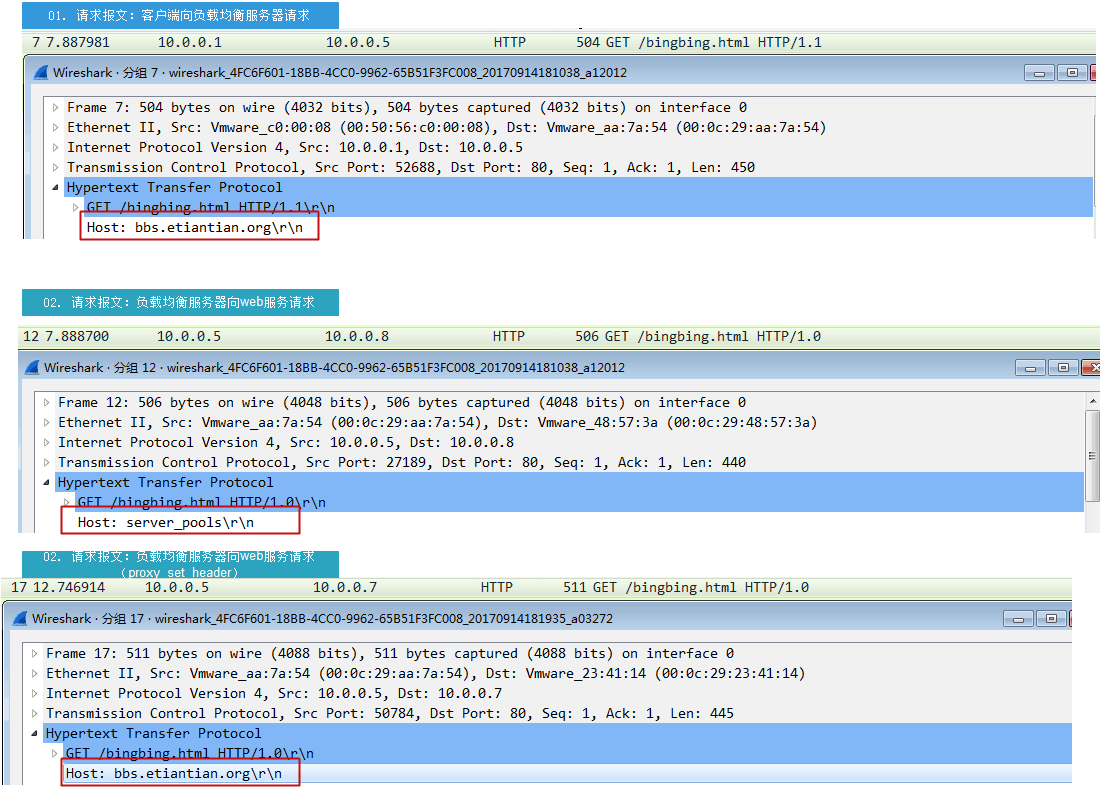
upstream server_pools {
## ip_hash;
server 10.0.0.7:80 weight=1 max_fails=3 fail_timeout=10;
server 10.0.0.8:80 weight=1
max_fails=3 fail_timeout=10 ;
}
server {
listen 80;
server_name bbs.etiantian.org;
location / {
proxy_pass http://server_pools;
}
}
}
hosts
[root@web03 conf]# cat /etc/hosts
127.0.0.1 localhost localhost.localdomain localhost4 localhost4.localdomain4
::1 localhost localhost.localdomain localhost6 localhost6.localdomain6
172.16.1.5 lb01
172.16.1.6 lb02
172.16.1.7 web02
172.16.1.9 web03
172.16.1.8 web01 bbs.etiantian.org www.etiantian.org
172.16.1.51 db01 db01.etiantian.org
172.16.1.31 nfs01
172.16.1.41 backup
172.16.1.61 m01
web服务器1 10.0.0.7
[root@web02 conf]# cat nginx.conf
worker_processes 1;
events {
worker_connections 1024;
}
http {
include mime.types;
default_type application/octet-stream;
sendfile on;
keepalive_timeout 65;
log_format main '$remote_addr - $remote_user [$time_local] "$request" '
'$status $body_bytes_sent "$http_referer" '
'"$http_user_agent" "$http_x_forwarded_for"';
server {
listen 80;
server_name bbs.etiantian.org;
location / {
root html/bbs;
index index.html index.htm;
}
access_log logs/access_bbs.log main;
}
server {
listen 80;
server_name www.etiantian.org;
location / {
root html/www;
index index.html index.htm;
}
access_log logs/access_www.log main;
}
}
hosts
[root@web02 conf]# cat /etc/hosts
127.0.0.1 localhost localhost.localdomain localhost4 localhost4.localdomain4
::1 localhost localhost.localdomain localhost6 localhost6.localdomain6
172.16.1.5 lb01
172.16.1.6 lb02
172.16.1.7 web02 bbs.etiantianorg www.etiantian.org blog.etiantian.org
172.16.1.9 web03
172.16.1.8 web01
172.16.1.51 db01 db01.etiantian.org
172.16.1.31 nfs01
172.16.1.41 backup
172.16.1.61 m01
10.0.0.9 bbs.etiantianorg www.etiantian.org blog.etiantian.org
web服务器2 10.0.0.8
[root@web01 conf]# cat nginx.conf
worker_processes 1;
events {
worker_connections 1024;
}
http {
include mime.types;
default_type application/octet-stream;
sendfile on;
keepalive_timeout 65;
log_format main '$remote_addr - $remote_user [$time_local] "$request" '
'$status $body_bytes_sent "$http_referer" '
'"$http_user_agent" "$http_x_forwarded_for"';
server {
listen 80;
server_name bbs.etiantian.org;
location / {
root html/bbs;
index index.html index.htm;
}
access_log logs/access_bbs.log main;
}
server {
listen 80;
server_name www.etiantian.org;
location / {
root html/www;
index index.html index.htm;
}
access_log logs/access_www.log main;
}
}
hosts
[root@web01 conf]# cat /etc/hosts
127.0.0.1 localhost localhost.localdomain localhost4 localhost4.localdomain4
::1 localhost localhost.localdomain localhost6 localhost6.localdomain6
172.16.1.5 lb01
172.16.1.6 lb02
172.16.1.7 web02
#172.16.1.8 web01 www.etiantian.org bbs.etiantian.org blog.etiantian.org
#172.16.1.9 web03
172.16.1.51 db01 db01.etiantian.org
172.16.1.31 nfs01
172.16.1.41 backup
172.16.1.61 m01
10.0.0.9 www.etiantian.org bbs.etiantian.org blog.etiantian.org etiantian.org
总结
1 两个web服务器的nginx.conf 必须是一样的
2两个web都解析负载均衡服务器
3本地win hosts解析负载均衡服务器
原创:Nginx反向代理实战部署的更多相关文章
- [原创]Nginx反向代理及负载均衡
1.基本命令 # 启动nginx start nginx.exe # windowsnginx -c /usr/local/nginx/conf/nginx.conf # Linux# 优雅的停止ng ...
- (原创)nginx反向代理上网,使docker可以拉取镜像
转载请注明出处:饭饭博客:https://www.cnblogs.com/zzf0305/p/9602107.html 摘语:参考了N多大侠的资料,终于将自己的环境配置起来了.站在众多巨人的肩膀进行总 ...
- nginx反向代理实战之轮询、Ip_hash、权重
实验环境 192.168.200.111 web1 centos7 192.168.200.112 web2 centos7 192.168.200.113 wev3 centos7 三台主机环境: ...
- Docker学习笔记之-部署.Net Core 3.1项目到Docker容器,并使用Nginx反向代理(CentOS7)(一)
上一节演示如何安装Docker,链接:Docker学习笔记之-在CentOS中安装Docker 本节演示 将.net core 3.1 部署到docker容器当中,并使用 Nginx反向代理,部署平台 ...
- Linux实战教学笔记30:Nginx反向代理与负载均衡应用实践
1.1 集群简介 简单地说,集群就是指一组(若干个)相互独立的计算机,利用高速通信网络组成的一个较大的计算机服务系统,每个集群节点(即集群中的每台计算机)都是运行各自服务的独立服务器.这些服务器之间可 ...
- 实战 | 一文带你读懂Nginx反向代理
一个执着于技术的公众号 前言 在前面的章节中,我们已经学习了nginx基础知识: 给小白的 Nginx 10分钟入门指南 Nginx编译安装及常用命令 完全卸载nginx的详细步骤 Nginx 配置文 ...
- Nginx反向代理部署指南
一.反向代理 我们都知道,80端口是web服务的默认端口,其他主机访问web服务器也是默认和80端口进行web交互,而一台服务器也只有一个80端口,这是约定俗成的标准. 我们来看下面两个场景: 1.服 ...
- [亲测]ASP.NET Core 2.0怎么发布/部署到Ubuntu Linux服务器并配置Nginx反向代理实现域名访问
前言 ASP.NET Core 2.0 怎么发布到Ubuntu服务器?又如何在服务器上配置使用ASP.NET Core网站绑定到指定的域名,让外网用户可以访问呢? 步骤 第1步:准备工作 一台Liun ...
- Tomcat多个项目部署,通过Nginx反向代理分别配置二级域名的流程
购买域名.示例:example.com 设置多个二级域名.如图: 配置tomcat文件: 修改tomcat/conf目录下的server.xml文件: 如下配置配置了3个容器,使用三个不同的端口. 请 ...
随机推荐
- UVA-11054(扫描法)
题意: n个等距村庄,每个村庄要么买酒要么卖酒,把k个单位的酒运到相邻村庄去需要k个单位的劳动力,问最少需要多少劳动力才能满足所有的村庄的要求; 思路: 上次做了一个环的,这个是直线的,就是一个大水题 ...
- 纯CSS画WP8界面
我的手机是诺基亚920,13年4月份买的.工作之余,就想用css做一下WP8的界面效果,如上图所示.不做不知道,一做还挺难的.尤其是画那个QQ 的企鹅图标,太难画了.怎么画都不像. <!doct ...
- codeforces round 420 div2 补题 CF 821 A-E
A Okabe and Future Gadget Laboratory 暴力 #include<bits/stdc++.h> using namespace std; typedef l ...
- Java中断机制
1. 引言 当我们点击某个杀毒软件的取消按钮来停止查杀病毒时,当我们在控制台敲入quit命令以结束某个后台服务时……都需要通过一个线程去取消另一个线程正在执行的任务.Java没有提供一种安全直接的方法 ...
- 4、html的body内标签之input系列
一.input标签与form表单 <!DOCTYPE html> <html lang="en"> <head> <meta charse ...
- 算法练习--LeetCode--54. Spiral Matrix 100%
Spiral MatrixMedium Given a matrix of m x n elements (m rows, n columns), return all elements of t ...
- CoreBluetooth Central模式 Swift版
也是醉了,CB这个API到现在也没有Swift的文档.最新的文档还是3年前还是4年前的OC版的,被雷的外焦里嫩的.自己一点一点写成Swift还各种报错,最坑的是这些错误压根找不到解决方案.索性自己做个 ...
- 洛谷 - P2152 - SuperGCD - 高精度
https://www.luogu.org/problemnew/show/P2152 一开始不知道Java可以有gcd,手写了个辗转相除法. 发现Number类在参数传递中传的并非是引用! 最主要要 ...
- IOS高级开发~Runtime(二)
#import <Foundation/Foundation.h> @interface CustomClass : NSObject { NSString *varTest1; NSSt ...
- ExtWebComponents
我们很高兴地宣布Sencha ExtWebComponents的早期版本现已推出.ExtWebComponents提供了数百个预构建的UI组件,您可以轻松地将它们集成到使用任何框架构建的Web应用程序 ...