
html5——表单
type类型
email     //输入email格式

tel       //手机号码

url       //只能输入url格式

number    //只能输入数字

search    //搜索框

range     //范围 滑动条

color     //拾色器

time      //时间

date      //日期不是绝对的

datetime  //时间日期

month     //月份

week       //星期

//部分类型是针对移动设备生效的,且具有一定的兼容性,在实际应用当中可选择性的使用。
表单元素
1、<datalist>数据列表与input标签使用
2、<keygen>生成加密字符串,谷歌没有效果
3、<output>元素用于不同类型的输出,比如计算或脚本输出
4、<meter>表示度量器,不建议用作进度条
5、<progress>进度条
<!DOCTYPE html>

<html lang="en">

<head>

    <meta charset="UTF-8">

    <title>Title</title>

    <style>

        form {

            width: 100%;

            max-width: 400px;

            min-width: 200px;

            margin: 100px auto;

        }

        input {

            width: 100%;

            margin-top: 10px;

        }

        meter, progress {

            width: 100%;

        }

    </style>

</head>

<body>

<form action="">

    <fieldset>

        <legend>表头</legend>

        <label for="sport">爱好:</label>

        <input type="text" list="hobby" name="hobby" id="sport">

        <datalist id="hobby">

            <option value="篮球"></option>

            <option value="足球"></option>

            <option value="羽毛球"></option>

            <option value="排球"></option>

        </datalist>

        <br><br>

        <label for="me">度量器:</label>

        <meter min="0" max="100" low="20" high="80" value="60" id="me"></meter>

        <br><br>

        <label for="pro">进度条:</label>

        <progress min="0" max="100" low="20" high="80" value="60" id="pro"></progress>

    </fieldset>

</form>

</body>

</html>

表单属性
placeholder   //占位符

autofocus     //获取焦点

multiple      //文件上传多选或多个邮箱地址

autocomplete  //自动完成,用于表单元素,也可用于表单自身(on/off)

form          //指定表单项属于哪个form,处理复杂表单时会需要

novalidate    //关闭验证,可用于<form>标签,谷歌没有效果

required      //必填项

pattern       //正则表达式 验证表单
<!DOCTYPE html>

<html lang="en">

<head>

    <meta charset="UTF-8">

    <title>Title</title>

    <style>

        form {

            width: 100%;

            max-width: 400px;

            min-width: 200px;

            margin: 100px auto;

        }

        input {

            width: 100%;

            margin-top: 10px;

        }

        meter, progress {

            width: 100%;

        }

    </style>

</head>

<body>

<form action="" id="form">

    <fieldset>

        <legend>表头</legend>

        <label for="sport">placeholder:</label>

        <input type="text" name="hobby" id="sport" placeholder="请输入您的兴趣爱好">

        <br><br>

        <label for="com">autocomplete:</label>

        <input type="text" name="com" id="com" autocomplete="on">

        <br><br>

        <label for="firstName">autofocus:</label>

        <input type="email" name="firstName" id="firstName" autofocus>

        <br><br>

        <label for="file">multiple :</label>

        <input type="file" name="file" id="file" multiple>

        <br><br>

        <label for="nova">novalidate :</label>

        <input type="email" name="novalidate " id="nova" novalidate>

        <br><br>

        <label for="re">required :</label>

        <input type="text" name="re" id="re" required>

        <br><br>

        <label for="pa">pattern :</label>

        <input type="tel" name="pa" id="pa" pattern="1\d{3}">

        <br><br>

        <input type="submit" value="提交">

    </fieldset>

</form>

<label for="other">表单外的一个input标签</label><input type="text" name="other" id="other" form="form">

</body>

</html>
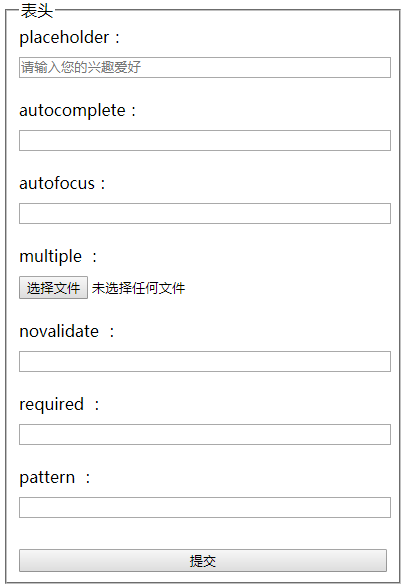
autocomplete:是带有name属性的input标签提交后,再次提交会触发事件,off会关闭自动显示历史输入的值 ,on会显示
form:表单外的input标签会随着表单提交
表单事件
oninput:用户输入内容时触发,可用于移动端输入字数统计
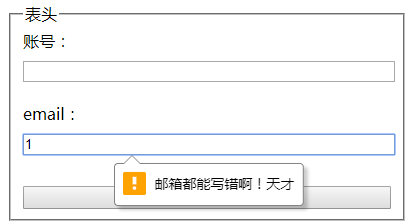
oninvalid:当验证不通过时触发
setCustomValidity:可获取验证错误信息并且自定义值
<!DOCTYPE html>

<html lang="en">

<head>

    <meta charset="UTF-8">

    <title>Title</title>

    <style>

        form {

            width: 100%;

            max-width: 400px;

            min-width: 200px;

            margin: 100px auto;

        }

        input {

            width: 100%;

            margin-top: 10px;

        }

        meter, progress {

            width: 100%;

        }

    </style>

</head>

<body>

<form action="" id="form">

    <fieldset>

        <legend>表头</legend>

        <label for="acount">账号:</label>

        <input type="text" name="acount" id="acount">

        <br><br>

        <label for="em">email:</label>

        <input type="email" name="em" id="em">

        <br><br>

        <input type="submit" value="提交">

    </fieldset>

</form>

<script>

    var inpArr = document.getElementsByTagName("input");

    inpArr[0].oninput = function () {

        console.log(this.value.length);

    }

    inpArr[1].oninvalid = function () {

        this.setCustomValidity("邮箱都能写错啊!天才");

    }

</script>

</body>

</html>
html5——表单的更多相关文章
- 实现跨浏览器html5表单验证
div:nth-of-type(odd){ float: left; clear: left; } .origin-effect > div:nth-of-type(even){ float: ...
- html5表单验证
表单验证为终端用户检测无效的数据并标记这些错误,是一种用户体验的优化. 下面展现浏览器自带的验证功能也可在移动端中查看: HTML部分: <!DOCTYPE html> <html ...
- Ideal Forms – 帮助你建立响应式 HTML5 表单
Ideal Forms 是建立和验证响应式 HTML5 表单的终极框架.它刚刚发布 V3 版本,更小,更快,更具可扩展性.它支持实时验证,完全自适应(适应容器,没有 CSS 媒体查询需要),键盘支持, ...
- HTML5学习总结-05 HTML5表单
一 HTML5 新的类型 HTML5 拥有多个新的表单输入类型.这些新特性提供了更好的输入控制和验证. email url number range Date pickers (date, month ...
- html5 表单样式 表单验证1 2 3
html5 表单样式 ie9以下不支持 <!DOCTYPE html> <html lang="en"> <head> <meta cha ...
- HTML5跨浏览器表单及HTML5表单的渐进增强
HTML5跨浏览器表单 http://net.tutsplus.com/tutorials/html-css-techniques/how-to-build-cross-browser-html5-f ...
- HTML5表单提交和PHP环境搭建
HTML5表单提交相关内容和PHP环境搭建需要的软件(只备注) (2)举例介绍 (3)PHP环境搭建
- HTML5表单及其验证
随笔- 15 文章- 1 评论- 115 HTML5表单及其验证 HTML表单一直都是Web的核心技术之一,有了它我们才能在Web上进行各种各样的应用.HTML5 Forms新增了许多新控件及其A ...
- HTML5表单新属性
HTML5表单新属性 autofocus 自动聚焦 <input type="text" autofocus> placeholder占位文本 tel ...
- HTML5 表单元素和属性
HTML5 表单元素和属性学习 版权声明:未经博主授权,内容严禁转载 ! 表单元素简介 无论实现提交功能还是展示页面功能,表单在HTML中的作用都十分重要. 在其他版本的HTML中,表单能够包含的元素 ...
随机推荐
- codeforces gym 100357 I (费用流)
题目大意 给出一个或与表达式,每个正变量和反变量最多出现一次,询问是否存在一种方案使得每个或式中有且仅有一个变量的值为1. 解题分析 将每个变量拆成三个点x,y,z. y表示对应的正变量,z表示对应的 ...
- 学一学书里的django是怎么写views.py的
他山之石,可以攻玉嘛. 好的习惯有时也是学别人来养成的. 外国人的编码习惯,学啊. from django.core.urlresolvers import reverse_lazy from dja ...
- Java使用JNative调用DLL库
编写测试DLL文件,源文件参照JNA调用用的DLL文件.地址:http://www.cnblogs.com/vevy/p/9076941.html (很重要)右键项目 --> 属性 --> ...
- windows下检測文件改变
这个主要是应用在我前一篇博客里提到的脚本热载入功能. 主要实现的功能检測目录内文件的变化(改变.新增.删除.重命名),当发现改变的时候通知lua又一次载入脚本.基本上就是一个windows api的使 ...
- HDU 4499 Cannon (暴力搜索)
题意:在n*m的方格里有t个棋子,问最多能放多少个炮且每一个炮不能互相攻击(炮吃炮) 炮吃炮:在同一行或同一列且中间有一颗棋子. #include <stdio.h> #include & ...
- JAVA 网络长短连接
作为java的刚開始学习的人,看了网上的资料后,关于java的长短连接,感觉理解的不是非常深刻.结合自己的学习和网上的资料整理例如以下.不对之处请大家批评指正. ...
- jenkins对接gitlab和git
1 需要的插件 jenkins的git插件和jenkins的gitlab插件. 2 对接gitlab 在系统配置中,随便起一个连接的名字,设置url,可以直接用ip地址,端口号默认是80,不需要写明. ...
- pymysql 本地不抱错 连接云数据库报错
import pymysql h, pt, u, p, db = 'rm-2zeoye0j3957bw1w2.mysql.rds.aliyuncs.com', 3306, 'tongji_2017', ...
- 洛谷 P3377 模板左偏树
题目:https://www.luogu.org/problemnew/show/P3377 左偏树的模板题: 加深了我对空 merge 的理解: 结构体的编号就是原序列的位置. 代码如下: #inc ...
- Python中操作myslq的方法
实例1.取得MYSQL的版本 在windows环境下安装mysql模块用于python开发,请见我的另一篇文章: MySQL-python Windows下EXE安装文件下载 # -*- coding ...