
gRPC应用实践
What is RPC?
Remote Procedure Call is a high-level model for client-server communication. Assume there are two computers, computer A(on local) and computer B(on some network). Computer B provides some API’s, let’s say it has some procedures which can be run and these procedures can be run on computer B itself.
What is gRPC?
gRPC is a high performance, open source universal RPC Framework. In simple words, it enables the server and client applications to communicate transparently and build connected systems. GRPC is developed and open sourced by Google.
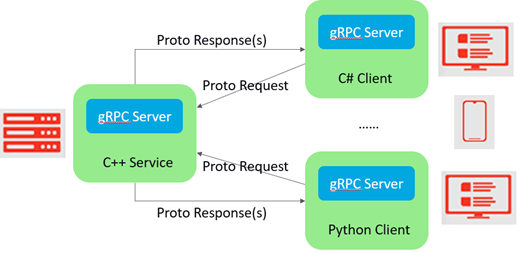
How GRPC Works?
- A client application can call methods directly on a server-side application present on other machines.
- Service is defined, methods are specified which can be further remotely called with their parameters and return types.
- GRPC uses protocol buffers as the Interface Definition Language to enable communication between two different systems used for describing the service interface and the structure of payload messages. Switch from JSON to protocol buffers. Because of binary data format, it gets much lighter.
- GRPC is built on HTTP 2. Break free from the call-and-response architecture. Allows client-side and server-side Streaming, and bidirectional streaming
Windows client (C++) Setup
- Follow the link to install “Chocolatey”: https://chocolatey.org/install
- Follow the link to build gRPC C++ from source using CMake: https://github.com/grpc/grpc/blob/master/BUILDING.md (Replace cmake .. -G “Visual Studio 14 2015” with cmake .. -G “Visual Studio 15 2017 Win64” to create x64 Visual Studio 2017 solution)
- Run Visual Studio 2017 as administrator, open the “grpc.sln” and build the ALL_BUILD project, then the INSTALL project. (1. Some of the generated files are not installed. You can find them in “your path to grpc\grpc\.build\Release”)
- Using below commands to generate the C++ client and server code (Copy grpc_cpp_plugin.exe and protoc.exe to the directory where the proto is located)
Protoc -I=$SRC_DIR –grpc_out=$DST_DIR $SRC_DIR/helloworld.proto
(e.g. protoc -I . --grpc_out=. --plugin=protoc-gen-grpc=grpc_cpp_plugin.exe helloworld.proto)
protoc -I=$SRC_DIR --cpp_out=$DST_DIR $SRC_DIR/helloworld.proto
(e.g. protoc -I . --cpp_out=. helloworld.proto)
5. Create C++ project
- Add “_WIN32_WINNT=0x0A00” to Preprocessor
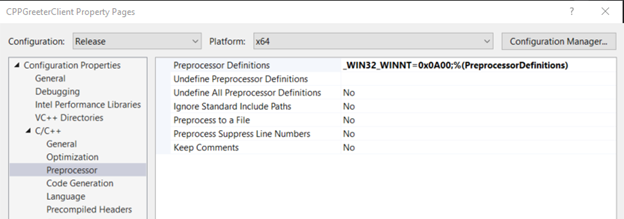
- Add the include file folder, lib folder and input libs
Windows client (C#) Setup
Visual Studio provides a convenient way to generate C# codes automatically from .proto files.
https://github.com/grpc/grpc/blob/master/src/csharp/BUILD-INTEGRATION.md
- Create a C# class library (.NET Framework) project.(This project is only used to build the .proto file automatically)
- Install below packages through NuGet Package Manager for the project
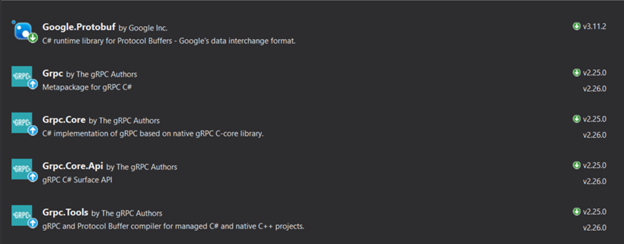
3. Add proto file to the project (e.g. helloworld.proto)

4. Edit .csproj file to add a new <ItemGroup>

5. Create a C#/WPF project as the gRPC client and add reference to the project which defines the .proto files.
6. Build the solution
Linux server (C++) Setup
gRPC C++ - Build from source
(1) Pre-requisites
$ sudo apt-get install build-essential autoconf libtool pkg-config

# If you plan to build from source and run tests, install the following as well:

$ sudo apt-get install libgflags-dev libgtest-dev

$ sudo apt-get install clang-5.0 libc++-dev
(2) Clone the repository (including submodules)
$ git clone -b $(curl -L https://grpc.io/release) https://github.com/grpc/grpc

$ cd grpc

$ git submodule update --init
(3) Building with CMake
$ sudo mkdir -p cmake/build

# Check if the cmake version > 3.6, otherwise install the latest version follow below steps:
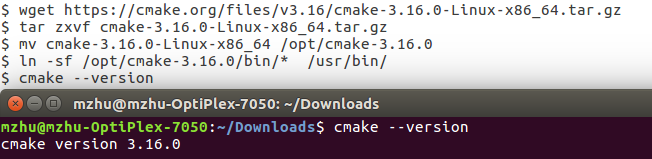
$ cd cmake/build

$ sudo apt-get install golang

$ sudo cmake ../.. -DBUILD_SHARED_LIBS=ON

$ sudo make

# Copy all needed libs, dlls and executables to the specified folder

$ sudo ln -sf ~/min-projects/grpc/cmake/build/* /usr/bin/

$ sudo cp -f /home/mzhu/min-projects/grpc/cmake/build/*.so /usr/local/lib

$ sudo cp -f /home/mzhu/min-projects/grpc/cmake/build/*.a /usr/local/lib

$ sudo cp -f /home/ mzhu /min-projects/grpc/libs/opt/pkgconfig/*.pc /usr/lib/pkgconfig/

# Add the line “/usr/local/lib” into the file “/etc/ld.so.conf”

$ sudo gedit /etc/ld.so.conf

# Refresh shared library cache

$ sudo ldconfig
(4) Install protoc along with the C++ runtime
$ cd ~/min-projects/grpc/third_party/protobuf/

$ ./autogen.sh

$ ./configure

$ sudo make

$ sudo make install
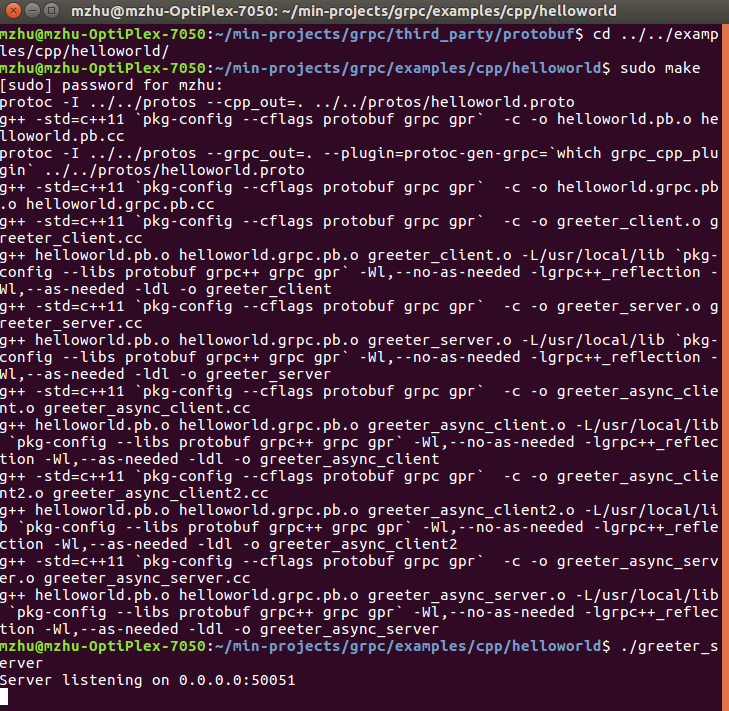
(5) Run an example to verify the environment
使用案例:
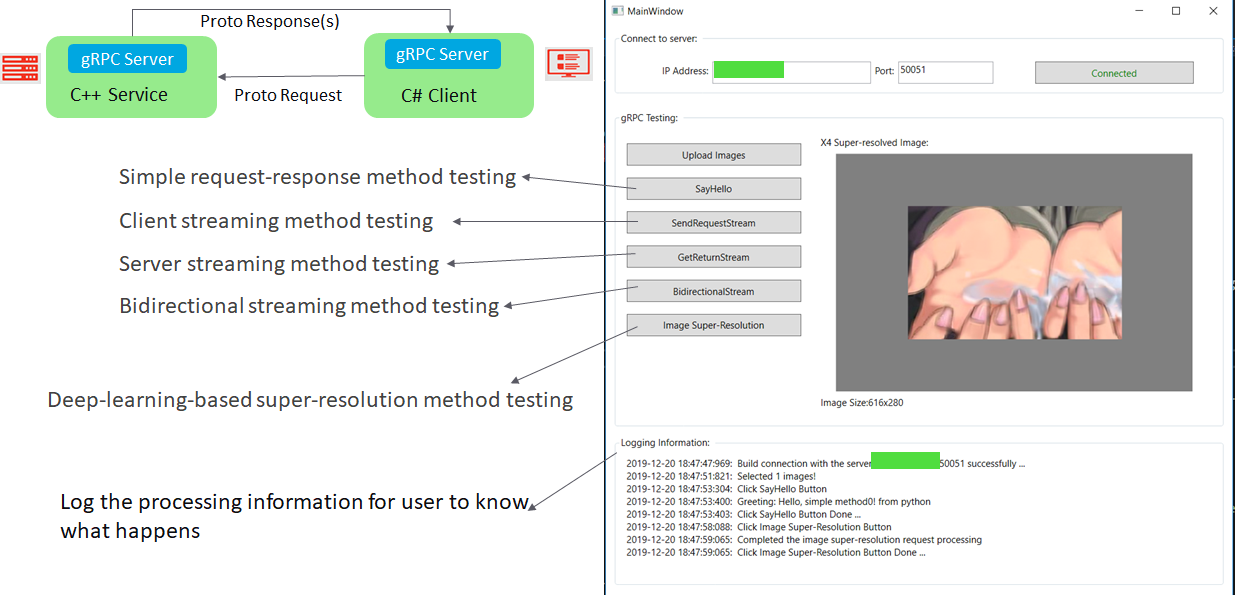
C#客户端界面代码:
<Window x:Class="TransferImage.MainWindow"

        xmlns="http://schemas.microsoft.com/winfx/2006/xaml/presentation"

        xmlns:x="http://schemas.microsoft.com/winfx/2006/xaml"

        xmlns:d="http://schemas.microsoft.com/expression/blend/2008"

        xmlns:mc="http://schemas.openxmlformats.org/markup-compatibility/2006"

        xmlns:local="clr-namespace:TransferImage"

        xmlns:utils="clr-namespace:TransferImage.Utils"

        mc:Ignorable="d"

        Title="MainWindow" Height="760" Width="805">

    <Grid>

        <Grid Margin="10,10,0,0" VerticalAlignment="Top" Height="500" HorizontalAlignment="Left" Width="770">

            <GroupBox HorizontalAlignment="Left" VerticalAlignment="Top" Height="80" Width="770">

                <GroupBox.Header>

                    <TextBlock Text="Connect to server: "/>

                </GroupBox.Header>

                <DockPanel>

                    <Label Content="IP Address:" Margin="50,20,0,0"></Label>

                    <TextBox Name="addressTxt" Text="10.192.132.217" Width="200" Height="28" Margin="0,15,0,0"></TextBox>

                    <Label Content="Port:" Margin="0,20,0,0"></Label>

                    <TextBox Name="portTxt" Text="50051" Margin="0,15,0,0" Width="120" Height="28"></TextBox>

                    <Button Name="btnConnect" Content="Connect" Click="BtnConnect_Click" Margin="20,15,0,0" Height="28" Width="200"></Button>

                </DockPanel>

            </GroupBox>

            <GroupBox Margin="0,100,0,0" HorizontalAlignment="Left" VerticalAlignment="Top" Height="400" Width="770">

                <GroupBox.Header>

                    <TextBlock Text="gRPC Testing: "/>

                </GroupBox.Header>

                <DockPanel>

                    <StackPanel Width="220" DockPanel.Dock="Left" Margin="10">

                        <Button Name="btnUpload" Content="Upload Images" Click="BtnUpload_Click" Margin="0,15,0,0" Height="28"></Button>

                        <Button Name="btngRPC" IsEnabled="False" Content="SayHello" Click="BtngRPC_Click" Margin="0,15,0,0" Height="28"></Button>

                        <Button Name="btnClientStreamRPC" IsEnabled="False" Content="SendRequestStream" Click="BtnClientStreamRPC_Click" Margin="0,15,0,0" Height="28"></Button>

                        <Button Name="btnServerStreamRPC" IsEnabled="False" Content="GetReturnStream" Click="BtnServerStreamRPC_Click" Margin="0,15,0,0" Height="28"></Button>

                        <Button Name="btnBidirectionalStreamRPC" IsEnabled="False" Content="BidirectionalStream" Click="BtnBidirectionalStreamRPC_Click" Margin="0,15,0,0" Height="28"></Button>

                        <Button Name="btnSRImgCase" IsEnabled="False" Content="Image Super-Resolution" Click="BtnSRImgCase_Click" Margin="0,15,0,0" Height="28"></Button>

                    </StackPanel>

                    <StackPanel Margin="10,10,10,10">

                        <Label Name="titleLbl" Height="28"></Label>

                        <utils:ZoomBorder x:Name="border" ClipToBounds="True" Background="Gray">

                            <Image Name="imgOutput" Stretch="UniformToFill" Width="450"></Image>

                        </utils:ZoomBorder>

                        <Label Name="imgSizeLbl" Height="28"></Label>

                    </StackPanel>

                </DockPanel>

            </GroupBox>

        </Grid>

        <Grid Margin="10,520,0,0" VerticalAlignment="Top" Height="200" HorizontalAlignment="Left" Width="776">

            <GroupBox HorizontalAlignment="Left" VerticalAlignment="Top" Height="190" Width="770">

                <GroupBox.Header>

                    <TextBlock Text="Logging Information: "/>

                </GroupBox.Header>

                <ScrollViewer x:Name="InfoBlockViewer" VerticalScrollBarVisibility="Auto" Margin="10,10,10,10">

                    <StackPanel Orientation="Horizontal" Background="White" Margin="0,0,0,0">

                        <TextBlock x:Name="RcInfo" Width="750">

                            <TextBlock.ContextMenu>

                                <ContextMenu>

                                    <MenuItem Header="Clear" Click="MenuItem_Clear_Click">

                                        <MenuItem.Icon>

                                            <Image Source="/Images/clear.ico" />

                                        </MenuItem.Icon>

                                    </MenuItem>

                                    <Separator />

                                    <MenuItem Header="Copy" Click="MenuItem_Copy_Click">

                                        <MenuItem.Icon>

                                            <Image Source="/Images/copy.ico" />

                                        </MenuItem.Icon>

                                    </MenuItem>

                                </ContextMenu>

                            </TextBlock.ContextMenu>

                        </TextBlock>

                    </StackPanel>

                </ScrollViewer>

            </GroupBox>

        </Grid>

    </Grid>

</Window>
后台逻辑代码:
using Google.Protobuf;

using Google.Protobuf.WellKnownTypes;

using Grpc.Core;

using Helloworld;

using System;

using System.Collections.Generic;

using System.ComponentModel;

using System.Drawing.Imaging;

using System.IO;

using System.Text;

using System.Threading;

using System.Threading.Tasks;

using System.Windows;

using System.Windows.Controls;

using System.Windows.Media;

using System.Windows.Media.Imaging;

namespace TransferImage

{

    /// <summary>

    /// Interaction logic for MainWindow.xaml

    /// </summary>

    public partial class MainWindow : Window

    {

        private List<string> pictureList = new List<string>();

        private const int LogTrimSize = 6 * 1024;

        private const int LogSize = 8 * 1024;

        private int _exactLogTrimSize;

        private Greeter.GreeterClient client;

        private Channel channel;

        private const int GRPC_MAX_RECEIVE_MESSAGE_LENGTH = (4 * 1024 * 1024) * 5;

        private void LogRcInfo(string str)

        {

            if (RcInfo.Text.Length > LogSize)

            {

                RcInfo.Text = RcInfo.Text.Substring(_exactLogTrimSize);

                _exactLogTrimSize = RcInfo.Text.Length;

            }

            RcInfo.Text += str;

            InfoBlockViewer.ScrollToBottom();

            if (_exactLogTrimSize < LogTrimSize)

            {

                _exactLogTrimSize += str.Length;

            }

        }

        public void LogInfo(string str)

        {

            LogRcInfo(DateTime.Now.ToString(@"yyyy-MM-dd HH:mm:ss\:fff") + ":  " + str + "\n");

        }

        public MainWindow()

        {

            InitializeComponent();

            _exactLogTrimSize = 0;

        }

        private void BtnConnect_Click(object sender, RoutedEventArgs e)

        {

            try

            {

                string address = addressTxt.Text;

                string port = portTxt.Text;

                string target = address + ":" + port;

                var channelOptions = new List<ChannelOption>();

                channelOptions.Add(new ChannelOption(ChannelOptions.MaxReceiveMessageLength, GRPC_MAX_RECEIVE_MESSAGE_LENGTH));

                channel = new Channel(target, ChannelCredentials.Insecure, channelOptions);

                client = new Greeter.GreeterClient(channel);

                client.TestConnection(new HelloRequest { Name = "test connection"});

                if (channel.State == ChannelState.Ready)

                {

                    btnConnect.Content = "Connected";

                    btnConnect.Foreground = Brushes.Green;

                    LogInfo("Build connection with the server " + target + " successfully ...");

                    btnConnect.IsEnabled = true;

                    btnClientStreamRPC.IsEnabled = true;

                    btnBidirectionalStreamRPC.IsEnabled = true;

                    btnServerStreamRPC.IsEnabled = true;

                    btngRPC.IsEnabled = true;

                    btnSRImgCase.IsEnabled = true;

                }

            }

            catch (RpcException ex)

            {

                MessageBox.Show(ex.Message, "Error", MessageBoxButton.OK, MessageBoxImage.Error);

            }

        }

        public static System.Drawing.Image BytesToImage(byte[] buffer)

        {

            MemoryStream ms = new MemoryStream(buffer);

            System.Drawing.Image image = System.Drawing.Image.FromStream(ms);

            return image;

        }

        public static ByteString ImageToByteString(string filepath)

        {

            FileStream fs = File.OpenRead(filepath);

            int filelength = 0;

            filelength = (int)fs.Length;

            Byte[] image = new Byte[filelength];

            fs.Read(image, 0, filelength);

            return ByteString.CopyFrom(image);

        }

        public BitmapImage BytesToBitmapImage(byte[] array)

        {

            using (var ms = new MemoryStream(array))

            {

                var image = new BitmapImage();

                image.BeginInit();

                image.CacheOption = BitmapCacheOption.OnLoad;

                image.StreamSource = ms;

                image.EndInit();

                return image;

            }

        }

        private ImageSource GetImageSource(string filePath)

        {

            return new BitmapImage(new Uri(filePath, UriKind.RelativeOrAbsolute));

        }

        private void BtngRPC_Click(object sender, RoutedEventArgs e)

        {

            try

            {

                LogInfo("Click " + btngRPC.Content + " Button");

                String user = "C# client simple method";

                for (int i = 0; i < pictureList.Count; i++)

                {

                    ByteString str = ImageToByteString(pictureList[i]);

                    var reply = client.SayHello(new Request { Name = user + i.ToString(), Photo = str });

                    LogInfo("Greeting: " + reply.Message.ToString());

                    var return_img = reply.Image;

                    byte[] bytes = return_img.ToByteArray();

                    BitmapImage img = BytesToBitmapImage(bytes);

                    imgOutput.Source = img;

                }

                LogInfo("Click " + btngRPC.Content + " Button Done ...");

            }

            catch (RpcException ex)

            {

                MessageBox.Show(ex.Message, "Error", MessageBoxButton.OK, MessageBoxImage.Error);

            }

        }

        private async void BtnClientStreamRPC_Click(object sender, RoutedEventArgs e)

        {

            LogInfo("Click " + btnClientStreamRPC.Content + " Button");

            await SendRequestsAsync();

            LogInfo("Click " + btnClientStreamRPC.Content + " Button Done ...");

        }

        private async void BtnServerStreamRPC_Click(object sender, RoutedEventArgs e)

        {

            LogInfo("Click " + btnServerStreamRPC.Content + " Button");

            if (pictureList.Count > 0)

            {

                await ListResponsesAsync("Server-streaming", ImageToByteString(pictureList[0]));

            }

            else

            {

                MessageBox.Show("Please select the image firstly", "Warning");

            }

            LogInfo("Click " + btnServerStreamRPC.Content + " Button Done ...");

        }

        //Calling async method on button click: https://stackoverflow.com/questions/28601678/calling-async-method-on-button-click

        private async void BtnBidirectionalStreamRPC_Click(object sender, RoutedEventArgs e)

        {

            LogInfo("Click " + btnBidirectionalStreamRPC.Content + " Button");

            await BidirectionalStreamAsync();

            LogInfo("Click " + btnBidirectionalStreamRPC.Content + " Button Done ...");

        }

        public async Task SendRequestsAsync()

        {

            try

            {

                using (var call = client.ClientStreamingMethod())

                {

                    var rand = new Random();

                    foreach (var item in pictureList)

                    {

                        await call.RequestStream.WriteAsync(new StreamRequest

                        {

                            Message = item,

                            RequestData = ImageToByteString(item)

                        });

                        await Task.Delay(rand.Next(200));

                    }

                    await call.RequestStream.CompleteAsync();

                    var response = await call.ResponseAsync;

                    LogInfo("Recv client streaming response: " + response.Message);

                }

            }

            catch (RpcException ex)

            {

                MessageBox.Show(ex.Message, "Error", MessageBoxButton.OK, MessageBoxImage.Error);

            }

        }

        public async Task ListResponsesAsync(string user, ByteString str)

        {

            try

            {

                Request request = new Request

                {

                    Name = user,

                    Photo = str

                };

                using (var call = client.GetReturnStream(request))

                {

                    var responseStream = call.ResponseStream;

                    StringBuilder responseLog = new StringBuilder("Recv server stream response: ");

                    while (await responseStream.MoveNext())

                    {

                        var reply = responseStream.Current;

                        responseLog.Append(reply.Description);

                    }

                    LogInfo(responseLog.ToString());

                }

            }

            catch (RpcException ex)

            {

                MessageBox.Show(ex.Message, "Error", MessageBoxButton.OK, MessageBoxImage.Error);

            }

        }

        public async Task BidirectionalStreamAsync()

        {

            try

            {

                StringBuilder responseLog = new StringBuilder("Recv bidirectional stream response: ");

                using (var call = client.BidirectionalStreamingMethod())

                {

                    var responseTask = Task.Run(async () =>

                    {

                        var responseStream = call.ResponseStream;

                        while (await responseStream.MoveNext())

                        {

                            var reply = responseStream.Current;

                            responseLog.Append(reply.Description + ", " + responseStream.Current.ResponseData.Length.ToString() + " bytes. ");

                            //Whenever you update your UI elements from a thread other than the main thread, use below method:

                            this.Dispatcher.Invoke(() =>

                            {

                                LogInfo(responseLog.ToString());

                            });

                        }

                    });

                    var rand = new Random();

                    foreach (var item in pictureList)

                    {

                        await call.RequestStream.WriteAsync(new StreamRequest

                        {

                            Message = item,

                            RequestData = ImageToByteString(item)

                        });

                        await Task.Delay(rand.Next(200));

                    }

                    await call.RequestStream.CompleteAsync();

                    await responseTask;

                }

            }

            catch (RpcException ex)

            {

                MessageBox.Show(ex.Message, "Error", MessageBoxButton.OK, MessageBoxImage.Error);

            }

        }

        private void BtnUpload_Click(object sender, RoutedEventArgs e)

        {

            try

            {

                var openFileDialog = new Microsoft.Win32.OpenFileDialog()

                {

                    Filter = "All Image Files|*.bmp;*.ico;*.gif;*.jpeg;*.jpg;*.png;*.tif;*.tiff|" +

                    "Windows Bitmap(*.bmp)|*.bmp|Windows Icon(*.ico)|*.ico|" +

                    "Graphics Interchange Format (*.gif)|(*.gif)|" +

                    "JPEG File Interchange Format (*.jpg)|*.jpg;*.jpeg|" +

                    "Portable Network Graphics (*.png)|*.png|" +

                    "Tag Image File Format (*.tif)|*.tif;*.tiff"

                };

                openFileDialog.Multiselect = true;

                var result = openFileDialog.ShowDialog();

                pictureList.Clear();

                if (result == true)

                {

                    foreach (string filename in openFileDialog.FileNames)

                        pictureList.Add(filename);

                    LogInfo("Selected " + pictureList.Count + " images!");

                    if (pictureList.Count > 0)

                    {

                        titleLbl.Content = "Raw Image:";

                        var img = GetImageSource(pictureList[0]);

                        imgOutput.Source = img;

                        imgSizeLbl.Content = ShowImageSize((img as BitmapSource).PixelWidth, (img as BitmapSource).PixelHeight);

                    }

                }

                else

                {

                    LogInfo("Selected 0 images!");

                }

            }

            catch (Exception ex)

            {

                MessageBox.Show(ex.Message, "Error", MessageBoxButton.OK, MessageBoxImage.Error);

            }

        }

        private void MenuItem_Clear_Click(object sender, RoutedEventArgs e)

        {

            RcInfo.Text = "";

        }

        private void MenuItem_Copy_Click(object sender, RoutedEventArgs e)

        {

            Clipboard.SetText(RcInfo.Text);

        }

        private string ShowImageSize(int width, int height)

        {

            return "Image Size:" + width.ToString() + "x" + height.ToString();

        }

        private void BtnSRImgCase_Click(object sender, RoutedEventArgs e)

        {

            LogInfo("Click " + btnSRImgCase.Content + " Button");

            try

            {

                for (int i = 0; i < pictureList.Count; i++)

                {

                    ByteString str = ImageToByteString(pictureList[i]);

                    var reply = client.GetSRImg(new RequestSRImg { ScaleFactor = 4, LRImg = str });

                    var return_img = reply.Img;

                    byte[] bytes = return_img.ToByteArray();

                    BitmapImage bitmap = BytesToBitmapImage(bytes);

                    titleLbl.Content = "X4 Super-resolved Image:";

                    imgOutput.Source = bitmap;

                    imgSizeLbl.Content = ShowImageSize(bitmap.PixelWidth, bitmap.PixelHeight);

                    LogInfo("Completed the image super-resolution request processing");

                }

            }

            catch (Exception ex)

            {

                MessageBox.Show(ex.Message, "Error", MessageBoxButton.OK, MessageBoxImage.Error);

            }

            LogInfo("Click " + btnSRImgCase.Content + " Button Done ...");

        }

    }

}
参考:
https://www.xenonstack.com/insights/what-is-grpc/
gRPC应用实践的更多相关文章
- Asp.Net Core Grpc 入门实践
Grpc简介 gRPC 是一种与语言无关的高性能远程过程调用 (RPC) 框架. 在 gRPC 中,客户端应用程序可以直接调用不同计算机上的服务器应用程序上的方法,就像它是本地对象一样,从而更轻松地创 ...
- 一款不错的 Go Server/API boilerplate,使用 K8S+DDD+CQRS+ES+gRPC 最佳实践构建
Golang API Starter Kit 该项目的主要目的是使用最佳实践.DDD.CQRS.ES.gRPC 提供样板项目设置. 为开发和生产环境提供 kubernetes 配置.允许与反映生产的 ...
- protobuffer、gRPC、restful gRPC的相互转化
转自:https://studygolang.com/articles/12510 文档 grpc中文文档 grpc-gateway,restful和grpc转换库 protobuf 官网 proto ...
- gRPC应用C++
1. gRPC简述 RPC,远程方法调用,就是像调用本地方法一样调用远程方法. gRPC是Google实现的一种RPC框架,基于HTTP/2标准设计,带来诸如双向流.流控.头部压缩.单 TCP 连接 ...
- python3和grpc的微服务探索实践
对于微服务的实践,一般都是基于Java和Golang的,博主最近研究了下基于Python的微服务实践,现在通过一个简单的服务来分析Python技术栈的微服务实践 技术栈:Python3 + grpc ...
- Laravel + go-micro + grpc 实践基于 Zipkin 的分布式链路追踪系统 摘自https://mp.weixin.qq.com/s/JkLMNabnYbod-b4syMB3Hw?
分布式调用链跟踪系统,属于监控系统的一类.系统架构逐步演进时,后期形态往往是一个平台由很多不同的服务.组件构成,用户请求过来后,可能会经过其中多个服务,如图 不过,出问题时往往很难排查,如整个请求变慢 ...
- 漫谈grpc 3:从实践到原理,带你参透 gRPC
原文链接:万字长文 | 从实践到原理,带你参透 gRPC 大家好,我是煎鱼. gRPC 在 Go 语言中大放异彩,越来越多的小伙伴在使用,最近也在公司安利了一波,希望这一篇文章能带你一览 gRPC ...
- GRPC在NET上的实践(记录篇)
GRPC是什么? GRPC是一个开源RPC框架,于2015年3月开源,其由Google主要面向移动应用开发并基于HTTP/2协议标准而设计,基于Protobuf 3.0(Protocol Buffer ...
- 从实践到原理,带你参透 gRPC
gRPC 在 Go 语言中大放异彩,越来越多的小伙伴在使用,最近也在公司安利了一波,希望这一篇文章能带你一览 gRPC 的巧妙之处,本文篇幅比较长,请做好阅读准备.本文目录如下: 简述 gRPC 是一 ...
随机推荐
- [转帖]开源的监控技术栈除了ELK,还有InfluxData的TICK
开源的监控技术栈除了ELK,还有InfluxData的TICK https://cloud.tencent.com/developer/news/357119 来源 | Influxdata 译者 ...
- sql server存储引擎启动错误(SQL Server could not spawn FRunCM thread)
错误信息: 中文版: 服务器无法在 'any' <ipv4> 1433 上侦听.错误: 0x277a.若要继续,请通知您的系统管理员. TDSSNIClient 初始化失败,出现错误 0x ...
- git合并时冲突<<<<<<< HEAD
<<<<<<< HEAD 本地代码 ======= 拉下来的代码 >>>>>>>
- error: [Errno 13] Permission denied: '/usr/local/lib/处理方法
在ubuntu系统下使用pip 命令安装包时,出现以下类似错误提示: error: [Errno 13] Permission denied: '/usr/local/lib/python2.7/di ...
- X86逆向13:向程序中插入Dll
本章我们将学习Dll的注入技巧,我们将把一个动态链接库永久的插入到目标程序中,让程序在运行后直接执行这个Dll文件,这一章的内容也可以看作是第八课的加强篇,第八课中我们向程序中插入了一个弹窗,有木有发 ...
- 怎样在 Vue 中使用 v-model 处理表单?
主要是通过 v-model 对表单元素做数据的 双向绑定. 用法其实也很简单, 只是因为表单元素有不同类型, 处理方式有些许不同, 这点需要注意. 1. 如果是 输入框 , 可以直接使用 v-mode ...
- Java-this关键词
this关键词 1,this调用本类属性 在程序里面是有this可以实现以下三类的结构的描述: ·当前类中的属性:this.属性: ·当前类中的方法(普通方法.构造方法):this().this.方法 ...
- 仍然有人在叫喊C语言已经过时了
现在,仍然有人在叫喊C语言已经过时了.还有什么值得学习的?看看现在使用Python.PHP和其他语言有多简单.谁去学旧的C语言?是真的吗?作者下载了这两种语言的底层源代码.由于空间的限制,它没有分析框 ...
- Redis-List常用命令
Redis-List常用命令 lpush key value- 将指定value推到指定key的最左端.假如有 key1 对应值为 1 2 3,现在lpush key1 4,将4推到队列的最左端,那么 ...
- docker容器里面安装php的redis扩展
docker exec -i -t php /bin/bash 进入php容器内执行:pecl install -o -f redis 修改php.ini,添加:extension=redis. ...