
Flume-自定义 Interceptor(拦截器)
使用 Flume 采集服务器本地日志,需要按照日志类型的不同,将不同种类的日志发往不同的分析系统。
在实际的开发中,一台服务器产生的日志类型可能有很多种,不同类型的日志可能需要发送到不同的分析系统。
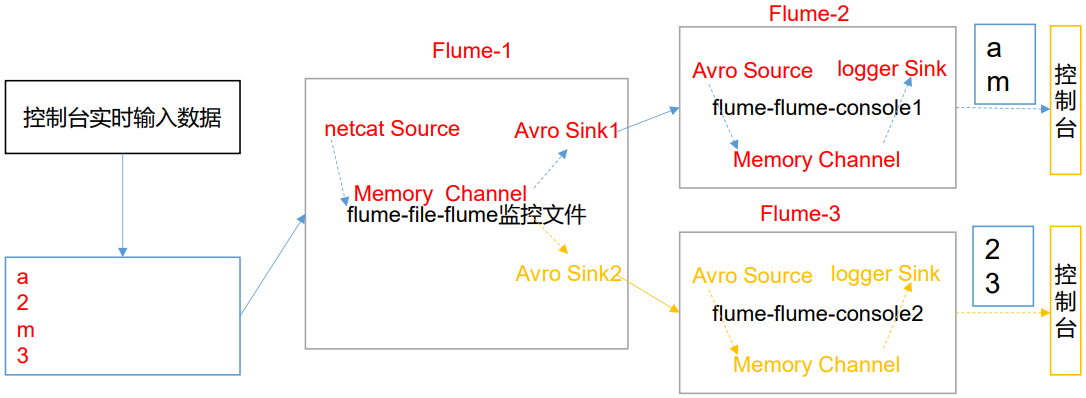
此时会用到 Flume 拓扑结构中的 Multiplexing 结构,Multiplexing的原理是,根据 event 中 Header 的某个 key 的值,将不同的 event 发送到不同的 Channel中,所以我们需要自定义一个 Interceptor,为不同类型的 event 的 Header 中的 key 赋予 不同的值。
这里以端口数据模拟日志,以数字(单个)和字母(单个)模拟不同类型的日志,需要自定义 interceptor 区分数字和字母,将其分别发往不同的分析系统(Channel)。
一、创建自定义拦截器
https://flume.apache.org/FlumeUserGuide.html#flume-interceptors
1.引入 pom 依赖
<?xml version="1.0" encoding="UTF-8"?>

<project xmlns="http://maven.apache.org/POM/4.0.0"

         xmlns:xsi="http://www.w3.org/2001/XMLSchema-instance"

         xsi:schemaLocation="http://maven.apache.org/POM/4.0.0 http://maven.apache.org/xsd/maven-4.0.0.xsd">

    <modelVersion>4.0.0</modelVersion>

    <groupId>com</groupId>

    <artifactId>flume</artifactId>

    <version>1.0-SNAPSHOT</version>

    <dependencies>

        <dependency>

            <groupId>org.apache.flume</groupId>

            <artifactId>flume-ng-core</artifactId>

            <version>1.9.0</version>

        </dependency>

    </dependencies>

    <build>

        <plugins>

            <plugin>

                <groupId>org.apache.maven.plugins</groupId>

                <artifactId>maven-compiler-plugin</artifactId>

                <configuration>

                    <source>1.8</source>

                    <target>1.8</target>

                    <encoding>UTF-8</encoding>

                </configuration>

            </plugin>

        </plugins>

    </build>

</project>
2.编写拦截器类
package interceptor;

import org.apache.flume.Context;

import org.apache.flume.Event;

import org.apache.flume.interceptor.Interceptor;

import java.util.List;

public class CustomInterceptor implements Interceptor {

    @Override

    public void initialize() {

    }

    // 单个事件拦截

    @Override

    public Event intercept(Event event) {

        byte[] body = event.getBody();

        if (body[0] < 'z' && body[0] > 'a') {

            // 自定义头信息

            event.getHeaders().put("type", "letter");

        } else if (body[0] > '0' && body[0] < '9') {

            // 自定义头信息

            event.getHeaders().put("type", "number");

        }

        return event;

    }

    // 批量事件拦截

    @Override

    public List<Event> intercept(List<Event> list) {

        for (Event event : list) {

            intercept(event);

        }

        return list;

    }

    @Override

    public void close() {

    }

    public static class Builder implements Interceptor.Builder {

        @Override

        public Interceptor build() {

            return new CustomInterceptor();

        }

        @Override

        public void configure(Context context) {

        }

    }

}
二、打包测试
1.打包上传
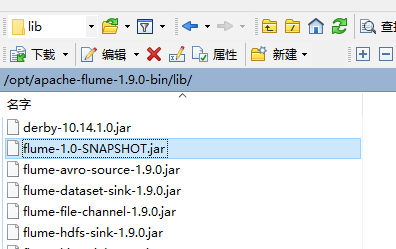
将项目打包。

上传到 flume 的 lib 目录下。
2.编写 flume 配置文件
1.flume1
配置 1 个 netcat source,1 个 sink group(2 个 avro sink),并配置相应的 ChannelSelector 和 interceptor。
# Name the components on this agent

a1.sources = r1

a1.sinks = k1 k2

a1.channels = c1 c2

# Describe/configure the source

a1.sources.r1.type = netcat

a1.sources.r1.bind = 127.0.0.1

a1.sources.r1.port = 4444

# 拦截器

a1.sources.r1.interceptors = i1

a1.sources.r1.interceptors.i1.type = interceptor.CustomInterceptor$Builder

# 选择器

a1.sources.r1.selector.type = multiplexing

a1.sources.r1.selector.header = type

# 与自定义拦截器中设置的头信息对应

a1.sources.r1.selector.mapping.letter = c1

a1.sources.r1.selector.mapping.number = c2

# Describe the sink

a1.sinks.k1.type = avro

a1.sinks.k1.hostname = 127.0.0.1

a1.sinks.k1.port = 4141

a1.sinks.k2.type=avro

a1.sinks.k2.hostname = 127.0.0.1

a1.sinks.k2.port = 4242

# Use a channel which buffers events in memory

a1.channels.c1.type = memory

a1.channels.c1.capacity = 1000

a1.channels.c1.transactionCapacity = 100

a1.channels.c2.type = memory

a1.channels.c2.capacity = 1000

a1.channels.c2.transactionCapacity = 100

# Bind the source and sink to the channel

a1.sources.r1.channels = c1 c2

a1.sinks.k1.channel = c1

a1.sinks.k2.channel = c2
2.flume2
配置一个 avro source 和一个 logger sink。
a2.sources = r1

a2.sinks = k1

a2.channels = c1

a2.sources.r1.type = avro

a2.sources.r1.bind = 127.0.0.1

a2.sources.r1.port = 4141

a2.sinks.k1.type = logger

a2.channels.c1.type = memory

a2.channels.c1.capacity = 1000

a2.channels.c1.transactionCapacity = 100

a2.sinks.k1.channel = c1

a2.sources.r1.channels = c1
3.flume3
配置一个 avro source 和一个 logger sink。
a3.sources = r1

a3.sinks = k1

a3.channels = c1

a3.sources.r1.type = avro

a3.sources.r1.bind = 127.0.0.1

a3.sources.r1.port = 4242

a3.sinks.k1.type = logger

a3.channels.c1.type = memory

a3.channels.c1.capacity = 1000

a3.channels.c1.transactionCapacity = 100

a3.sinks.k1.channel = c1

a3.sources.r1.channels = c1
3.测试
flume2 和 flume3 需要先启动,flume1 需要连接 flume2 和 flume3,若先启动 flume1 会报连接不上(也可以无视错误日志,先启动)
cd /opt/apache-flume-1.9.-bin

bin/flume-ng agent --conf conf/ --name a3 --conf-file /tmp/flume-job/interceptor/flume3 -Dflume.root.logger=INFO,console

bin/flume-ng agent --conf conf/ --name a2 --conf-file /tmp/flume-job/interceptor/flume2 -Dflume.root.logger=INFO,console

bin/flume-ng agent --conf conf/ --name a1 --conf-file /tmp/flume-job/interceptor/flume1 -Dflume.root.logger=INFO,console
向监控端口发送数据。
nc 127.0.0.1

qwer
可以看到不同的内容被发送到不同的 flume 了,拦截器代码中只定义数字和小写字母,发送其它的内容不会被 flume1 转发。

Flume-自定义 Interceptor(拦截器)的更多相关文章
- struts2自定义Interceptor拦截器
<%@ page language="java" contentType="text/html; charset=UTF-8" pageEncoding= ...
- flume中的拦截器
Flume中的拦截器(interceptor),用户Source读取events发送到Sink的时候,在events header中加入一些有用的信息,或者对events的内容进行过滤,完成初步的数据 ...
- SpringMVC 自定义一个拦截器
自定义一个拦截器方法,实现HandlerInterceptor方法 public class FirstInterceptor implements HandlerInterceptor{ /** * ...
- Spring自定义一个拦截器类SomeInterceptor,实现HandlerInterceptor接口及其方法的实例
利用Spring的拦截器可以在处理器Controller方法执行前和后增加逻辑代码,了解拦截器中preHandle.postHandle和afterCompletion方法执行时机. 自定义一个拦截器 ...
- SpringMvc中Interceptor拦截器用法
SpringMVC 中的Interceptor 拦截器也是相当重要和相当有用的,它的主要作用是拦截用户的请求并进行相应的处理.比如通过它来进行权限验证,或者是来判断用户是否登陆等. 一. 使用场景 1 ...
- springMVC3学习(七)--Interceptor拦截器
Spring为我们提供了:org.springframework.web.servlet.HandlerInterceptor接口, org.springframework.web.servlet.h ...
- SpringBoot-SpringMvc的Interceptor拦截器配置
Interceptor拦截器实现对每一个用户请求处理前后的业务处理,比如我们需要对用户请求进行响应时间的记录,需要记录请求从开始到结束所耗的时间,这时我们就需要用到拦截器了 下面我们以记录请求处理时间 ...
- Mybatis自定义SQL拦截器
本博客介绍的是继承Mybatis提供的Interface接口,自定义拦截器,然后将项目中的sql拦截一下,打印到控制台. 先自定义一个拦截器 package com.muses.taoshop.com ...
- springmvc自定义的拦截器以及拦截器的配置
一.自定义拦截器 Spring MVC也可以使用拦截器对请求进行拦截处理,用户可以自定义拦截器来实现特定的功能,自定义的拦截器必须实现HandlerInterceptor接口. 二.HandlerIn ...
- SpringMVC中使用Interceptor拦截器
SpringMVC 中的Interceptor 拦截器也是相当重要和相当有用的,它的主要作用是拦截用户的请求并进行相应的处理.比如通过它来进行权限验证,或者是来判断用户是否登陆,或者是像12306 那 ...
随机推荐
- 2 vue学习
1 vue的核心是数据与视图的双向绑定 2 当viewmodel销毁时,所有的事件处理器都会自动删除,无需自己清理 3 v-model的修饰符解释 .lazy :失去焦点或者按回车键时触发同步 .nu ...
- Java 之 IDEA 的 Debug 追踪
使用 IDEA 的断点调试功能,查看程序的运行过程. 1.在有效代码行,点击行号右边的空白区域,设置断点,程序执行到断点将停止,我们可以手动来运行程序 2.点击 Debug 运行模式 3.程序停止在断 ...
- vue拦截
```javascript import Vue from 'vue' import App from './App.vue' import router from './router' import ...
- 当SAP云平台account的service Marke place里找不到Machine Learning服务该怎么办
问题症状: 我在CloudFoundry环境的Service Market place里根本找不到Leonardo ML foundation这组服务. 解决方案: 进入global Account- ...
- DAY1注册店铺
- python基础应用---格式化输出
python的格式化输出,原来不是很理解,现在有点了解了,为此特意写一个博客来记录一下,以便自己会忘记了,随时查看, 程序主体 #格式化输出之一 name = input("pls inpu ...
- H5之postMessage
对于跨域我们有很多的解决方案,今天我来分享一下postMessage的那点事,postMessage是html5新增的一个解决跨域的一个方法,不过很可惜万恶的ie6,7不支持 postMessage( ...
- PAT Basic 1070 结绳 (25 分)
给定一段一段的绳子,你需要把它们串成一条绳.每次串连的时候,是把两段绳子对折,再如下图所示套接在一起.这样得到的绳子又被当成是另一段绳子,可以再次对折去跟另一段绳子串连.每次串连后,原来两段绳子的长度 ...
- c线程使用锁控制并发
// // Created by gxf on 2019/12/16. // #include <stdlib.h> #include <stdio.h> #include & ...
- JavaScript004,输出
<!DOCTYPE html> <html> <head> <meta charset="utf-8"> <title> ...