
ST Debug (printf) Viewer for Jlink
Debug (printf) Viewer
http://www.keil.com/support/man/docs/uv4/uv4_db_dbg_serialwin.htm
Serial Window
The Serial window accepts serial input and output data streams. The window displays serial output data received from a simulated CPU, while characters typed into a serial window are input to the simulated CPU. This allows testing a UART interface prior to having the target hardware.
The Debug (printf) Viewer is a special serial window that can exchange data with the microcontoller. For Cortex-M microcontrollers, the window displays printf-data received from the Instrumentation Trace Macrocell (ITM). To redirect output, refer also to Retarget Output via ITM, and Debug Access in the CMSIS documentation.
 Open these windows using the toolbar button or the menu View - Serial Windows.
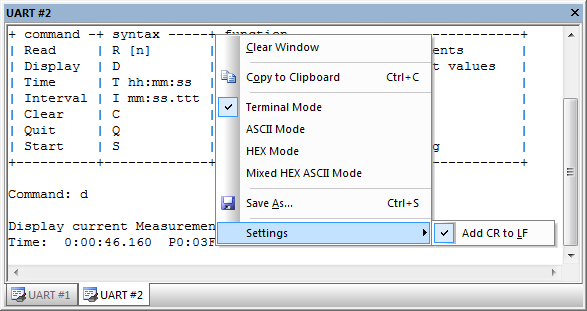
The Context Menu allows:
- Clearing the window.
- Copying and saving the content to the clipboard or a file.
- Setting a Carriage Return to every Line Feed that is received (enabled by default).
- Switching to various representation modes.
Terminal Mode Text formatting and cursor control sequences are supported (see table below). ASCII Mode Every printable character is displayed. An unprintable character is displayed as white-space (' '). HEX Mode Every character is displayed as a HEX-number. Mixed Mode Every character is displayed as a HEX-number and ASCII character. An unprintable character is displayed as dot ('.').
ANSI VT100 Terminal Sequences
| Sequence | Description |
|---|---|
| From Target −→ µVision | |
| CR ('\r') | Carriage Return |
| LF ('\n') | Line Feed |
| TAB ('\t') | Tabulator |
| BS (0x08) | Back Space |
| BEL (0x07) | Bell |
| <ESC>[C | Move cursor (position) 1 to the right |
| <ESC>[D | Move cursor (position) 1 to the left |
| <ESC>[K | Delete line right to cursor |
| <ESC>[J | Clear screen |
| <ESC>[y;xf | Set cursor to Row y, Column x; (x,y) are numeric ASCII values |
| From µVision ⇒ Target | |
| <ESC>[A | Cursor Key UP |
| <ESC>[B | Cursor Key DOWN |
| <ESC>[C | Cursor Key RIGHT |
| <ESC>[D | Cursor Key LEFT |
Examples
// Clear screen and set cursor home

void ClearScreen(void)

{

        printf("%c[1;1f%c[J", 27, 27);

}

// set cursor to position (x, y)

void SetCursorPosition(int x, int y)

{

        printf("%c[%i;%if", 27, (signed int)y, (signed int)x);

}
See also
- Assign Serial I/O to a PC COM Port using the debug command ASSIGN.
- SLOG the debug command to redirect serial output to a file.
- Low Level I/O Routines redirect serial communication to a different UART or peripheral.
- UART Communication provides examples of UART simulation, peripheral dialogs, VTREG's, or controlling UART communication timing.
- Debug (printf) Viewer usage when debugging hardware with ULINKpro.
ST Debug (printf) Viewer for Jlink的更多相关文章
- Keil ARM-CM3 printf输出调试信息到Debug (printf) Viewer
参考资料:http://www.keil.com/support/man/docs/jlink/jlink_trace_itm_viewer.htm 1.Target Options -> De ...
- Keil Debug (printf) Viewer
Debug (printf) Viewer Home » µVision Windows » Debug (printf) Viewer The Debug (printf) Viewer windo ...
- MDK Debug (printf) Viewer打印数据
1.Target Options -> Debug -> Settings(JLink) -> Debug里ort选择SW模式 2.在Target Options -> Deb ...
- STM32 使用 printf 发送数据配置方法 -- 串口 UART, JTAG SWO, JLINK RTT
STM32串口通信中使用printf发送数据配置方法(开发环境 Keil RVMDK) http://home.eeworld.com.cn/my/space-uid-338727-blogid-47 ...
- 【转】keil+stm32+jlink利用swd方式进行printf输出
出处:http://www.douban.com/note/248637026/ ----------------------------------------------------------- ...
- Jlink使用技巧之虚拟串口功能
前言 串口调试是单片机开发过程必不可少的一个功能,一般是使用一个UART-TTL的串口模块来实现串口的功能,其实下载调试使用的Jlink仿真器也可以实现串口调试的功能,本篇文章将介绍如何使用Jlink ...
- Keil debugging techniques and alternative printf (SWO function)
One of the basic needs of the embedded software development through the terminal to output debugging ...
- 使用SWO代替UART,实现Printf打印功能
JTAG接口中,有个SWO引脚,一直没有在意,也没有去研究过是干嘛用的.直到发现ST-LINK V2-1上也有个SWO引脚,于是去研究学习它的作用,用起来相比UART方得便多. 本文内容已经整理成PD ...
- 【STM32H7教程】第8章 STM32H7的终极调试组件Event Recorder
完整教程下载地址:http://forum.armfly.com/forum.php?mod=viewthread&tid=86980 第8章 STM32H7的终极调试组件Event Re ...
随机推荐
- angular2-cli 环境搭建
开发工具:windows ,Vscode, npm, 前提:安装nodejs nodejs 模块全局安装路径配置:http://www.cnblogs.com/rancho-blog/p/656792 ...
- 【JUC】1.线程
先复习一下线程的东西: Java线程的内存模型 主内存与工作内存 Java内存模型主要定义了程序中各个变量的访问规则 所有的变量都在主内存,Java堆(线程共享) 每条线程都有自己的工作内存,虚拟机栈 ...
- Django 中使用权限认证
权限认证 权限概念 """ 在实际开发中,项目中都有后台运营站点,运营站点里面会存在多个管理员, 那么不同的管理员会具备不同的任务和能力,那么要实现这样的管理员功能,那么 ...
- 全干货!百度AI快车道艾尼专场成都站开启报名
成都市自年初出台<成都市加快人工智能产业发展推进方案(2019-2022年)>以来,便积极推动相关企业落地.强化人才培养并推进人工智能与传统行业融合应用,在AI赛道上不断"加速& ...
- IIS 自动化发布工具实现【一】
[持续更新中啦] 过去一年,有在尝试做.net 这块的开发运维工作.基于现在的开发场景,写了一套差异发布工具.后面用python重写了一套,现学现卖. 主要功能: 差异打包.自动发布.自动回滚 实现架 ...
- Educational Codeforces Round 41 (Rated for Div. 2) D. Pair Of Lines (几何,随机)
D. Pair Of Lines time limit per test 2 seconds memory limit per test 256 megabytes input standard in ...
- 1227:Ride to Office
题目来源:http://ybt.ssoier.cn:8088/problem_show.php?pid=1227 1227:Ride to Office 时间限制: 1000 ms 内 ...
- Selenium(十四)处理登录框的验证码
对于 web 应用来说,大部分的系统在用户登录时都要求用户输入验证码,验证码的类型的很多,有字母数字的,有汉字的,甚至还要用户输入一条算术题的答案的,对于系统来说使用验证码可以有效果的防止采用机器猜测 ...
- Robot Framework--RIDE面板与库的说明
Robot Framework的测试用例是以project作为单位进行管理的.一个project可以包含多个Test Suite文件,每一个Test Suite可以包含多条测试用例一个Test Sui ...
- google Guava包的reflection(反射)解析
译者:万天慧(武祖) 由于类型擦除,你不能够在运行时传递泛型类对象——你可能想强制转换它们,并假装这些对象是有泛型的,但实际上它们没有. 举个例子: ArrayList<String> s ...