
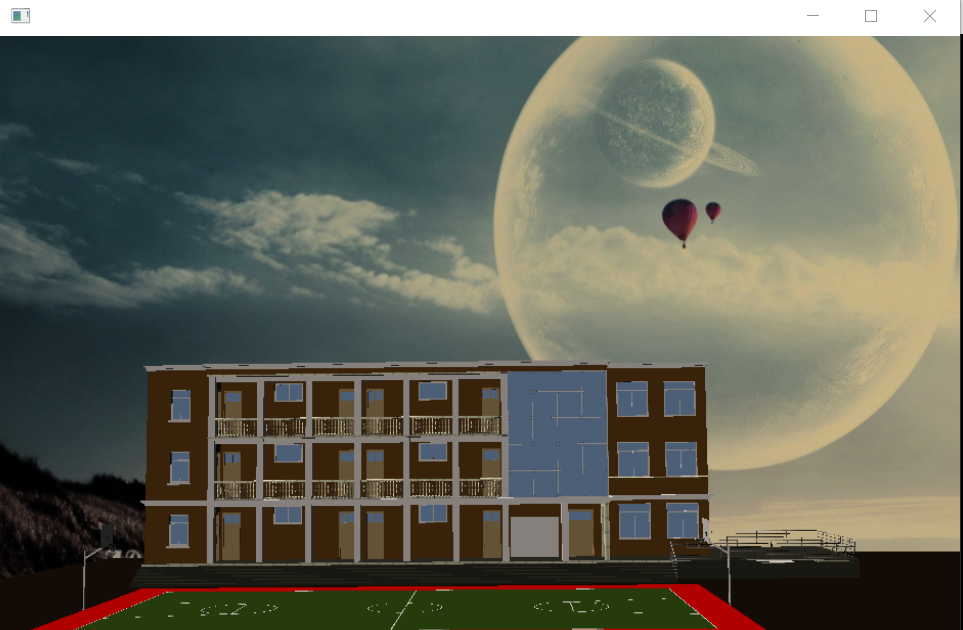
osg HUD 背景图片设置
#ifdef _WIN32

#include <Windows.h>

#endif // _WIN32

#include<iostream>

#include <osgViewer/Viewer>

#include <osgViewer/ViewerEventHandlers>

#include <osgViewer/CompositeViewer>

#include <osgDB/ReadFile>

#include <osg/Geode>

#include <osg/Node>

#include <osg/Geometry>

#include <osg/GraphicsContext>

#include <osg/ShapeDrawable>

#include <osg/Material>

#include <osg/Image>

#include <osg/Texture2D>

#include <osg/TexEnv>

#include <osg/TexGen>

#include <osg/NodeVisitor>

#include <osg/MatrixTransform>

#include <osg/PositionAttitudeTransform>

#include <osg/AnimationPath>

#include <osg/Matrixd>

#include <osg/PagedLOD>

#include <osg/Camera>

#include <osgText/Text>

#include <osgGA/TrackballManipulator>

#include <osgGA/GUIEventHandler>

#include <osgGA/CameraManipulator>

#include <osgGA/StandardManipulator>

#include <osgGA/OrbitManipulator>

#include <osgGA/TrackballManipulator>

#include <osgUtil/IntersectionVisitor>

#include <osgUtil/LineSegmentIntersector>

osg::Camera* createBackground(std::string strImg)

{

    osg::ref_ptr<osg::Geode> geode1 = new osg::Geode;

    osg::ref_ptr<osg::Geometry> geometry1 = new osg::Geometry;

    osg::ref_ptr<osg::Camera> camera1 = new osg::Camera;

    camera1->setAllowEventFocus(false);

    camera1->setProjectionMatrixAsOrtho2D(, , , );

    camera1->setViewport(, , , );

    camera1->setReferenceFrame(osg::Transform::ABSOLUTE_RF);

    camera1->setRenderOrder(osg::Camera::PRE_RENDER);

    camera1->setClearMask(GL_DEPTH_BUFFER_BIT  |  GL_COLOR_BUFFER_BIT);

    //camera1->setClearColor(osg::Vec4());

    camera1->setViewMatrix(osg::Matrix::identity());

    //压入顶点

    osg::ref_ptr<osg::Vec3Array> vertex = new osg::Vec3Array;

    vertex->push_back(osg::Vec3(0.0,0.0,0.0));

    vertex->push_back(osg::Vec3(960.0, 0.0, 0.0));

    vertex->push_back(osg::Vec3(960.0, 600.0, 0.0));

    vertex->push_back(osg::Vec3(0.0, 600.0, 0.0));

    geometry1->setVertexArray(vertex);

    //压入法线

    osg::ref_ptr<osg::Vec3Array> norml = new osg::Vec3Array;

    norml->push_back(osg::Vec3(0.0, 0.0, 1.0));

    geometry1->setNormalArray(norml);

    geometry1->setNormalBinding(osg::Geometry::BIND_OVERALL);

    //纹理坐标

    osg::ref_ptr<osg::Vec2Array> coord = new osg::Vec2Array;

    coord->push_back(osg::Vec2(0.0,0.0));

    coord->push_back(osg::Vec2(1.0, 0.0));

    coord->push_back(osg::Vec2(1.0, 1.0));

    coord->push_back(osg::Vec2(0.0, 1.0));

    geometry1->setTexCoordArray(, coord);

    geometry1->addPrimitiveSet(new osg::DrawArrays(osg::PrimitiveSet::QUADS, , ));

    osg::ref_ptr<osg::Image> img1 = osgDB::readImageFile(strImg);

    if (!img1.valid())

    {

        std::cout << "" << std::endl;

    }

    osg::ref_ptr<osg::Texture2D> texture2d = new osg::Texture2D;

    texture2d->setImage(, img1);

    geometry1->getOrCreateStateSet()->setTextureAttributeAndModes(,texture2d,osg::StateAttribute::ON);

    camera1->addChild(geode1);

    geode1->getOrCreateStateSet()->setMode(GL_LIGHTING, osg::StateAttribute::OFF);

    geode1->addDrawable(geometry1);

    return camera1.release();

}

int main()

{

    osg::ref_ptr<osgViewer::Viewer> viewer1 = new osgViewer::Viewer;

    osg::ref_ptr<osg::Group> group1 = new osg::Group;

    osg::ref_ptr<osg::Node> node1 = osgDB::readNodeFile("D:\\参考手册\\BIM\\osg\\build20190628.osgb");

    group1->addChild(createBackground("D:\\参考手册\\images\\104.jpg"));

    group1->addChild(node1.get());

    viewer1->getCamera()->setClearMask(GL_DEPTH_BUFFER_BIT);

    viewer1->setSceneData(group1.get());

    viewer1->setUpViewInWindow(, , , , );

    return viewer1->run();

}

osg HUD 背景图片设置的更多相关文章
- Android TextView背景颜色与背景图片设置
Android TextView 背景颜色与背景图片设置,android textview 控件,android textview 背景, android textview 图片,android te ...
- JAVA GUI学习 - 窗体背景图片设置方法:重写paintComponent(Graphics g)方法
public class BackgroundImage extends JFrame { public BackgroundImage() { this.setTitle("窗体背景图片设 ...
- css样式背景图片设置缩放
一.背景颜色图片平铺 background-color 背景颜色 background-image 背景图片地址 background-repeat 是否平铺 默认是平铺 background-pos ...
- 【CSS】css网页背景图片设置
刚学CSS,了解了下网页背景图设置,顺便记录下. 下面主要是实现背景图位置保持不变,即不随滚动条动而动的功能. body { background-image:url(images/bck.png); ...
- TextView字体和背景图片 设置透明度
背景图片透明度设置 viewHolder.relative_layout.getBackground().setAlpha(225); 0 --- 225 ((TextView)tv). ...
- WPF Button的背景图片设置
这个问题很简单,但是对于从winfrom转过来的来讲,在做事的时候就会被绕进去,言归正传,如何设置一个bUtton的背景图片?如何去掉让人烦的默认选中时的灰色背景?请看如下的描述.问题的来源和解决都在 ...
- QT:给Widget设置背景图片——设置Widget的调色板,调色板使用图片和背景色
QT:给Widget设置背景图片 1 /*2 * set background image3 */4 QPixmap bgImages(":/images/bg.png");5 Q ...
- MFC 窗体背景图片设置
很多人在做MFC 界面的时候想要给对话框加入背景图片,很多人都会想到在OnPaint()里面来加一段代码来实现,其实这样做并不怎么科学,因为它会导致窗口不断重绘,在很多项目中窗口会闪烁(比如带播放视频 ...
- ios UITableView背景图片设置
- (UITableViewCell *)tableView:(UITableView *)tableView cellForRowAtIndexPath:(NSIndexPath *)indexPa ...
随机推荐
- (转)Java锁性能提高有哪些机制?
转自:https://forum.idevfun.io/t/topic/235/2 Java 中,Synchronized是通过对象内部的一个叫做监视器锁(monitor)来实现的.但是监视器锁本质又 ...
- 利用k8s实现HPA
如何利用kubernetes实现应用的水平扩展(HPA) 云计算具有水平弹性的特性,这个是云计算区别于传统IT技术架构的主要特性.对于Kubernetes中的POD集群来说,HPA就是实现这种水平伸缩 ...
- MySql 数据库 SQLException: The user specified as a definer ('root'@'%') does not exist 错误原因及解决办法
The user specified as a definer ('root'@'%') does not exist 此种报错主要是针对访问视图文件引起的(没有权限) 经查明:是用户root并没有获 ...
- Nginx入门(三)——正向代理
server { resolver 114.114.114.114; #指定DNS服务器IP地址 listen 443; location / { proxy_pass https://$host$r ...
- Visual Studio Code IDE开发插件配置
[PHP通用集成环境] PHP Extension Pack #PHP拓展包,PHP开发最重要的拓展 PHP Intelephense #PHP自动补全工具 PHP IntelliSense #PHP ...
- JS正则表达式完整教程
JS正则表达式完整教程(略长) 引言 亲爱的读者朋友,如果你点开了这篇文章,说明你对正则很感兴趣. 想必你也了解正则的重要性,在我看来正则表达式是衡量程序员水平的一个侧面标准. 关于正则表达式的教程, ...
- [Angular 8] Calculate and Measure Performance budgets with the Angular CLI
Measuring is extremely important, without numbers we don’t know about potential problems and we don’ ...
- 通过反射获取DataSource里数据源的账号密码
public Connection getDbConnection() { Connection conn = null; // 获得连接 DataSource ds = null; try { Co ...
- HEML与Css的基本理解
什么是 HTML? HTML 就像造房子一样,一栋房子有多个组成部分,html类似于房子的户型,它设计了房子的整体架构.分区.布局,而且还定义了每个区块的功能作用.html技术为后续入住的数据事先搭建 ...
- java+下载+大文件断点续传
java两台服务器之间,大文件上传(续传),采用了Socket通信机制以及JavaIO流两个技术点,具体思路如下: 实现思路:1.服:利用ServerSocket搭建服务器,开启相应端口,进行长连接操 ...