
Suricata Rules
Suricata Rules
https://redmine.openinfosecfoundation.org/projects/suricata/wiki/Suricata_Rules
https://suricata.readthedocs.io/en/suricata-4.1.4/rules/index.html
Suricata Rules
Introduction
Signatures play a very important role in Suricata. In most occasions people are using existing rulesets. The most used are Emerging Threats, Emerging Threats Pro and source fire's VRT. A way to install rules is described in Rule Management with Oinkmaster.
This Suricata Rules document explains all about signatures; how to read-, adjust-and create them.
A rule/signature consists of the following:
The action, header and rule-options.
Example of a signature:
Action
For more information read 'Action Order' in the suricata.yaml wiki.
Example: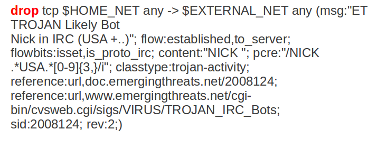
In this example the red, bold-faced part is the action.
Protocol
This keyword in a signature tells Suricata which protocol it concerns. You can choose between four settings. tcp (for tcp-traffic), udp, icmp and ip. ip stands for 'all' or 'any'.
Suricata adds a few protocols : http, ftp, tls (this includes ssl), smb and dns (from v2.0). These are the so-called application layer protocols or layer 7 protocols.
If you have a signature with for instance a http-protocol, Suricata makes sure the signature can only match if it concerns http-traffic.
Example: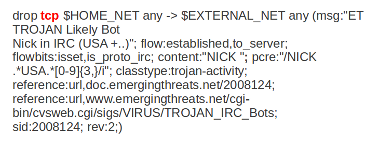
In this example the red, bold-faced part is the protocol.
Source and destination
In source you can assign IP-addresses; IPv4 and IPv6 combined as well as separated. You can also set variables such as HOME_NET. (For more information see 'Rule-vars' at Suricata.yaml in the user guide.)
In the Yaml-file you can set IP-addresses for variables such as EXTERNAL_NET and HOME_NET. These settings will be used when you use these variables in a rule.
In source and destination you can make use of signs like ! And [ ].
For example:
! 1.1.1.1                       (Every IP address but 1.1.1.1)

![1.1.1.1, 1.1.1.2]             (Every IP address but 1.1.1.1 and 1.1.1.2)

$HOME_NET                       (Your setting of HOME_NET in yaml)

[$EXTERNAL_NET, !$HOME_NET]     (EXTERNAL_NET and not HOME_NET)

[10.0.0.0/24, !10.0.0.5]        (10.0.0.0/24 except for 10.0.0.5)

[…..,[....]]

[…. ,![.....]]
Pay attention to the following:
If your settings in Yaml are:
HOME_NET: any
EXTERNAL_NET: ! $HOME_NET
You can not write a signature using EXTERNAL_NET because it stands for 'not any'. This is a invalid setting.
Example of source and destination in a signature:
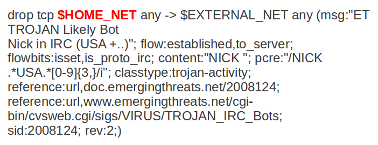
The red, bold-faced part is the source.
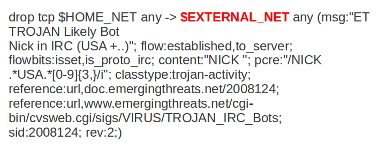
The red, bold-faced part is the destination.
Ports (source-and destination-port)
Traffic comes in and goes out through ports. Different ports have different port-numbers. The HTTP-port for example is 80 while 443 is the port for HTTPS and MSN makes use of port 1863. Commonly the Source port will be set as 'any'. This will be influenced by the protocol. The source port is designated at random by the operating system. Sometimes it is possible to filter/screen on the source
In setting ports you can make use of special signs as well, like described above at 'source'. Signs like:
!       exception/negation

:       range

[]      signs to make clear which parts belong together

,       separation
Example:
[80, 81, 82]    (port 80, 81 and 82)

[80: 82]        (Range from 80 till 82)

[1024: ]        (From 1024 till the highest port-number)

!80             (Every port but 80)

[80:100,!99]    (Range from 80 till 100 but 99 excluded)

[1:80,![2,4]]

[….[.....]]
Example of ports in a signature:
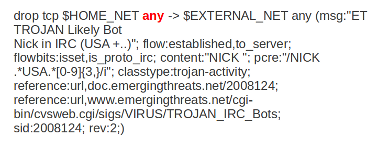
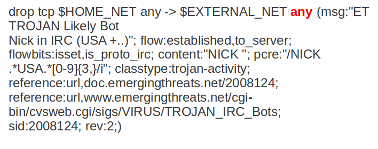
In this example, the red, bold-faced part is the port.
Direction
The direction tells in which way the signature has to match. Nearly every signature has an arrow to the right. This means that only packets with the same direction can match.
source -> destination

source <> destination  (both directions)
Example:
alert tcp 1.2.3.4 1024 - > 5.6.7.8 80
Example 1 tcp-session
In this example there will only be a match if the signature has the same order/direction as the payload.
Example of direction in a signature:
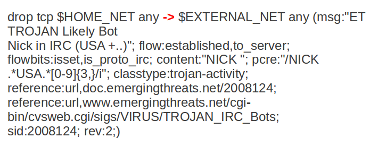
In this example the red, bold-faced part is the direction.
Rule options
Keywords have a set format:
name: settings;
Sometimes it is just the name of the setting followed by ; . Like nocase;
There are specific settings for:
- meta-information.
- headers
- payloads
- flows
For more information about these settings, you can click on the following headlines:
Meta-settings
Payload keywords
HTTP-keywords
DNS-keywords
Flow-keywords
IP Reputation keyword
============== End
Suricata Rules的更多相关文章
- 构建基于Suricata+Splunk的IDS入侵检测系统
一.什么是IDS和IPS? IDS(Intrusion Detection Systems):入侵检测系统,是一种网络安全设备或应用软件,可以依照一定的安全策略,对网络.系统的运行状况进行监视,尽可能 ...
- [DPI][suricata] suricata-4.0.3 安装部署
suricata 很值得借鉴.但是首先还是要安装使用,作为第一步的熟悉. 安装文档:https://redmine.openinfosecfoundation.org/projects/suricat ...
- suricata 原文记录
如何在 Linux 系统上安装 Suricata 入侵检测系统 编译自:http://xmodulo.com/install-suricata-intrusion-detection-system-l ...
- Suricata产生的数据存储目录
不多说,直接上干货! 我这里呢,分两种常用的Suricata. 一.源码编译安装的Suricata 这里不多说,大家可以去看我下面写的博客 使用 Suricata 进行入侵监控(一个简单小例子访问百度 ...
- Suricata的规则解读(默认和自定义)
不多说,直接上干货! 见suricata官网 https://suricata.readthedocs.io/en/latest/rules/index.html 一.Suricata的规则所放位置 ...
- 使用 Suricata 进行入侵监控(一个简单小例子访问百度)
前期博客 基于CentOS6.5下Suricata(一款高性能的网络IDS.IPS和网络安全监控引擎)的搭建(图文详解)(博主推荐) 1.自己编写一条规则,规则书写参考snort规则(suricata ...
- suricata.yaml (一款高性能的网络IDS、IPS和网络安全监控引擎)默认配置文件(图文详解)
不多说,直接上干货! 前期博客 基于CentOS6.5下Suricata(一款高性能的网络IDS.IPS和网络安全监控引擎)的搭建(图文详解)(博主推荐) 或者 基于Ubuntu14.04下Suric ...
- 基于CentOS6.5下Suricata(一款高性能的网络IDS、IPS和网络安全监控引擎)的搭建(图文详解)(博主推荐)
不多说,直接上干货! 为什么,要写这篇论文? 是因为,目前科研的我,正值研三,致力于网络安全.大数据.机器学习研究领域! 论文方向的需要,同时不局限于真实物理环境机器实验室的攻防环境.也不局限于真实物 ...
- Stamus Networks的产品SELKS(Suricata IDPS、Elasticsearch 、Logstash 、Kibana 和 Scirius )的下载和安装(带桌面版和不带桌面版)(图文详解)
不多说,直接上干货! SELKS是什么? SELKS 是Stamus Networks的产品,它是基于Debian的自启动运行发行,面向网络安全管理.它基于自己的图形规则管理器提供一套完整的.易于使 ...
随机推荐
- Flutter -------- dio网络请求
dio是Flutter中文网开源的一个强大的Dart Http请求库,支持Restful API.FormData.拦截器.请求取消.Cookie管理.文件上传/下载.超时等... 1.添加依赖# d ...
- flutter SnackBar 底部消息提示
具有可选操作的轻量级消息提示,在屏幕的底部显示 文档:https://api.flutter.dev/flutter/material/SnackBar-class.html demo: import ...
- Qt QLabel加载图片
QLabel加载图片 //在对应的控件中显示图片 void qm_img::DisplayImg(cv::Mat imgParam, QLabel *labelParam) { if (!imgPar ...
- Windows下安装RabbitMQ3.6.5
1.安装erlang 网址:http://www.erlang.org/ 下载exe文件安装即可 2.安装RabbitmQ 下载地址:http://www.rabbitmq.com/download. ...
- Qt编写气体安全管理系统1-项目框架
一.前言 说到项目框架,也叫代码框架,其实是非常重要的,随着编程经验的增加,相信每个程序员都会有一个自己的习惯的项目框架,这个东西跟建房子一样,先把架子搭好,然后挨个往里边填充内容,据说牛逼的架构师都 ...
- 使用postman调用webservice接口
通过wsdl查看接口地址: 填入xml报文: 配置相应的headers:
- window下安装docker
下载docker toolbox https://mirrors.aliyun.com/docker-toolbox/windows/docker-toolbox/ 1,.双击安装DockerTool ...
- Anti Pattern - ThreadLocal variables with Thread Pool(转)
In a previous post, I wrote the usage and benefits of ThreadLocal based instance variables in concur ...
- Python - Django - ORM QuerySet 方法补充
models.py: from django.db import models class Employee2(models.Model): name = models.CharField(max_l ...
- Python离线环境
一.应用场景 比如:对于数据安全要求比较严格的机房,服务器是不允许上网的.那么我现在开发了一套python程序,需要一些模块,怎么运行? 二.离线包制作 有2个解决方案: 1. 使用requireme ...