
Suricata Rules
Suricata Rules
https://redmine.openinfosecfoundation.org/projects/suricata/wiki/Suricata_Rules
https://suricata.readthedocs.io/en/suricata-4.1.4/rules/index.html
Suricata Rules
Introduction
Signatures play a very important role in Suricata. In most occasions people are using existing rulesets. The most used are Emerging Threats, Emerging Threats Pro and source fire's VRT. A way to install rules is described in Rule Management with Oinkmaster.
This Suricata Rules document explains all about signatures; how to read-, adjust-and create them.
A rule/signature consists of the following:
The action, header and rule-options.
Example of a signature:
Action
For more information read 'Action Order' in the suricata.yaml wiki.
Example: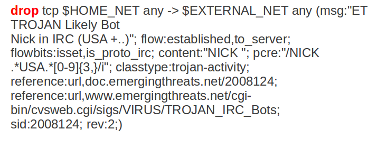
In this example the red, bold-faced part is the action.
Protocol
This keyword in a signature tells Suricata which protocol it concerns. You can choose between four settings. tcp (for tcp-traffic), udp, icmp and ip. ip stands for 'all' or 'any'.
Suricata adds a few protocols : http, ftp, tls (this includes ssl), smb and dns (from v2.0). These are the so-called application layer protocols or layer 7 protocols.
If you have a signature with for instance a http-protocol, Suricata makes sure the signature can only match if it concerns http-traffic.
Example: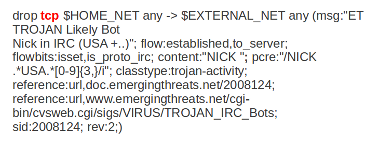
In this example the red, bold-faced part is the protocol.
Source and destination
In source you can assign IP-addresses; IPv4 and IPv6 combined as well as separated. You can also set variables such as HOME_NET. (For more information see 'Rule-vars' at Suricata.yaml in the user guide.)
In the Yaml-file you can set IP-addresses for variables such as EXTERNAL_NET and HOME_NET. These settings will be used when you use these variables in a rule.
In source and destination you can make use of signs like ! And [ ].
For example:
! 1.1.1.1                       (Every IP address but 1.1.1.1)

![1.1.1.1, 1.1.1.2]             (Every IP address but 1.1.1.1 and 1.1.1.2)

$HOME_NET                       (Your setting of HOME_NET in yaml)

[$EXTERNAL_NET, !$HOME_NET]     (EXTERNAL_NET and not HOME_NET)

[10.0.0.0/24, !10.0.0.5]        (10.0.0.0/24 except for 10.0.0.5)

[…..,[....]]

[…. ,![.....]]
Pay attention to the following:
If your settings in Yaml are:
HOME_NET: any
EXTERNAL_NET: ! $HOME_NET
You can not write a signature using EXTERNAL_NET because it stands for 'not any'. This is a invalid setting.
Example of source and destination in a signature:
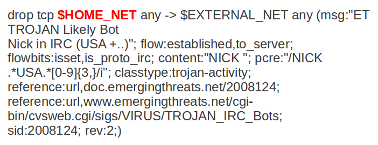
The red, bold-faced part is the source.
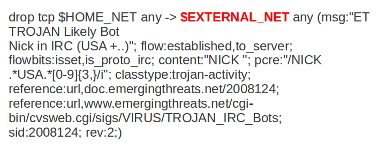
The red, bold-faced part is the destination.
Ports (source-and destination-port)
Traffic comes in and goes out through ports. Different ports have different port-numbers. The HTTP-port for example is 80 while 443 is the port for HTTPS and MSN makes use of port 1863. Commonly the Source port will be set as 'any'. This will be influenced by the protocol. The source port is designated at random by the operating system. Sometimes it is possible to filter/screen on the source
In setting ports you can make use of special signs as well, like described above at 'source'. Signs like:
!       exception/negation

:       range

[]      signs to make clear which parts belong together

,       separation
Example:
[80, 81, 82]    (port 80, 81 and 82)

[80: 82]        (Range from 80 till 82)

[1024: ]        (From 1024 till the highest port-number)

!80             (Every port but 80)

[80:100,!99]    (Range from 80 till 100 but 99 excluded)

[1:80,![2,4]]

[….[.....]]
Example of ports in a signature:
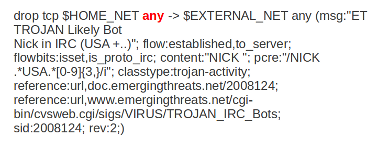
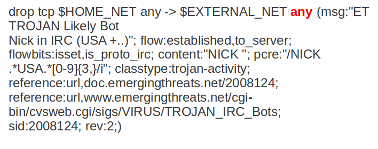
In this example, the red, bold-faced part is the port.
Direction
The direction tells in which way the signature has to match. Nearly every signature has an arrow to the right. This means that only packets with the same direction can match.
source -> destination

source <> destination  (both directions)
Example:
alert tcp 1.2.3.4 1024 - > 5.6.7.8 80
Example 1 tcp-session
In this example there will only be a match if the signature has the same order/direction as the payload.
Example of direction in a signature:
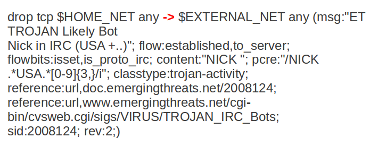
In this example the red, bold-faced part is the direction.
Rule options
Keywords have a set format:
name: settings;
Sometimes it is just the name of the setting followed by ; . Like nocase;
There are specific settings for:
- meta-information.
- headers
- payloads
- flows
For more information about these settings, you can click on the following headlines:
Meta-settings
Payload keywords
HTTP-keywords
DNS-keywords
Flow-keywords
IP Reputation keyword
============== End
Suricata Rules的更多相关文章
- 构建基于Suricata+Splunk的IDS入侵检测系统
一.什么是IDS和IPS? IDS(Intrusion Detection Systems):入侵检测系统,是一种网络安全设备或应用软件,可以依照一定的安全策略,对网络.系统的运行状况进行监视,尽可能 ...
- [DPI][suricata] suricata-4.0.3 安装部署
suricata 很值得借鉴.但是首先还是要安装使用,作为第一步的熟悉. 安装文档:https://redmine.openinfosecfoundation.org/projects/suricat ...
- suricata 原文记录
如何在 Linux 系统上安装 Suricata 入侵检测系统 编译自:http://xmodulo.com/install-suricata-intrusion-detection-system-l ...
- Suricata产生的数据存储目录
不多说,直接上干货! 我这里呢,分两种常用的Suricata. 一.源码编译安装的Suricata 这里不多说,大家可以去看我下面写的博客 使用 Suricata 进行入侵监控(一个简单小例子访问百度 ...
- Suricata的规则解读(默认和自定义)
不多说,直接上干货! 见suricata官网 https://suricata.readthedocs.io/en/latest/rules/index.html 一.Suricata的规则所放位置 ...
- 使用 Suricata 进行入侵监控(一个简单小例子访问百度)
前期博客 基于CentOS6.5下Suricata(一款高性能的网络IDS.IPS和网络安全监控引擎)的搭建(图文详解)(博主推荐) 1.自己编写一条规则,规则书写参考snort规则(suricata ...
- suricata.yaml (一款高性能的网络IDS、IPS和网络安全监控引擎)默认配置文件(图文详解)
不多说,直接上干货! 前期博客 基于CentOS6.5下Suricata(一款高性能的网络IDS.IPS和网络安全监控引擎)的搭建(图文详解)(博主推荐) 或者 基于Ubuntu14.04下Suric ...
- 基于CentOS6.5下Suricata(一款高性能的网络IDS、IPS和网络安全监控引擎)的搭建(图文详解)(博主推荐)
不多说,直接上干货! 为什么,要写这篇论文? 是因为,目前科研的我,正值研三,致力于网络安全.大数据.机器学习研究领域! 论文方向的需要,同时不局限于真实物理环境机器实验室的攻防环境.也不局限于真实物 ...
- Stamus Networks的产品SELKS(Suricata IDPS、Elasticsearch 、Logstash 、Kibana 和 Scirius )的下载和安装(带桌面版和不带桌面版)(图文详解)
不多说,直接上干货! SELKS是什么? SELKS 是Stamus Networks的产品,它是基于Debian的自启动运行发行,面向网络安全管理.它基于自己的图形规则管理器提供一套完整的.易于使 ...
随机推荐
- INotifyPropertyChanged PropertyChangedEventArgs获取变更属性
INotifyPropertyChanged: 该接口包含一个事件, 针对属性发生变更时, 执行该事件发生. // // 摘要: // 通知客户端属性值已更改. public interface IN ...
- Redis For Windows安装及密码
启动要先开启一个控制台作为服务端,启动服务,然后在重新打开一个控制台,连接服务进行操作. redis-server.exe redis.conf 重新打开一个控制台,刚开始连接服务,因为初始没有密码, ...
- Xamarin图表开发基础教程(1)
Xamarin图表开发基础教程(1) 在Xamarin图表开发中,最常用的框架是OxyPlot和Microcharts.其中,OxyOPlot提供多种多样的图表类型和丰富的图表功能,可以实现各种复杂的 ...
- tensorflow 如何看shape
https://blog.csdn.net/yinxingtianxia/article/details/78121941 输入: x= tf.truncated_normal([, , ], dty ...
- OMPL 在windows下的安装
博客参考:https://blog.csdn.net/shitanding/article/details/82562702 和 https://bitbucket.org/ompl/omplapp/ ...
- Spring cloud微服务安全实战-5-12实现基于token的SSO(2)
我只要把这个meFilter放在AuthorizationFilter后面就可以了. authorizationFilter的排序是3 MeFilter设置为4 就可以了. 拿到了username直接 ...
- 转 How to Find Out Who Is Locking a Table in MySQL
MySQL is adding more tools to monitor its internals with every new release, but one thing it still l ...
- PL/SQL developer 开发小技能 and ash show command PL/SQL EXECUTE 以及注释
##sample test windows 调试存储过程, 总体指导思想使用pl/sql test windows 调试存储过程,存储过程调试 可以用 run to next exception ...
- 【opencv基础-VxWorks】话说图像格式转换-COLOR_YUV2BGR_YUY2
前言 基于Vxworks的WindRiver获取摄像头图像进行处理,需要先进行转换,对于转换格式博主有点疑问.本文对此作出解释,若有错误,请交流指正. README.md The video came ...
- 原生JavaScript常用本地浏览器存储方法五(LocalStorage+userData的一个浏览器兼容类)
基于LocalStorage+globalStorage+userData实现的一个本地存储类 userData用来兼容ie6 ie7 由userData模仿Session的方法:浏览器关闭删除保存的 ...