
【Azure 环境】【Azure Developer】使用Python代码获取Azure 中的资源的Metrics定义及数据
问题描述
使用Python SDK来获取Azure上的各种资源的Metrics的名称以及Metrics Data的示例
问题解答
通过 azure-monitor-query ,可以创建一个 metrics client,调用 client.list_metric_definitions 来获取Metrics 定义,然后通过 client.query_resource 获取Metrics data。
关键函数为:
#第一步:定义 client

client = MetricsQueryClient(credential=credential, endpoint='https://management.chinacloudapi.cn',

audience='https://management.chinacloudapi.cn')

#第二步:获取metrics name

response = client.list_metric_definitions(metric_uri)

#第三步:获取 metrcis data

response = client.query_resource(

        resource_uri=url,

        metric_names=[name],

        timespan=timedelta(hours=2),

        granularity=timedelta(minutes=5),

        aggregations=[MetricAggregationType.AVERAGE],

        )
需要注意:
- endpoint 和 audience 需要根据代码的使用Azure环境不同而改变,以上为中国区Azure的Endpoint。与Global Azure 终结点对比文档见:https://docs.microsoft.com/en-us/azure/china/resources-developer-guide#check-endpoints-in-azuredevelop
- metrics_url 可以在Azure 门户中的“属性”页面获取,当然也可以通过Python对于资源的SDK进行获取。示例代码见附录一.
全部示例代码:
# import required package

from ast import Try

from warnings import catch_warnings

from datetime import timedelta

from azure.monitor.query import MetricsQueryClient, MetricAggregationType

from azure.identity import AzureCliCredential   ## pip install azure-identity

# prepare credential

credential = AzureCliCredential()

#init metric query client, endpoint need to target China Azure

client = MetricsQueryClient(credential=credential, endpoint='https://management.chinacloudapi.cn',

audience='https://management.chinacloudapi.cn')

def printMetricsDataByName(url, name):

    ##metrics_uri =metric_uri; ### os.environ.get('METRICS_RESOURCE_URI')

    response = client.query_resource(

        resource_uri=url,

        metric_names=[name],

        timespan=timedelta(hours=2),

        granularity=timedelta(minutes=5),

        aggregations=[MetricAggregationType.AVERAGE],

        )

    for metric in response.metrics:

        print(metric.name + ' -- ' + metric.display_description)

        for time_series_element in metric.timeseries:

            for metric_value in time_series_element.data:

                print('\tThe {}  at {} is {}'.format(

                    name,

                    metric_value.timestamp,

                    metric_value.average

                ))

print("###  ..Special Reource URL.. ....")

# specific resource uri

metric_uri = '/subscriptions/<your-subscriptions-id>/resourceGroups/<your-resource-group>/providers/Microsoft.Cache/Redis/<your-resource-name>'

# do query...

response = client.list_metric_definitions(metric_uri)

for item in response:

    print(item.name + " ......  Metrics Data  ......")

    try:

        printMetricsDataByName(metric_uri,item.name)

    except Exception as e:

        print(e)
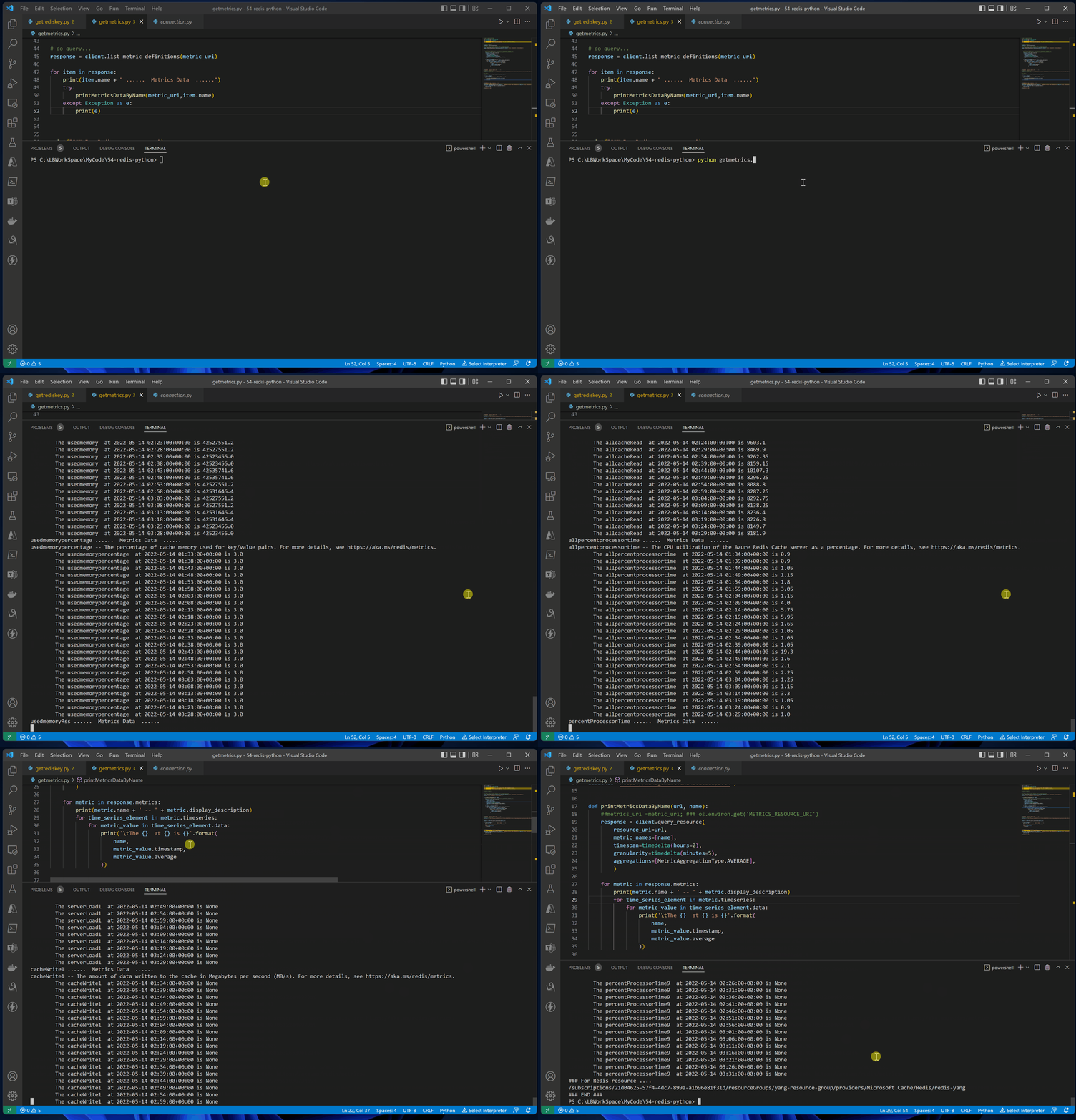
测试效果图:
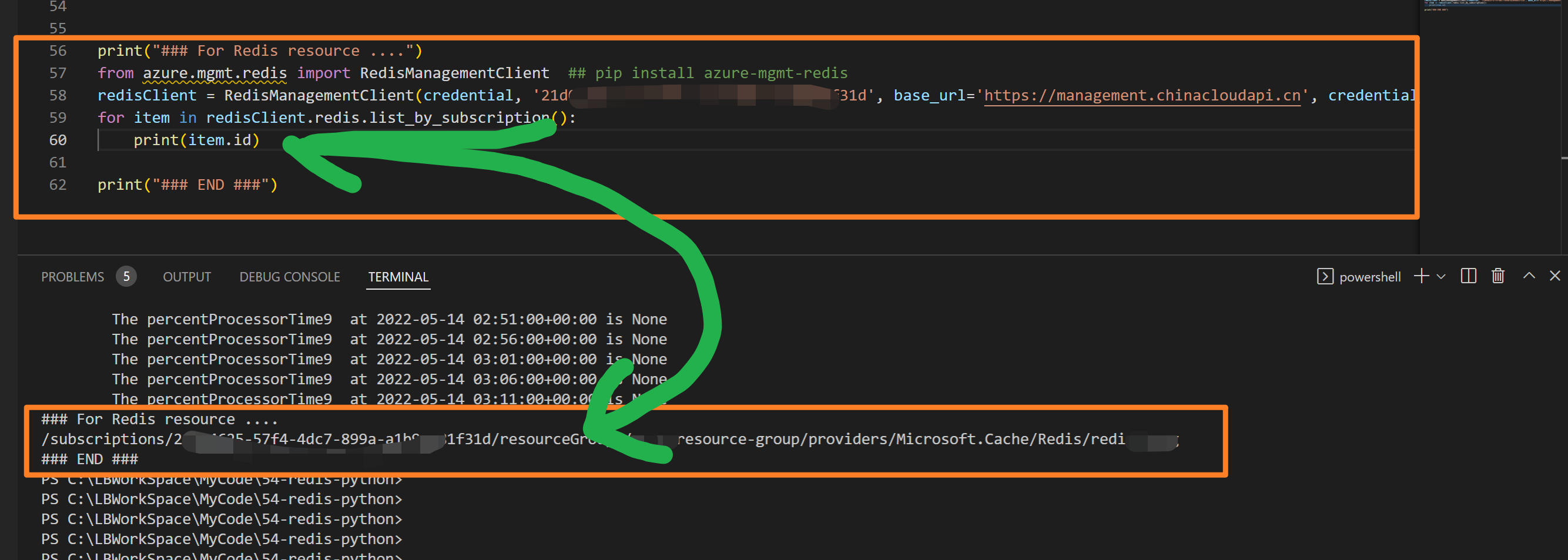
附录一:例如在代码中获取Redis资源的Resource ID
from azure.mgmt.redis import RedisManagementClient  ## pip install azure-mgmt-redis

from azure.identity import AzureCliCredential   ## pip install azure-identity

# prepare credential

credential = AzureCliCredential()

redisClient = RedisManagementClient(credential, '<YOUR SUB>',

base_url='https://management.chinacloudapi.cn',

credential_scopes=[https://management.chinacloudapi.cn/.default])

for item in redisClient.redis.list_by_subscription():

    print(item.id)
附录二:credential = AzureCliCredential() 为访问Azure资源时提供认证授权的方法,如果出现权限不够,或者是无法访问的情况,会出现类似如下的提示,需要根据消息提示来解决权限问题。
Code: AuthorizationFailed

Message: The client 'xxxxxxxxxxxxxxxxxxx@xxxxx.partner.onmschina.cn' with object id 'xxxxxxxx-xxxx-xxxx-xxxxx-xxxxxxxxxxxx'
does not have authorization to perform action 'Microsoft.Insights/metricDefinitions/read'
over scope '/subscriptions/xxxxxxxx-xxxx-xxxx-xxxxx-xxxxxxxxxxxx/resourceGroups/xxxx-resource-group/providers/Microsoft.Cache/Redis/redis-xxxxxx/providers/Microsoft.Insights'
or the scope is invalid. If access was recently granted, please refresh your credentials.
参考资料
Azure Monitor Query client library Python samples: https://github.com/Azure/azure-sdk-for-python/tree/main/sdk/monitor/azure-monitor-query/samples
Azure China developer guide: https://docs.microsoft.com/en-us/azure/china/resources-developer-guide#check-endpoints-in-azuredevelop
【Azure 环境】【Azure Developer】使用Python代码获取Azure 中的资源的Metrics定义及数据的更多相关文章
- 【Azure Redis 缓存】使用Python代码获取Azure Redis的监控指标值 (含Powershell脚本方式)
问题描述 通过Metrics监控页面,我们能得知当前资源(如Redis)的运行情况与各种指标.如果我们需要把指标下载到本地或者生成JSON数据导入到第三方的监控平台呢?Azure是否可以通过Pytho ...
- 【Azure Developer】Python代码通过AAD认证访问微软Azure密钥保管库(Azure Key Vault)中机密信息(Secret)
关键字说明 什么是 Azure Active Directory?Azure Active Directory(Azure AD, AAD) 是 Microsoft 的基于云的标识和访问管理服务,可帮 ...
- 【python】获取列表中最长连续数字
最近开发遇到一个功能需求,目的是要获取一个AI分析结果中最长连续帧,比如一个视频中连续3帧有人,那么我认为这个视频就是有人,我就要判断这个视频帧列表中是否有连续的三帧有人.本质就是获取列表中的最长连续 ...
- 万答#2,一样的Python代码,为什么可以删表,却不能更新数据
欢迎来到 GreatSQL社区分享的MySQL技术文章,如有疑问或想学习的内容,可以在下方评论区留言,看到后会进行解答 问题 运行下面的这段Python代码,却总是无法更新数据: import pym ...
- pycharm中运行成功的python代码在jenkin中运行问题总结
我们在用selenium+python完成了项目的UI自动化后,一般用jekins持续集成工具来定期运行,python程序在pycharm中编辑运行成功,但在jenkins中运行失败的两个问题,整理如 ...
- python,如何获取字符串中的子字符串,部分字符串
说明: 比如有一个字符串,python,如何就获取前3位,或者后2位.在此记录下. 操作过程: 1.通过分割符的方式,下标的方式,获取字符串中的子串 >>> text = 'pyth ...
- 当From窗体中数据变化时,使用代码获取数据库中的数据然后加入combobox中并且从数据库中取得最后的结果
private void FormLug_Load(object sender, EventArgs e) { FieldListLug.Clear();//字段清除 DI = double.Pars ...
- 【Azure Developer】使用Postman获取Azure AD中注册应用程序的授权Token,及为Azure REST API设置Authorization
Azure Active Directory (Azure AD) is Microsoft's cloud-based identity and access management service, ...
- 编写python代码获取4k高清壁纸
Huskiesir最近在研究python爬虫大约俩周了吧,由于比较懒,也没把具体研究的过程与经验写下来,实在是一大憾事.这次直接上干货,代码送给大家: import re import request ...
随机推荐
- 学习SVN01
SVN服务器搭建实录 第一章 SVN介绍 1.1 什么是SVN(subversion) SVN是近年来崛起的非常优秀的版本管理工具,与CVS管理工具一样,SVN是一个固态的跨平台的开源的版本控制 ...
- 【Linux-vim】vim文件:查看某几行,把某几行复制到另一个文件中
一.查看文件的某几行1.使用cat命令(1)查看文件的前10行: cat filename |head -n 10(2)查看文件后10行: cat filename |tail -n 10(3)查看文 ...
- 检查浏览器支持Webp
什么是Webp? Webp 是一种支持有损压缩和无损压缩的图片文件格式,派生自图像编码格式 VP8.根据 Google 的测试,无损压缩后的 WebP 比 PNG 文件少了 45% 的文件大小,即使这 ...
- Android优化应用启动速度
一.应用的启动 启动方式 通常来说,在安卓中应用的启动方式分为两种:冷启动和热启动. 1.冷启动:当启动应用时,后台没有该应用的进程,这时系统会重新创建一个新的进程分配给该应用,这个启动方式就是冷启动 ...
- java语言和jdk、jre基础
Java语言平台 * J2SE(Java 2 Platform Standard Edition)标准版 * 是为开发普通桌面和商务应用程序提供的解决方案,该技术体系是其他两者的基础,可以完成一些桌 ...
- Spring5-IOC底层原理
1.什么是IOC (1)控制反转,把对象创建和对象之间的调用过程,交给Spring进行管理 (2)使用IOC目的:为了降低耦合度 2.IOC底层原理 (1)xml解析.工厂模式.反射
- spring-xml实现aop-通知的种类
如果本代码有疑问,请访问spring-aop快速入门或者spring-aop动态代理技术(底层分析) 1.导入aop的相关坐标 <dependency> <groupId>or ...
- Java基础之浅谈集合
Java基础知识.关于List.Set.Map接口的了解,以及ArrayList.LinkedList.HashSet.TreeSet.HashMap.TreeMap...
- 使用IntelliJ IDEA创建Java项目
准备: Intelliyu IDEA 下载好JDK1.8 方法一: 方法二
- Python学习阵痛期
Python和之前学习的Java语法上有较大的区别,例如Java中for循环常使用++自增符,在Python中是没有++的. 因为Python中整型.字符型等都是不可变的,一改变值就重新分配了新的内存 ...