
【Azure 环境】【Azure Developer】使用Python代码获取Azure 中的资源的Metrics定义及数据
问题描述
使用Python SDK来获取Azure上的各种资源的Metrics的名称以及Metrics Data的示例
问题解答
通过 azure-monitor-query ,可以创建一个 metrics client,调用 client.list_metric_definitions 来获取Metrics 定义,然后通过 client.query_resource 获取Metrics data。
关键函数为:
#第一步:定义 client

client = MetricsQueryClient(credential=credential, endpoint='https://management.chinacloudapi.cn',

audience='https://management.chinacloudapi.cn')

#第二步:获取metrics name

response = client.list_metric_definitions(metric_uri)

#第三步:获取 metrcis data

response = client.query_resource(

        resource_uri=url,

        metric_names=[name],

        timespan=timedelta(hours=2),

        granularity=timedelta(minutes=5),

        aggregations=[MetricAggregationType.AVERAGE],

        )
需要注意:
- endpoint 和 audience 需要根据代码的使用Azure环境不同而改变,以上为中国区Azure的Endpoint。与Global Azure 终结点对比文档见:https://docs.microsoft.com/en-us/azure/china/resources-developer-guide#check-endpoints-in-azuredevelop
- metrics_url 可以在Azure 门户中的“属性”页面获取,当然也可以通过Python对于资源的SDK进行获取。示例代码见附录一.
全部示例代码:
# import required package

from ast import Try

from warnings import catch_warnings

from datetime import timedelta

from azure.monitor.query import MetricsQueryClient, MetricAggregationType

from azure.identity import AzureCliCredential   ## pip install azure-identity

# prepare credential

credential = AzureCliCredential()

#init metric query client, endpoint need to target China Azure

client = MetricsQueryClient(credential=credential, endpoint='https://management.chinacloudapi.cn',

audience='https://management.chinacloudapi.cn')

def printMetricsDataByName(url, name):

    ##metrics_uri =metric_uri; ### os.environ.get('METRICS_RESOURCE_URI')

    response = client.query_resource(

        resource_uri=url,

        metric_names=[name],

        timespan=timedelta(hours=2),

        granularity=timedelta(minutes=5),

        aggregations=[MetricAggregationType.AVERAGE],

        )

    for metric in response.metrics:

        print(metric.name + ' -- ' + metric.display_description)

        for time_series_element in metric.timeseries:

            for metric_value in time_series_element.data:

                print('\tThe {}  at {} is {}'.format(

                    name,

                    metric_value.timestamp,

                    metric_value.average

                ))

print("###  ..Special Reource URL.. ....")

# specific resource uri

metric_uri = '/subscriptions/<your-subscriptions-id>/resourceGroups/<your-resource-group>/providers/Microsoft.Cache/Redis/<your-resource-name>'

# do query...

response = client.list_metric_definitions(metric_uri)

for item in response:

    print(item.name + " ......  Metrics Data  ......")

    try:

        printMetricsDataByName(metric_uri,item.name)

    except Exception as e:

        print(e)
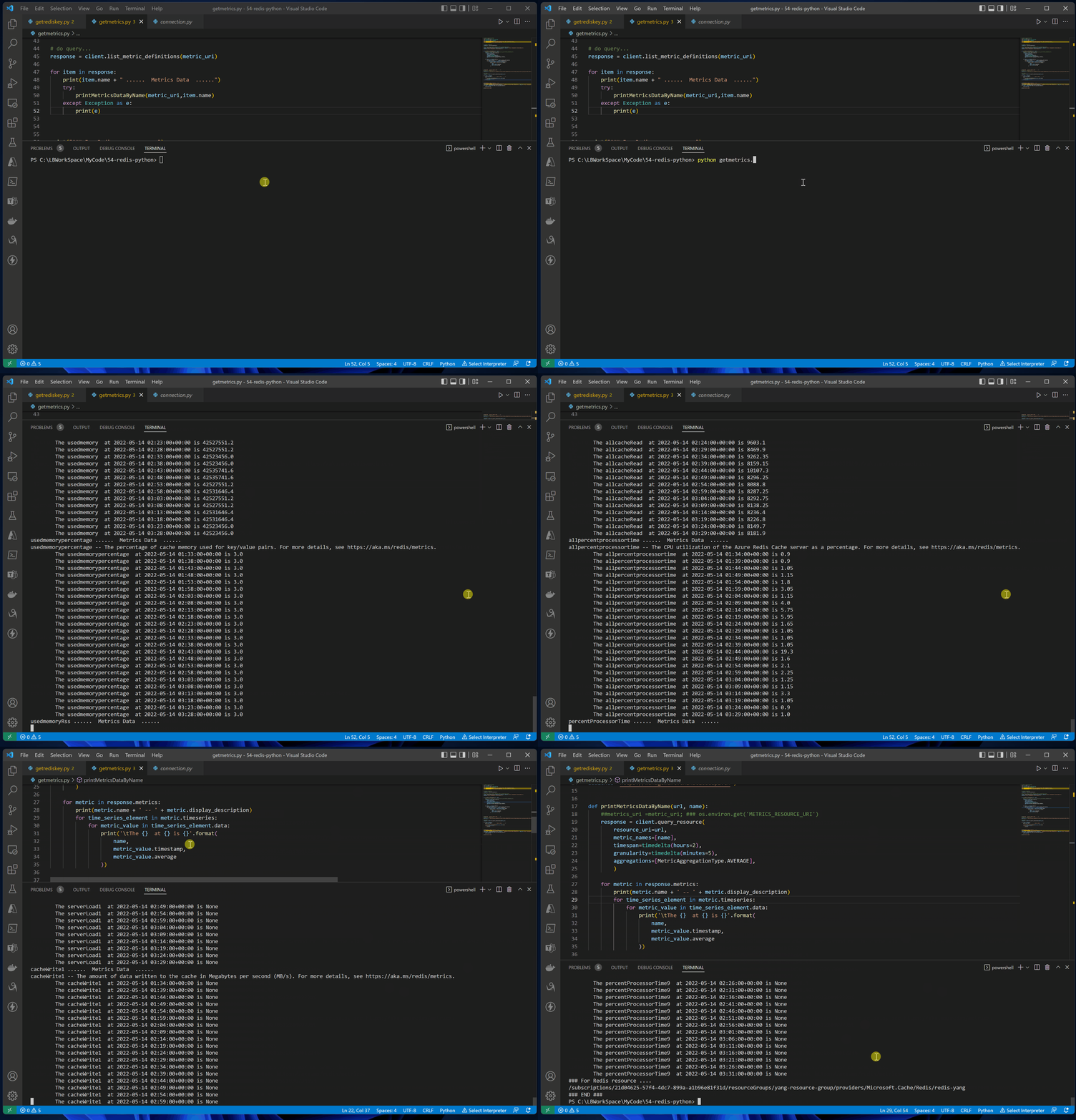
测试效果图:
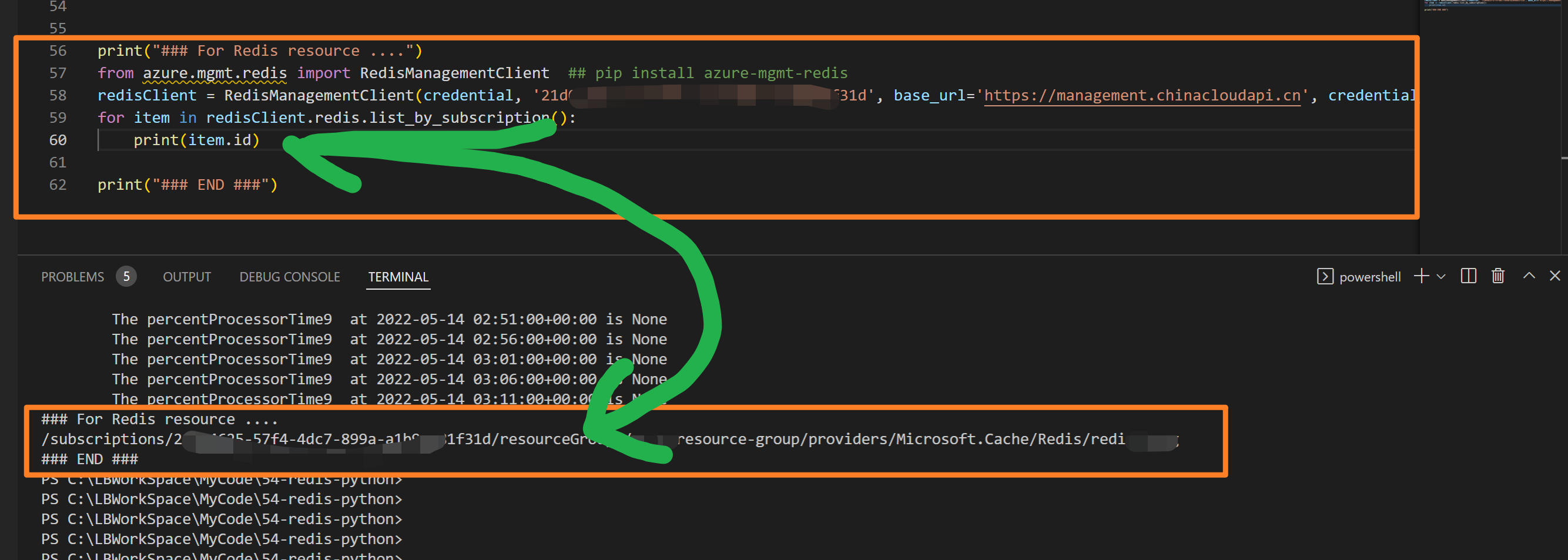
附录一:例如在代码中获取Redis资源的Resource ID
from azure.mgmt.redis import RedisManagementClient  ## pip install azure-mgmt-redis

from azure.identity import AzureCliCredential   ## pip install azure-identity

# prepare credential

credential = AzureCliCredential()

redisClient = RedisManagementClient(credential, '<YOUR SUB>',

base_url='https://management.chinacloudapi.cn',

credential_scopes=[https://management.chinacloudapi.cn/.default])

for item in redisClient.redis.list_by_subscription():

    print(item.id)
附录二:credential = AzureCliCredential() 为访问Azure资源时提供认证授权的方法,如果出现权限不够,或者是无法访问的情况,会出现类似如下的提示,需要根据消息提示来解决权限问题。
Code: AuthorizationFailed

Message: The client 'xxxxxxxxxxxxxxxxxxx@xxxxx.partner.onmschina.cn' with object id 'xxxxxxxx-xxxx-xxxx-xxxxx-xxxxxxxxxxxx'
does not have authorization to perform action 'Microsoft.Insights/metricDefinitions/read'
over scope '/subscriptions/xxxxxxxx-xxxx-xxxx-xxxxx-xxxxxxxxxxxx/resourceGroups/xxxx-resource-group/providers/Microsoft.Cache/Redis/redis-xxxxxx/providers/Microsoft.Insights'
or the scope is invalid. If access was recently granted, please refresh your credentials.
参考资料
Azure Monitor Query client library Python samples: https://github.com/Azure/azure-sdk-for-python/tree/main/sdk/monitor/azure-monitor-query/samples
Azure China developer guide: https://docs.microsoft.com/en-us/azure/china/resources-developer-guide#check-endpoints-in-azuredevelop
【Azure 环境】【Azure Developer】使用Python代码获取Azure 中的资源的Metrics定义及数据的更多相关文章
- 【Azure Redis 缓存】使用Python代码获取Azure Redis的监控指标值 (含Powershell脚本方式)
问题描述 通过Metrics监控页面,我们能得知当前资源(如Redis)的运行情况与各种指标.如果我们需要把指标下载到本地或者生成JSON数据导入到第三方的监控平台呢?Azure是否可以通过Pytho ...
- 【Azure Developer】Python代码通过AAD认证访问微软Azure密钥保管库(Azure Key Vault)中机密信息(Secret)
关键字说明 什么是 Azure Active Directory?Azure Active Directory(Azure AD, AAD) 是 Microsoft 的基于云的标识和访问管理服务,可帮 ...
- 【python】获取列表中最长连续数字
最近开发遇到一个功能需求,目的是要获取一个AI分析结果中最长连续帧,比如一个视频中连续3帧有人,那么我认为这个视频就是有人,我就要判断这个视频帧列表中是否有连续的三帧有人.本质就是获取列表中的最长连续 ...
- 万答#2,一样的Python代码,为什么可以删表,却不能更新数据
欢迎来到 GreatSQL社区分享的MySQL技术文章,如有疑问或想学习的内容,可以在下方评论区留言,看到后会进行解答 问题 运行下面的这段Python代码,却总是无法更新数据: import pym ...
- pycharm中运行成功的python代码在jenkin中运行问题总结
我们在用selenium+python完成了项目的UI自动化后,一般用jekins持续集成工具来定期运行,python程序在pycharm中编辑运行成功,但在jenkins中运行失败的两个问题,整理如 ...
- python,如何获取字符串中的子字符串,部分字符串
说明: 比如有一个字符串,python,如何就获取前3位,或者后2位.在此记录下. 操作过程: 1.通过分割符的方式,下标的方式,获取字符串中的子串 >>> text = 'pyth ...
- 当From窗体中数据变化时,使用代码获取数据库中的数据然后加入combobox中并且从数据库中取得最后的结果
private void FormLug_Load(object sender, EventArgs e) { FieldListLug.Clear();//字段清除 DI = double.Pars ...
- 【Azure Developer】使用Postman获取Azure AD中注册应用程序的授权Token,及为Azure REST API设置Authorization
Azure Active Directory (Azure AD) is Microsoft's cloud-based identity and access management service, ...
- 编写python代码获取4k高清壁纸
Huskiesir最近在研究python爬虫大约俩周了吧,由于比较懒,也没把具体研究的过程与经验写下来,实在是一大憾事.这次直接上干货,代码送给大家: import re import request ...
随机推荐
- Windows10安装PHP7+Apache 2.4
下载下面的文件 httpd-2.4.39-win64-VC15.zip php-7.3.4-Win32-VC15-x64.zip 如果下载失效,从这里下载 https://windows.php.ne ...
- 4-Pandas数据预处理之数据转换(df.map()、df.replace())
在数据分析中,根据需求,有时候需要将一些数据进行转换,而在Pandas中,实现数据转换的常用方法有: 利用函数或是映射 可以将自己定义的或者是其他包提供的函数用在Pandas对象上实现批量修改. ap ...
- C语言 | 栈的应用 | 非递归栈实现快排
/* 非递归栈实现快排 */ #include <stdio.h> #include <math.h>> #include <malloc.h> #inclu ...
- WebView的一些简单用法
一直想写一个关于 WebView 控件的 一些简单运用,都没什么时间,这次也是挤出时间写的,里面的一些基础知识就等有时间再更新讲解一下,今天就先把项目出来做一些简单介绍,过多的内容可以看我的源码,都传 ...
- sticker-footer 布局
sticker-footer 1.嵌套层级不深,可直接继承自 body width:100%: height:100%; // html <body> <div id="s ...
- web页面性能优化之接口前置
上个Q做了一波web性能优化,积累了一点点经验 记录分享一下. 先分享一个比较常用的接口前置 的优化方案吧 优化前首屏秒开大约在40%左右 首屏秒开大约提高了25% 先发一张优化成果图 前置原因 对于 ...
- python-输入输出-计算字符串中的数
将字符串中的每个数都抽取出来,然后统计所有数的个数并求和. 输入格式: 一行字符串,字符串中的数之间用1个空格或者多个空格分隔. 输出格式: 第1行:输出数的个数.第2行:求和的结果,保留3位小数. ...
- 【Android开发】【第三方SDK】 安卓版分词功能
功能介绍: 获取剪切板内容,进行分词: 点击分解后的词,填入输入框: 点击叉号将地址拼接起来返回主界面 用途: 增加用户的体验效果,可以直接在微信上复制地址,然后通过此功能确认地址. 附上git地址 ...
- java中什么叫覆盖Override?请给实例
5.覆盖(Override) 马克-to-win:方法的覆盖(Override)是指子类重写从父类继承来的一个同名方法(参数.返回值也同). 例1.5.1-- class AAAMark_to_win ...
- Springboot之Actuator的渗透测试和漏洞利用
背景概述 Spring的生态很优秀,而使用Spring Boot的开发者也比较多. Actuator是Spring Boot提供的对应用系统的监控和管理的集成功能,可以查看应用配置的详细信息,例如自动 ...