
模拟FCFS调度算法(先来先服务)
文章目录
一、FCFS的介绍
先来先服务的调度算法:最简单的调度算法,既可以用于作业调度 ,也可以用于程序调度,当作业调度中采用该算法时,系统将按照作业到达的先后次序来进行调度,优先从后备队列中,选择一个或多个位于队列头部的作业,把他们调入内存,分配所需资源、创建进程,然后放入“就绪队列”,直到该进程运行到完成或发生某事件堵塞后,进程调度程序才将处理机分配给其他进程。
简单了说就是如同名字 “先来先服务” ;
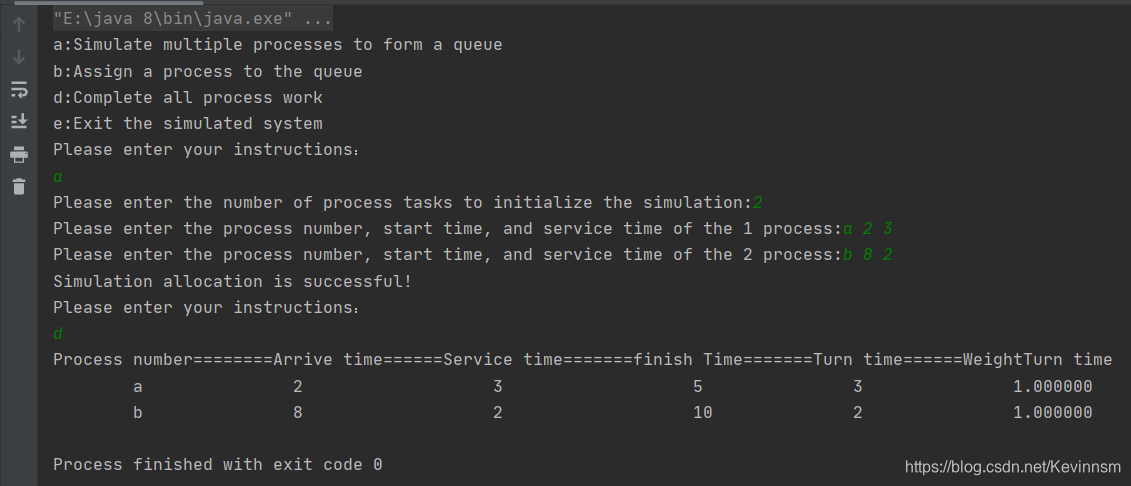
二、代码演示
package com.zsh.blog;

import java.util.Scanner;

/**

 * @author:抱着鱼睡觉的喵喵

 * @date:2021/3/19

 * @description:

 */

public class SimulateSystem {

    public static void main(String[] args) {

        Scanner scanner = new Scanner(System.in);

        SimulateFCFS simulateFCFS = new SimulateFCFS();

        boolean flag = true;

        char at = ' ';

        System.out.println("a:Simulate multiple processes to form a queue");

        System.out.println("b:Assign a process to the queue");

        System.out.println("d:Complete all process work");

        System.out.println("e:Exit the simulated system");

        while (flag) {

            System.out.println("Please enter your instructions:");

            at = scanner.next().charAt(0);

            switch (at) {

                case 'a':

                    simulateFCFS.createQueue();

                    break;

                case 'b':

                    simulateFCFS.assignProcess();

                    break;

                case 'd':

                    simulateFCFS.finishAllProcessTask();

                    return;

                case 'e':

                    System.out.println("Simulated is end~");

                    return;

                default:

                    System.out.println("Your input is wrong, please re-enter!");

                    break;

            }

        }

    }

}

class Queue {

    int arrTime;            //timeOfArrival

    int serviceTime;        //timeOfService

    int finishTime;         //timeOfComplish

    int turnTime;           //timeOfTurnaround

    double weightTurnTime;     //timeOfWeightTurnaround

    String processName;      //process number

    Queue next;

    public Queue(int arrTime, int serviceTime, String processName) {

        this.arrTime = arrTime;

        this.serviceTime = serviceTime;

        this.processName = processName;

    }

    public Queue() {

    }

}

/**

 * Simulate FCFS algorithm class

 */

class SimulateFCFS {

    private Queue head = new Queue(-1, -1, null);

    private int timer = 0;

    private Queue tail = head;

    public void createQueue() {

        Queue arr = null;

        Queue temp = head;

        Scanner scanner = new Scanner(System.in);

        System.out.printf("Please enter the number of process tasks to initialize the simulation:");

        int n = scanner.nextInt();

        for (int i = 1; i <= n; i++) {

            System.out.printf("Please enter the process number, start time, and service time of the %d process:",i);

            arr = new Queue();

            keyBordInput(arr, scanner);

            calTime(arr);

            temp.next = arr;

            temp = arr;

        }

        this.tail = arr;

        System.out.println("Simulation allocation is successful!");

    }

    /**

     * Completion time of calculation process - Turnaround time - Weighted turnaround time

     * @param arr

     */

    public void calTime(Queue arr) {

        Queue temp = arr;

        if (this.timer < temp.arrTime) {

            this.timer = arr.arrTime;

        } else {

            if (timer == 0) {

                this.timer = temp.arrTime;

            }

        }

        temp.finishTime = temp.serviceTime + this.timer;

        temp.turnTime = temp.finishTime - temp.arrTime;

        temp.weightTurnTime = (temp.turnTime * 1.0) / (temp.serviceTime * 1.0);

        this.timer += temp.serviceTime;

    }

    /**

     * Process number,arrival time,service time entered from the keyboard

     * @param arr

     * @param scanner

     */

    public void keyBordInput(Queue arr, Scanner scanner) {

        arr.processName = scanner.next();

        arr.arrTime = scanner.nextInt();

        arr.serviceTime = scanner.nextInt();

    }

    /**

     * Assign a process to the queue

     */

    public void assignProcess() {

        Queue newProcess = new Queue();

        Scanner scanner = new Scanner(System.in);

        System.out.printf("Please enter the add process number,start time,and service time of the process:");

        keyBordInput(newProcess, scanner);

        calTime(newProcess);

        this.tail.next = newProcess;

        this.tail = newProcess;

    }

    /**

     * Complish a task of process from the queue

     */

//    public void finishProcessTask() {

//        Queue workingProcess = head;

//

//    }

    /**

     * Complish all task of process from the queue

     */

    public void finishAllProcessTask() {

        if (isEmpty()) {

            return;

        }

        Queue cur = head.next;

        System.out.println("Process number========Arrive time======Service time=======finish Time=======Turn time======WeightTurn time");

        while (true) {

            System.out.printf("\t\t%s\t\t\t\t%d\t\t\t\t\t%d\t\t\t\t\t%d\t\t\t\t%d\t\t\t\t%f",cur.processName,cur.arrTime,cur.serviceTime,cur.finishTime,cur.turnTime,cur.weightTurnTime);

            System.out.println();

            if (cur.next == null) {

                break;

            }

            cur = cur.next;

        }

    }

    public boolean isEmpty() {

        if (head.next == null) {

            System.out.println("Queue is null!");

            return true;

        }

        return false;

    }

}
三、代码分析
1.使用节点模拟进程
因为需要计算完成时间、周转时间、带权周转时间,所以需要事先给出每个进程到达时间和服务时间
模拟时至少需要以下几个属性(Queue类对象模拟进程)
class Queue {

    int arrTime;            //timeOfArrival

    int serviceTime;        //timeOfService

    int finishTime;         //timeOfComplish

    int turnTime;           //timeOfTurnaround

    double weightTurnTime;     //timeOfWeightTurnaround

    String processName;      //process number

    Queue next;

    public Queue(int arrTime, int serviceTime, String processName) {

        this.arrTime = arrTime;

        this.serviceTime = serviceTime;

        this.processName = processName;

    }

    public Queue() {

    }

}
2.SimulateFCFS(核心模拟FCFS类)
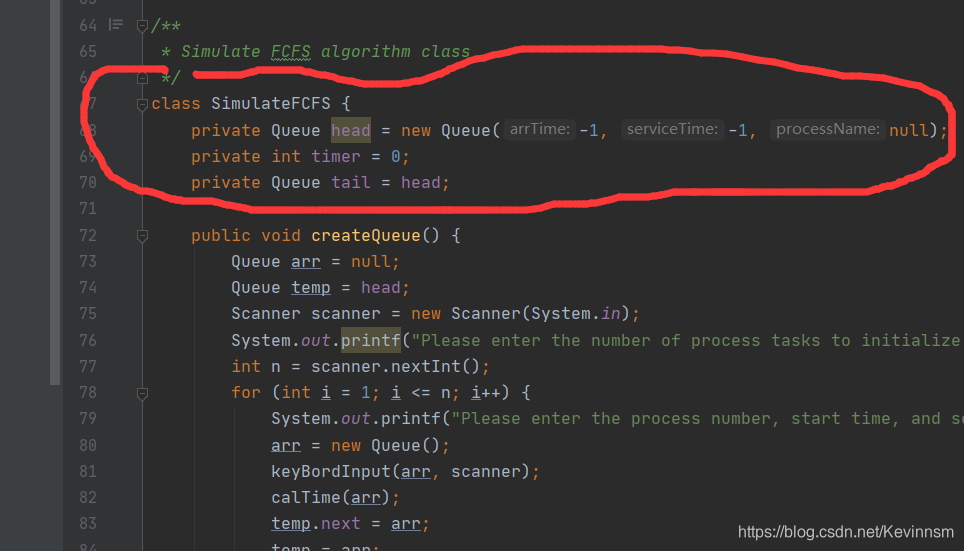
以下分析核心模拟类
3.创建一个节点为n的队列(模拟就绪队列)
    public void createQueue() {

        Queue arr = null;

        Queue temp = head;

        Scanner scanner = new Scanner(System.in);

        System.out.printf("Please enter the number of process tasks to initialize the simulation:");

        int n = scanner.nextInt();	//创建节点数为n的队列

        for (int i = 1; i <= n; i++) {

            System.out.printf("Please enter the process number, start time, and service time of the %d process:",i);

            arr = new Queue();

            keyBordInput(arr, scanner);//这个自定义的函数主要用来输入进程的到达时间和服务时间

            calTime(arr); //该自定义函数用来计算完成时间、周转时间、带权周转时间

            temp.next = arr;

            temp = arr;		//进行节点连接

        }

        this.tail = arr;

        System.out.println("Simulation allocation is successful!");

    }
4.核心计算分析
(如果是第一个进程) 完成时间 = 服务时间 + 到达时间
如果是n>1的进程就要考虑前面进程所花费的时间和该进程到达时间的长短问题。如果前面所花费的完成时间大于该进程的到达进程,则(完成时间 = 服务时间+上一个进程的完成时间)
反之则是 (完成时间= 服务时间+到达时间)
//timer是全局变量,用来计算完成时间(解决上面的问题)

public void calTime(Queue arr) {

        Queue temp = arr;

        if (this.timer < temp.arrTime) {

            this.timer = arr.arrTime;

        } else {

            if (timer == 0) {

                this.timer = temp.arrTime;

            }

        }

        temp.finishTime = temp.serviceTime + this.timer;

        temp.turnTime = temp.finishTime - temp.arrTime;

        temp.weightTurnTime = (temp.turnTime * 1.0) / (temp.serviceTime * 1.0);

        this.timer += temp.serviceTime;

    }
5.输入到达时间和服务时间(模拟进程到达和服务)
public void keyBordInput(Queue arr, Scanner scanner) {

        arr.processName = scanner.next();

        arr.arrTime = scanner.nextInt();

        arr.serviceTime = scanner.nextInt();

    }
6.出队列(模拟完成所有进程工作)
public void finishAllProcessTask() {

        if (isEmpty()) {

            return;

        }

        Queue cur = head.next;

        System.out.println("Process number========Arrive time======Service time=======finish Time=======Turn time======WeightTurn time");

        while (true) {

            System.out.printf("\t\t%s\t\t\t\t%d\t\t\t\t\t%d\t\t\t\t\t%d\t\t\t\t%d\t\t\t\t%f",cur.processName,cur.arrTime,cur.serviceTime,cur.finishTime,cur.turnTime,cur.weightTurnTime);

            System.out.println();

            if (cur.next == null) {

                break;

            }

            cur = cur.next;

        }

    }
模拟FCFS调度算法(先来先服务)的更多相关文章
- 《操作系统_FCFS和SJF》
先来先服务FCFS和短作业优先SJF进程调度 转自:https://blog.csdn.net/qq_34374664/article/details/73231072 一.概念介绍和案例解析 FCF ...
- python基础(31):进程(一)
1. 什么是进程 进程(Process)是计算机中的程序关于某数据集合上的一次运行活动,是系统进行资源分配和调度的基本单位,是操作系统结构的基础.在早期面向进程设计的计算机结构中,进程是程序的基本执行 ...
- OS作业模拟SJF和FCFS
一个OS的作业, 用于模拟短作业优先 和 先来先服务两种作业调度方式. #!/usr/bin/python3.5 ## Modify the SJF and FCFS algorithm in the ...
- FCFS,SSTF,SCAN,FIFO,LRO考点题解
四.应用题 ( 本大题共5 小题,50 分 ) 1. 假设某系统中有五个进程,每个进程的执行时间(单位:ms)和优先数如下表所示(优先数越小,其优先级越高). 进程 执行时间 优先数 P1 P2 P3 ...
- Linux 常见的进程调度算法
1.在介绍进程调度之前,先对进程的状态的概念应该有所了解,下面是关于进程状态的一些基本概念:进程的状态分为三种,分别为: 1).运行态:该状态表明进程在实际占用CPU 2).就绪态: 该状态下进程可以 ...
- Linux - 进程调度算法
进程调度: 无论是在批处理系统还是分时系统中,用户进程数一般都多于处理机数.这将导致它们互相争夺处理机.另外,系统进程也同样需要使用处理机. 这就要求进程调度程序按一定的策略,动态地把处理机分配给处于 ...
- 操作系统常用调度算法(转载https://www.cnblogs.com/kxdblog/p/4798401.html)
操作系统常用调度算法 在操作系统中存在多种调度算法,其中有的调度算法适用于作业调度,有的调度算法适用于进程调度,有的调度算法两者都适用.下面介绍几种常用的调度算法. 先来先服务(FCFS)调度算法 ...
- s5-2 Cpu调度算法
调度程序采用什么算法选择一个进程(作业)? 如何评价调度算法的性能? 调度准则 CPU利用率 – 使CPU尽可能的忙碌 吞吐量 – 单位时间内运行完的进程数 周转时间 – 进程从提交到运行结束的全部时 ...
- Python 调度算法 死锁 静动态链接 分页分段
1 select poll epoll的区别基本上select有3个缺点: 连接数受限查找配对速度慢数据由内核拷贝到用户态poll改善了第一个缺点 epoll改了三个缺点. (1)select,pol ...
随机推荐
- .NET CORE 授权
.NET CORE 授权 一.三种方式授权 不论使用NET CORE框架的何种授权都必须引入中间件,因为它实现了在管道中对当前请求的鉴权和授权的验证,在Startup中的Configure中首先加入鉴 ...
- LGP4463题解
这玩意儿怎么看上去就很经典啊( 哦互不相同啊,那没事了( 考虑一个 \(\rm DP\).由于限制了互不相同,那么我们考虑从值域开始想. 设 \(dp_{n,k}\) 为在 \([1,n]\) 中选了 ...
- pycharm实用常用快捷键
我们在实用pycharm时候,可以使用一些快捷键来帮助我们写代码. 1 alt + enter 快速导包,在需要导入包时候可以使用这个快捷键: 2 alt + 1 可以快速打开或者关闭左侧projec ...
- LintCode 练习题
/** * 给定一个链表,旋转链表,将链表每个节点向右移动 k 个位置,其中 k 是非负数. 示例 1: 输入: 1->2->3->4->5->NULL, k = 2 输 ...
- 论文解读《Cauchy Graph Embedding》
Paper Information Title:Cauchy Graph EmbeddingAuthors:Dijun Luo, C. Ding, F. Nie, Heng HuangSources: ...
- office online在线预览服务与https的tls证书兼容问题
问题现象:k8s环境配置证书后,无法调用office online 服务,附件无法预览 问题原因:ingress默认启用得是tls1.2,不兼容以下版本 k8s环境解决方法:增加ingress配置,兼 ...
- dotnet 6 使用 string.Create 提升字符串创建和拼接性能
本文告诉大家,在 dotnet 6 或更高版本的 dotnet 里,如何使用 string.Create 提升字符串创建和拼接的性能,减少拼接字符串时,需要额外申请的内存,从而减少内存回收压力 本文也 ...
- 关于如何让写自然溢出hash的无辜孩子见祖宗这件事
关于如何让写自然溢出hash的无辜孩子见祖宗这件事 来源博客 这几天考试连着好几次被卡hash卡到死. 我谔谔,为什么连hash都要卡. 码力弱鸡什么时候才能站起来. 只需要任意两种字符,比如噫呜呜噫 ...
- 面向对象编程(C++篇4)——RAII
目录 1. 概述 2. 详论 2.1. 堆.栈.静态区 2.2. 手动管理资源的弊端 2.3. 间接使用 2.4. 自下而上的抽象 3. 总结 4. 参考 1. 概述 在前面两篇文章<面向对象编 ...
- redis 为什么是单线程的?
一.Redis为什么是单线程的? 因为Redis是基于内存的操作,CPU不是Redis的瓶颈,Redis的瓶颈最有可能是机器内存的大小或者网络带宽.既然单线程容易实现,而且CPU不会成为瓶颈,那就顺理 ...