
yum源出现 AppStream‘ 缓存失败,忽略这个 repo。同步仓库 ‘base‘ 缓存失败,忽略这个 repo 的问题解决办法
今天安装Wget时出现如下错误
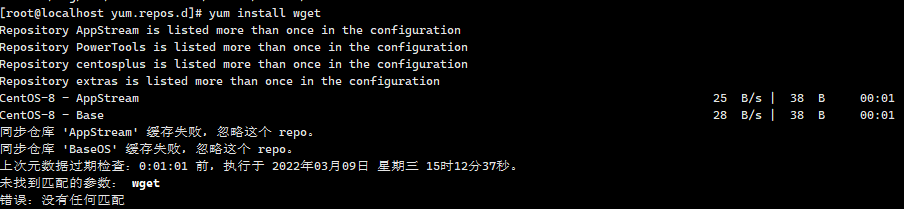
到 /etc/yum.repos.d/目录下编辑CentOS-Base.repo ,更改为如下内容。
vim CentOS-Base.repo
# CentOS-Base.repo

#

# The mirror system uses the connecting IP address of the client and the

# update status of each mirror to pick mirrors that are updated to and

# geographically close to the client.  You should use this for CentOS updates

# unless you are manually picking other mirrors.

#

# If the mirrorlist= does not work for you, as a fall back you can try the

# remarked out baseurl= line instead.

#

#

[base]

name=CentOS-8.5.2111 - Base - mirrors.aliyun.com

baseurl=http://mirrors.cloud.tencent.com/centos/$releasever/BaseOS/$basearch/os/

gpgcheck=0

gpgkey=http://mirrors.aliyun.com/centos/RPM-GPG-KEY-CentOS-Official

#additional packages that may be useful

[extras]

name=CentOS-8.5.2111 - Extras - mirrors.aliyun.com

baseurl=http://mirrors.cloud.tencent.com/centos/$releasever/extras/$basearch/os/

gpgcheck=0

gpgkey=http://mirrors.aliyun.com/centos/RPM-GPG-KEY-CentOS-Official

#additional packages that extend functionality of existing packages

[centosplus]

name=CentOS-8.5.2111 - Plus - mirrors.aliyun.com

baseurl=http://mirrors.cloud.tencent.com/centos/$releasever/centosplus/$basearch/os/

gpgcheck=0

enabled=0

gpgkey=http://mirrors.aliyun.com/centos/RPM-GPG-KEY-CentOS-Official

[PowerTools]

name=CentOS-8.5.2111 - PowerTools - mirrors.aliyun.com

baseurl=http://mirrors.cloud.tencent.com/centos/$releasever/PowerTools/$basearch/os/

gpgcheck=0

enabled=0

gpgkey=http://mirrors.aliyun.com/centos/RPM-GPG-KEY-CentOS-Official

[AppStream]

name=CentOS-8.5.2111 - AppStream - mirrors.aliyun.com

baseurl=http://mirrors.aliyun.com/centos/8-stream/AppStream/$basearch/os/

gpgcheck=0

gpgkey=http://mirrors.aliyun.com/centos/RPM-GPG-KEY-CentOS-Official
继续修改 CentOS-AppStream.repo root 下执行命令 vim CentOS-AppStream.repo
#CentOS-AppStream.repo

#

# The mirror system uses the connecting IP address of the client and the

# update status of each mirror to pick mirrors that are updated to and

# geographically close to the client.  You should use this for CentOS updates

# unless you are manually picking other mirrors.

#

# If the mirrorlist= does not work for you, as a fall back you can try the

# remarked out baseurl= line instead.

#

#

[AppStream]

name=CentOS-$releasever - AppStream

baseurl=http://mirrors.aliyun.com/centos/8-stream/AppStream/$basearch/os/

gpgcheck=0

enabled=1

gpgkey=file:///etc/pki/rpm-gpg/RPM-GPG-KEY-centosofficial
然后
yum clean all
yum makecache 重建元数据缓存,
yum源出现 AppStream‘ 缓存失败,忽略这个 repo。同步仓库 ‘base‘ 缓存失败,忽略这个 repo 的问题解决办法的更多相关文章
- 本地创建yum源并安装lnmp
注意:安装系统时,文件类型要未xfs类型,root要分配最多的空间 1.挂载安装光盘mount -t iso9660 -o loop CentOS-7-x86_64-DVD-1511.iso /mnt ...
- CentOS6.5 搭建在线yum源
CentOS6.5 搭建在线yum源 发布时间: 2017-04-21 浏览次数: 611 下载次数: 1 问题描述 尽管有很多的免费镜像提供yum源服务,但是还是有必要建立自己的yum服务器 ...
- 修改CentOS的YUM源
CentOS配置本地yum源/阿里云yum源/163yuan源并配置yum源的优先级 1.查看本地yum源 2.把默认yum源备份 mkdir /opt/centos-yum.bak mv /etc/ ...
- 阿里云服务器yum源更新问题
阿里云官网也给出了yum卸载重装以及修改源为阿里云内网的文档.步骤这里就不说了,可点击下面的链接进行参考 https://help.aliyun.com/knowledge_detail/670864 ...
- RedHat无法使用yum源问题
RedHat下的yum是需要注册才能使用的 使用的话会提示: [root@test ~]# yum clean all Loaded plugins: product-id, refresh-pack ...
- 自建yum仓库yum源
目的:搭建自己的yum源主要是解决大批量服务器下载更新人互联网带宽占用问题及速度问题以及不能访问的问题. 服务端: 步骤如下: 一.创建一个目录,就是我们yum软件存放的目录 [root@vicwe ...
- yum源仓库的三种搭建方式
yum源的三种搭建方式 一. 本地yum仓库的搭建 1.1.获取软件包资源 将iso镜像挂载在本地目录中,此次挂载目录为/var/www/html/repo/,此目录本身不存在,需要创建.软件宝资源 ...
- day37 05-HIbernate二级缓存:一级缓存更新同步到二级缓存及二级缓存配置文件
一级缓存的更新会自动同步到二级缓存. @SuppressWarnings("all") @Test // 将内存中的数据写到硬盘 public void demo7(){ Sess ...
- RHEL 6.3使用CentOS yum源 (redhat yum安装失败)
由于Redhat的yum在线更新是收费的,如果没有注册的话是不能使用的,即不能在线安装软件.所以yum install 命令每次都安装失败 下面介绍一种更改yum源的方式: 系统说明: 系统:Red ...
随机推荐
- Idea 如何不通过模板创建支持Maven的JavaWeb项目
手动与模板创建的区别,请自行体会. 1. 点击创建项目 2. 不勾选骨架 3.填写项目名称以及该Maven项目坐标(groupid.artifactid.version). 在仓库中,以坐标确定项目. ...
- 版本控制SVN
为什么需要版本控制软件 代码的冻结 避免在重大的考核之前改动代码 每个稳定版本都在服务器保存进度,随时可以回退 需求频繁的变化不要改动稳定的代码,不要改别人写好的代码 为什么需求会变化?有时候产品自己 ...
- Python—经典练手题目汇总
Python-经典练手题目汇总 # 1.有1020个西瓜,第一天卖掉总数的一半后又多卖出两个,以后每天卖剩下的一半多两# 个,问几天以后能卖完? day=0 xg=1020 for i in rang ...
- 动态路由与RIP协议
动态路由与RIP协议 目录 动态路由与RIP协议 一.动态路由(Dynamic Route) 1.动态路由概述 2.动态路由特点 3.动态路由协议 (1)动态路由协议概述 (2)度量值 (3)收敛 4 ...
- Python语法进阶(1)- 进程与线程编程
1.进程与多进程 1.1.什么是进程 进程就是程序执行的载体 什么叫多任务? 多任务就是操作系统可以同时运行多个任务.比如你一边在用浏览器学习,还一边在听音乐,,这就是多任务,至少同时有3个任务正在运 ...
- APK修改神器:插桩工具 DexInjector
本文介绍了一个针对Dex进行插桩的工具,讲解了一下直接修改Dalvik字节码和Dex文件时遇到的问题和解决方法 作者:字节跳动终端技术-- 李言 背景 线下场景中,我们经常需要在APK中插入一些检测代 ...
- OC之判断数组最大最小值
超简单的筛选方法 array为你筛选的数组 NSNumber * max = [Array valueForKeyPath:@"@max.floatValue"]; NSNumbe ...
- Android SugarORM(2)
Android Sugar ORM (2) Android Sugar ORM 实体 1. 创建一个实体类 Sugar ORM在创建一个实体的时候, 仅需要使这个实体类继承于SugarRecord即可 ...
- curl的HTTP参数速查表
curl简介 curl是一个开源的命令行工具,它基于网络协议,对指定URL进行网络传输,得到数据后不任何具体处理(如:html的渲染等),直接显示在"标准输出"(stdout)上. ...
- jmeter重点(详细)
之前,写过一篇文章:jmeter,学这些重点就可以了,今天就来把一些重点细节点说一下. 测试计划 可以理解为各种测试元件的容器 其中: 定义整个测试中使用的重复值(全局变量),一般定义服务器的ip.端 ...