
yum源出现 AppStream‘ 缓存失败,忽略这个 repo。同步仓库 ‘base‘ 缓存失败,忽略这个 repo 的问题解决办法
今天安装Wget时出现如下错误
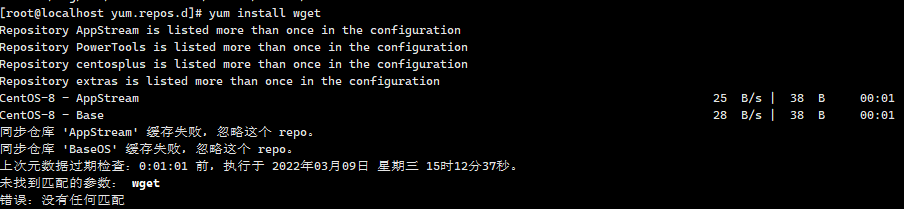
到 /etc/yum.repos.d/目录下编辑CentOS-Base.repo ,更改为如下内容。
vim CentOS-Base.repo
# CentOS-Base.repo

#

# The mirror system uses the connecting IP address of the client and the

# update status of each mirror to pick mirrors that are updated to and

# geographically close to the client.  You should use this for CentOS updates

# unless you are manually picking other mirrors.

#

# If the mirrorlist= does not work for you, as a fall back you can try the

# remarked out baseurl= line instead.

#

#

[base]

name=CentOS-8.5.2111 - Base - mirrors.aliyun.com

baseurl=http://mirrors.cloud.tencent.com/centos/$releasever/BaseOS/$basearch/os/

gpgcheck=0

gpgkey=http://mirrors.aliyun.com/centos/RPM-GPG-KEY-CentOS-Official

#additional packages that may be useful

[extras]

name=CentOS-8.5.2111 - Extras - mirrors.aliyun.com

baseurl=http://mirrors.cloud.tencent.com/centos/$releasever/extras/$basearch/os/

gpgcheck=0

gpgkey=http://mirrors.aliyun.com/centos/RPM-GPG-KEY-CentOS-Official

#additional packages that extend functionality of existing packages

[centosplus]

name=CentOS-8.5.2111 - Plus - mirrors.aliyun.com

baseurl=http://mirrors.cloud.tencent.com/centos/$releasever/centosplus/$basearch/os/

gpgcheck=0

enabled=0

gpgkey=http://mirrors.aliyun.com/centos/RPM-GPG-KEY-CentOS-Official

[PowerTools]

name=CentOS-8.5.2111 - PowerTools - mirrors.aliyun.com

baseurl=http://mirrors.cloud.tencent.com/centos/$releasever/PowerTools/$basearch/os/

gpgcheck=0

enabled=0

gpgkey=http://mirrors.aliyun.com/centos/RPM-GPG-KEY-CentOS-Official

[AppStream]

name=CentOS-8.5.2111 - AppStream - mirrors.aliyun.com

baseurl=http://mirrors.aliyun.com/centos/8-stream/AppStream/$basearch/os/

gpgcheck=0

gpgkey=http://mirrors.aliyun.com/centos/RPM-GPG-KEY-CentOS-Official
继续修改 CentOS-AppStream.repo root 下执行命令 vim CentOS-AppStream.repo
#CentOS-AppStream.repo

#

# The mirror system uses the connecting IP address of the client and the

# update status of each mirror to pick mirrors that are updated to and

# geographically close to the client.  You should use this for CentOS updates

# unless you are manually picking other mirrors.

#

# If the mirrorlist= does not work for you, as a fall back you can try the

# remarked out baseurl= line instead.

#

#

[AppStream]

name=CentOS-$releasever - AppStream

baseurl=http://mirrors.aliyun.com/centos/8-stream/AppStream/$basearch/os/

gpgcheck=0

enabled=1

gpgkey=file:///etc/pki/rpm-gpg/RPM-GPG-KEY-centosofficial
然后
yum clean all
yum makecache 重建元数据缓存,
yum源出现 AppStream‘ 缓存失败,忽略这个 repo。同步仓库 ‘base‘ 缓存失败,忽略这个 repo 的问题解决办法的更多相关文章
- 本地创建yum源并安装lnmp
注意:安装系统时,文件类型要未xfs类型,root要分配最多的空间 1.挂载安装光盘mount -t iso9660 -o loop CentOS-7-x86_64-DVD-1511.iso /mnt ...
- CentOS6.5 搭建在线yum源
CentOS6.5 搭建在线yum源 发布时间: 2017-04-21 浏览次数: 611 下载次数: 1 问题描述 尽管有很多的免费镜像提供yum源服务,但是还是有必要建立自己的yum服务器 ...
- 修改CentOS的YUM源
CentOS配置本地yum源/阿里云yum源/163yuan源并配置yum源的优先级 1.查看本地yum源 2.把默认yum源备份 mkdir /opt/centos-yum.bak mv /etc/ ...
- 阿里云服务器yum源更新问题
阿里云官网也给出了yum卸载重装以及修改源为阿里云内网的文档.步骤这里就不说了,可点击下面的链接进行参考 https://help.aliyun.com/knowledge_detail/670864 ...
- RedHat无法使用yum源问题
RedHat下的yum是需要注册才能使用的 使用的话会提示: [root@test ~]# yum clean all Loaded plugins: product-id, refresh-pack ...
- 自建yum仓库yum源
目的:搭建自己的yum源主要是解决大批量服务器下载更新人互联网带宽占用问题及速度问题以及不能访问的问题. 服务端: 步骤如下: 一.创建一个目录,就是我们yum软件存放的目录 [root@vicwe ...
- yum源仓库的三种搭建方式
yum源的三种搭建方式 一. 本地yum仓库的搭建 1.1.获取软件包资源 将iso镜像挂载在本地目录中,此次挂载目录为/var/www/html/repo/,此目录本身不存在,需要创建.软件宝资源 ...
- day37 05-HIbernate二级缓存:一级缓存更新同步到二级缓存及二级缓存配置文件
一级缓存的更新会自动同步到二级缓存. @SuppressWarnings("all") @Test // 将内存中的数据写到硬盘 public void demo7(){ Sess ...
- RHEL 6.3使用CentOS yum源 (redhat yum安装失败)
由于Redhat的yum在线更新是收费的,如果没有注册的话是不能使用的,即不能在线安装软件.所以yum install 命令每次都安装失败 下面介绍一种更改yum源的方式: 系统说明: 系统:Red ...
随机推荐
- git init和git init –bare的区别:
感谢原文作者:ljchlx 原文链接:https://blog.csdn.net/ljchlx/article/details/21805231 git init 和 git init –bare 的 ...
- js判断当前浏览设备
前端开发经常遇到需要判断用户的浏览设备,是pc端还是移动端,移动端使用的是什么手机系统?android.ios.ipad.windows phone等等,有时候还需要知道用户浏览页面是在微信中打开还是 ...
- C语言设计ATM存取款界面
这个虽然很简单,但是我还是弄了一会儿,可见有多菜.练习算. 主要考察switch开关语句.do...while语句,页面的跳转我用的是goto,虽然是弊端,可是还是用了,因为太菜啊.大家有好建议的欢迎 ...
- File常用的方法
import java.io.File; import java.io.IOException; /* 创建: createNewFile() 在指定位置创建一个空文件,成功就返回true,如果已存在 ...
- 使用Docker安装ElasticSearch和可视化界面Kibana【图文教学】
一.前言 Elasticsearch是一个基于Lucene的搜索服务器.它提供了一个分布式多用户能力的全文搜索引擎,基于RESTful web接口.Elasticsearch是用Java语言开发的,并 ...
- js--事件流、事件委托、事件阶段
前言 JavaScript 与 HTML 的交互是通过事件实现的,事件代表文档或浏览器窗口中某个有意义的时刻.可以使用仅在事件发生时执行的监听器(也叫处理程序)订阅事件.本文总结一下 JS 中的事件相 ...
- Java中Arrays数组工具类的使用全解
本文几乎涵盖了所有的Arrays工具类(基于Java 11)的方法以及使用用例,一站式带你了解Arrays类的用法,希望对大家有帮助. 码字不易,三连支持一下吧 Arrays数组工具类 方法一览表 快 ...
- Solution -「LOCAL」二进制的世界
\(\mathcal{Description}\) OurOJ. 给定序列 \(\{a_n\}\) 和一个二元运算 \(\operatorname{op}\in\{\operatorname{ ...
- JUC并发工具类之 CountDownLatch等待多线程完成
上篇JUC同步工具之Semaphore - 池塘里洗澡的鸭子 - 博客园 (cnblogs.com)示例中,资源释放一个线程就可以退出然后另一个线程可以使用了,那如果需要所有规定数量的资源同时释放了才 ...
- 【计理01组04号】JDK基础入门
java.lang包 java.lang包装类 我们都知道 java 是一门面向对象的语言,类将方法和属性封装起来,这样就可以创建和处理相同方法和属性的对象了.但是 java 中的基本数据类型却不是面 ...