
kafka-linux-install
linux按照kafka
必须先按照java jdk包!!!!!!!!!!!!
先安装zookeeper
下载:http://mirrors.hust.edu.cn/apache/zookeeper/zookeeper-3.4.14/zookeeper-3.4.14.tar.gz
解压,整个目录复制到/usr/local中

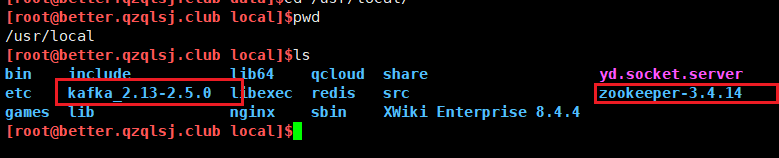
环境变量配置
编辑环境变量配置文件:vim /etc/profile
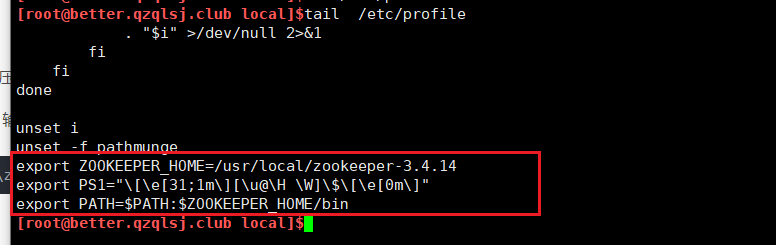
在文件末尾位置添加如下内容
export ZOOKEEPER_HOME=/usr/local/zookeeper-3.4.11
export PATH=$PATH:$ZOOKEEPER_HOME/bin
通过vim的 ":wq" 命令进行保存退出
使配置生效:source /etc/profile
修改zookeeper的配置文件
进入conf文件夹下将zoo_simple.cfg改名为zoo.cfg:mv zoo_sample.cfg zoo.cfg
zkServer.sh start|stop|restart|status客户端连接:
zkCli.sh -server ${ip}:${port}客户端关闭:
quit 或者按 Ctrl + C启动即可
bin/kafka-topics.sh --create --zookeeper localhost:2181 --replication-factor 1 --partitions 1 --topic demo
[root@better.qzqlsj.club kafka_2.13-2.5.0]$bin/kafka-topics.sh --create --zookeeper localhost:2181 --replication-factor 1 --partitions 1 --topic huolala-kafka-topic

OpenJDK 64-Bit Server VM warning: If the number of processors is expected to increase from one, then you should configure the number of parallel GC threads appropriately using -XX:ParallelGCThreads=N

Created topic huolala-kafka-topic.
解析:
partitions指定topic分区数

replication-factor指定topic每个分区的副本数

--zookeeper:表示在这个集群里面创建
查询toipc列表
bin/kafka-topics.sh --zookeeper localhost:2181 --list
bin/kafka-topics.sh --zookeeper 129.204.3.133:2181 --list
[root@better.qzqlsj.club kafka_2.13-2.5.0]$bin/kafka-topics.sh --zookeeper localhost:2181 --list

OpenJDK 64-Bit Server VM warning: If the number of processors is expected to increase from one, then you should configure the number of parallel GC threads appropriately using -XX:ParallelGCThreads=N

__consumer_offsets

demo

huolala

huolala-kafka-topic

my-kafka-topic

test
查看指定topic信息
bin/kafka-topics.sh --zookeeper 129.204.3.133:2181 --describe --topic huolala
[root@better.qzqlsj.club kafka_2.13-2.5.0]$bin/kafka-topics.sh --zookeeper 129.204.3.133:2181 --describe --topic  huolala

OpenJDK 64-Bit Server VM warning: If the number of processors is expected to increase from one, then you should configure the number of parallel GC threads appropriately using -XX:ParallelGCThreads=N

Topic: huolala    PartitionCount: 1    ReplicationFactor: 1    Configs:

    Topic: huolala    Partition: 0    Leader: 0    Replicas: 0    Isr: 0
删除topic
bin/kafka-topics.sh --zookeeper localhost:2181 --delete --topic my-kafka-topic
[root@better.qzqlsj.club kafka_2.13-2.5.0]$bin/kafka-topics.sh --zookeeper localhost:2181 --delete --topic my-kafka-topic

OpenJDK 64-Bit Server VM warning: If the number of processors is expected to increase from one, then you should configure the number of parallel GC threads appropriately using -XX:ParallelGCThreads=N

Topic my-kafka-topic is marked for deletion.

Note: This will have no impact if delete.topic.enable is not set to true.

[root@better.qzqlsj.club kafka_2.13-2.5.0]$bin/kafka-topics.sh --zookeeper 129.204.3.133:2181 --list

OpenJDK 64-Bit Server VM warning: If the number of processors is expected to increase from one, then you should configure the number of parallel GC threads appropriately using -XX:ParallelGCThreads=N

__consumer_offsets

demo

huolala

huolala-kafka-topic

test

[root@better.qzqlsj.club kafka_2.13-2.5.0]$
kafka 生产和消费:
bin/kafka-console-producer.sh --broker-list localhost:9092 --topic huolala
代理列表 - 我们要发送邮件的代理列表。 在这种情况下,我们只有一个代理。 Config / server.properties文件包含代理端口ID,因为我们知道我们的代理正在侦听端口9092
直接指定它。主题huolala
启动消费者
bin/kafka-console-consumer.sh --bootstrap-server localhost:9092 --topic huolala --from-beginning
查看topic某分区偏移量最大(小)值
bin/kafka-run-class.sh kafka.tools.GetOffsetShell --topic huolala --time -1 --broker-list localhost:9092 --partitions 0
[root@better.qzqlsj.club kafka_2.13-2.5.0]$bin/kafka-run-class.sh kafka.tools.GetOffsetShell --topic huolala  --time -1 --broker-list localhost:9092 --partitions 0

OpenJDK 64-Bit Server VM warning: If the number of processors is expected to increase from one, then you should configure the number of parallel GC threads appropriately using -XX:ParallelGCThreads=N

huolala:0:16
增加topic分区数
bin/kafka-topics.sh --zookeeper localhost:2181 --alter --topic huolala --partitions 10
[root@better.qzqlsj.club kafka_2.13-2.5.0]$bin/kafka-topics.sh --zookeeper localhost:2181  --alter --topic huolala --partitions 10

OpenJDK 64-Bit Server VM warning: If the number of processors is expected to increase from one, then you should configure the number of parallel GC threads appropriately using -XX:ParallelGCThreads=N

WARNING: If partitions are increased for a topic that has a key, the partition logic or ordering of the messages will be affected

Adding partitions succeeded!

[root@better.qzqlsj.club kafka_2.13-2.5.0]$bin/kafka-topics.sh --zookeeper 129.204.3.133:2181 --describe --topic huolala

OpenJDK 64-Bit Server VM warning: If the number of processors is expected to increase from one, then you should configure the number of parallel GC threads appropriately using -XX:ParallelGCThreads=N

Topic: huolala    PartitionCount: 10    ReplicationFactor: 1    Configs:

    Topic: huolala    Partition: 0    Leader: 0    Replicas: 0    Isr: 0

    Topic: huolala    Partition: 1    Leader: 0    Replicas: 0    Isr: 0

    Topic: huolala    Partition: 2    Leader: 0    Replicas: 0    Isr: 0

    Topic: huolala    Partition: 3    Leader: 0    Replicas: 0    Isr: 0

    Topic: huolala    Partition: 4    Leader: 0    Replicas: 0    Isr: 0

    Topic: huolala    Partition: 5    Leader: 0    Replicas: 0    Isr: 0

    Topic: huolala    Partition: 6    Leader: 0    Replicas: 0    Isr: 0

    Topic: huolala    Partition: 7    Leader: 0    Replicas: 0    Isr: 0

    Topic: huolala    Partition: 8    Leader: 0    Replicas: 0    Isr: 0

    Topic: huolala    Partition: 9    Leader: 0    Replicas: 0    Isr: 0
kafka-linux-install的更多相关文章
- linux install wineQQ
Linux上没有QQ太麻烦了,查了一下讲wineQQ安装上去了,亲测可以使用滴---就是版本低,安装步骤如下: 一.安装Wine 1.添加PPA sudo add-apt-repository ppa ...
- linux install Theano+Tensorflow+Keras
安装过程中,网络状态一定要好,如果安装过程中出现time out的提示信息,今天就可以洗洗睡啦,等明天网络状态好的时候再安装. 安装过程出现不知名的错误的时候,执行第一步,update一下 1.#up ...
- linux install sublime_text3
ubuntu & debian: (baidu or google) 1). download ***.deb to install inux系统下怎么安装.deb文件? deb 是 ubun ...
- Linux install sogou input method
# Copyright (c) 2016, 付刘伟 (Liuwei Fu)# All rights reserved.# 转载请注明出处 Linux下安装搜狗输入法需要安装以下插件,当以下所有插件安装 ...
- Kafka~Linux环境下的部署
概念 Kafka是一种高吞吐量的分布式发布订阅消息系统,它可以处理消费者规模的网站中的所有动作流数据. 这种动作(网页浏览,搜索和其他用户的行动)是在现代网络上的许多社会功能的一个关键因素. 这些数据 ...
- linux install tomcat
折腾了好久,按照官网的安装流程安装了不止3次,发现还是不能成功,最终发现是linux机器本身的问题,因为我用的公司的virtual machine,可能是机器本身在一次迁移的过程当中出现了问题,导致了 ...
- 2018 kali linux install tools
1.VM setup https://www.vmware.com/products/workstation-pro/workstation-pro-evaluation.html VMware-Wo ...
- RHEL / CentOS Linux Install Core Development Tools Automake, Gcc (C/C++), Perl, Python & Debuggers
how do I install all developer tools such as GNU GCC C/C++ compilers, make and others, after install ...
- linux install mysql
sudo apt-get install mysql-server #此处会输入root的密码,设置的密码要记住 sudo apt-get install mysql-client sudo apt- ...
- Kafka Linux 安装
要先设置host, etc/hosts,添加 127.0.0.1 机器名 创建目录 修改日志保存位置 ...
随机推荐
- Linux下的Tmux分屏操作
Linux中,我们使用命令行的时候,一个窗口只能使用一个命令行,若是需要使用多个输入位置进行操作,那么只能多开几个窗口,今天介绍一款软件,可以让我们在一个窗口使用多个输入行,先来效果图展示下 Linu ...
- React函数类组件及其Hooks学习
目录 函数类组件 函数式组件和类式组件的区别: 为什么要使用函数式组件? Hooks概念及常用的Hooks 1. useState: State的Hook 语法 useState()说明: setXx ...
- 导出QQ聊天记录并用python处理
今天和天天弟弟聊天,很有感慨,想把聊天记录保存下来(QQ),教程如下. STEP1 从QQ里导出聊天记录 有两个方法导出:(1)打开聊天窗口中的"聊天记录",右下角是消息管理器, ...
- 移动C盘的.gradle文件
今天参照一位博主的方法,移动了C盘下的.gradle文件,解放C盘,就是设置了一下环境变量,然后就把gradle文件移过去了,运行是可以运行,但是再看其他博主的方法都需要AndroidStudio下的 ...
- 怎样打开win7的IIS功能及internet信息服务(IIS)管理器在哪里
1:在windows7桌面上的左下角,点击"开始",找到"控制面板",并点击进去.如下图所示: 2:进入控制面板后,首先将"查看方式"选择为 ...
- JZ-064-滑动窗口的最大值
滑动窗口的最大值 题目描述 给定一个数组和滑动窗口的大小,找出所有滑动窗口里数值的最大值.例如,如果输入数组{2,3,4,2,6,2,5,1}及滑动窗口的大小3,那么一共存在6个滑动窗口,他们的最大值 ...
- LeetCode-039-组合总和
组合总和 题目描述:给定一个无重复元素的数组 candidates 和一个目标数 target ,找出 candidates 中所有可以使数字和为 target 的组合. candidates 中的数 ...
- 【阅读SpringMVC源码】手把手带你debug验证SpringMVC执行流程
✿ 阅读源码思路: 先跳过非重点,深入每个方法,进入的时候可以把整个可以理一下方法的执行步骤理一下,也可以,理到某一步,继续深入,回来后,接着理清除下面的步骤. ✿ 阅读本文的准备工作,预习一下Spr ...
- 前端工程化:使用 shelljs 生成 yapi 接口文件
之前的文章介绍了使用 yapi-to-typescript (下文简称 ytt)生成接口类型定义文件,方便我们直接使用接口的请求和响应类型,能减少很多写接口类型的时间. 使用 yapi-to-type ...
- ssl 证书配置
方式1: 1:找见域名列表 2: 主机记录 *,@,www 2:证书申请并下载 3: 4:宝塔网站ssl 参考博客: https://developer.aliyun.com/article/7714 ...