
004.NTP多层级架设
一 环境需求
1.1 需求
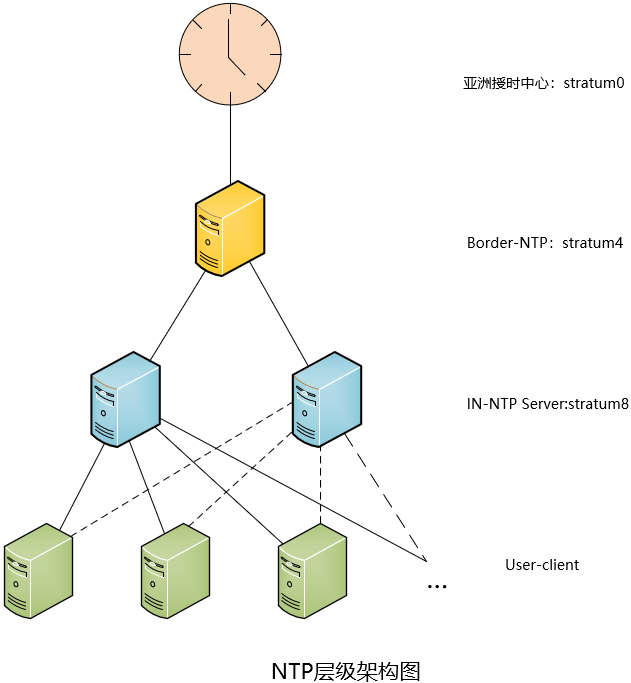
1.2 架构
|
主机名
|
IP
|
备注
|
|
border_ntp
|
内网IP:172.24.8.71
|
边界NTP服务器
|
|
in_ntp01
|
172.24.8.72
|
内部NTP服务器01
|
|
in_ntp02
|
172.24.8.73
|
内部NTP服务器02
|
|
client
|
172.24.8.74
|
模拟局域网内部客户端节点
|
- Border-NTP部署在边界上,作为和互联网(亚洲授时中心)同步,同时为局域网内部IN-NTP提供同步服务。
- User-client,包括所有局域网内客户端等,从两台(一主一备)IN-NTP进行同步。
二 Border-NTP配置
2.1 服务包安装
  1 [root@border_ntp ~]# rpm -qa | grep ntp

  2 [root@border_ntp ~]# yum -y install ntp			#安装ntp服务
2.2 ntp配置
  1 [root@border_ntp ~]# vi /etc/ntp.conf

  2 driftfile /var/lib/ntp/drift

  3 #定义与上级时间服务器联系时所花费的时间,记录在driftfile参数后面的文件内。

  4 driftfile   /var/lib/ntp/drift

  5 pidfile     /var/run/ntpd.pid				#进程pid文件

  6 logfile     /var/log/ntp.log				#开启日志记录

  7 #定义与上级时间服务器联系时所花费的时间,记录在driftfile参数后面的文件内。

  8

  9 restrict default nomodify notrap nopeer noquery	        #默认拒绝所有NTP连接

 10 restrict 127.0.0.1

 11 restrict ::1 						#开启本地授权

 12

 13 restrict 172.24.8.72 mask 255.255.255.255 nomodify notrap	#添加IN-NTP Server允许校时

 14 restrict 172.24.8.73 mask 255.255.255.255 nomodify notrap	#添加IN-NTP Server允许校时

 15

 16 #server 0.cn.pool.ntp.org

 17 #server 1.asia.pool.ntp.org

 18 #restrict 0.cn.pool.ntp.org nomodify notrap noquery

 19 #restrict 1.asia.pool.ntp.org nomodify notrap noquery

 20 #添加Border-NTP的上一级时间中心,即亚洲授时中心服务器,此处建议注释,转而采用国内阿里云时钟,相对网络更稳定,如下。

 21 server ntp1.aliyun.com iburst minpoll 4 maxpoll 10

 22 restrict ntp1.aliyun.com nomodify notrap nopeer noquery

 23 server ntp2.aliyun.com iburst minpoll 4 maxpoll 10

 24 restrict ntp2.aliyun.com nomodify notrap nopeer noquery

 25 #允许阿里授时中心修改本地时间。

 26 server 127.127.1.0

 27 fudge 127.127.1.0 stratum 4

 28 #当授时不可用,采用本地时间,stratum级别为4。
2.3 其他配置
  1 [root@border_ntp ~]# chown ntp:ntp /var/log/ntp.log

  2 [root@border_ntp ~]# chcon -t ntpd_log_t /var/log/ntp.log

  3 [root@border_ntp ~]# firewall-cmd --permanent --add-service=ntp

  4 [root@border_ntp ~]# firewall-cmd --reload

  5 [root@border_ntp ~]# setenforce 0
2.4 开启服务
  1 [root@border_ntp ~]# systemctl start ntpd.service

  2 [root@border_ntp ~]# systemctl enable ntpd.service
2.5 验证
1 [root@border_ntp ~]# ntpq -np

三 IN-NTP Server配置
3.1 服务包安装
  1 [root@in_ntp01 ~]# rpm -qa | grep ntp			#查看是否安装ntp

  2 [root@in_ntp01 ~]# yum -y install ntp			#安装ntp服务
3.2 ntp配置
  1 [root@in_ntp01 ~]# vi /etc/ntp.conf

  2 driftfile   /var/lib/ntp/drift

  3 pidfile     /var/run/ntpd.pid				#进程pid文件

  4 logfile     /var/log/ntp.log				#开启日志记录

  5 #定义与上级时间服务器联系时所花费的时间,记录在driftfile参数后面的文件内。

  6 tinker stepout 0

  7 restrict    default ignore				        #默认拒绝所有连接

  8 restrict -6 default ignore				        #默认拒绝所有ipv6连接

  9 restrict    127.0.0.1

 10 restrict    -6 ::1					        #开启本地授权

 11

 12 restrict 172.24.8.0 mask 255.255.255.0 nomodify notrap	#允许局域网内网段校时

 13

 14 restirct 172.24.8.71 nomodify notrap nopeer noquery

 15 #允许根据上一级时间修改本地时间

 16 server 172.24.8.71  iburst minpoll 3 maxpoll 3 prefer

 17 #添加上一层Border-NTP服务地址

 18

 19 #peer 172.24.8.72 iburst minpoll 4 maxpoll 6

 20 #peer 172.24.8.73 iburst minpoll 4 maxpoll 6

 21 #服务器接收其他服务器的地址,同时也会为其他设备提供NTP服务器,即互相同步,用于在孤岛环境中,若同时具备上层时钟,可注释掉。

 22

 23 server 127.127.1.0

 24 fudge 127.127.1.0 stratum 8			#上一级不可用,使用本地时间,stratum为8
3.3 其他配置
3.4 开启服务
  1 [root@in_ntp01 ~]# systemctl start ntpd

  2 [root@in_ntp01 ~]# systemctl enable ntpd
3.5 验证
1 [root@in_ntp01 ~]# ntpq -np

四 user-client配置
4.1 服务包安装
  1 [root@client ~]# rpm -qa | grep ntp			#查看是否安装ntp

  2 [root@client ~]# yum -y install ntp			#安装ntp服务
4.2 ntp配置
  1 [root@client ~]# vi /etc/ntp.conf

  2 driftfile   /var/lib/ntp/drift

  3 pidfile     /var/run/ntpd.pid				#进程pid文件

  4 logfile     /var/log/ntp.log				#开启日志记录

  5 #定义与上级时间服务器联系时所花费的时间,记录在driftfile参数后面的文件内。

  6

  7 tinker panic 600

  8 #当client和server时差在600秒以内,使用渐变调整client时间,超过600秒,ntpd进程自动终止,需要手动进行调整。

  9 restrict    default ignore				        #默认拒绝所有连接

 10 restrict -6 default ignore				        #默认拒绝所有ipv6连接

 11 restrict    127.0.0.1					#开启本地授权

 12

 13 restrict 172.24.8.72 nomodify notrap noquery		#允许根据上一级时间修改本地时间

 14 restrict 172.24.8.73 nomodify notrap noquery		#允许根据上一级时间修改本地时间

 15

 16 server 172.24.8.72 iburst minpoll 4 maxpoll 6 prefer

 17 server 172.24.8.73 iburst minpoll 4 maxpoll 6
4.3 其他配置
4.4 开启服务
  1 [root@client ~]# systemctl start ntpd

  2 [root@client ~]# systemctl enable ntpd
4.5 验证
1 [root@client ~]# ntpq -np

1 [root@client ~]# ntpstat

附录一
附录二
004.NTP多层级架设的更多相关文章
- CentOS 6.5 下搭建NTP服务器
参考网站: http://www.iyunv.com/thread-64847-1-1.html http://acooly.iteye.com/blog/1993484 1 检查系统 ...
- NTP服务搭建详解一条龙
说在前面:ntp和ntpdate区别 ①两个服务都是centos自带的(centos7中不自带ntp).ntp的安装包名是ntp,ntpdate的安装包是ntpdate.他们并非由一个安装包提供. ② ...
- 内网环境搭建NTP服务器
说在前面:ntp和ntpdate区别 ①两个服务都是centos自带的(centos7中不自带ntp).ntp的安装包名是ntp:ntpdate的安装包是ntpdate.他们并非由一个安装包提供. ② ...
- CentOS学习之NTP服务配置详解
详解centos7下ntp服务配置 一.ntp服务是什么 1.定义 NTP是网络时间协议(Network Time Protocol),它是用来同步网络中各个计算机的时间的协议. 2.发展 首次记载在 ...
- ntpdate server时出错原因及解决
错误1.Server dropped: Strata too high 在ntp客户端运行ntpdate serverIP,出现no server suitable for synchronizati ...
- linux ntp时间服务器配置
Network Time Protocol (NTP) 也是RHCE新增的考试要求. 学习的时候也顺便复习了一下如何设置Linux的时间,现在拿出来和大家分享 设置NTP服务器不难但是NTP本身是一个 ...
- CentOS7 NTP 安装配置
NTP 网络时间协议用来同步网络上不同主机的系统时间.你管理的所有主机都可以和一个指定的被称为 NTP 服务器的时间服务器同步它们的时间.而另一方面,一个 NTP 服务器会将它的时间和任意公共 NTP ...
- 时间服务器:NTP 服务器
15.1 关于时区与网络校时的通讯协议 使得每一部主机的时间同步化. DHCP 客户端/服务器端所需要的租约时间限制. 网络侦测时所需要注意的时间点.刚刚谈到的登录文件分析功能.具有相关性的主 ...
- ntp -q 输出说明
-bash-3.00# ntpq -p remote refid st t when poll reach delay offset ...
随机推荐
- Confluence 6 管理员联系表单的后台配置界面
管理员联系表单的后台配置界面截图和配置. 对输入的数据进行编辑和选择是否启用发送电子邮件给管理员 https://www.cwiki.us/display/CONFLUENCEWIKI/Configu ...
- HTML5-长按事件
<!DOCTYPE html> <html> <head> <meta charset="utf-8"/> <title> ...
- day12 函数的嵌套调用 闭包函数,函数对象
函数嵌套: 函数嵌套: 嵌套指的是,一个物体包含另一个物体,函数嵌套就是一个函数包含另一个函数 按照函数的两个阶段 嵌套调用 指的是在函数的执行过程中调用了另一个函数,其好处可以简化外层大函数的代码, ...
- poj1236 SCC+缩点
/* 强连通分量内的点可以互相传送,可以直接缩点 缩点后得到一棵树 第一问的答案是零入度点数量, 第二问: 加多少边后变成强连通图 树上入度为0的点有p个,出度为0的点为q,那么答案就是max(p,q ...
- MySQL5.7.11版本,报错Cannot proceed because system tables used by Event Scheduler were found damaged at server start
解决思路: 1. 在MySQL安装目录下执行./mysql_upgrade -uroot -p,此处是为了更新MySQL的系统表,在5.6之前的版本上,更新系统表的命令是mysql_fix_privi ...
- json数据转为Map集合
我是利用Gson来弄得Gson gson = new Gson();//显得出HashMap的类型Type type = new TypeToken<HashMap<String, Str ...
- jenkins原理
原理:Jenkins是一个开源软件项目,是基于Java开发的一种持续集成工具,用于监控持续重复的工作,旨在提供一个开放易用的软件平台,使软件的持续集成变成可能. 直白的说:这个jenkins是CI ...
- pycharm安装mysql驱动包
新的环境配置pycharm的项目时,发现pycharm不能连接到mysql数据库.由于安了java环境但是还没配置相关的库,并且jetbrains家的IDE一般都是java写的,于是猜想可能是java ...
- [SDOI2018]原题识别
题解: ..感觉挺烦得 而且我都没有注意到树随机这件事情.. 就写个30分的莫队.. #include <bits/stdc++.h> using namespace std; #defi ...
- python全栈开发day73-Django认证系统
一.Form组件 day73 2018-08-10 1. 内容回顾 1. form表单组件 1. 常用字段 1. CharField() 2. ChoiceField() 2. 参数或配置 1. la ...