
004.NTP多层级架设
一 环境需求
1.1 需求
1.2 架构
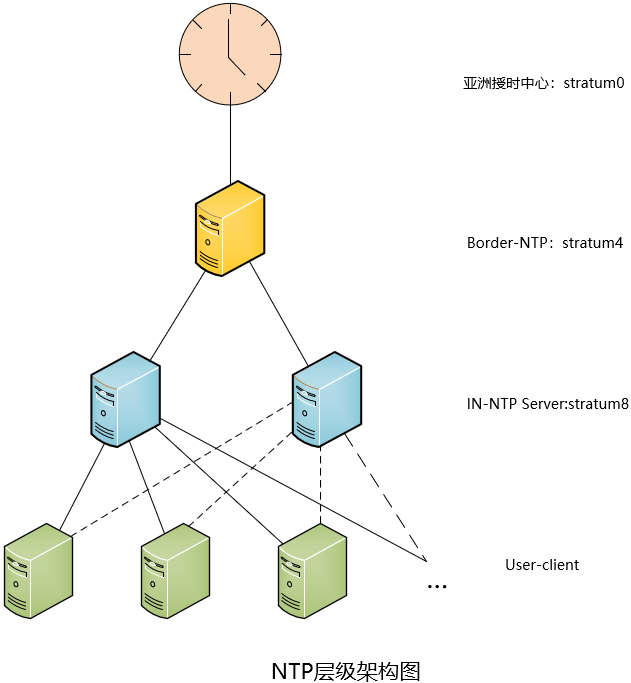
|
主机名
|
IP
|
备注
|
|
border_ntp
|
内网IP:172.24.8.71
|
边界NTP服务器
|
|
in_ntp01
|
172.24.8.72
|
内部NTP服务器01
|
|
in_ntp02
|
172.24.8.73
|
内部NTP服务器02
|
|
client
|
172.24.8.74
|
模拟局域网内部客户端节点
|
- Border-NTP部署在边界上,作为和互联网(亚洲授时中心)同步,同时为局域网内部IN-NTP提供同步服务。
- User-client,包括所有局域网内客户端等,从两台(一主一备)IN-NTP进行同步。
二 Border-NTP配置
2.1 服务包安装
  1 [root@border_ntp ~]# rpm -qa | grep ntp

  2 [root@border_ntp ~]# yum -y install ntp			#安装ntp服务
2.2 ntp配置
  1 [root@border_ntp ~]# vi /etc/ntp.conf

  2 driftfile /var/lib/ntp/drift

  3 #定义与上级时间服务器联系时所花费的时间,记录在driftfile参数后面的文件内。

  4 driftfile   /var/lib/ntp/drift

  5 pidfile     /var/run/ntpd.pid				#进程pid文件

  6 logfile     /var/log/ntp.log				#开启日志记录

  7 #定义与上级时间服务器联系时所花费的时间,记录在driftfile参数后面的文件内。

  8

  9 restrict default nomodify notrap nopeer noquery	        #默认拒绝所有NTP连接

 10 restrict 127.0.0.1

 11 restrict ::1 						#开启本地授权

 12

 13 restrict 172.24.8.72 mask 255.255.255.255 nomodify notrap	#添加IN-NTP Server允许校时

 14 restrict 172.24.8.73 mask 255.255.255.255 nomodify notrap	#添加IN-NTP Server允许校时

 15

 16 #server 0.cn.pool.ntp.org

 17 #server 1.asia.pool.ntp.org

 18 #restrict 0.cn.pool.ntp.org nomodify notrap noquery

 19 #restrict 1.asia.pool.ntp.org nomodify notrap noquery

 20 #添加Border-NTP的上一级时间中心,即亚洲授时中心服务器,此处建议注释,转而采用国内阿里云时钟,相对网络更稳定,如下。

 21 server ntp1.aliyun.com iburst minpoll 4 maxpoll 10

 22 restrict ntp1.aliyun.com nomodify notrap nopeer noquery

 23 server ntp2.aliyun.com iburst minpoll 4 maxpoll 10

 24 restrict ntp2.aliyun.com nomodify notrap nopeer noquery

 25 #允许阿里授时中心修改本地时间。

 26 server 127.127.1.0

 27 fudge 127.127.1.0 stratum 4

 28 #当授时不可用,采用本地时间,stratum级别为4。
2.3 其他配置
  1 [root@border_ntp ~]# chown ntp:ntp /var/log/ntp.log

  2 [root@border_ntp ~]# chcon -t ntpd_log_t /var/log/ntp.log

  3 [root@border_ntp ~]# firewall-cmd --permanent --add-service=ntp

  4 [root@border_ntp ~]# firewall-cmd --reload

  5 [root@border_ntp ~]# setenforce 0
2.4 开启服务
  1 [root@border_ntp ~]# systemctl start ntpd.service

  2 [root@border_ntp ~]# systemctl enable ntpd.service
2.5 验证
1 [root@border_ntp ~]# ntpq -np

三 IN-NTP Server配置
3.1 服务包安装
  1 [root@in_ntp01 ~]# rpm -qa | grep ntp			#查看是否安装ntp

  2 [root@in_ntp01 ~]# yum -y install ntp			#安装ntp服务
3.2 ntp配置
  1 [root@in_ntp01 ~]# vi /etc/ntp.conf

  2 driftfile   /var/lib/ntp/drift

  3 pidfile     /var/run/ntpd.pid				#进程pid文件

  4 logfile     /var/log/ntp.log				#开启日志记录

  5 #定义与上级时间服务器联系时所花费的时间,记录在driftfile参数后面的文件内。

  6 tinker stepout 0

  7 restrict    default ignore				        #默认拒绝所有连接

  8 restrict -6 default ignore				        #默认拒绝所有ipv6连接

  9 restrict    127.0.0.1

 10 restrict    -6 ::1					        #开启本地授权

 11

 12 restrict 172.24.8.0 mask 255.255.255.0 nomodify notrap	#允许局域网内网段校时

 13

 14 restirct 172.24.8.71 nomodify notrap nopeer noquery

 15 #允许根据上一级时间修改本地时间

 16 server 172.24.8.71  iburst minpoll 3 maxpoll 3 prefer

 17 #添加上一层Border-NTP服务地址

 18

 19 #peer 172.24.8.72 iburst minpoll 4 maxpoll 6

 20 #peer 172.24.8.73 iburst minpoll 4 maxpoll 6

 21 #服务器接收其他服务器的地址,同时也会为其他设备提供NTP服务器,即互相同步,用于在孤岛环境中,若同时具备上层时钟,可注释掉。

 22

 23 server 127.127.1.0

 24 fudge 127.127.1.0 stratum 8			#上一级不可用,使用本地时间,stratum为8
3.3 其他配置
3.4 开启服务
  1 [root@in_ntp01 ~]# systemctl start ntpd

  2 [root@in_ntp01 ~]# systemctl enable ntpd
3.5 验证
1 [root@in_ntp01 ~]# ntpq -np

四 user-client配置
4.1 服务包安装
  1 [root@client ~]# rpm -qa | grep ntp			#查看是否安装ntp

  2 [root@client ~]# yum -y install ntp			#安装ntp服务
4.2 ntp配置
  1 [root@client ~]# vi /etc/ntp.conf

  2 driftfile   /var/lib/ntp/drift

  3 pidfile     /var/run/ntpd.pid				#进程pid文件

  4 logfile     /var/log/ntp.log				#开启日志记录

  5 #定义与上级时间服务器联系时所花费的时间,记录在driftfile参数后面的文件内。

  6

  7 tinker panic 600

  8 #当client和server时差在600秒以内,使用渐变调整client时间,超过600秒,ntpd进程自动终止,需要手动进行调整。

  9 restrict    default ignore				        #默认拒绝所有连接

 10 restrict -6 default ignore				        #默认拒绝所有ipv6连接

 11 restrict    127.0.0.1					#开启本地授权

 12

 13 restrict 172.24.8.72 nomodify notrap noquery		#允许根据上一级时间修改本地时间

 14 restrict 172.24.8.73 nomodify notrap noquery		#允许根据上一级时间修改本地时间

 15

 16 server 172.24.8.72 iburst minpoll 4 maxpoll 6 prefer

 17 server 172.24.8.73 iburst minpoll 4 maxpoll 6
4.3 其他配置
4.4 开启服务
  1 [root@client ~]# systemctl start ntpd

  2 [root@client ~]# systemctl enable ntpd
4.5 验证
1 [root@client ~]# ntpq -np

1 [root@client ~]# ntpstat

附录一
附录二
004.NTP多层级架设的更多相关文章
- CentOS 6.5 下搭建NTP服务器
参考网站: http://www.iyunv.com/thread-64847-1-1.html http://acooly.iteye.com/blog/1993484 1 检查系统 ...
- NTP服务搭建详解一条龙
说在前面:ntp和ntpdate区别 ①两个服务都是centos自带的(centos7中不自带ntp).ntp的安装包名是ntp,ntpdate的安装包是ntpdate.他们并非由一个安装包提供. ② ...
- 内网环境搭建NTP服务器
说在前面:ntp和ntpdate区别 ①两个服务都是centos自带的(centos7中不自带ntp).ntp的安装包名是ntp:ntpdate的安装包是ntpdate.他们并非由一个安装包提供. ② ...
- CentOS学习之NTP服务配置详解
详解centos7下ntp服务配置 一.ntp服务是什么 1.定义 NTP是网络时间协议(Network Time Protocol),它是用来同步网络中各个计算机的时间的协议. 2.发展 首次记载在 ...
- ntpdate server时出错原因及解决
错误1.Server dropped: Strata too high 在ntp客户端运行ntpdate serverIP,出现no server suitable for synchronizati ...
- linux ntp时间服务器配置
Network Time Protocol (NTP) 也是RHCE新增的考试要求. 学习的时候也顺便复习了一下如何设置Linux的时间,现在拿出来和大家分享 设置NTP服务器不难但是NTP本身是一个 ...
- CentOS7 NTP 安装配置
NTP 网络时间协议用来同步网络上不同主机的系统时间.你管理的所有主机都可以和一个指定的被称为 NTP 服务器的时间服务器同步它们的时间.而另一方面,一个 NTP 服务器会将它的时间和任意公共 NTP ...
- 时间服务器:NTP 服务器
15.1 关于时区与网络校时的通讯协议 使得每一部主机的时间同步化. DHCP 客户端/服务器端所需要的租约时间限制. 网络侦测时所需要注意的时间点.刚刚谈到的登录文件分析功能.具有相关性的主 ...
- ntp -q 输出说明
-bash-3.00# ntpq -p remote refid st t when poll reach delay offset ...
随机推荐
- Confluence 6 配置验证码(Captcha)来防止垃圾
如果你的 Confluence 站点是对公众开放的(允许匿名用户使用,添加评论,创建页面等),你可能会发现你的站点会被自动创建很多垃圾页面,评论或者其他垃圾内容. 你可以配置让 Confluence ...
- 在 Confluence 6 中禁用 workbox 应用通知
如果你选择 不提供应用通知(does not provide in-app notifications): Confluence workbox 图标将不会可见同时用户也不能在这个服务器上访问 wor ...
- Confluence 6 连接到 Jira 用户管理的限制
当你在使用 JIRA 目录为用户目录的时候,请考虑下面的一些限制和建议. 不知道跨平台的多应用单点登录 当你使用 JIRA 为你的目录管理器的时候,系统将不能支持跨平台的单点登录.当 JIRA 用作目 ...
- vue 之webpack打包工具的使用
一.什么是webpack? webpack是一个模块打包工具.用vue项目来举例:浏览器它是只认识js,不认识vue的.而我们写的代码后缀大多是.vue的,在每个.vue文件中都可能html.js.c ...
- java----作用域
代码块: public class Demo { public static void main(String[] args){ Test t = new Test(); Test t1 = new ...
- 使用Calendar获取上一月,下一月,上一年,下一年的当天日期
Calendar的add(int field,int amount)方法 field 表示月或年,天等字段 amount 代表增量或减量 例如: 上月的当天日期 Calendar cal = Cal ...
- 论文阅读笔记二-ImageNet Classification with Deep Convolutional Neural Networks
分类的数据大小:1.2million 张,包括1000个类别. 网络结构:60million个参数,650,000个神经元.网络由5层卷积层,其中由最大值池化层和三个1000输出的(与图片的类别数相同 ...
- HTTP 599: SSL certificate problem: unable to get local issuer certificate错误
自己在用 PySpider 框架爬虫运行代码后时出现 HTTP 599: SSL certificate problem: unable to get local issuer certificate ...
- 定时获取MySQL库的大小
定时获取MySQL库的大小 获取数据库单个库的大小命令 [root@admin ~]# cat db_size.txt mysql -h 192.8.1.1 -uUSER -pPASSWORD -e' ...
- Caused by: java.net.ConnectException: Connection refused: master/192.168.3.129:7077
1:启动Spark Shell,spark-shell是Spark自带的交互式Shell程序,方便用户进行交互式编程,用户可以在该命令行下用scala编写spark程序. 启动Spark Shell, ...