
win64位安装python-mysqldb1.2.3
在其他版本的mysqldb里面时间查询有问题
最后确定还是在 1.2.5 版本下来解决,需要解决的问题就是这个:
“Cannot open include file: 'config-win.h': No such file or directory” while installing mysql-python
上面是在 1.2.4 版本上的,后来在 1.2.5 上面应该是解决的。但实际上,1.2.5 在Windows 64 位环境下还是有问题的,原因见后面的说明。
安装步骤如下:
1.安装 Microsoft Visual C++ Compiler Package for Python 2.7
下载链接
2.安装 MySQL Connector C 6.0.2
下载链接
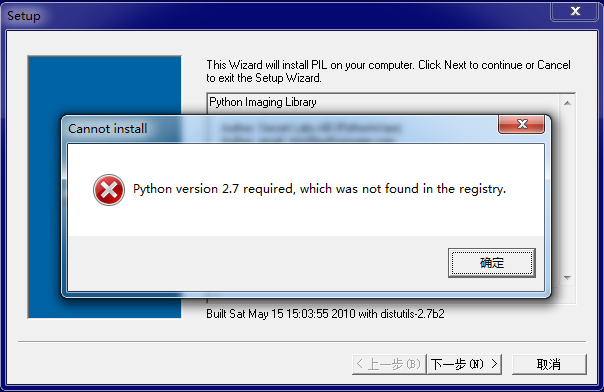
大意是说找不到注册表,网上搜索解决方案。
新建一个register.py文件写入代码:
|
1
2
3
4
5
6
7
8
9
10
11
12
13
14
15
16
17
18
19
20
21
22
23
24
25
26
27
28
29
30
31
32
33
34
35
36
37
|
import sys from _winreg import * # tweak as necessaryversion = sys.version[:3]installpath = sys.prefix regpath = "SOFTWARE\\Python\\Pythoncore\\%s\\" % (version)installkey = "InstallPath"pythonkey = "PythonPath"pythonpath = "%s;%s\\Lib\\;%s\\DLLs\\" % ( installpath, installpath, installpath) def RegisterPy(): try: reg = OpenKey(HKEY_CURRENT_USER, regpath) except EnvironmentError as e: try: reg = CreateKey(HKEY_CURRENT_USER, regpath) SetValue(reg, installkey, REG_SZ, installpath) SetValue(reg, pythonkey, REG_SZ, pythonpath) CloseKey(reg) except: print "*** Unable to register!" return print "--- Python", version, "is now registered!" return if (QueryValue(reg, installkey) == installpath and QueryValue(reg, pythonkey) == pythonpath): CloseKey(reg) print "=== Python", version, "is already registered!" return CloseKey(reg) print "*** Unable to register!" print "*** You probably have another Python installation!" |
启动命令切到register.py文件目录下执行

重新安装PIL,错误解决,安装成功。
如果是win7 64位的用户在安装Python 32位程序时,如果选择只为当前用户,以上问题不会出现。如果选择所有用户,就试着使用以上方法解决。
提示其它版本解决方法类似。
win64位安装python-mysqldb1.2.3的更多相关文章
- win7 32位安装 python 及Numpy、scipy、matplotlib函数包
操作系统: win7 64位,但选择安装32位的python. 1,python下载安装 https://www.python.org/downloads/ 下载2.7版,一路下一步安装. 并在pat ...
- [置顶] 如何在Windows 7 64位安装Python,并使用Matplotlib绘图
1. 安装Python 我使用的是Windows 7 64 bit,所以我从Python官网下载python-2.7.5.amd64.msi,安装步骤如下: 1) 安装windo ...
- win64位安装python-mysqldb1.2.5
在其他版本的mysqldb里面时间查询有问题最后确定还是在 1.2.5 版本下来解决,需要解决的问题就是这个:"Cannot open include file: 'config-win.h ...
- window7 64位安装Python
Python下载地址:https://www.python.org/download/releases/2.7.8/ 选择64位的安装,然后双击打开下载的文件,默认一步步安装. 其中有一个步骤如下图: ...
- win7 64 位安装 python,提示: 0x80240017-未指定的错误
首先确保从python官网下载正确的python版本: https://www.python.org/downloads/windows/ 然后,应该是 VC 相关的问题. 去微软网站下载下列补丁包即 ...
- 【转】linux和windows下安装python集成开发环境及其python包
本系列分为两篇: 1.[转]windows和linux中搭建python集成开发环境IDE 2.[转]linux和windows下安装python集成开发环境及其python包 3.windows和l ...
- linux和windows下安装python拓展包及requirement.txt安装类库
python拓展包安装 直接安装拓展包默认路径: Unix(Linux)默认路径:/usr/local/lib/pythonX.Y/site-packagesWindows默认路径:C:\Python ...
- 在win64位,python64位2.7版本中安装pyHook
今天看了一篇博文说的是利用pyhook监听键盘鼠标事件(感兴趣的可以看博客园中相关文章),文章中使用的pyHook模块的官方下载地址是:http://sourceforge.net/projects/ ...
- 怎样在Win7 64位旗舰版安装Python+Eclipse开发环境
原地址:http://www.cnblogs.com/balian/archive/2011/06/19/2084632.html 自从上周抛弃了WinXP转而安装了Win7,64位后,尝试安装Pyt ...
随机推荐
- c/c++ 标准库 string
c/c++ 标准库 string 标准库 string的小例子 test1~test10 #include <iostream> using namespace std; int main ...
- 【Git 学习三】深入理解git reset 命令
重置命令(git reset)是Git 最常用的命令之一,也是最危险最容易误用的命令.来看看git reset命令用法. --------------------------------------- ...
- jQuery中 对标签元素操作(1)
一:创建元素节点(添加) 创建元素节点并且把节点作为元素的子节点添加到DOM树上 append(): 在元素下添加元素 用法:$("id").append(" ...
- Tomcat结构
Tomcat结构 Server(服务器) 服务器代表整个Tomcat容器. Tomcat提供了服务器接口的默认实现(很少由用户定制). Service(服务) 服务是位于服务器内部的中间组件,将一个或 ...
- 关于IDE的选择
以往忘了看到谁说的,说开发.NET就用VS,开发JS就用webStorm,开发java没钱用Eclipse,有钱用IDEA
- 寒假特训——I - Fair
Some company is going to hold a fair in Byteland. There are nn towns in Byteland and mm two-way road ...
- C#のsocket通信
博主要做一个手机和电脑端(C#)通讯的程序,便览了网络上关乎socket的东西.但是接收文件的时候卡住了,怎么也接收不全.后来做了分片处理,如果分片,发送的时候就会有不同的socket(客户端开发不是 ...
- 解决vaio s13笔记本 ubuntu重启卡屏问题
终端 sudo gedit /etc/default/grub 找到GRUB_CMDLINE_LINUX_DEFAULT="quiet splash",添加内核启动参数reboot ...
- 机器学习算法总结(五)——聚类算法(K-means,密度聚类,层次聚类)
本文介绍无监督学习算法,无监督学习是在样本的标签未知的情况下,根据样本的内在规律对样本进行分类,常见的无监督学习就是聚类算法. 在监督学习中我们常根据模型的误差来衡量模型的好坏,通过优化损失函数来改善 ...
- Echarts 报错:Uncaught Error: [MODULE_MISS]"echarts/config" is not exists!
每天学习一点点 编程PDF电子书.视频教程免费下载:http://www.shitanlife.com/code 问题: 报错:Uncaught Error: [MODULE_MISS]" ...