
Lucene的简单用法
1.创建索引
package com.DingYu.Test;

import java.io.File;

import java.io.FileInputStream;

import java.io.FileNotFoundException;

import java.io.IOException;

import java.io.UnsupportedEncodingException;

import java.nio.file.Paths;

import org.apache.lucene.analysis.Analyzer;

import org.apache.lucene.analysis.standard.StandardAnalyzer;

import org.apache.lucene.document.Document;

import org.apache.lucene.document.Field;

import org.apache.lucene.document.Field.Store;

import org.apache.lucene.document.StoredField;

import org.apache.lucene.index.IndexWriter;

import org.apache.lucene.index.IndexWriterConfig;

import org.apache.lucene.store.Directory;

import org.apache.lucene.store.FSDirectory;

import org.junit.Test;

/**

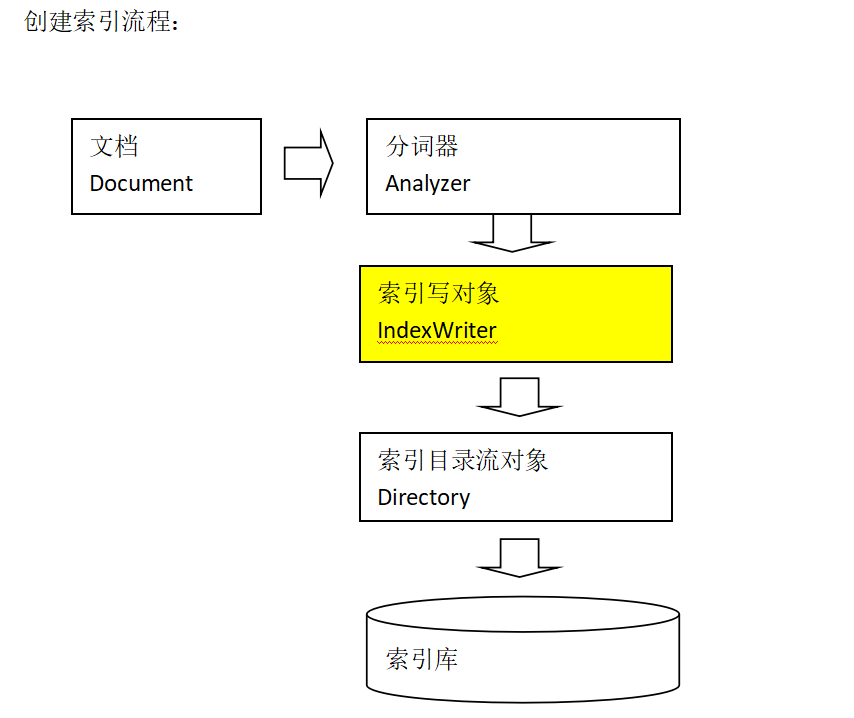
 * 我们的目标是把索引和文档存入索引库中, 所以首先我们需要创建一个索引库 然后创建一个IndexWrite对象把索引,和文档对象写入,

 * 文档对象中需要自己设置域,索引是通过分词器对域进行分词产生的, 所以我们需要分词器

 *

 * @author 丁宇

 *

 */

public class LuceneTest {

    /**

     * 创建索引

     * @throws IOException

     */

    @Test

    public void createIndex() throws IOException {

        // 标准分词器

        Analyzer analyzer = new StandardAnalyzer();

        // 创建一个索引

        Directory directory = FSDirectory.open(Paths.get("D:\\LuceneIndex"));

        // 创建一个IndexWriteConfig对象

        IndexWriterConfig config = new IndexWriterConfig(analyzer);

        // 创建一个IndexWrite对象

        IndexWriter write = new IndexWriter(directory, config);

        // 获得所有文件下的文件

        File[] files = new File("D:\\LuceneTest").listFiles();

        for (File file : files) {

            // 创建一个文档对象

            Document document = new Document();

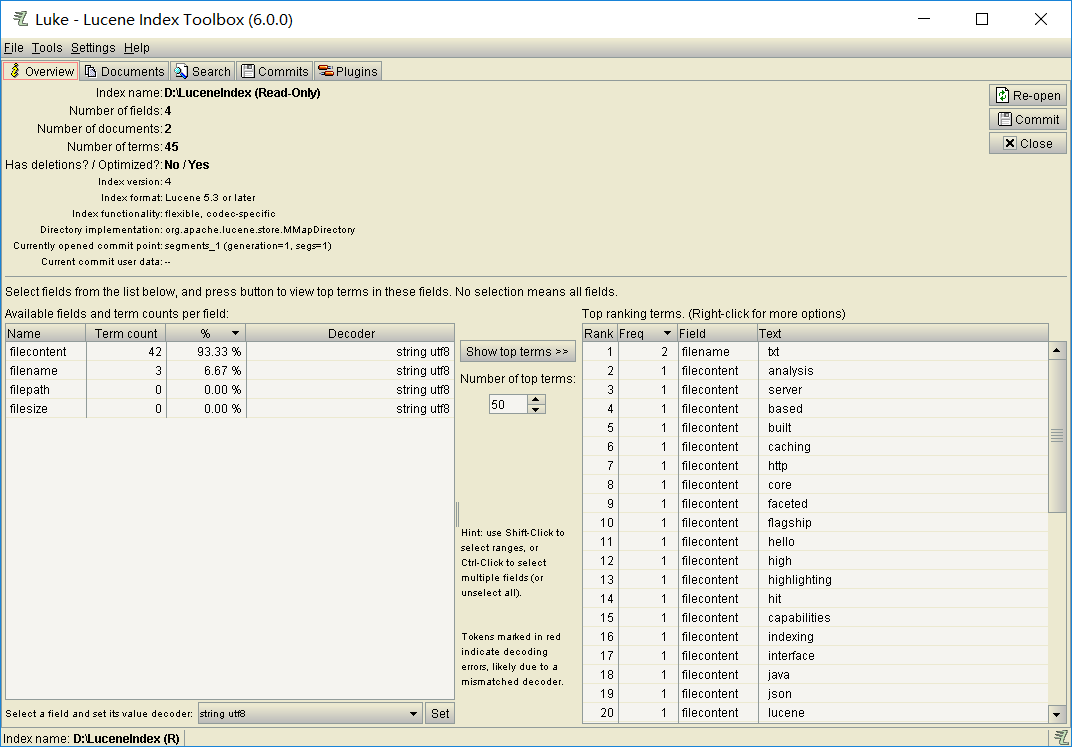
            // 增加一个filepath域,不分析 不索引 但会存储在索引库里 把文件路径放到域中

            Field field1 = new StoredField("filepath", file.getPath());

            // 增加一个filename域,会分词,会索引,

            Field field2 = new org.apache.lucene.document.TextField("filename", file.getName(), Store.YES);

            // 增加一个fileContent域,会分词,会索引,只放文件内容的索引

            Field field3 = new org.apache.lucene.document.TextField("filecontent", fileContent(file), Store.NO);

            // 增加一个filesize域,不分析 不索引 但会存储在索引库里 把文件路径放到域中

            Field field4 = new StoredField("filesize", file.length());

            document.add(field1);

            document.add(field2);

            document.add(field3);

            document.add(field4);

            write.addDocument(document);

        }

        write.close();

    }

    /**

     * 获得文件内容

     * @param file

     * @return

     */

    public String fileContent(File file)  {

        byte[] fileContent = new byte[(int) file.length()];

        FileInputStream in = null;

        try {

            in = new FileInputStream(file);

        } catch (FileNotFoundException e2) {

            e2.printStackTrace();

        }

        try {

            in.read(fileContent);

        } catch (IOException e1) {

            e1.printStackTrace();

        }

        try {

            in.close();

        } catch (IOException e) {

            e.printStackTrace();

        }

        try {

            return new String(fileContent, "UTF-8");

        } catch (UnsupportedEncodingException e) {

            e.printStackTrace();

        }

        return null;

    }

}

2.查询索引
package com.DingYu.Test;

import java.io.IOException;

import java.nio.file.Path;

import java.nio.file.Paths;

import org.apache.lucene.document.Document;

import org.apache.lucene.index.DirectoryReader;

import org.apache.lucene.index.IndexReader;

import org.apache.lucene.index.Term;

import org.apache.lucene.search.BooleanClause.Occur;

import org.apache.lucene.search.BooleanQuery;

import org.apache.lucene.search.IndexSearcher;

import org.apache.lucene.search.NumericRangeQuery;

import org.apache.lucene.search.Query;

import org.apache.lucene.search.ScoreDoc;

import org.apache.lucene.search.TermQuery;

import org.apache.lucene.search.TopDocs;

import org.apache.lucene.store.Directory;

import org.apache.lucene.store.FSDirectory;

import org.junit.Test;

/**

 * 查询索引

 *

 * @author 丁宇

 *

 */

public class LuceneTest1 {

    // 获得IndexSearcher对象

    private IndexSearcher getIndexSearcher() throws IOException {

        // 指定索引库

        Directory directory = FSDirectory.open(Paths.get("D:\\LuceneIndex"));

        // 打开索引库

        IndexReader reader = DirectoryReader.open(directory);

        // 创建查询的对象

        IndexSearcher searcher = new IndexSearcher(reader);

        return searcher;

    }

    // 输出查到的内容

    private void printIndex(TopDocs docs,IndexSearcher searcher) throws IOException {

        // 获得顶部匹配记录

        ScoreDoc[] scoreDocs = docs.scoreDocs;

        // 获得在索引库中存着的文档的id,利用id去寻找文档

        for (ScoreDoc scoreDoc : scoreDocs) {

            // 获得id

            int doc = scoreDoc.doc;

            // 获得文档

            Document document = searcher.doc(doc);

            // 获得这个文档的域

            System.out.println(document.get("filename"));

            System.out.println(document.get("filecontent"));

            System.out.println(document.get("filepath"));

            System.out.println(document.get("filesize"));

            System.out.println("------------------------");

        }

    }

    /**

     * 精准查询

     * @throws IOException

     */

    @Test

    public void termQueryIndex() throws IOException {

        IndexSearcher searcher = getIndexSearcher();

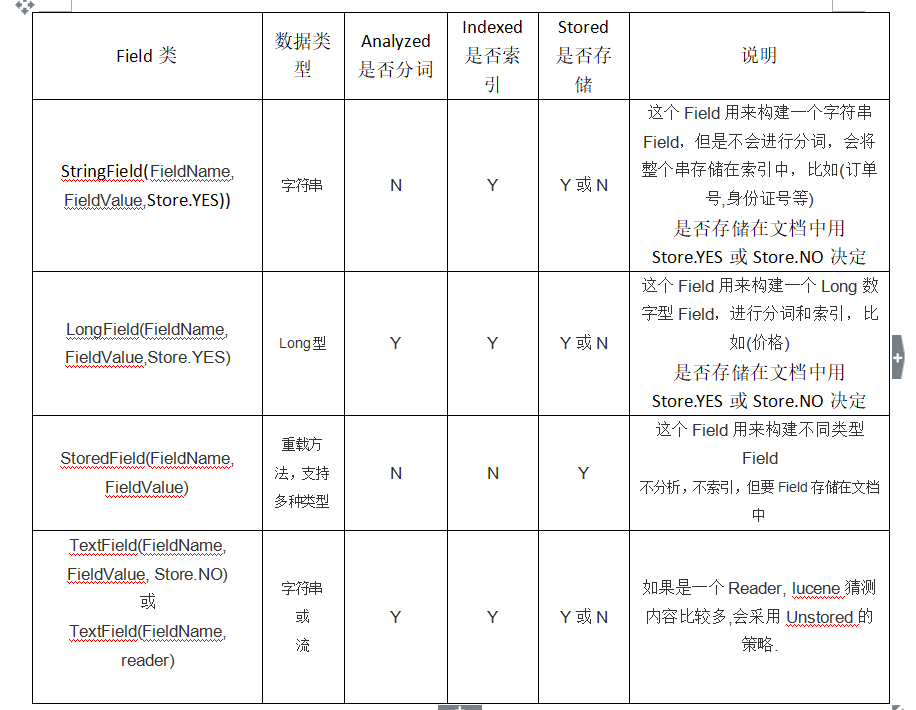
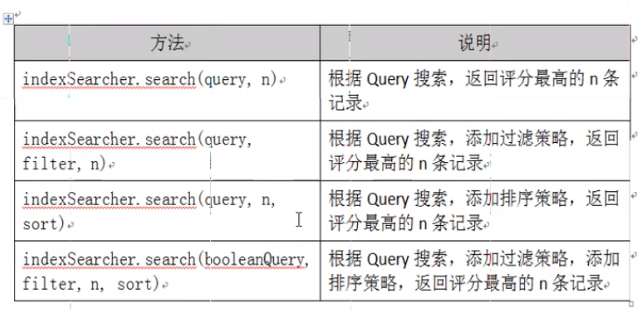
        // 选择合适的查询方法,这里用最简单的,具体的看下图

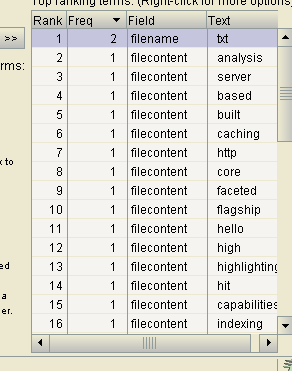
        Query query = new TermQuery(new Term("filename", "txt"));

        // 执行查询

        TopDocs docs = searcher.search(query, 2);

        //输出查询内容

        printIndex(docs, searcher);

        // 关闭索引库

        searcher.getIndexReader().close();

    }

    /**

     * 范围查询 五个参数 第一个域名,第二个第三个表示范围,第四个第五个表示是否包含最小值和最大值。

     * @throws IOException

     */

    @Test

    public void numRangeQueryIndex() throws IOException {

        IndexSearcher searcher = getIndexSearcher();

        // 选择合适的查询方法,这里用最简单的,具体的看下图

        Query query = NumericRangeQuery.newLongRange("filesize", 0L, 1000L, true, true);

        // 执行查询

        TopDocs docs = searcher.search(query, 2);

        //输出查询内容

        printIndex(docs, searcher);

        // 关闭索引库

        searcher.getIndexReader().close();

    }

    /**

     * 组合查询

     * @throws IOException

     */

    @Test

    public void booleanQueryIndex() throws IOException {

        IndexSearcher searcher = getIndexSearcher();

        BooleanQuery booleanQuery = new BooleanQuery();

        Query query = new TermQuery(new Term("filename","txt"));

        Query query2 = NumericRangeQuery.newLongRange("filesize", 0L, 1000L, true, true);

        //表示query是必须的 query2也是必须 相当于并集

        booleanQuery.add(query,Occur.MUST);

        booleanQuery.add(query2, Occur.MUST);

        // 执行查询

        TopDocs docs = searcher.search(query, 2);

        //输出查询内容

        printIndex(docs, searcher);

        // 关闭索引库

        searcher.getIndexReader().close();

    }

}

3.删除索引
package com.DingYu.Test;

import java.io.IOException;

import java.nio.file.Paths;

import org.apache.lucene.analysis.Analyzer;

import org.apache.lucene.analysis.standard.StandardAnalyzer;

import org.apache.lucene.index.IndexWriter;

import org.apache.lucene.index.IndexWriterConfig;

import org.apache.lucene.index.Term;

import org.apache.lucene.search.Query;

import org.apache.lucene.search.TermQuery;

import org.apache.lucene.store.Directory;

import org.apache.lucene.store.FSDirectory;

import org.junit.Test;

/**

 * 删除索引 一般增删改都是同一个操作对象 这里使用IndexWriter对象

 *

 * @author 丁宇

 *

 */

public class LuceneTest3 {

    /**

     * 获得IndexWrite对象

     * @return

     * @throws IOException

     */

    public IndexWriter getIndexWrite() throws IOException {

        Analyzer analyzer = new StandardAnalyzer();

        Directory directory = FSDirectory.open(Paths.get("D:\\LuceneIndex"));

        IndexWriterConfig config = new IndexWriterConfig(analyzer);

        return new IndexWriter(directory, config);

    }

    /**

     * 删除所有的索引

     *

     * @throws IOException

     */

    @Test

    public void deleteAllIndex() throws IOException {

        IndexWriter indexWrite = getIndexWrite();

        indexWrite.deleteAll();

        indexWrite.close();

    }

    /**

     * 根据条件删除索引,同时删除文档

     * @throws IOException

     */

    @Test

    public void deleteSomeIndex() throws IOException {

        IndexWriter indexWrite = getIndexWrite();

        Query query = new TermQuery(new Term("filename","txt"));

        indexWrite.deleteDocuments(query);

        indexWrite.close();

    }

}
4.修改索引
package com.DingYu.Test;

import java.io.IOException;

import java.nio.file.Paths;

import org.apache.lucene.analysis.Analyzer;

import org.apache.lucene.analysis.standard.StandardAnalyzer;

import org.apache.lucene.document.Document;

import org.apache.lucene.document.Field.Store;

import org.apache.lucene.document.StringField;

import org.apache.lucene.index.IndexWriter;

import org.apache.lucene.index.IndexWriterConfig;

import org.apache.lucene.index.IndexableField;

import org.apache.lucene.index.Term;

import org.apache.lucene.store.Directory;

import org.apache.lucene.store.FSDirectory;

import org.junit.Test;

/**

 * 索引的修改

 * @author 丁宇

 *

 */

public class LuceneTest2 {

    private IndexWriter getIndexWriter() throws IOException {

        Analyzer analyzer = new StandardAnalyzer();

        Directory directory = FSDirectory.open(Paths.get("D:\\LuceneIndex"));

        IndexWriterConfig config = new IndexWriterConfig(analyzer);

        return new IndexWriter(directory, config);

    }

    @Test

    public void updateIndex() throws IOException {

        IndexWriter indexWriter = getIndexWriter();

        Document document = new Document();

        document.add(new StringField("filename", "think in java", Store.YES));

        //update 就是删除一个你指定的 创建一个你想要的 。

        indexWriter.updateDocument(new Term("filecontent","txt"), document);

        indexWriter.close();

    }

}
Lucene的简单用法的更多相关文章
- 2、Lucene 最简单的使用(小例子)
在了解了Lucene以后,我打算亲手来做一个Lucene的小例子,这个例子只是Lucene最简单的应用:使用Lucene实现标准的英文搜索: 1.下载Lucene 下载Lucene,到Lucene的官 ...
- CATransition(os开发之画面切换) 的简单用法
CATransition 的简单用法 //引进CATransition 时要添加包“QuartzCore.framework”,然后引进“#import <QuartzCore/QuartzCo ...
- jquery.validate.js 表单验证简单用法
引入jquery.validate.js插件以及Jquery,在最后加上这个插件的方法名来引用.$('form').validate(); <!DOCTYPE html PUBLIC " ...
- NSCharacterSet 简单用法
NSCharacterSet 简单用法 NSCharacterSet其实是许多字符或者数字或者符号的组合,在网络处理的时候会用到 NSMutableCharacterSet *base = [NSMu ...
- [转]Valgrind简单用法
[转]Valgrind简单用法 http://www.cnblogs.com/sunyubo/archive/2010/05/05/2282170.html Valgrind的主要作者Julian S ...
- Oracle的substr函数简单用法
substr(字符串,截取开始位置,截取长度) //返回截取的字 substr('Hello World',0,1) //返回结果为 'H' *从字符串第一个字符开始截取长度为1的字符串 subst ...
- Ext.Net学习笔记19:Ext.Net FormPanel 简单用法
Ext.Net学习笔记19:Ext.Net FormPanel 简单用法 FormPanel是一个常用的控件,Ext.Net中的FormPanel控件同样具有非常丰富的功能,在接下来的笔记中我们将一起 ...
- TransactionScope简单用法
记录TransactionScope简单用法,示例如下: void Test() { using (TransactionScope scope = new TransactionScope()) { ...
- WPF之Treeview控件简单用法
TreeView:表示显示在树结构中分层数据具有项目可展开和折叠的控件 TreeView 的内容是可以包含丰富内容的 TreeViewItem 控件,如 Button 和 Image 控件.TreeV ...
随机推荐
- struts2 简单注解配置代替xml配置文件
1. 主要文件 LoginAction.javapackage com.edu.struts2.action;import org.apache.struts2.convention.annotati ...
- asp.net中的Filter类型其实是被当作单例的
Filter对请求进行过滤.例如,在进行身份验证的基础上增加一些权限判断,对于身份验证通过的用户,检测其是否有开通UserSpace,如果没有则在Response中说明.示例代码如下: public ...
- VSCode插件开发全攻略(九)常用API总结
更多文章请戳VSCode插件开发全攻略系列目录导航. 本文提炼一些常见的API使用场景供参考,本文内容有待完善. 编辑器相关 修改当前激活编辑器内容 替换当前编辑器全部内容: vscode.windo ...
- 包建强的培训课程(7):iOS企业级开发实战
@import url(http://i.cnblogs.com/Load.ashx?type=style&file=SyntaxHighlighter.css);@import url(/c ...
- 【高速接口-RapidIO】6、Xilinx RapidIO核仿真与包时序分析
提示:本文的所有图片如果不清晰,请在浏览器的新建标签中打开或保存到本地打开 一.软件平台与硬件平台 软件平台: 操作系统:Windows 8.1 64-bit 开发套件:Vivado2015.4.2 ...
- eclipse使用和快捷键
一.快捷键 - ctrl + shift + o 导包 - ctrl + shift + t 快速查找某个类 - 先按ctrl + 2 ,再点L, 创建变量并命名 - ctrl + o , 在当前类中 ...
- Eclipse 中 Spring 项目的 XML 配置文件报错 Referenced file contains errors
原来运行正常的项目,突然在applicationContext.xml 文件头报错 总结一下网上的解决方案: 1.有可能网络状况不好导致 如果使用Maven构建项目,spring在加载xsd文件时总是 ...
- 软件测试人员需要掌握的linux命令(二)
2 设备管理 2.1 mount 名称 : mount 使用权限 : 系统管理者或/etc/fstab中允许的使用者 使用方式 : mount [-hV] mount [-fnrsvw] [-t vf ...
- flash中调用XML遇到的中文显示异常问题
昨天使用flash调用XML文件进行显示时,出现了中文无法显示的问题,记录一下解决方法: 1.字体设置: 一般flash里的动态文本和嵌入文本都是默认的使用Arial字体,这个字体里可能没有中文,所以 ...
- Swift中空合运算符、闭区间运算符、单侧区间、半开区间
空合运算符(Nil Coalescing Operator) 用于取代3目判空运算,提供超短的写法比如常规判空写法如下,反正我写java就是这么干的 var anOptionalInt: Int? = ...