
ehcache如何配置
1.pom.xml文件配置(主要针对jar包的引入)
<ehcache.version>2.6.9</ehcache.version>
<ehcache-web.version>2.0.4</ehcache-web.version>
<!-- CACHE begin -->
<dependency>
   <groupId>net.sf.ehcache</groupId>
   <artifactId>ehcache-core</artifactId>
   <version>${ehcache.version}</version>
</dependency>
<dependency>
   <groupId>net.sf.ehcache</groupId>
   <artifactId>ehcache-web</artifactId>
   <version>${ehcache-web.version}</version>
</dependency>
<dependency>
   <groupId>redis.clients</groupId>
   <artifactId>jedis</artifactId>
    <version>2.5.1</version>
</dependency>
<!-- CACHE end -->

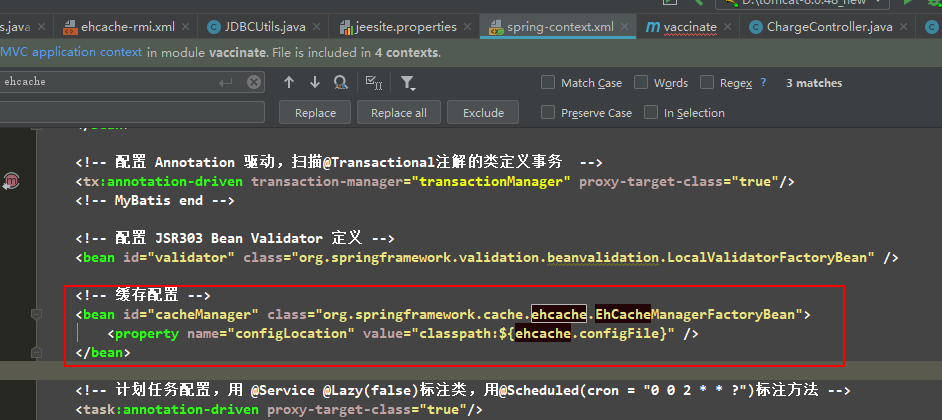
2.spring-context.xml
<!-- 缓存配置 -->

<bean id="cacheManager" class="org.springframework.cache.ehcache.EhCacheManagerFactoryBean">

    <property name="configLocation" value="classpath:${ehcache.configFile}" />

</bean>
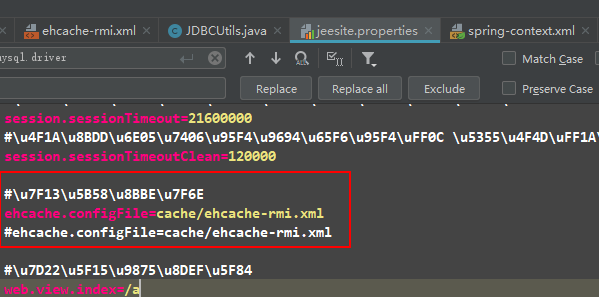
3.jeesite.properties
4.ehcache-rmi.xml配置
<?xml version="1.0" encoding="UTF-8"?>
<ehcache updateCheck="false" name="defaultCache">
   <!-- <cacheManagerPeerProviderFactory class="net.sf.ehcache.distribution.RMICacheManagerPeerProviderFactory" properties="peerDiscovery=manual, socketTimeoutMillis=2000,
      rmiUrls=//localhost:40001/defaultCache" /> <cacheManagerPeerListenerFactory class="net.sf.ehcache.distribution.RMICacheManagerPeerListenerFactory" properties="hostName=localhost,
      port=40000, socketTimeoutMillis=2000"/> -->

   <cacheManagerPeerProviderFactory class="net.sf.ehcache.distribution.RMICacheManagerPeerProviderFactory"
      properties="peerDiscovery=automatic,multicastGroupAddress=230.0.0.1,multicastGroupPort=4446,timeToLive=1,hostName=localhost" />
   <cacheManagerPeerListenerFactory class="net.sf.ehcache.distribution.RMICacheManagerPeerListenerFactory"
      properties="hostName=localhost,port=40001" />

   <diskStore path="../temp/qbkj/ehcache" />
<!--
diskStore path:用来配置磁盘缓存使用的物理路径
name: 缓存名称,cache的唯一标识(ehcache会把这个cache放到HashMap里)
eternal="false" 元素是否永恒,如果是就永不过期(必须设置)
maxElementsOnDisk====磁盘缓存中最多可以存放的元素数量,0表示无穷大
maxElementsInMemory="1000" 内存缓存中最多可以存放的元素数量(必须设置)
timeToIdleSeconds="0" 导致元素过期的访问间隔(秒为单位). 0表示可以永远空闲,默认为0
timeToLiveSeconds="600" 元素在缓存里存在的时间(秒为单位). 0 表示永远存在不过期
overflowToDisk="false" 当缓存达到maxElementsInMemory值是,是否允许溢出到磁盘(必须设置)
diskPersistent="false" 磁盘缓存在VM重新启动时是否保持(默认为false)
diskExpiryThreadIntervalSeconds="100" 磁盘失效线程运行时间间隔,默认是120秒
memoryStoreEvictionPolicy="LFU" 内存存储与释放策略.当达到maxElementsInMemory时
共有三种策略,分别为LRU(最近最少使用)、LFU(最常用的)、FIFO(先进先出)默认使用"最近使用"策略
-->
   <!-- 默认缓存配置. -->
   <defaultCache maxEntriesLocalHeap="100" eternal="false" timeToIdleSeconds="300" timeToLiveSeconds="600" overflowToDisk="true"
      maxEntriesLocalDisk="100000" />

   <!-- 系统缓存 -->
   <cache name="sysCache" maxEntriesLocalHeap="100" eternal="true" overflowToDisk="true">
      <cacheEventListenerFactory class="net.sf.ehcache.distribution.RMICacheReplicatorFactory" />
      <bootstrapCacheLoaderFactory class="net.sf.ehcache.distribution.RMIBootstrapCacheLoaderFactory"/>
   </cache>

   <!-- 用户缓存 -->
   <cache name="userCache" maxEntriesLocalHeap="100" eternal="true" overflowToDisk="true" />

   <!-- 工作流模块缓存 -->
   <cache name="actCache" maxEntriesLocalHeap="100" eternal="true" overflowToDisk="true" />

   <!-- toke缓存 -->
   <cache name="tokenCache" maxEntriesLocalHeap="20" eternal="false" timeToLiveSeconds="7000" diskSpoolBufferSizeMB="2" overflowToDisk="true" />
   <!-- 签字缓存 -->
   <cache name="signCache" maxEntriesLocalHeap="0" eternal="false" timeToLiveSeconds="3600" diskSpoolBufferSizeMB="100" overflowToDisk="true" />
   <!-- 冷链缓存 -->
   <cache name="coldCache" maxEntriesLocalHeap="0" eternal="false" timeToLiveSeconds="300" diskSpoolBufferSizeMB="100" overflowToDisk="true" />
   <!-- 系统活动会话缓存 -->
   <cache name="activeSessionsCache" maxEntriesLocalHeap="10000" overflowToDisk="true" eternal="true" timeToLiveSeconds="0" timeToIdleSeconds="0"
      diskPersistent="true" diskExpiryThreadIntervalSeconds="600" />

</ehcache>
ehcache如何配置的更多相关文章
- (转)springMVC+mybatis+ehcache详细配置
一. Mybatis+Ehcache配置 为了提高MyBatis的性能,有时候我们需要加入缓存支持,目前用的比较多的缓存莫过于ehcache缓存了,ehcache性能强大,而且位各种应用都提供了解决方 ...
- ehcache.xml配置参数
<ehcache xmlns:xsi="http://www.w3.org/2001/XMLSchema-instance" xsi:noNamespaceSchemaLoc ...
- hibernate二级缓存ehcache hibernate配置详解
<!-----------------hibernate二级缓存ehcache------------------------->hibernate配置 <prop key=&quo ...
- spring中ehcache的配置和使用方法
继续上篇,这篇介绍服务层缓存,ehcache一般的配置和用法 一.添加jar包引用 修改pom.xml文件,加入: <dependency> <groupId>org.spri ...
- SpringBoot中整合Redis、Ehcache使用配置切换 并且整合到Shiro中
在SpringBoot中Shiro缓存使用Redis.Ehcache实现的两种方式实例 SpringBoot 中配置redis作为session 缓存器. 让shiro引用 本文是建立在你是使用这sh ...
- EhCache的配置
JPA和Hibernate的二级缓存都是这样做的 代码目录: 这是基础的jar包,如果少的话,再去maven下载 <!-- Spring --> <dependency> &l ...
- Ehcache缓存配置
Cache的配置很灵活,官方提供的Cache配置方式有好几种.你可以通过声明配置.在xml中配置.在程序里配置或者调用构造方法时传入不同的参数. 你可以将Cache的配置从代码中剥离出来,也可以在使用 ...
- Hibernate学习笔记之EHCache的配置
Hibernate默认二级缓存是不启动的,启动二级缓存(以EHCache为例)需要以下步骤: 1.添加相关的包: Ehcache.jar和commons-logging.jar,如果hibernate ...
- ehcache 的配置
配置:一.在src目录下加入ehcache.xml: <cache name="SimplePageCachingFilter" maxElementsInMemory=&q ...
- 02_MyBatis项目结构,所需jar包,ehcache.xml配置,log4j.properties,sqlMapConfig.xml配置,SqlMapGenerator.xml配置
项目结构(所需jar包,配置文件) sqlMapConfig.xml的配置内容如下: <?xmlversion="1.0"encoding="UTF-8&qu ...
随机推荐
- Java学习笔记 -- Java定时调度工具Timer类
1 关于 (时间宝贵的小姐姐请跳过) 本教程是基于Java定时任务调度工具详解之Timer篇的学习笔记. 什么是定时任务调度 基于给定的时间点,给定的时间间隔或者给定的执行次数自动执行的任务. 在Ja ...
- Redis集群以及自动故障转移测试
在Redis中,与Sentinel(哨兵)实现的高可用相比,集群(cluster)更多的是强调数据的分片或者是节点的伸缩性,如果在集群的主节点上加入对应的从节点,集群还可以自动故障转移,因此相比Sen ...
- whereis命令详解
1.简介: whereis命令只能用于程序名的搜索,而且只搜索二进制文件(参数-b).man说明文件(参数-m)和源代码文件(参数-s).如果省略参数,则返回所有信息. 和find相比,whereis ...
- border三角形
border:100px solid ; box-shadow: inset 0 1px,inset 1px 0px,inset 0 -1px,inset -1px 0px; width:0px; h ...
- python入门(十一):异常
1.异常概念: >>> a Traceback (most recent call last): File "<stdin>", line 1, i ...
- 深入理解C++11【2】
[深入理解C++11[2]] 1.继承构造函数. 当基类拥有多个构造函数的时候,子类不得不一一实现. C++98 可以使用 using 来使用基类的成员函数. #include < iostre ...
- docker for mac
MacOS上通过docker部署 docker环境准备 1.访问这里安装好docker,需要注册账号才能下载dmg安装包:https://hub.docker.com/editions/communi ...
- hbase基础建表语句
在Hadoop目录下的HBASE下执行命令 ./hbase shell 进入hbase环境 创建hbase 数据库表 create "表名", "字段A",&q ...
- Hillstone设备管理-恢复出厂设置
1.CLI命令行操作 unset all: 根据提示选择是否保存当前配置y/n: 选择是否重启y/n: 系统重启后即恢复到出厂设置. 2.webUI操作 “系统”—“配置”,点击“清除”按钮,系统会提 ...
- abap 常用TCODE
ABAP: 通过查询表TSTC或者TSTCT:SAP系统将所有的事务代码都存储在这个表中,包括字开发的Y*和Z* TCODE 事务代码功能描述 CG3Y 下载服务器上文件 CG3Z upload fi ...