
同一台windows下配置安装多个mysql实例,实现主从同步
一、安装多个mysql
参见:
https://blog.csdn.net/wrh_csdn/article/details/80198795
https://www.cnblogs.com/qjoanven/p/7898006.html
https://www.cnblogs.com/qq931399960/p/10186627.html
如博客说的,我解压安装文件两次,在同一台win下做两mysql实例的主从同步:
版本:mysql-5.6.17-winx64.zip
我没有采用:mysqld.exe --port=3307 --console 的方式启动多个实例,而是采用了注册服务的方式操作:
1,编辑my.ini文件,以其中一个my.ini文件为例子,另一个只需要修改一下port、basedir、datadir即可:
# For advice on how to change settings please see

# http://dev.mysql.com/doc/refman/5.6/en/server-configuration-defaults.html

# *** DO NOT EDIT THIS FILE. It's a template which will be copied to the

# *** default location during install, and will be replaced if you

# *** upgrade to a newer version of MySQL.

[Client]

port = 3307

[mysqld]

# Remove leading # and set to the amount of RAM for the most important data

# cache in MySQL. Start at 70% of total RAM for dedicated server, else 10%.

# innodb_buffer_pool_size = 128M

# Remove leading # to turn on a very important data integrity option: logging

# changes to the binary log between backups.

# log_bin

# These are commonly set, remove the # and set as required.

server_id = 1

port = 3307

basedir = C:\Users\eddy\Desktop\win-eddy\mysql-5.6.17-winx64

datadir = C:\Users\eddy\Desktop\win-eddy\mysql-5.6.17-winx64\data

#back_log = 600

#max_connections=2000

#max_connect_errors = 6000

#wait_timeout=605800

#tmp_table_size = 256M

#max_heap_table_size = 256M

#default-storage-engine=MYISAM

# Remove leading # to set options mainly useful for reporting servers.

# The server defaults are faster for transactions and fast SELECTs.

# Adjust sizes as needed, experiment to find the optimal values.

# join_buffer_size = 128M

# sort_buffer_size = 2M

# read_rnd_buffer_size = 2M

#sql_mode=NO_ENGINE_SUBSTITUTION,STRICT_TRANS_TABLES

#default_time_zone=+08:00

[mysql]

default-character-set=utf8
2,初始化mysql,搜索cmd找到命令提示符,右键以管理员身份运行,进入bin目录, 主要是生成一些data目录等。。
mysqld --initialize --user=mysql --console
3,安装服务(两个,在不同目录下):
mysqld --install mysql3306
mysqld --install mysql3307
windows下生成了两个服务,可以运行regedit,进入注册表
HKEY_LOCAL_MACHINE\SYSTEM\CurrentControlSet\Services\mysql3306
C:\Users\eddy\Desktop\win-eddy\3306\bin\mysqld --defaults-file=C:\Users\eddy\Desktop\win-eddy\3306\my.ini mysql3306
同理,也修改一下mysql3307
到此,运行两个服务
net start mysql3306
net start mysql3307
4,初始化mysql的使用
https://blog.csdn.net/wzcyamadie/article/details/82699398
二、主从同步问题
参见:
https://blog.csdn.net/L_Mr_l/article/details/81485391
我以端口为3307 做了主,3306为从,
1,主mysql的my.ini配置:红色为添加项
# For advice on how to change settings please see

# http://dev.mysql.com/doc/refman/5.6/en/server-configuration-defaults.html

# *** DO NOT EDIT THIS FILE. It's a template which will be copied to the

# *** default location during install, and will be replaced if you

# *** upgrade to a newer version of MySQL.

[Client]

port = 3307

[mysqld]

# Remove leading # and set to the amount of RAM for the most important data

# cache in MySQL. Start at 70% of total RAM for dedicated server, else 10%.

# innodb_buffer_pool_size = 128M

# Remove leading # to turn on a very important data integrity option: logging

# changes to the binary log between backups.

# log_bin

# These are commonly set, remove the # and set as required.

server_id = 1

port = 3307

basedir = C:\Users\eddy\Desktop\win-eddy\mysql-5.6.17-winx64

datadir = C:\Users\eddy\Desktop\win-eddy\mysql-5.6.17-winx64\data

log-bin=mysql-bin

binlog-do-db=cms_main

#back_log = 600

#max_connections=2000

#max_connect_errors = 6000

#wait_timeout=605800

#tmp_table_size = 256M

#max_heap_table_size = 256M

#default-storage-engine=MYISAM

# Remove leading # to set options mainly useful for reporting servers.

# The server defaults are faster for transactions and fast SELECTs.

# Adjust sizes as needed, experiment to find the optimal values.

# join_buffer_size = 128M

# sort_buffer_size = 2M

# read_rnd_buffer_size = 2M

#sql_mode=NO_ENGINE_SUBSTITUTION,STRICT_TRANS_TABLES

#default_time_zone=+08:00

[mysql]

default-character-set=utf8
2,从mysql,my.ini配置,红色字体为必填
# For advice on how to change settings please see

# http://dev.mysql.com/doc/refman/5.6/en/server-configuration-defaults.html

# *** DO NOT EDIT THIS FILE. It's a template which will be copied to the

# *** default location during install, and will be replaced if you

# *** upgrade to a newer version of MySQL.

[Client]

port = 3306

[mysqld]

# Remove leading # and set to the amount of RAM for the most important data

# cache in MySQL. Start at 70% of total RAM for dedicated server, else 10%.

# innodb_buffer_pool_size = 128M

# Remove leading # to turn on a very important data integrity option: logging

# changes to the binary log between backups.

# log_bin

# These are commonly set, remove the # and set as required.

server_id =2

basedir = C:\Users\eddy\Desktop\win-eddy\3306

datadir = C:\Users\eddy\Desktop\win-eddy\3306\data

port = 3306

log-slave-updates

log-bin=mysqld-bin

innodb_force_recovery=0

#default-storage-engine=MYISAM

#replicate-ignore-table=mydb.test1146

#replicate-do-db = cms_main

log-slave-updates

replicate-rewrite-db = cms_main -> cms_test

#back_log = 600

#max_connections=2000

#max_connect_errors = 6000

#wait_timeout=605800

#tmp_table_size = 256M

#max_heap_table_size = 256M

[mysql]

default-character-set=utf8
如果配置没有问题的话,重启是没有问题的。
3,备份主mysql的表结构,和insert语句,方式和方法有很多,这是为了从mysql中执行主mysql下的sql语句,提醒一点的是,如果没有做这一步,在主服务器中,修改从服务器中没有同步的数据,从服务器是没有记录的,就是说,从服务器只检测 主服务器insert,和已经同步过来的数据的update。
4,在主服务器:
4.1,连接主服务器 锁表 FLUSH TABLES WITH READ LOCK;这样防止在做的时候数据改变了,导致脏数据,也为了防止,影响后的流程,下面一部再说
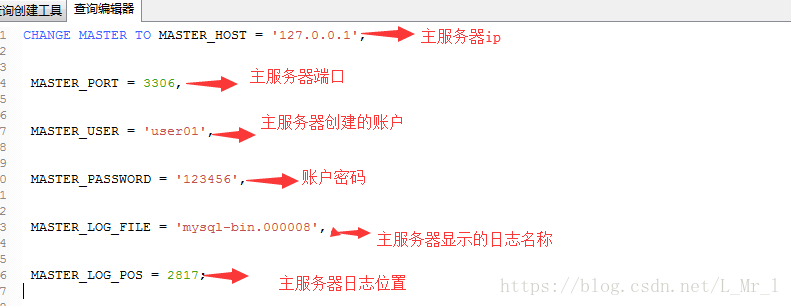
4.2,SHOW MASTER STATUS; 执行该命令 这一步很关键,这也是为啥锁库的原因,执行这句命令一会有两个参数后面用,一个是File,一个是Position。一个是日志的名称,一个是日志的位置。下面在配置从服务器的时候会用到

5,在从服务器的操作:
5.1执行sql语句:
stop SLAVE;

CHANGE MASTER TO MASTER_HOST = '127.0.0.1',

MASTER_PORT = 3306,

MASTER_USER = 'user01',

MASTER_PASSWORD = '123456',

MASTER_LOG_FILE = 'mysql-bin.000008',

MASTER_LOG_POS = 2817;

start SLAVE;

show slave status;

当,Slave_IO_Running 和 Slave_SQL_Running 显示Yes,说明,从服务器配置完毕了
5.2 从服务器上执行主服务器上面备份的表结构和表执行语句。
修改主服务器上面的数据,从服务器上的数据也变更了。ok
三、一个主服务的多个数据库同步到从服务器的一个数据库
主服务只需要多配置一个 binlog-do-db=cms_main
从服务器只需要多配置一个 replicate-rewrite-db
同一台windows下配置安装多个mysql实例,实现主从同步的更多相关文章
- windows下手动安装 Apache+php+mysql
PHP 为什么先说php,因为apache的配置要写入php的一些路径 http://php.net/downloads.php 选择windows donwload 选择Thread Safe的版 ...
- 在一台Linux服务器上安装多个MySQL实例(一)--使用mysqld_multi方式
(一)MySQL多实例概述 实例是进程与内存的一个概述,所谓MySQL多实例,就是在服务器上启动多个相同的MySQL进程,运行在不同的端口(如3306,3307,3308),通过不同的端口对外提供服务 ...
- 一台Windows下配置多个Tomcat服务器
上一篇博客<Windows下配置Tomcat服务器>讲了,如何在一台Windows机器上配置一个Tomcat服务器.这篇介绍一下如何在一台Windows机器上配置多个Tomcat. 第一步 ...
- windows下配置启动多个mysql服务
查找配置做下记录 先安装mysql5.6,安装不在介绍 接下来配置启动另一个mysql服务, 1:先到服务里停止在运行的mysql服务 2:到mysql的安装目录下(默认安装目录在c:\Program ...
- windows下如何安装和启动MySQL
1.下载,解压到自己喜欢的目录 2.配置环境变量.MYSQL_HOME,值为mysql的根目录:在path中添加%MYSQL_HOME%/bin目录. 3.向windows注册mysql服务.必须用管 ...
- .NetCore 分布式日志收集Exceptionless 在Windows下本地安装部署及应用实例
自己安装时候遇到很多问题,接下来把这些问题写出来希望对大家有所帮助 搭建环境: 1.下载安装 java 8 SDK (不要安装最新的10.0) 并配置好环境变量(环境变量的配置就不做介绍了) 2.下载 ...
- MySQL8.0在Windows下的安装和使用
前言 MySQL在Windows下有2种安装方式:1.图形化界面方式安装MySQL 2.noinstall方式安装MySQL.在这里,本文只介绍第二种方式:以noinstall方式安装MySQL,以及 ...
- Windows下pry安装和配置
Windows下pry安装和配置 pry是一个增强型的交互式命令行工具,比irb强大. 有自动完成功能,自动缩进,有颜色.有更强大的调试功能. pry 安装很简单. 在终端输入: gem instal ...
- Python在windows下的安装与配置
安装python 文件准备: A. python安装文件:我用的是python-3.4.3.amd64.msi: 安装很简单,直接双击点下一步即可: 配置环境变量,在windows系统变量中找到pat ...
随机推荐
- ANOVA-方差分析和单尾方差分析
https://www.cnblogs.com/webRobot/p/6877283.html https://blog.csdn.net/zijinmu69/article/details/8056 ...
- python 三种 安装包的方法
1.pycharm安装第三方库 然后点+搜索库安装. 注意 : 有时候点+会出现下图提示:Nothing to show,这就需要在点加号前点一下绿色圈圈的conda标志. 点+号出现下图的内容才是正 ...
- APP测试常用工具以及框架
APP测试常用工具以及框架 1)纯白盒方式的测试,Monkey.一般是开发用的比较多,动手能力强的同学可以自己去尝试下! 2)偏白盒的robotium,这家伙号称是黑盒,但是本人不太认同- 因为使用r ...
- c#上课总结
private 是完全私有的,只有当前类中的成员能访问到. protected 是受保护的,只有当前类的成员与继承该类的类才能访问. Ctrl+k+c 多行注释Ctrl+k+u 解除注释 e ...
- 20164318 毛瀚逸-----EXP5 MSF基础应用
1. 实践内容 本实践目标是掌握metasploit的基本应用方式,重点常用的三种攻击方式的思路.具体需要完成: 1.1一个主动攻击实践,如ms08_067; (成功) 1.2 一个针对浏览器的攻击, ...
- Linux可以生产uImage
默认kernel只生产Image和zImage,若想让kernel生产uImage,需要用到mkimage,这个是uboot可以提供的,位于uboot/tool/目录下,将其加入到环境变量即可.
- 【SQL】 借助游标来实现文本的分列与合并
有时我们会遇到需要把表中个别字段拆分成多条数据或是把多条数据合并到一起的情况.一般的编程语言都有函数“split”和“join”来实现,而SQL中既没有这些函数也没有类似数组和列表这类方便保存成组数据 ...
- redis key命令
key命令主要用于管理redis中的key del key //删除key, 不存在的key会忽略 dump key //序列化key,不存在的key返回nil exists key //判断key是 ...
- steam商店正式支持RMB直接结算
前两天看到新闻, 想不到这么快: http://tech.sina.com.cn/s/2015-10-26/doc-ifxizwsm2369244.shtml 今天登陆steam发现标价已经成了RMB ...
- httpd日志格式
日志的缺省格式有如下几种: LogFormat "%h %l %u %t "%r" %>s %b "%{Referer}i" "%{U ...