
idea2018.2.4的安装激活与热部署插件JRebel的激活方法
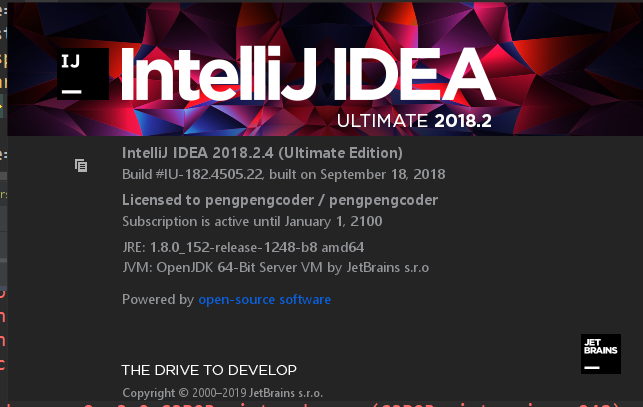
去Idea的官网下载如上版本的Idea安装文件

并且在网上搜索下载如下破解工具

放置在相应的Idea安装目录下
然后在Idea中输入激活码
{
"licenseId": "ThisCrackLicenseId",
"licenseeName": "pengpengcoder",
"assigneeName": "pengpengcoder",
"assigneeEmail": "1620851849@qq.com",
"licenseRestriction": "XXXXXXXXXXXXXXXXXXX",
"checkConcurrentUse": false,
"products": [
{
"code": "II",
"paidUpTo": "2099-12-31"
},
{
"code": "DM",
"paidUpTo": "2099-12-31"
},
{
"code": "AC",
"paidUpTo": "2099-12-31"
},
{
"code": "RS0",
"paidUpTo": "2099-12-31"
},
{
"code": "WS",
"paidUpTo": "2099-12-31"
},
{
"code": "DPN",
"paidUpTo": "2099-12-31"
},
{
"code": "RC",
"paidUpTo": "2099-12-31"
},
{
"code": "PS",
"paidUpTo": "2099-12-31"
},
{
"code": "DC",
"paidUpTo": "2099-12-31"
},
{
"code": "RM",
"paidUpTo": "2099-12-31"
},
{
"code": "CL",
"paidUpTo": "2099-12-31"
},
{
"code": "PC",
"paidUpTo": "2099-12-31"
},
{
"code": "DB",
"paidUpTo": "2099-12-31"
},
{
"code": "GO",
"paidUpTo": "2099-12-31"
},
{
"code": "RD",
"paidUpTo": "2099-12-31"
}
],
"hash": "2911276/0",
"gracePeriodDays": 7,
"autoProlongated": false
}
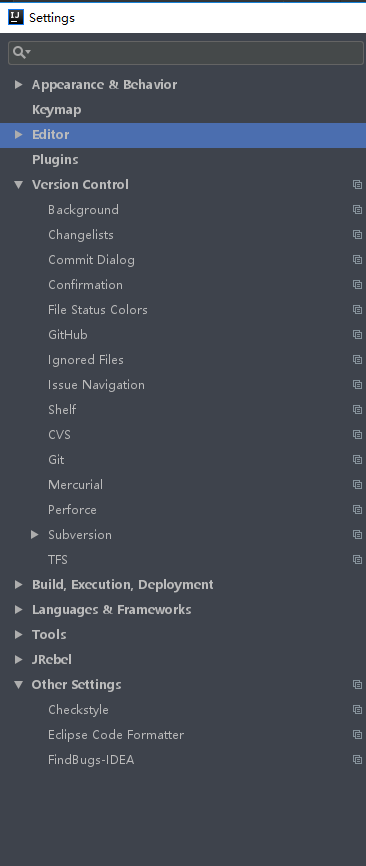
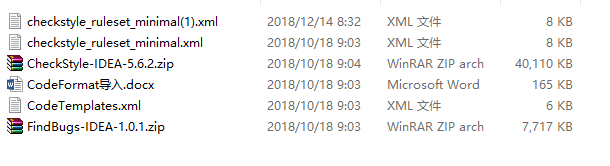
按需安装导入如下文件

http://139.199.89.239:1008/88414687-3b91-4286-89ba-2dc813b107ce
zp_uestc@163.com
点击JRebel下的debug,然后JRebel插件激活
在jrebel server处,输入http://139.199.89.239:1008/88414687-3b91-4286-89ba-2dc813b107ce和邮箱,即可运行zp_uestc@163.com
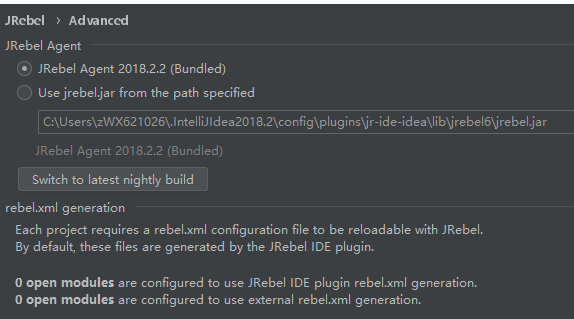
网上查找jrebel.jar
Idea常用快捷键
*************Editing(编辑操作)********************
Ctrl + Space (代码补全) Basic code completion (the name of any class,method or variable)
Ctrl + Shift + Space (代码智能补全) Smart code completion (filters the list of methods and variables by expected type)
Ctrl + Shift + Enter (补全申明) Complete statement
Ctrl + P (显示参数信息) Parameter info (within method call arguments)
Ctrl + Q (文档快速浏览) Quick documentation lookup
Shift + F1 (代码补全) External Doc
Ctrl + mouse (浏览代码简短信息) over code Brief Info
Ctrl + F1 (显示错误或者警告描述) Show descriptions of error or warning at caret
Alt + Insert (生成代码属性方法,构造方法) Generate code... (Getters, Setters,Constructors, hashCode/equals, toString)
Ctrl + O (方法重载) Override methods
Ctrl + I (方法补全) Implement methods
Ctrl + Alt + T (包裹if...else,try...catch) Surround with… (if..else, try..catch, for,synchronized, etc.)
Ctrl + / (增加行注释) Comment/uncomment with line comment
Ctrl + Shift + / (增加块注释) Comment/uncomment with block comment
Ctrl + W (选择连续扩选代码块) Select successively increasing code blocks
Ctrl + Shift + W (选择连续缩选代码块) Decrease current selection to previous state
Alt + Q (内容信息) Context info
Alt + Enter () Show intention actions and quick-fixes
Ctrl + Alt + L (重新格式化代码) Reformat code
Ctrl + Alt + O (优化导入包) Optimize imports
Ctrl + Alt + I (行自动缩进) Auto-indent line(s)
Tab / Shift + Tab (缩进缩选行) Indent/unindent selected lines
Ctrl + X , (剪切) Shift + Delete Cut current line or selected block to clipboard
Ctrl + C , (复制) Ctrl + Insert Copy current line or selected block to clipboard
Ctrl + V , (粘贴) Shift + Insert Paste from clipboard
Ctrl + Shift + V (从最近缓存中选择粘贴) Paste from recent buffers...
Ctrl + D (复制当前行并粘贴到下一行) Duplicate current line or selected block
Ctrl + Y (删除当前光标所在行) Delete line at caret
Ctrl + Shift + J (智能行合并) Smart line join
Ctrl + Enter (智能行拆分) Smart line split
Shift + Enter (开始新的一行) Start new line
Ctrl + Shift + U (选中一个单词或者一个代码块) Toggle case for word at caret or selected block
Ctrl + Shift + ]/[ (向前或者向后选中整个代码块) Select till code block end/start
Ctrl + Delete/Backspace (删除至整个单词) Delete to word end/start
Ctrl + NumPad+/- (折叠或者展开整个代码块) Expand/collapse code block
Ctrl + Shift + NumPad+ (展开所有代码块) Expand all
Ctrl + Shift + NumPad- (折叠所有代码块) Collapse all
Ctrl + F4 Close active editor tab (关闭活动的tab编辑页)
****************Usage Search********************************
Alt + F7/Ctrl + F7 (查找) Find usages/Find usages in file
Ctrl + Shift + F7 (高亮使用的地方) Highlight usages in file
Ctrl + Alt + F7 (展示使用地方) Show usages
*************************Navigation(导航)*************************************
Ctrl + N (查找类文件) Go to class
Ctrl + Shift + N (查找文件) Go to file
Ctrl + Alt + Shift + N (查找符号) Go to symbol
Alt + Right/Left (跳转至前一个或者后一个tab编辑页) Go to next / previous editor tab
F12 (跳转至前一个工具窗口) Go back to previous tool window
Esc Go to editor (from tool window)
Shift + Esc (隐藏最后一个或者活动窗口) Hide active or last active window
Ctrl + Shift + F4 Close active run / messages / find / ... tab
Ctrl + G (跳转至某一行) Go to line
Ctrl + E (最近操作文件) Recent files popup
Ctrl + Alt + Left/Right (向前或者向后导航) Navigate back / forward
Ctrl + Shift + Backspace (导航至最后编辑的地方) Navigate to last edit location
Alt + F1 (忽略) Select current file or symbol in any view
Ctrl + B , Ctrl + Click (跳转至申明) Go to declaration
Ctrl + Alt + B (跳转至代码实现) Go to implementation(s)
Ctrl + Shift + I (打开定义) Open quick definition lookup
Ctrl + Shift + B (跳转至类型申明) Go to type declaration
Ctrl + U (跳转至父类方法或者父类类) Go to super-method / super-class
Alt + Up/Down (跳转至下一个或者上一个方法) Go to previous / next method
Ctrl + ]/[ (忽略) Move to code block end/start
Ctrl + F12 (忽略) File structure popup
Ctrl + H (类型层次) Type hierarchy
Ctrl + Shift + H (方法调用层次关系) Method hierarchy
Ctrl + Alt + H (调用层级关系) Call hierarchy
F2 / Shift + F2 (忽略) Next/previous highlighted error
F4 / Ctrl + Enter (忽略) Edit source / View source
Alt + Home (忽略) Show navigation bar
F11 (忽略) Toggle bookmark
Ctrl + F11 (忽略) Toggle bookmark with mnemonic
Ctrl + #[0-9] (忽略) Go to numbered bookmark
Shift + F11 (忽略) Show bookmarks
******************Search/Replace*********************
Double Shift (搜索所有地方) Search everywhere
Ctrl + F (搜索) Find
F3 / Shift + F3 (忽略) Find next / Find previous
Ctrl + R (忽略) Replace
Ctrl + Shift + F (忽略) Find in path
Ctrl + Shift + R (忽略) Replace in path
Ctrl + Shift + S (忽略) Search structurally (Ultimate Edition only)
Ctrl + Shift + M (忽略) Replace structurally (Ultimate Edition only)
************Live Templates*******************
Ctrl + Alt + J Surround with Live Template
Ctrl + J Insert Live Template
iter Iteration according to Java SDK 1.5 style
inst Check object type with instanceof and
downcast it
itco Iterate elements of java.util.Collection
itit Iterate elements of java.util.Iterator
itli Iterate elements of java.util.List
psf public static final
thr throw new
**************************Refactoring**************************
F5 Copy
F6 Move
Alt + Delete Safe Delete
Shift + F6 Rename
Ctrl + F6 Change Signature
Ctrl + Alt + N Inline
Ctrl + Alt + M Extract Method
Ctrl + Alt + V Extract Variable
Ctrl + Alt + F Extract Field
Ctrl + Alt + C Extract Constant
Ctrl + Alt + P Extract Parameter
***********************Debugging*********************
F8/F7 Step over/Step into
Shift + F7 / Shift + F8 Smart step into/Step out
Alt + F9 Run to cursor
Alt + F8 Evaluate expression
F9 Resume program
Ctrl + F8 Toggle breakpoint
Ctrl + Shift + F8 View breakpoints
**************************Compile and Run************************************
Ctrl + F9 Make project (compile modifed and dependent)
Ctrl + Shift + F9 Compile selected file, package or module
Alt + Shift + F10/F9 Select configuration and run/and debug
Shift + F10/F9 Run/Debug
Ctrl + Shift + F10 Run context configuration from editor
********************VCS/Local History*****************
Ctrl + K / Ctrl + T Commit project to VCS/Update from VCS
Alt + Shift + C View recent changes
Alt + BackQuote (`) ‘VCS’ quick popup
******************General******************************
Alt + #[0-9] Open corresponding tool window
Ctrl + S Save all
Ctrl + Alt + Y Synchronize
Ctrl + Shift + F12 Toggle maximizing editor
Alt + Shift + F Add to Favorites
Alt + Shift + I Inspect current file with current profile
Ctrl + BackQuote (`) Quick switch current scheme
Ctrl + Alt + S Open Settings dialog
Ctrl + Alt + Shift + S Open Project Structure dialog
Ctrl + Shift + A Find Action
Ctrl + Tab Switch between tabs and tool window
**********常用快捷输入语句**************
sout System.out.println()
fori for循环代码块
psvm 快速输入main()函数
idea2018.2.4的安装激活与热部署插件JRebel的激活方法的更多相关文章
- IntelliJ IDEA热部署插件JRebel免费激活图文教程(持续更新)转载
之前教了大家如何免费激活IDEA,大家学会了吗?今天再来教大家如何免费激活JRebel插件,实现真正的热部署,无论是改了代码片段还是配置文件,都可以做到不用重新启动就生效,这种酸爽,谁用谁知道! 这次 ...
- Idea 热部署插件JRebel 安装与环境配置-上海尚学堂Java培训
在企业日常项目开发中,如果我们需要调试一个Java Web项目,就需要先将项目编译之后,放入Web容器或借助Maven web 插件来运行,如果对Java源代码进行修改,那么必须重新编译并重启Web容 ...
- Intellij热部署插件JRebel
Intellij热部署插件JRebel 安装JRebel 激活JRebel 相关设置 Intellij热部署插件JRebel 项目需求,一直用eclipse的我,也要改用IDEA了,一开始,很不习惯. ...
- Intellij热部署插件JRebel使用方法(转载)
Intellij热部署插件JRebel帮助开发者在项目处于运行状态下任意修改Java文件并动态反馈到运行的项目中.插件官方下载地址:https://plugins.jetbrains.com/plug ...
- Intellij 热部署插件 JRebel [转载]
原文:https://blog.csdn.net/weixin_42831477/article/details/82229436 Intellij热部署插件JRebel IDEA本身没有集成热部署工 ...
- Mac 安装并破解热部署插件JRebel详细教程
热部署插件 JRebel 非常高效的解决了在IDEA中对 Java 代码修改重启Tomcat的效率问题,这样大大降低了项目开发的时间,不用重启即可重新编译修改过的Java代码! (1)IDEA中安装热 ...
- IntelliJ IDEA - 热部署插件JRebel ,对静态资源文件进行热部署?javascript、css、vm文件
IntelliJ IDEA - 热部署插件JRebel ,对静态资源文件进行热部署?javascript.css.vm文件https://blog.csdn.net/feng_pump/article ...
- IntelliJ IDEA - 热部署插件JRebel 安装使用教程
IntelliJ IDEA - JRebel 安装使用教程 JRebel 能做什么? JRebel 是一款热部署插件.当你的 Java-web 项目在 tomcat 中 run/debug 的时候 , ...
- IDEA安装热部署插件JRebel
首先说下热部署是什么意思吧,简单了说就是在我们对代码进行更改之后,不需要重启项目,重新编译一下就可以直接运行最新的代码的部署方式.既然是部署方式,项目启动部署的时候当然就会和正常情况下不一样啦~ JR ...
随机推荐
- ES6解构赋值的应用场景
一.变量交换 1.ES6的方式 { let a=; let b=; [a,b]=[b,a]; console.log(a,b); } 输出为 2.ES5的方式 采用中间变量的方式进行存储 二.获取函数 ...
- RDMA的基础概念
一张图可以简单明确的说明,目前RDMA的几种技术的差别: RDMA是remote Direct memory access的简称,有几个最基本的特点: CPU offload kernel bypas ...
- How to use GM MDI interface for programming
GM has had its newest programming/J2534 Pass Thru device on the market for some years now. A lot has ...
- [都是原创]Php simplexml 添加节点
Php simplexml 添加节点 原始代码如下 //================<? //创建xml对象$xml = new SimpleXMLElement('<Messages ...
- Spring 属性注入(二)BeanWrapper 结构
Spring 属性注入(二)BeanWrapper 结构 Spring 系列目录(https://www.cnblogs.com/binarylei/p/10117436.html) BeanWrap ...
- so文件相关
2018-08-31 今天尝试了一下编译so文件. 最开始是按照这个博主来操作的https://blog.csdn.net/tianshuai4317618/article/details/79073 ...
- 字符串匹配 - sunday算法
常见的字符串匹配算法有BF.KMP(教科书中非常经典的).BM.Sunday算法 这里主要想介绍下性能比较好并且实现比较简单的Sunday算法 . 基本原理: 从前往后匹配,如果遇到不匹配情况判断母串 ...
- H.264, MPEG4之间的关系
百度百科搜索 H.264 H.264是国际标准化组织(ISO)和国际电信联盟(ITU)共同提出的继MPEG4之后的新一代数字视频压缩格式.H.264是ITU-T以H.26x系列为名称命名的视频编解码技 ...
- Django学习经验
1.在1.9——>到2.0的版本中, Django.core.urlresolvers import reverse ——>django.urls 2.当无法访问时把原来的数据清空: 首先 ...
- EXCEL中R1C1样式引用
主要引用http://club.excelhome.net/thread-759847-1-1.html Sub chengji() ' ' 宏1 宏 ' Dim Finalrow As Intege ...