
fullCalendar插件基本使用
效果图
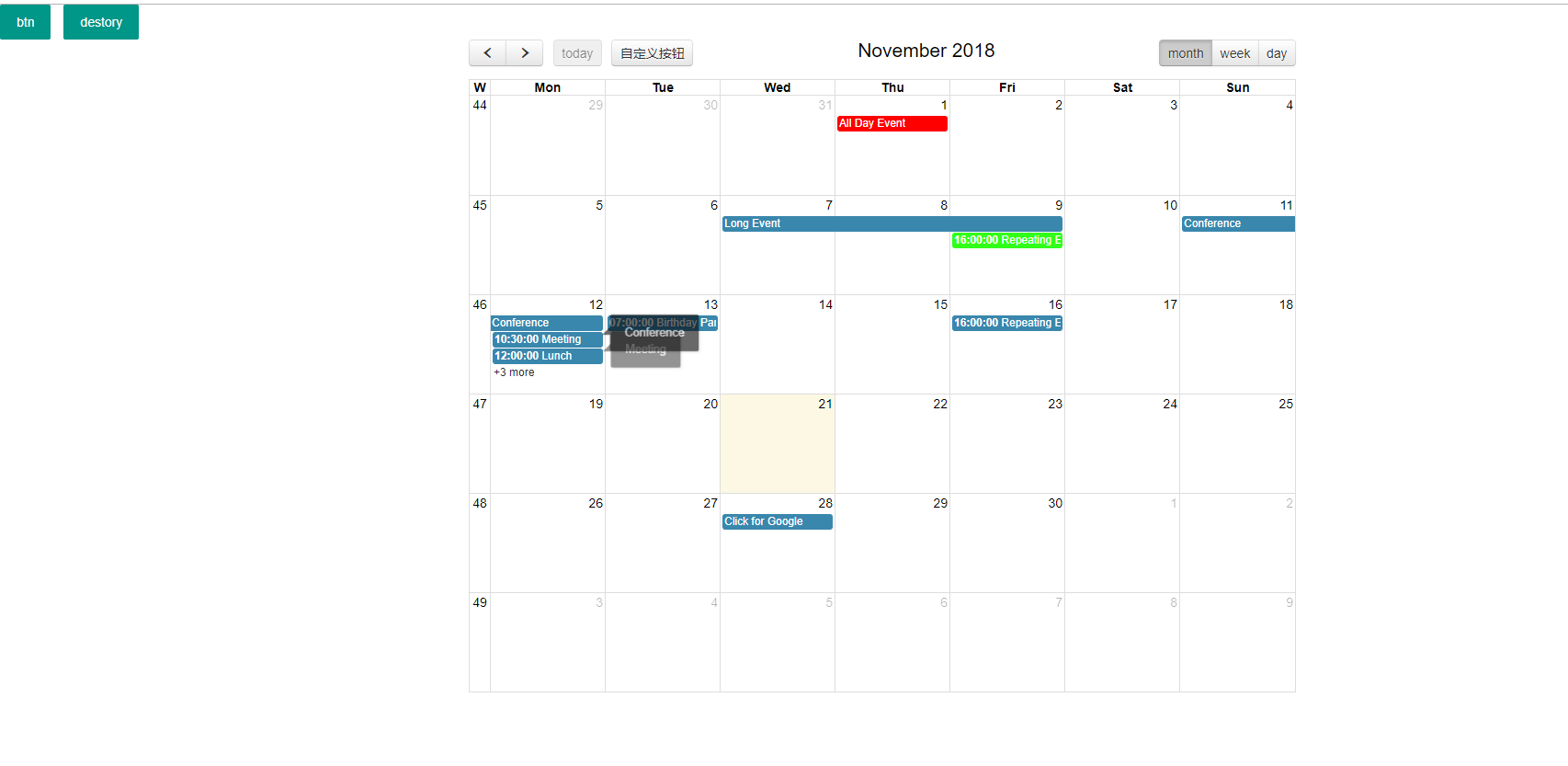
html代码,需要引入jquery,layui,fullCalendar
<!DOCTYPE html>

<html lang="en">

<head>

    <meta charset="UTF-8">

    <title>fullCalendar</title>

    <link rel="stylesheet" href="fullcalendar-3.9.0/fullcalendar.print.css"  media='print' />

    <link rel="stylesheet" href="fullcalendar-3.9.0/fullcalendar.css" />

    <!--<script src="https://cdn.bootcss.com/jquery/3.3.1/jquery.min.js"></script>-->

    <!--<script src="https://cdnjs.cloudflare.com/ajax/libs/fullcalendar/3.6.1/fullcalendar.min.js"></script>

    <script src="https://cdnjs.cloudflare.com/ajax/libs/fullcalendar/3.6.1/fullcalendar.min.css"></script>

    <script src="https://cdnjs.cloudflare.com/ajax/libs/fullcalendar/3.6.1/fullcalendar.print.css"></script>-->

    <style>

        body {

            margin: 40px 10px;

            padding: 0;

            font-family: "Lucida Grande",Helvetica,Arial,Verdana,sans-serif;

            font-size: 14px;

        }

        #calendar {

            max-width: 900px;

            margin: 0 auto;

        }

    </style>

    <script src="layui/layui.all.js"></script>

    <link rel="stylesheet" href="layui/css/layui.css">

</head>

<body>

<button class="layui-btn" onclick="render()">btn</button>

<button class="layui-btn" onclick="destory()">destory</button>

<div id='calendar'></div>

</body>

<script src="fullcalendar-3.9.0/lib/jquery.min.js"></script>

<script src="fullcalendar-3.9.0/lib/moment.min.js"></script>

<script src="fullcalendar-3.9.0/lib/jquery-ui.min.js"></script>

<script src="fullcalendar-3.9.0/fullcalendar.js"></script>

<script>

    $(document).ready(function() {

        $('#calendar').fullCalendar({

            customButtons: {

                myCustomButton: {

                    text: '自定义按钮',

                    click: function() {

                        alert('点击了自定义按钮!');

                    }

                }

            },

            //头工具栏,三个位置,左中右,https://www.helloweba.net/javascript/447.html#fc-header  有固定参数。

            header: {

                left: 'prev,next today myCustomButton',

                center: 'title',

                right: 'month,agendaWeek,agendaDay'

            },

            defaultDate: '2018-11', //默认时间,

            defaultView:'month', //默认视图

            editable: true,//可以被编辑

            weekNumbers:true,//显示周数

            selectable: true,//是否允许用户单击或者拖拽日历中的天和时间隙。默认false。

            firstDay: 1,//设置每周第一天,数字int型,默认0(周日)

            timezone: 'local',//时区

            timeFormat: 'HH:mm:ss',//时间格式

            eventLimit: true, // allow "more" link when too many events

            loading: function( isLoading, view ){

                //暂时这里没有看到效果

                console.log("loading回调",view)

            },

            events: [  //日历显示的事件,数组形式显示的

                {

                    title: 'All Day Event',

                    start: '2018-11-01',

                    color:'red'//不同事件不同颜色

                },

                {

                    title: 'Long Event',

                    start: '2018-11-07',

                    end: '2018-11-10',

                    colorl:'blue'

                },

                {

                    id: 999,

                    title: 'Repeating Event',

                    start: '2018-11-09T16:00:00',

                    color:'#30ff18'

                },

                {

                    id: 999,

                    title: 'Repeating Event',

                    start: '2018-11-16T16:00:00'

                },

                {

                    title: 'Conference',

                    start: '2018-11-11',

                    end: '2018-11-13'

                },

                {

                    title: 'Meeting',

                    start: '2018-11-12T10:30:00',

                    end: '2018-11-12T12:30:00'

                },

                {

                    title: 'Lunch',

                    start: '2018-11-12T12:00:00'

                },

                {

                    title: 'Meeting',

                    start: '2018-11-12T14:30:00'

                },

                {

                    title: 'Happy Hour',

                    start: '2018-11-12T17:30:00'

                },

                {

                    title: 'Dinner',

                    start: '2018-11-12T20:00:00'

                },

                {

                    title: 'Birthday Party',

                    start: '2018-11-13T07:00:00'

                },

                {

                    title: 'Click for Google',

                    url: 'http://google.com/',

                    start: '2018-11-28'

                }

            ],

            eventMouseover: function( event, jsEvent, view ) { //鼠标划过的事件

                layer.tips(event.title, this);

            },

            eventMouseout:function( event, jsEvent, view ) { //鼠标离开的事件

                var index = layer.tips();

                layer.close(index);

            },

            selectAllow : function(clickInfo) {//禁止点击的控制,是否允许点击false不让点击,  将用户选择限制到某些时间窗口。仅当selectable选项是激活状态时可用。值为事件id或对象。

                var start = clickInfo.start.unix();//获取点击的开始时间

                console.log("点击是否允点击");

                //如果大于当前时间就让点击,否则就不让点击,提示

                if(clickInfo.start >= new Date()){

                    return true;

                }

                //不让点击了 提示

                layer.msg("选择时间小于当前时间,不可以点击过去的时间");

                return false;

            },

            select:function(start, end, jsEvent) {  //点击日历上的某个时间触发的函数

                //layer.msg("点击时间控件" + JSON.stringify(jsEvent));

                /*

                执行顺序,先执行selectAllow:判断是否可以点击

                然后执行select:点击了时间空间出发的事件,这两个控件其实感觉在上边的那个里边写逻辑就可以

                如果可以执行的事件,就在上边那个里边直接写,不可以执行的,就直接提示反馈fase,这样就不可以点击了。

                 */

                layer.msg("点击时间控件");

            },

            eventClick: function(eventObj) {//点击日期控件上显示的事件触发的事件

                layer.msg("我点击的是:11" +  eventObj.title );

                console.log("我点击的是",eventObj)

            },

        });

    });

    /**

     * 重新渲染事件到日程控件上

     * https://www.helloweba.net/javascript/454.html#fc-EventSourceObject

     */

    function render(){

        var json = '{"state":"ok","msg":"操作成功!","calendar":[{"id":1121,"title":"3344-  辅导辅导13 [ 津津]","start":"2018-11-22 15:30:00","remarks":"课程:3344-  辅导辅导13<br>校区:中心校区<br>教室:花样教室<br>教师:米桂<br>时间:15:30:00-16:00:00<br>课时:1<br>上课学员姓名:津津","end":"2018-11-22 16:00:00"}]}';

        var s =  $.parseJSON( json );

        $('#calendar').fullCalendar('renderEvents', s.calendar, true);//批量渲染事件到日程控件上

    }

    /**

     * 移除日程插件上的事件

     */

    function destory(){

        $("#calendar").fullCalendar('removeEvents');

    }

</script>

</html>
fullCalendar插件基本使用的更多相关文章
- ASP.NET MVC5+EF6+EasyUI 后台管理系统(86)-日程管理-fullcalendar插件用法
前言 本文分享fullcalendar用法,最后面提供代码下载 说到日程管理,基于JQuery的插件FullCalendar当之无愧,完整的API稳定和调用方式,非常易于扩展!可以用于系统的个人历程管 ...
- fullcalendar插件日程管理
日程管理-fullcalendar插件用法 前言 本文分享fullcalendar用法,最后面提供代码下载 说到日程管理,基于JQuery的插件FullCalendar当之无愧,完整的API稳定和 ...
- FullCalendar插件的基本使用
我的另一博客地址:https://segmentfault.com/u/lyrfighting/articles 前段时间,一直在开发考勤系统,当时为满足设计的需求,选了好几个插件,最后决定采用Ful ...
- js jquery 实现 排班,轮班,日历,日程。使用fullcalendar 插件
如果想用fullcalendar实现排班功能,或者日历.日程功能.那么只需要简单的几步: 这里先挂官网链接: fullcalendar fullcalendar官网下载链接 一.下载及简单配置 1.这 ...
- Easyui+MVC+FullCalendar插件实现日程记录功能
好久好久好久,,,没有写博客了,,久到账号都忘记了....分享一个干货.... 废话少说,先看看效果图. 要实现这样一个功能,先创建一个用于存储日程的记录表(不要问我为什么都是大写,因为初版在orac ...
- 日历插件FullCalendar应用:(二)数据增删改
接上一篇 日历插件FullCalendar应用:(一)数据展现. 这一篇主要讲使用fullcalendar插件如何做数据的增删改,用到了art.dialog web对话框组件,上一篇用到的webFor ...
- FullCalendar应用——整合农历节气和节日
FullCalendar用来做日程管理功能非常强大,但是唯一不足的地方是没有将中国农历历法加进去,今天我将结合实例和大家分享如何将中国农历中的节气和节日整合到FullCalendar中,从而增强其实用 ...
- FullCalendar Timeline View 使用
FullCalendar Timeline View(v4) The Scheduler add-on provides a new view called “timeline view” with ...
- Jquery 记一次使用fullcalendar的使用记录
最近接了一个需求,把excel做的表格开发到系统里,本来想直接做成表格的形式,后来考虑到数据库中的表结构不好设计,最后决定做成日历的形式: 先上成品图 需要引用的js,fullcalendar官网可以 ...
随机推荐
- Flex学习笔记PopUpMenuButton
<?xml version="1.0" encoding="utf-8"?> <s:Application xmlns:fx="ht ...
- 转载:用Source Insight中看Python代码
在Source Insight中看Python代码 http://blog.csdn.net/lvming404/archive/2009/03/18/4000394.aspx SI是个很强大的代码查 ...
- module模块和包
import 和 from 调用 module 目录有calc.py 和 test.py 两个文件 calc.py文件内容: def add(x,z): return x+z def sub(x,z ...
- vue父子组件嵌套的时候遇到 - Component template should contain exactly one root element. If you are using v-i
转自:https://blog.csdn.net/yangyiboshigou/article/details/72084619
- 轻量级Java持久化框架,Hibernate完美助手,Minidao 1.6.2版本发布
Minidao 1.6.2 版本发布,轻量级Java持久化框架(Hibernate完美助手) Minidao产生初衷? 采用Hibernate的J2EE项目都有一个痛病,针对复杂业务SQL,hiber ...
- 【JEECG技术文档】数据权限自定义SQL表达式用法说明
功能介绍 数据规则通过配置自定义sql来实现数据权限的控制,自定义SQL支持表达式取值 其中自定义sql 条件中字段的名称和数据库表的字段名保持一致. 角色授权 用户角色授权,权限测试不要用adm ...
- 使用linux的shell脚本实现在当前行重复动态显示时间等字符串信息(不另起新行)
###本脚本在Suse11sp2当中验证正确 #!/bin/sh )) do echo -ne "\r$(date)" sleep 0.3 done ###关键在 echo 的 & ...
- 关于 SAXParseException Content is not allowed in Prolog (前言中不允许有内容)
解析 XML 文件的时候,如 Mybatis 的 Mapper 文件,有时会出现 org.xml.sax.SAXParseException 前言中不允许有内容 的异常,英文就是 Content is ...
- ReactiveX 学习笔记(7)聚合操作符
Mathematical and Aggregate Operators 本文的主题为处理 Observable 的聚合操作符. 这里的 Observable 实质上是可观察的数据流. RxJava操 ...
- Oracle分区表常见操作
Oracle分区表常用于业务中大表使用,如历史交易记录表等,提高表记录查询效率.本文主要描述范围分区表的创建.新增以及索引创建. Oracle操作分区表相关信息 显示数据库所有分区表的信息:DBA_P ...