
vue的通讯与传递props emit (简单的弹框组件)
props父把信息传递给子组件
 1父组件
  <template>

   <div class="hello">

      <div id="app-3" v-on:click="show">

         点击显示隐藏

        <p v-if="seen">现在可以看到我了</p>

      </div>

      <div class="app-4">

       <ol>

         <tab v-for="item in groceryList" v-bind:todo="item">
        <!--:todo-->

         </tab>

       </ol>

      </div>

      <div class="app-5">

        <p>{{message}}</p>

        <input v-model="message">

        <button v-on:click="reverse">逆转信息</button>

      </div>

   </div>

 </template>

 <script>

 import Tab from '@/components/tab/tab'

 export default {

   name: 'hello',

   components:{Tab},

   data () {

     return {

       message:'Hello Vue!',

       seen:true,

       todos:[

         {text:'学习javascript'},

         {text:'学习Vue'}

       ],

       groceryList: [

         { id: 0, text: '蔬菜' },

         { id: 1, text: '奶酪' },

         { id: 2, text: '随便其他什么人吃的东西' }

       ]

     }

   },

   methods:{

     show(){

       this.seen=!this.seen;

     },

     reverse(){

       this.message=this.message.split('').reverse().join('');

     }

   }

 }

 </script>

 <style scoped>

 h1, h2 {

   font-weight: normal;

 }

 ul {

   list-style-type: none;

   padding: 0;

 }

 li {

   display: inline-block;

   margin: 0 10px;

 }

 a {

   color: #42b983;

 }

 </style>
  /****
  ******
  *******
  **********
  *********/
 子组件
 <template>

     <li>{{todo.id}}{{todo.text}}</li>

 </template>

 <script>

 export default{

     props:['todo'],/*通过这个把数据传过来*/

     data(){

         return{

         }

     },

     methods:{

     }

 }

 </script>
子组件传值给父元素
 只展示重要代码

 子组件

 this.$emit('changeLocale',locale);

 父组件

 <v-header @changeLocale="paLocale"></v-header>

 方法

 paLocale(evtValue){

    //evtValue表示子组件传递过来的locale值

 },
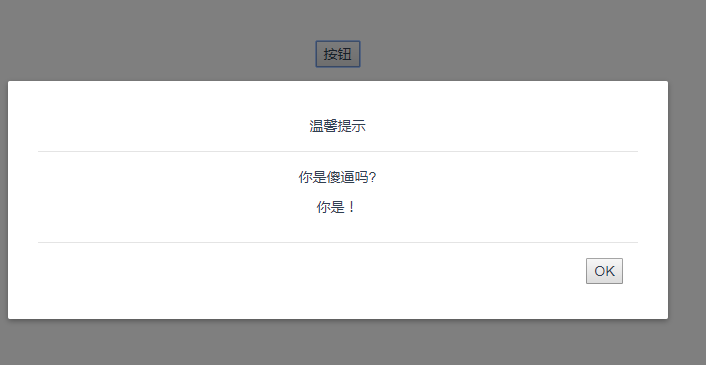
简单的 弹窗组件编写
//父组件

<template>

    <div class="parent">

        <button @click="showModal">按钮</button>

        <child v-if="showModel" header-title="温馨提示"  @close="showModel = false" @closeModel="closeModel">

            <div slot="body">

                <p>你是傻逼吗?</p>

                <p>你是!</p>

            </div>

        </child>

    </div>

</template>

<script>

import child from '@/components/sub/child'

export default{

    components:{child},

    data(){

        return{

            showModel:false

        }

    },

    methods:{

        showModal(){

            this.showModel=true

        },

        closeModel(){

            this.showModel=false

        }

    }

}

</script>

<style>

</style>

//子组件

<template>

    <transition name="model">

        <div class="model" >

            <div class="model-mask" @click="close"></div>

            <div class="modal-wrapper">

                <div class="modal-header">

          <slot name="header">

            {{headerTitle}}

          </slot>

        </div>

        <div class="modal-body">

          <slot name="body">

            default body

          </slot>

        </div>

        <div class="modal-footer">

          <slot name="footer">

            <button class="modal-default-button" @click="close">

              OK

            </button>

          </slot>

        </div>

            </div>

        </div>

    </transition>

</template>

<script>

export default{

    props:['headerTitle'],

    methods:{

        close(){

            this.$emit('closeModel');

        }

    }

}

</script>

<style scoped>

.model{

    position: fixed;

  z-index: 96;

  top: 0;

  left: 0;

  width: 100%;

  height: 100%;

}

.model-mask{

    position: fixed;

  z-index: 97;

  top: 0;

  left: 0;

  width: 100%;

  height: 100%;

  background-color: rgba(0, 0, 0, .5);

  transition: opacity .3s ease;

}

.modal-wrapper{

    position: relative;

    width:80%;

  height: auto;

  margin: 0 auto;

  margin-top: 100px;

  padding: 20px 30px;

  background-color: #fff;

  border-radius: 2px;

  box-shadow: 0 2px 8px rgba(0, 0, 0, .33);

  transition: all .3s ease;

  z-index:98;

}

.model-enter-active, .model-leave-active{

    transition: opacity .5s;

    opacity:1;

}

.model-enter, .model-leave-to {

    opacity: 0

}

</style>
vue的通讯与传递props emit (简单的弹框组件)的更多相关文章
- vue移动端弹框组件,vue-layer-mobile
最近做一个移动端项目,弹框写的比较麻烦,查找资料,找到了这个组件,但是说明文档比较少,自己研究了下,把我碰到的错,和详细用法分享给大家!有疑问可以打开组件看一看,这个组件是仿layer-mobile的 ...
- vue移动端弹框组件
最近做一个移动端项目,弹框写的比较麻烦,查找资料,找到了这个组件,但是说明文档比较少,自己研究了下,把我碰到的错,和详细用法分享给大家!有疑问可以打开组件看一看,这个组件是仿layer-mobile的 ...
- vue封装一个弹框组件
这是一个提示框和对话框,例: 这是一个组件 eject.vue <template> <div class='kz-cont' v-show='showstate'> &l ...
- Vue.js学习(八)—— 树形结构下拉框组件vue-treeselect
vue-treeselect是一个多选组件,具有对Vue.js的嵌套选项支持. 具有嵌套选项支持的单个和多个选择 模糊匹配 异步搜索 延迟加载(仅在需要时加载深层选项的数据) 键盘支持(使用Arrow ...
- 移动端(H5)弹框组件--简单--实用--不依赖jQuery
俗话说的好,框架是服务与大家的,包含的功能比较多,代码多.在现在追求速度的年代.应该根据自己的需求去封装自己所需要的组件. 下边就给大家介绍一下自己封装的一个小弹框组件,不依赖与jQuery,代码少, ...
- vue+elementui 新增和编辑如何实现共用一个弹框
//html代码: //按钮 <el-button type="primary" size="medium" @click="addEquipm ...
- 【jQuery学习】写一个简单的弹框页面,火狐浏览器有弹框,但IE8没有弹框的原因?
我也是刚学习jQuery,就从官网上下载了jQuery的包,版本是3.2.1 代码 如下: <!DOCTYPE html> <html> <head> <me ...
- Vue简单基础 + 实例 及 组件通信
vue的双向绑定原理:Object.defineProperty() vue实现数据双向绑定主要是:采用数据劫持结合发布者-订阅者模式的方式,通过 Object.defineProperty() 来劫 ...
- 基于Vue.js PC桌面端弹出框组件|vue自定义弹层组件|vue模态框
vue.js构建的轻量级PC网页端交互式弹层组件VLayer. 前段时间有分享过一个vue移动端弹窗组件,今天给大家分享一个最近开发的vue pc端弹出层组件. VLayer 一款集Alert.Dia ...
随机推荐
- 创建一个Maven Web应用程序
1 在Eclipes创建maven,首先File new ,在other 中找到Maven,Maven Project,下一步选择WebApp,创建Maven工程名字,完成 2 在新建的Maven工程 ...
- Hibernate 再接触 基础配置 续
<property name="show_sql">true</property> 这句话是意思显示sql语句 <property name=&quo ...
- 计算平面面积和斜面面积-ArcGIS案例学习笔记
计算平面面积和斜面面积-ArcGIS案例学习笔记 联系方式:谢老师,135_4855_4328,xiexiaokui#139.com 数据:实验数据\Chp8\Ex5\demTif.tif 平面面积= ...
- fwrite()中参数含义——size和count经常用搞反
函数原型:size_t fwrite(const void* buffer, size_t size, size_t count, FILE* stream); 注意:这个函数以二进制形式对文件进 ...
- MD5加密和彩虹表
首先叙述一下彩虹表的原理.本部分内容.图片和例子基本来自英文维基的Rainbow table词条(Rainbow table)——中文维基中目前(2013年10月9日)尚无对应的词条——因此对本答案中 ...
- HTTP状态码汇总
- SSM商城项目(一)
1. 学习计划 1.电商行业的背景. 2.宜立方商城介绍 3.宜立方商城的系统架构 a) 功能介绍 b) 架构讲解 4.工程搭建-后台工程 a) 使用maven搭建工程 b) 使用maven的tomc ...
- Bootstrap 导航元素(标签页)
[Bootstrap 导航元素] 1.基本的导航元素:标签导航.基于ul.li而来,给ul添加 class="nav nav-tabs" 即可.选中的li添加 class=&quo ...
- mongodb 副本集部署
1.安装三节点linux环境:196.168.1.111,196.168.1.112,192.168.1.113(三节点可彼此ping通) 2.三节点安装mongodb,参考https://blog. ...
- Linux 学习总结(二)
一.用户与用户组管理 1.添加用户 useradd 选项 用户名 -c 指定一段注释性描述 -d 目录,指定用户目录,若目录不存在,-m 选项可以创建目录 -g 指定用户所属用户组 -s 指定用户登陆 ...