
Excel怎么下拉框多选
打开Exlce,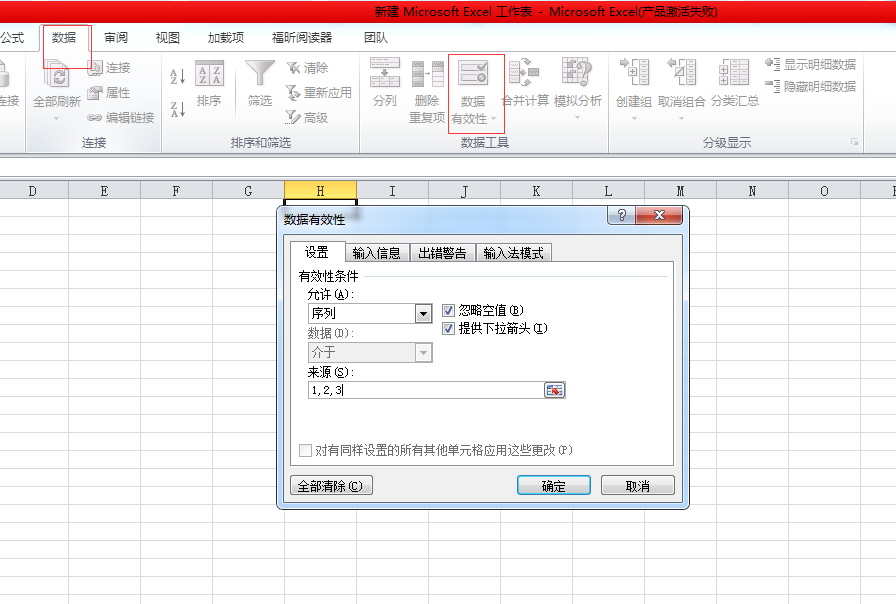
确定,然后
右击查看代码,把这段代码复制到新建的文件里面
此时Excel会给出提示,选择否,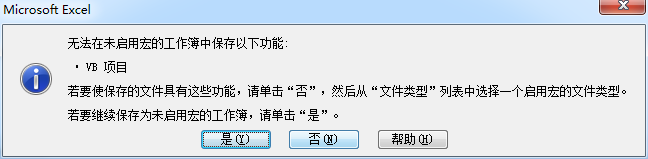 ,系统会提示保存,在保存的时候选择启用宏的工作簿然后保存,此时Excel下拉框多选就搞定了,最后,代码如下:
Option Explicit

Sub Worksheet_Change(ByVal Target As Range)

'让数据有效性选择 可以多选,重复选

Dim rngDV As Range

Dim oldVal As String

Dim newVal As String

If Target.Count > 1 Then GoTo exitHandler

On Error Resume Next

Set rngDV = Cells.SpecialCells(xlCellTypeAllValidation)

On Error GoTo exitHandler

If rngDV Is Nothing Then GoTo exitHandler

If Intersect(Target, rngDV) Is Nothing Then

'do nothing

Else

Application.EnableEvents = False

newVal = Target.Value

Application.Undo

oldVal = Target.Value

Target.Value = newVal

If oldVal = "" Then

Else

If newVal = "" Then

Else

Target.Value = oldVal _

& ", " & newVal

End If

End If

End If

exitHandler:

Application.EnableEvents = True

End Sub
优化后的代码
Option Explicit

Sub Worksheet_Change(ByVal Target As Range)

'让数据有效性选择 可以多选,重复选

Dim rngDV As Range

Dim oldVal As String

Dim newVal As String

If Target.Count > 1 Then GoTo exitHandler

On Error Resume Next

Set rngDV = Cells.SpecialCells(xlCellTypeAllValidation)

On Error GoTo exitHandler

If rngDV Is Nothing Then GoTo exitHandler

If Intersect(Target, rngDV) Is Nothing Then

'do nothing

Else

Application.EnableEvents = False

newVal = Target.Value

Application.Undo

oldVal = Target.Value

Target.Value = newVal

If oldVal = "" Then

Else

If newVal = "" Then

Else

If Target.Column <> 2 And Target.Column <> 3 And Target.Column <> 5 Then

Dim oldValArray

oldValArray = Split(oldVal, ",")

Dim exitVal As Boolean

exitVal = False

Dim i As Integer

Dim resultVal As String

For i = 0 To UBound(oldValArray)

  If oldValArray(i) = newVal Then

    exitVal = True

  Else

    If resultVal = "" Then

      resultVal = oldValArray(i)

    Else

      resultVal = resultVal & "," & oldValArray(i)

    End If

  End If

Next

If exitVal = False Then

   If oldVal = newVal Then

     Target.Value = resultVal

   Else

     Target.Value = resultVal & "," & newVal

   End If

Else

Target.Value = resultVal

End If

End If

End If

End If

End If

exitHandler:

Application.EnableEvents = True

End Sub
转载自:https://www.cnblogs.com/boosasliulin/p/5970120.html
Excel怎么下拉框多选的更多相关文章
- jquery实现下拉框多选
一.说明 本文是利用EasyUI实现下拉框多选功能,在ComboxTree其原有的基础上对样式进行了改进,样式表已上传demo,代码如下 二.代码 <!DOCTYPE html PUBLIC & ...
- combobox中动态加入几个checkbox,实现下拉框多选
combobox中动态加入几个checkbox,实现下拉框多选,将一个checkbox选中时其内容就会在combobox中显示出来,将另一个checkbox选中时其内容会跟在第一个checkbox的内 ...
- vue实现下拉框全选和输入匹配
实际项目中的一个需求: 点击文本框,弹出带有复选框的选项,然后获取选中项的数据,传给后面的一个功能.在文本框输入内容,也会动态的匹配下拉列表,并且列表带有全选功能. 朴素的效果图: 我选择了用vue实 ...
- 使用poi解决导出excel内下拉框枚举项较多的问题
废话少说,直接上代码: package com.fst.attachment.controller; import java.io.FileOutputStream; import org.apach ...
- easyui combotree下拉框多选赋值
发现jquery.easyui.min.js 1.3.4版本的用setValues给多选下拉框赋值不成功,只能用1.3.1版本的 Html代码: <input id="ProductL ...
- checkboxlist 下拉框多选功能 ,模拟dropdownlist带复选框效果
前台代码 01.<html xmlns="http://www.w3.org/1999/xhtml"> 02.<head runat="server&q ...
- ops-web运维平台-create.jsp-mootools下拉框-复选框
create.jsp页面的,body部分 <body onload="Page.init('${pageError}','${pageMessage}',${isSubmit},tru ...
- 表id关联数据获取至页面,制作下拉框多选进行数据多项获取(字段处理)
这周完成了一张表单,重点碰到以下问题: 1.freemaker获取年份的type值取year,类型直接为Long,传至后台和获取数据不需要转换: 2.freemaker获取日期type值为date, ...
- angularJs实现下拉框多选
话不多说,直接上干货. 肯定需要下拉选插件.必须引入的是 注意 先后顺序 select2.css select2-bootstrap.css select2.min.js angular.min. ...
随机推荐
- 新版openvpn for pc使用旧证书问题的处理
在client.ovpn中增加一句: tls-cipher "DEFAULT:@SECLEVEL=0"
- python实现查找算法:二分查找法
二分查找算法也称折半查找,基本思想就是折半,和平时猜数字游戏一样,比如猜的数字时67,猜测范围是0-100,则会先猜测中间值50,结果小了,所以就会从50-100猜测,中间值为75,结果大了,又从50 ...
- 解决运行wamp提示“MSVCR110.dll”丢失的问题!
我在Windows系统上安装wampserver2.5 64位,安装到最后,总是提示丢失msvcr110.dll 解决办法: 到这个网站下载一个Visual C++ Redistributable f ...
- endl
endl英语意思是end of line,即一行输出结束,然后输出下一行. endl与cout搭配使用,意思是输出结束.
- BOS物流项目第十二天
教学计划 1.角色管理 a. 添加角色功能 b. 角色分页查询 2.用户管理 a. 添加用户功能 b. 用户分页查询 3.修改Realm中授权方法(查询数据库) 4.使用ehcache缓存权限 ...
- k8s 调度器
https://blog.csdn.net/qq_21816375/article/details/78209605
- 03_java基础(六)之CRUD实现
1.简单实现 package com.day01.station.dao; /** * Created by Administrator on 2018/2/1. */ import java.sql ...
- 10.18号java课后作业代码
import java.util.*; public class T { public static int a=0; public T() { a++; System.out.println(&qu ...
- Signed Distance Field Technique
[Distance Field Technique] 一种小纹理高清放大的技术. A distance field is generated from a high resolution image, ...
- webservice客户端 get delete post 请求
package com.cn.eport.util.common; import java.io.IOException; import java.util.List; import org.apac ...