
Struts2学习:Action获取properties文件的值
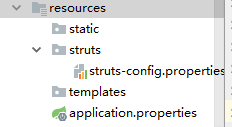
配置文件路径:
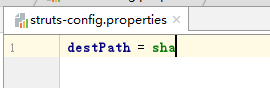
配置内容:
方法一:
Action内被调用的函数添加下段代码:
Properties props = new Properties();
props.load(UploadFileAction.class.getClassLoader().getResourceAsStream("/struts/struts-config.properties"));
System.out.println(props.getProperty("destPath"));
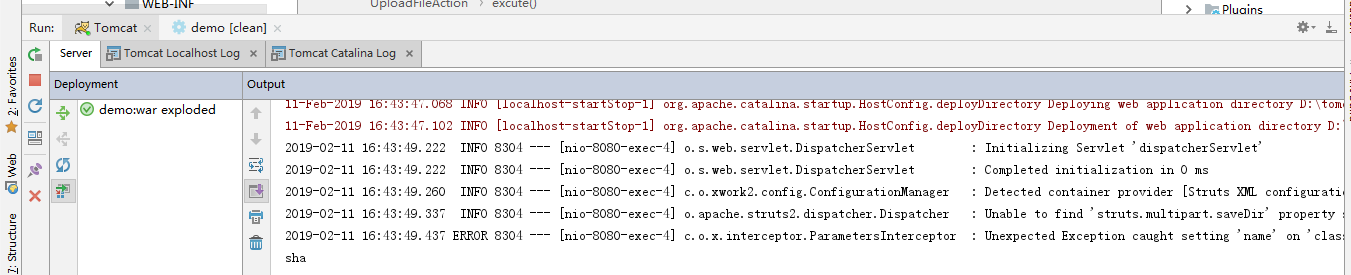
执行效果:
为了便于其他Action重用,可以将此部分写成一个工具类:
package com.struts2demo.demo.util;

import com.opensymphony.xwork2.Action;

import java.io.IOException;
import java.util.Properties;

public class StrutsConfig {

    public Properties GetProperties(Class actionClass) throws IOException {
        Properties props = new Properties();
        props.load(actionClass.getClassLoader().getResourceAsStream("/struts/struts-config.properties"));
        return props;
    }

}
然后Action里如此调用即可:
Properties props = new StrutsConfig().GetProperties(UploadFileAction.class);
System.out.println(props.getProperty("destPath"));
方法二:@ConfigurationProperties + @PropertySource
package com.example.spdemo.controller;

import org.springframework.boot.context.properties.ConfigurationProperties;
import org.springframework.context.annotation.PropertySource;
import org.springframework.web.bind.annotation.RequestMapping;
import org.springframework.web.bind.annotation.RestController;

@RestController
@ConfigurationProperties
@PropertySource("/struts/struts-config.properties")
public class Index {

    private String destPath;

    @RequestMapping("/")
    public String getProps() {
        return destPath;
    }

    public String getDestPath() {
        return destPath;
    }

    public void setDestPath(String destPath) {
        this.destPath = destPath;
    }

}
对于非application.properties的配置,需@PropertySource指明配置文件的路径;否则默认是从application.properties中读取配置,不需要写该注解。
方法三:spring的xml配置中配置上properties,然后通过@Value注入(该方法在Spring MVC中验证过,但是不知道集成struts2后是否受影响)
spring-context.xml
<util:properties id="APP_PROP" local-override="true" location="classpath:owlforest.properties" />
owlforest.properties
jdbc.driver=com.mysql.jdbc.Driver
jdbc.url=jdbc:mysql://localhost:3306/linfu_test_db?useUnicode=true&characterEncoding=utf-8
jdbc.username=root
jdbc.password=root
代码样例:
package com.owlforest.www.config.dao;

import com.alibaba.druid.pool.DruidDataSource;
import org.mybatis.spring.annotation.MapperScan;
import org.springframework.beans.factory.annotation.Value;
import org.springframework.context.annotation.Configuration;
import org.springframework.context.annotation.PropertySource;

@Configuration
public class DataSourceConfiguration {
    @Value("#{APP_PROP['jdbc.driver']}")
    private String driver;

    @Value("#{APP_PROP['jdbc.url']}")
    private String url;

    @Value("#{APP_PROP['jdbc.username']}")
    private String username;

    @Value("#{APP_PROP['jdbc.password']}")
    private String password;

    public DruidDataSource createDataSource(){
        DruidDataSource dataSource = new DruidDataSource();
        dataSource.setDriverClassName(driver);
        dataSource.setUrl(url);
        dataSource.setUsername(username);
        dataSource.setPassword(password);
        dataSource.setDefaultAutoCommit(true);
        return dataSource;
    }
}
方法四:使用spring的PropertiesFactoryBean
    @Bean
    public PropertiesFactoryBean getProperties() {
        PropertiesFactoryBean propertiesFactoryBean = new PropertiesFactoryBean();
        propertiesFactoryBean.setLocations(new ClassPathResource("application.properties"));
        return propertiesFactoryBean;
    }
调用:
    @Autowired
    private PropertiesFactoryBean propertiesFactoryBean;

    public String getProperties(String key) throws IOException {
        Properties properties = propertiesFactoryBean.getObject();
        return properties.getProperty(key);
    }
方法五:不使用自动装配,使用classLoader获取Properties
MailUtil.class.getClassLoader().getResourceAsStream("/config.properties")
Struts2学习:Action获取properties文件的值的更多相关文章
- Java学习-021-Properties 获取配置项对应的值
在日常的脚本编写过程中,通常会获取配置文件中的配置项,以执行相应的业务逻辑. 小二上码...若有不足之处,敬请大神指正,不胜感激! 获取配置项值的源码如下所示: /** * Get value fro ...
- 【Properties】获取Properties文件
获取Properties文件 package com.chinamobile.epic.tako.v2.query.commons; import org.springframework.core.i ...
- 获取properties文件的内容
获取properties文件的内容 public void test() throws Exception{ String resource = "application.propertie ...
- spring Controller 层注解获取 properties 里面的值
前言:最近在做一个项目,想要在 controller 层直接通过注解 @Value("")来获取 properties 里面配置的属性. 这个其实和 springmvc.sprin ...
- struts2,action上传文件
通过servlet实现文件上传,可以用用servlet接受到request的值的话:主要是这句话 List<?> items = upload.parseRequest(request); ...
- Spring获取properties文件中的属性
1.前言 本文主要是对这两篇blog的整理,感谢作者的分享 Spring使用程序方式读取properties文件 Spring通过@Value注解注入属性的几种方式 2.配置文件 applicatio ...
- 获取.properties配置文件属性值
public class TestProperties { /** * * @Title: printAllProperty * @Description: 输出所有配置信息 * @param pro ...
- spring通过静态方法获得properties文件的值
获得spring bean方法 @Component public class BeanUtils implements ApplicationContextAware { private stati ...
- struts2学习笔记之十:文件上传
Struts2的上传 1.Struts2默认采用了apache commons-fileupload 2.Struts2支持三种类型的上传组件 3.需要引入commons-fileupload相关依赖 ...
随机推荐
- elasticsearch:shard 和 replica 机制
shard 和 replica 机制: index包含多个shard 每个shard都是一个最小工作单元,承载部分数据,lucene实例,完整的建立索引和处理请求的能力 增减节点时,shard会自动在 ...
- ts项目报错:Import sources within a group must be alphabetized
报错:Import sources within a group must be alphabetized. 原因:import名称排序问题,要求按照字母从小到大排序:修改 tslint.json 中 ...
- TestNG.xml参数配置-如何控制部分执行@test方法
如果在methods中标识了@test的方法,也可以在method中通过include和exclude来控制需要执行哪些方法 <include name="testMethod1&qu ...
- Python正则表达式指南 (转)
本文http://www.cnblogs.com/huxi/archive/2010/07/04/1771073.html 正则表达式经常被用到,而自己总是记不全,转载一份完整的以备不时之需. 1. ...
- SyntaxError: Non-ASCII character '\xe4' in file t.py on line 3, but no encoding declared
问题 报错代码 #!/usr/bin/python s = "你好" print s 执行报错: File "t.py", line 3 SyntaxError ...
- CentOS 6.5 下源码搭建LAMP环境
参考网站: http://wenku.baidu.com/link?url=Cvkqss2E9mnxXOZigMWPaCfqwsBxnm0sZ4aKE2oLAgQ888XxeC0DWOChxVqiHz ...
- OpenWrt路由器通过LuCI界面实现Guest SSID功能
转自: http://blog.ltns.info/linux/guest_ssid_over_openwrt_router/ 之前尝试过 Tomato路由器设置VLAN实现Guest SSID功能, ...
- CPS(Cyber-Physical Systems)白皮书-摘选
<中国制造2025>提出,“基于信息物理系统的智能装备.智能工厂等智能制造正在引领制造方式变革”,要围绕控制系统.工业软件.工业网络.工业云服务和工业大数据平台等,加强信息物理系统的研发与 ...
- XE5开发Android程序调用电话相关功能(短信息和电话) [转]
其实都可以通过intent和URI调用系统功能.Windows程序员可以理解成是ShellExecute.这个是万金油.可以有调用各种功能.后面会介绍. 1.短信息.很简单 方法a.不使用Intent ...
- xe5 android 控制蓝牙[转]
用以下代码中的接口实现控制蓝牙的开.关及详细信息 unit Androidapi.JNI.BluetoothAdapter; // (c) RedTitan Technology 2013// JNI ...