
[Asp.net mvc]国际化
摘要
在实际项目中,经常遇到,开发的项目要提供给不同的国家使用,如果根据国家来开发不同的站点,肯定是非常耗时又耗成本的。asp.net中,提供了一种比较方便的方式,可以使用资源文件的方式,使我们的站点,面向国际化。
一个例子
新建一个mvc项目,如下:
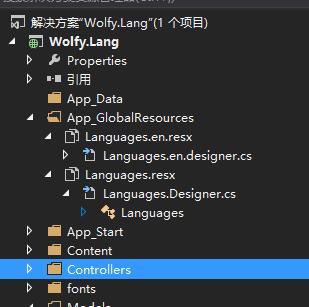
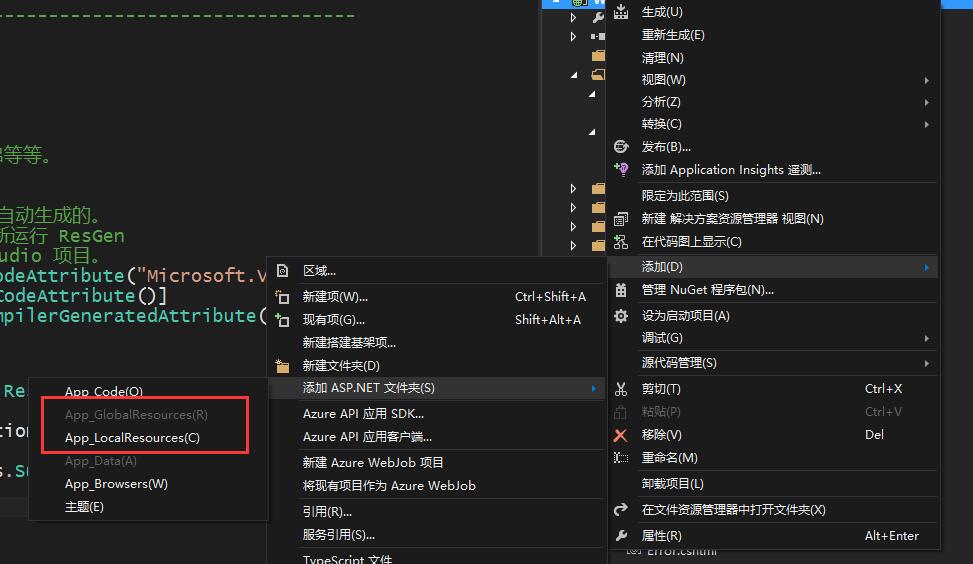
其中文件夹App_GlobalResources,为资源文件文件夹。可以通过右键添加,如图:
Languages.resx:默认中文资源文件。
Languages.en.resx:英文资源文件。
资源项包括

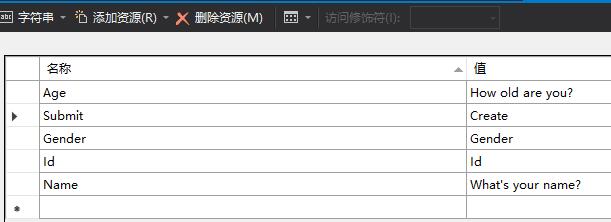
注意,添加过之后,你可以对比一下,这两个文件,其中默认中文资源文件Languages.Designer.cs中有代码,英文资源的是没有代码的(这里不再做分析,之后可以通过反编译工具进行查看)。
测试
为了测试方便,添加一个UserInfo的实体类
using System;

using System.Collections.Generic;

using System.ComponentModel.DataAnnotations;

using System.Linq;

using System.Web;

namespace Wolfy.Lang.Models

{

    /// <summary>

    /// 默认 资源文件 中文

    /// </summary>

    public class UserInfo

    {

        [Display(Name = "Id", ResourceType = typeof(Resources.Languages))]

        public int Id { set; get; }

        [Display(Name = "Name", ResourceType = typeof(Resources.Languages))]

        public string Name { set; get; }

        [Display(Name = "Gender", ResourceType = typeof(Resources.Languages))]

        public string Gender { set; get; }

        [Display(Name = "Age", ResourceType = typeof(Resources.Languages))]

        public int Age { set; get; }

    }

}
这里采用默认资源中文的资源文件。
获取语言的辅助类,用来获取语言。这里为了设置方便,采用获取cookie中的lang字段作为测试用,当然你也可以使用url进行传递。
using System;

using System.Collections.Generic;

using System.Linq;

using System.Web;

namespace Wolfy.Lang.Utilities

{

    public class LanguageHelper

    {

        private static List<string> _cultures = new List<string> { "zh-CN", "en-US" };

        public static string FindLanguageName(string name)

        {

            if (string.IsNullOrEmpty(name))

            {

                return _cultures[];

            }

            if (_cultures.Where(l => l.Equals(name, StringComparison.InvariantCultureIgnoreCase)).Any())

            {

                return name;

            }

            var partName = GetPartName(name);

            foreach (var item in _cultures)

            {

                if (item.StartsWith(partName))

                {

                    return item;

                }

            }

            return _cultures[];

        }

        private static string GetPartName(string name)

        {

            if (!name.Contains("-"))

            {

                return name;

            }

            else

            {

                return name.Split('-')[];

            }

        }

    }

}
添加BaseController,在需要国际化的视图对应的控制器,都需要继承该类。
using System;

using System.Collections.Generic;

using System.Linq;

using System.Threading;

using System.Web;

using System.Web.Mvc;

using Wolfy.Lang.Utilities;

namespace Wolfy.Lang.Controllers

{

    public class BaseController : Controller

    {

        protected override IAsyncResult BeginExecuteCore(AsyncCallback callback, object state)

        {

            string langName = string.Empty;

            HttpCookie langCookie = Request.Cookies["lang"];

            if (langCookie != null)

            {

                langName = langCookie.Value;

            }

            else

            {

                langName = Request.UserLanguages != null && Request.UserLanguages.Length >  ? Request.UserLanguages[] : string.Empty;

            }

            langName = LanguageHelper.FindLanguageName(langName);

            Thread.CurrentThread.CurrentCulture = new System.Globalization.CultureInfo(langName);

            Thread.CurrentThread.CurrentUICulture = Thread.CurrentThread.CurrentCulture;

            return base.BeginExecuteCore(callback, state);

        }

    }

}
添加user控制器
using System;

using System.Collections.Generic;

using System.Linq;

using System.Threading;

using System.Web;

using System.Web.Mvc;

namespace Wolfy.Lang.Controllers

{

    public class UserController : BaseController

    {

        // GET: User

        public ActionResult Index()

        {

            ViewBag.submit = Resources.Languages.Submit;

            HttpCookie cookie = Request.Cookies["lang"];

            if (cookie == null)

            {

                //默认中文

                cookie = new HttpCookie("lang", "zh") { Expires = DateTime.Now.AddDays() };

                Response.Cookies.Add(cookie);

            }

            return View();

        }

    }

}
对应的视图
@model Wolfy.Lang.Models.UserInfo

@{

    Layout = null;

    var culture = System.Threading.Thread.CurrentThread.CurrentCulture.Name.ToLowerInvariant();

}

<!DOCTYPE html>

<html>

<head>

    <meta name="viewport" content="width=device-width" />

    <title>Index</title>

</head>

<body>

    @Scripts.Render("~/bundles/jquery")

    @Scripts.Render("~/bundles/jqueryval")

    @using (Html.BeginForm())

    {

        @Html.AntiForgeryToken()

        <div class="form-horizontal">

            @Html.ValidationSummary(true, "", new { @class = "text-danger" })

            <div class="form-group">

                @Html.LabelFor(model => model.Name, htmlAttributes: new { @class = "control-label col-md-2" })

                <div class="col-md-10">

                    @Html.EditorFor(model => model.Name, new { htmlAttributes = new { @class = "form-control" } })

                    @Html.ValidationMessageFor(model => model.Name, "", new { @class = "text-danger" })

                </div>

            </div>

            <div class="form-group">

                @Html.LabelFor(model => model.Gender, htmlAttributes: new { @class = "control-label col-md-2" })

                <div class="col-md-10">

                    @Html.EditorFor(model => model.Gender, new { htmlAttributes = new { @class = "form-control" } })

                    @Html.ValidationMessageFor(model => model.Gender, "", new { @class = "text-danger" })

                </div>

            </div>

            <div class="form-group">

                @Html.LabelFor(model => model.Age, htmlAttributes: new { @class = "control-label col-md-2" })

                <div class="col-md-10">

                    @Html.EditorFor(model => model.Age, new { htmlAttributes = new { @class = "form-control" } })

                    @Html.ValidationMessageFor(model => model.Age, "", new { @class = "text-danger" })

                </div>

            </div>

            <div class="form-group">

                <div class="col-md-offset-2 col-md-10">

                    <input type="submit" value="@ViewBag.submit" class="btn btn-default" />

                </div>

            </div>

        </div>

    }

    <div>

        @Html.ActionLink("Back to List", "Index")

    </div>

</body>

</html>
测试
通过切换cookie中lang的值进行语言的切换
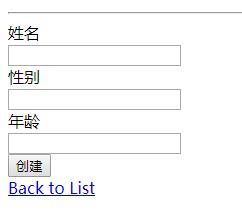
切换英文

修改cookie中lang字段对应的值为en-US
总结
之前,国际化都是通过angularjs的方式在前端实现的,今天尝试下mvc中的实现方式。这里需要注意的,在使用特性Display的ResourceType参数时,需要指定Languages是public的,默认是interval,需要修改可访问性。
[Asp.net mvc]国际化的更多相关文章
- ASP.NET MVC之国际化(十一)
前言 在项目中遇到国际化语言的问题是常有的事情,之前在做关于MVC国际化语言时,刚开始打算全部利用AngularJS来实现,但是渐渐发现对于页面Title难以去控制其语言转换,于是对于页面Tiltle ...
- ASP.NET MVC Filters 4种默认过滤器的使用【附示例】
过滤器(Filters)的出现使得我们可以在ASP.NET MVC程序里更好的控制浏览器请求过来的URL,不是每个请求都会响应内容,只响应特定内容给那些有特定权限的用户,过滤器理论上有以下功能: 判断 ...
- Datatables 在asp.net mvc中的使用
前言 最近使用ABP(ASP.NET Boilerplate)做新项目,以前都是自己扩展一个HtmlHelper来完成同步/异步分页,但是有个地方一直不满意,排序太费劲. 以前接触过一点点的Datat ...
- ASP.NET MVC 监控诊断、本地化和缓存
这篇博客主要是针对asp.net mvc项目的一些常用的东东做一个讲解,他们分别是监控诊断.本地化和缓存.虽然前两者跟asp.net mvc看上去好像是没什么关联. 但其实如果真正需要做asp.net ...
- [渣译文] 使用 MVC 5 的 EF6 Code First 入门 系列:为ASP.NET MVC应用程序创建更复杂的数据模型
这是微软官方教程Getting Started with Entity Framework 6 Code First using MVC 5 系列的翻译,这里是第六篇:为ASP.NET MVC应用程序 ...
- 【MVC5】ASP.NET MVC 项目笔记汇总
ASP.NET MVC 5 + EntityFramework 6 + MySql 先写下列表,之后慢慢补上~ 对MySql数据库使用EntityFramework 使用域用户登录+记住我 画面多按钮 ...
- asp.net mvc开发的社区产品相关开发文档分享
分享一款基于asp.net mvc框架开发的社区产品--近乎.目前可以在官网免费下载,下载地址:http://www.jinhusns.com/Products/Download?type=whp 1 ...
- ASP.NET MVC 第六回 过滤器Filter
在Asp.netMvc中当你有以下及类似以下需求时你可以使用Filter功能 判断登录与否或用户权限 决策输出缓存 防盗链 防蜘蛛 本地化与国际化设置 实现动态Action Filter是一种声明式编 ...
- ASP.NET MVC 过滤器Filter
在Asp.netMvc中当你有以下及类似以下需求时你可以使用Filter功能 判断登录与否或用户权限 决策输出缓存 防盗链 防蜘蛛 本地化与国际化设置 实现动态Action Filter是一种声明式编 ...
随机推荐
- 云计算--MPI
[root@localhost mpi]# mpicc -c base.c[root@localhost mpi]# mpicc -o base base.o[root@localhost mpi]# ...
- Java 连接远程Linux 服务器执行 shell 脚本查看 CPU、内存、硬盘信息
pom.xml jar 包支持 <dependency> <groupId>com.jcraft</groupId> <artifactId>jsch& ...
- Pandas DataFrame数据的增、删、改、查
Pandas DataFrame数据的增.删.改.查 https://blog.csdn.net/zhangchuang601/article/details/79583551 #删除列 df_2 = ...
- PHP转盘抽奖算法
流程: 1.拼装奖项数组 2.计算概率 3.返回中奖情况 代码如下: 中奖概率 ' v ' 可以在后台设置,传到此方法中,注意传整数 function get_gift(){ //拼装奖项数组 // ...
- CAS5.2x单点登录(一)——搭建cas服务器
系列文章列表: https://blog.csdn.net/u013825231/article/category/7517313 单点登录的介绍 单点登录(Single Sign On ,简称SSO ...
- java & android 开发规范手册
阿里巴巴Java开发手册(终极版)https://pan.baidu.com/s/1c1UQM7Q 阿里巴巴Java开发规约插件p3cGitHub:https://github.com/alibaba ...
- .NetCore下使用Autofac做 IOC 容器
在.NetCore中使用自带的IOC容器 写注入的时候会写很多,如果要自己封装的话也达不到预期的效果,所以这里采用Autofac来时替代 .NetCore自带的容器 nuget首先引用Autofac. ...
- zookeeper命令行客户端
前提条件:搭建好zookeeper服务器集群<Zookeeper深入认识>,并且集群成功开启. 执行zkServer.sh,客户端连接上服务器hadoop1. 都有哪些命令行操作呢?(见下 ...
- 024 关于spark中日志分析案例
1.四个需求 需求一:求contentsize的平均值.最小值.最大值 需求二:请各个不同返回值的出现的数据 ===> wordCount程序 需求三:获取访问次数超过N次的IP地址 需求四:获 ...
- 记在VMware虚拟机中对网站进行性能压力测试的经历
由于本次测试,仅仅是对静态网站首页进行的测试,所以没有涉及到MySQL数据库的性能监测 服务器基本配置 webbench测试工具 Linux上一款优秀的web性能压力测试工具.webbench最多可以 ...