
C#实现语音朗读功能
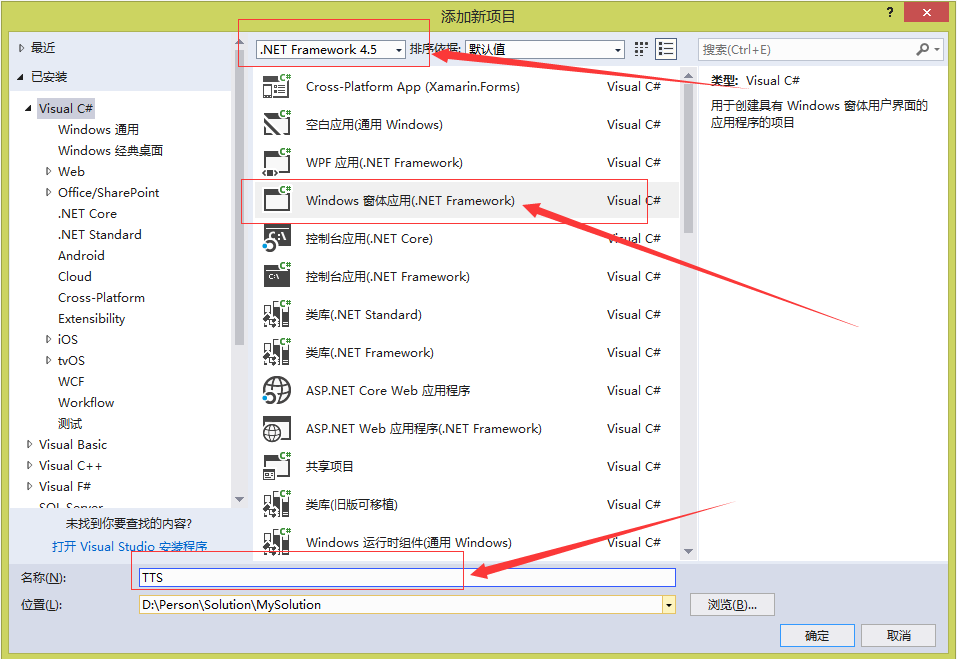
第一步:新建项目 TTS(从文本到语音(TextToSpeech))
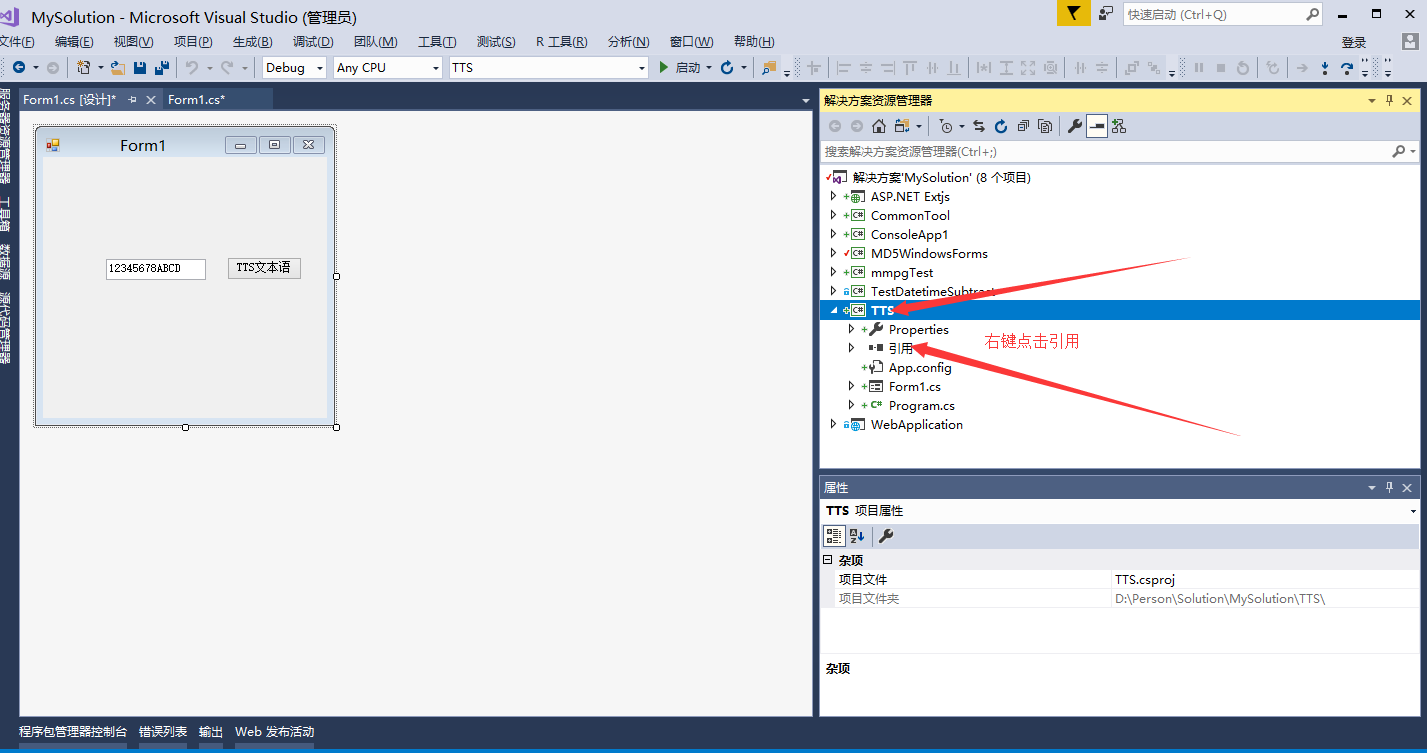
第二步:添加引用 System.Speech

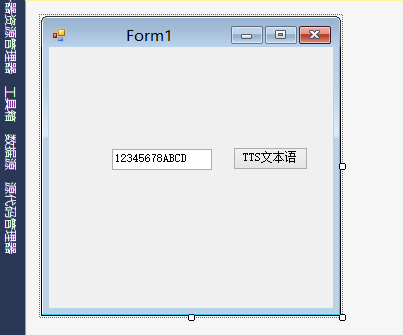
第三步:主界面以及后台代码
using System;
using System.Globalization;
using System.Linq;
using System.Speech.Synthesis;
using System.Windows.Forms;
namespace TTS
{
public partial class Form1 : Form
{
private SpeechSynthesizer speech = new SpeechSynthesizer();
public Form1()
{
InitializeComponent();
}
private void button1_Click(object sender, EventArgs e)
{
#region 只能读数字和英文
//string text = textBox1.Text;
//if (text.Trim().Length != 0)
//{
// speech.Rate = 5;//语速
// speech.SelectVoice("Microsoft Lili");//设置播音员(中文)
// //speech.SelectVoice("Microsoft Anna"); //英文
// speech.Volume = 100; //音量
// speech.SpeakAsync(textBox1.Text);//语音阅读方法
//}
#endregion
#region 可以读取中文
string phrase = "123我是好人";
SpeechSynthesizer speech = new SpeechSynthesizer();
CultureInfo keyboardCulture = System.Windows.Forms.InputLanguage.CurrentInputLanguage.Culture;
InstalledVoice neededVoice = speech.GetInstalledVoices(keyboardCulture).FirstOrDefault();
if (neededVoice == null)
{
phrase = "Unsupported Language";
}
else if (!neededVoice.Enabled)
{
phrase = "Voice Disabled";
}
else
{
speech.SelectVoice(neededVoice.VoiceInfo.Name);
}
speech.Speak(phrase);
#endregion
}
}
}
源代码下载:https://download.csdn.net/download/longtenggenssupreme/10452762
注:本代码是在是在windows server 2012 R2 上的vs2017 上的4.5版本的环境。
建议Win10 环境,
如果不是上述环境,可能会出现以下:
1、报错
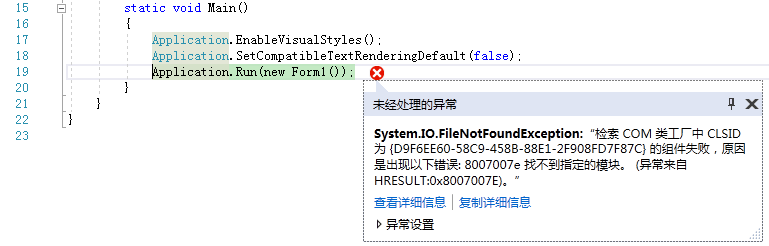
HResult=0x8007007E
Message=检索 COM 类工厂中 CLSID 为 {D9F6EE60-58C9-458B-88E1-2F908FD7F87C} 的组件失败,原因是出现以下错误: 8007007e 找不到指定的模块。 (异常来自 HRESULT:0x8007007E)。
Source=System.Speech
StackTrace:
在 System.Speech.Internal.ObjectTokens.RegistryDataKey..ctor(String fullPath, IntPtr regHandle)
在 System.Speech.Internal.ObjectTokens.RegistryDataKey.Open(String registryPath, Boolean fCreateIfNotExist)
在 System.Speech.Internal.ObjectTokens.SAPICategories.DefaultDeviceOut()
在 System.Speech.Internal.Synthesis.VoiceSynthesis..ctor(WeakReference speechSynthesizer)
在 System.Speech.Synthesis.SpeechSynthesizer.get_VoiceSynthesizer()
在 System.Speech.Synthesis.SpeechSynthesizer.set_Rate(Int32 value)
在 TTS.Form1.button1_Click(Object sender, EventArgs e) 在 C:\Users\Administrator\Desktop\TTS\Form1.cs 中: 第 26 行
在 System.Windows.Forms.Control.OnClick(EventArgs e)
在 System.Windows.Forms.Button.OnClick(EventArgs e)
在 System.Windows.Forms.Button.OnMouseUp(MouseEventArgs mevent)
在 System.Windows.Forms.Control.WmMouseUp(Message& m, MouseButtons button, Int32 clicks)
在 System.Windows.Forms.Control.WndProc(Message& m)
在 System.Windows.Forms.ButtonBase.WndProc(Message& m)
在 System.Windows.Forms.Button.WndProc(Message& m)
在 System.Windows.Forms.Control.ControlNativeWindow.OnMessage(Message& m)
在 System.Windows.Forms.Control.ControlNativeWindow.WndProc(Message& m)
在 System.Windows.Forms.NativeWindow.DebuggableCallback(IntPtr hWnd, Int32 msg, IntPtr wparam, IntPtr lparam)
在 System.Windows.Forms.UnsafeNativeMethods.DispatchMessageW(MSG& msg)
在 System.Windows.Forms.Application.ComponentManager.System.Windows.Forms.UnsafeNativeMethods.IMsoComponentManager.FPushMessageLoop(IntPtr dwComponentID, Int32 reason, Int32 pvLoopData)
在 System.Windows.Forms.Application.ThreadContext.RunMessageLoopInner(Int32 reason, ApplicationContext context)
在 System.Windows.Forms.Application.ThreadContext.RunMessageLoop(Int32 reason, ApplicationContext context)
在 System.Windows.Forms.Application.Run(Form mainForm)
在 TTS.Program.Main() 在 C:\Users\Administrator\Desktop\TTS\Program.cs 中: 第 19 行
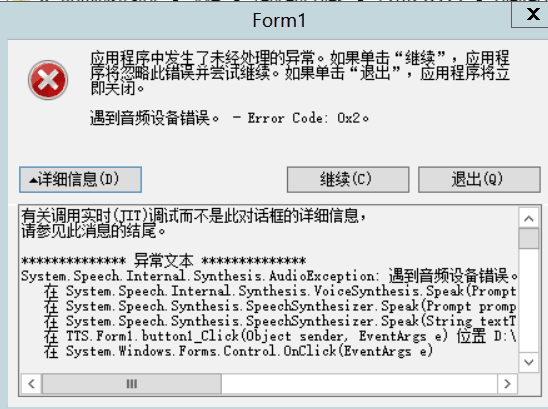
2、或者是下面错误
C#实现语音朗读功能的更多相关文章
- Android 轻松实现语音朗读
语音朗读,这是一个很好的功能,可以实现一些客户的特殊要求.在Android 实现主意功能只需要几段简单的代码即可完成. 在Android 中使用语音朗读功能 只需要使用此类 TextToSpeech ...
- C#语音朗读文本 — TTS的实现
TTS, Text To Speech的缩写,是使用语音朗读文本的技术.目前,在国内应用较多的是排队叫号系统 Windows 平台的TTS,通常使用的是微软自带的 Speech API. Window ...
- Pyqt SpVoice朗读功能
用Pyqt 做一个读取系统剪贴板内容,然后通过语音合成(TTS)朗读出剪贴板的内容 知识要点 SpVoice SpVoice类是支持语音合成(TTS)的核心类.通过SpVoice对象调用TTS引擎,从 ...
- 小梦windows phone 8.1开发:语音朗读
使用SpeechSynthesizer类可以实现文本朗读功能,位于 Windows.Media.SpeechSynthesis命名空间.有了它我们就可以实现有声小说了,是不是很爽.下面给出一个将文本块 ...
- Android Studio快速集成讯飞SDK实现文字朗读功能
今天,我们来学习一下怎么在Android Studio快速集成讯飞SDK实现文字朗读功能,先看一下效果图: 第一步 :了解TTS语音服务 TTS的全称为Text To Speech,即“从文本到语音” ...
- java文字转语音播报功能的实现方法
java文字转语音播报功能的实现方法 一.pom.xml引入jar包依赖 <!-- https://mvnrepository.com/artifact/com.jacob/jacob 文字转语 ...
- 基于Qt5.5.0的sql数据库、SDK_tts文本语音朗读的CET四六级单词背诵系统软件的编写V1.0
作者:小波 QQ:463431476 请关注我的博客园:http://www.cnblogs.com/xiaobo-Linux/ 我的第二款软件:CET四六级单词背诵软件.基于QT5.5.0.sql数 ...
- 实现百度地图导航Demo的语音播报功能
上文中实现了在本地导入百度地图导航Demo,那么在此基础上如何实现导航的语音播报呢? 一.为该应用申请语音播报(也叫注册) http://developer.baidu.com/map/index.p ...
- AngularJS进阶(十八)在AngularJS应用中集成科大讯飞语音输入功能
在AngularJS应用中集成科大讯飞语音输入功能 注:请点击此处进行充电! 前言 根据项目需求,需要在首页搜索框中添加语音输入功能,考虑到科大讯飞语音业务的强大能力,遂决定使用科大讯飞语音输入第三方 ...
随机推荐
- git如何删除已经 add 的文件 (如何撤销已放入缓存区文件的修改)
使用 git rm 命令即可,有两种选择, 一种是 git rm –cached “文件路径”,不删除物理文件,仅将该文件从缓存中删除: 一种是 git rm –f “文件路径”,不仅将该文件从缓存中 ...
- linux分区命名
linux中任何内容都是文件 硬盘 文件 用户 都是文件 硬件设备文件名称 ide硬盘 /dev/hd[a-d] scsi/sata/usb硬盘 /dev/sd[a-p] 光驱 /dev/cdrom/ ...
- Only IPV6 下 使用MSDTC ping 之后 出现 找不到主机的问题
1. 很奇怪 使用两个虚拟机 进行IPV6测试, 需要验证MSDTC. app的机器名 Win12r2update DB的机器名 Win12r2UpdateDB 2. 在使用ipv4 以及 不进行ho ...
- IIS 下 搭建简单的FTP服务器
1. 修改用户策略, 创建简单用户密码 命令行输入 gpedit.msc 打开组策略 位置 2. 创建一个FTP使用的用户 net user zhaobsh Test6530 /add 3. 安装II ...
- CentOS 下运行Docker 内执行 docker build 命令的简单方法
1. 通过部分文档进行学习...主要知识来源 https://blog.csdn.net/shida_csdn/article/details/79812817 2. 下载 docker 的rpm包. ...
- Yii 框架的Rbac [权限控制]
转载自 xmlife 的博客 : http://blog.csdn.net/xmlife/article/details/50733451 1.首先我们要在配置文件的组件(component)里面配置 ...
- 从0到1搭建基于Kafka、Flume和Hive的海量数据分析系统(一)数据收集应用
大数据时代,一大技术特征是对海量数据采集.存储和分析的多组件解决方案.而其中对来自于传感器.APP的SDK和各类互联网应用的原生日志数据的采集存储则是基本中的基本.本系列文章将从0到1,概述一下搭建基 ...
- Python之Numpy数组拼接,组合,连接
转自:https://www.douban.com/note/518335786/?type=like ============改变数组的维度==================已知reshape函数 ...
- 认清Android框架 MVC,MVP和MVVM
编者按:现在很多时候,我们都是面向搜索(或 Google 或百度).GitHub 编程,那么,在早期没有互联网的情况下,该如何学习编程,成为一名真正的开发者?亦或是作为一名小白,如何进入互联网编程时代 ...
- luogu2678 [NOIp2015]跳石头 (二分答案+贪心)
先二分出一个x,我们要算使最近的跳跃距离>=x的最少移除数量是否<=M就可以了 然后就别dp了...贪心就完事了...我肯定能不移就不移比较好... #include<bits/st ...