
pytorch张量数据索引切片与维度变换操作大全(非常全)
(1-1)pytorch张量数据的索引与切片操作
1、对于张量数据的索引操作主要有以下几种方式:
a=torch.rand(4,3,28,28):DIM=4的张量数据a
(1)a[:2]:取第一个维度的前2个维度数据(不包括2);
(2)a[:2,:1,:,:]:取第一个维度的前两个数据,取第2个维度的前1个数据,后两个维度全都取到;
(3)a[:2,1:,:,:]:取第一个维度的前两个数据,取第2个维度的第1个索引到最后索引的数据(包含1),后两个维度全都取到;
(4)a[:2,-3:]:负号表示第2个维度上从倒数第3个数据取到最后倒数第一个数据-1(包含-3);
(5)a[:,:,0:28:2,0:28:2]:两个冒号表示隔行取数据,一定的间隔;
(6)a[:,:,::2,::3]:两个冒号直接写表示从所有的数据中隔行取数据。
2、对于tensor数据的切片与其中某些维度数据的提取方法:
a.index_select(x,torch.tensor([m,n])):表示提取tensor数据a的第x个维度上的索引为m和n的数据
3、torch.masked_select(x,mask):该函数主要用来选取x数据中的mask性质的数据,比如mask=x.ge(0.5)表示选出大于0.5的所有数据,并且输出时将其转换为了dim=1的打平tensor数据。
4、#take函数的应用:先将张量数据打平为一个dim=1的张量数据(依次排序下来成为一个数据列),然后按照索引进行取数据
a=torch.tensor([[1,2,3],[4,5,6]])
torch.take(a,torch.tensor([1,2,5])):表示提取a这个tensor数据打平以后的索引为1/2/5的数据元素
(1-2)tensor数据的维度变换
1、对于tensor数据的维度变换主要有四大API函数:
(1)view/reshape:主要是在保证tensor数据大小不变的情况下对tensor数据进行形状的重新定义与转换
(2)Squeeze/unsqueeze:删减维度或者增加维度操作
(3)transpose/t/permute:类似矩阵的转置操作,对于多维的数据具有多次或者单次的转换操作
(4)Expand/repeat:维度的扩展,将低维数据转换为高维的数据
2、view(reshape)维度转换操作时需要保证数据的大小numl保持不变,即数据变换前后的prod是相同的:
prod(a.size)=prod(b.size)
另外,对于view操作有一个致命的缺陷就是在数据进行维度转换之后数据之前的存储与维度顺序信息会丢失掉,不能够复原,而这对于训练的数据来说非常重要。
3、squeeze/unsqueeze挤压和增加维度操作的函数
a=torch.rand(4,3,28,28)
a.unsqueeze(1):在a原来维度索引1之间增加一个维度
a.unsqueeze(-1):在a原来维度索引-1之后增加维度
例如:
a=torch.tensor([1.2,1.3]) #[2]
print(a.unsqueeze(0)) #[1,2]
print(a.unsqueeze(-1)) #[2,1]
a=torch.rand(4,32,28,28)
b=torch.rand(32) #如果要实现a和数据b的叠加,则需要对于数据b进行维度扩张
print(b.unsqueeze(1).unsqueeze(2).unsqueeze(0).shape)
4、维度删减squeeze()
对于维度的挤压squeeze,主要是挤压掉tensor数据中维度特征数为1的维度,如果不是1的话就不可以挤压
b=torch.rand(32)
b=b.unsqueeze(1).unsqueeze(2).unsqueeze(0)
print(b.squeeze().shape)
print(b.squeeze(0).shape)
print(b.squeeze(1).shape)
print(b.squeeze(-1).shape)
5、维度的扩展:expand(绝对扩展)/repeat(相对扩展)
#维度的扩张expand(绝对值)/repeat,repeat扩展实质是重复拷贝的次数-相对值,并且由于拷贝操作,原来的数据不能再用,已经改变,而expand是绝对扩展,其实现只能从1扩张到n,不能从M扩张到N,另外-1表示对该维度保持不变的操作。
a=torch.rand(4,32,14,14)
b=torch.rand(32)
b=b.unsqueeze(1).unsqueeze(2).unsqueeze(0)
print(a.shape,b.shape)
print(b.expand(4,32,14,14).shape)
print(b.expand(-1,32,-1,-1).shape) #-1表示对维度保持不变
print(b.repeat(4,32,1,1).shape)
print(b.repeat(4,1,14,14).shape)
6、维度交换操作:
(1).t()操作:只可以对DIM=2的矩阵进行转置操作
(2)transpose操作:对不同的DIM均可以进行维度交换
a=torch.rand(4,3,32,32)
a1=a.transpose(1,3).contiguous().view(4,32*32*3).view(4,32,32,3).transpose(1,3)
print(a1.shape)
print(torch.all(torch.eq(a,a1)))
整体的变换顺序为a[b,c,h,w]->[b,w,h,c]->[b,w*h*c]->[b,w,h,c]->[b,c,h,w]
7、permute操作
相比于transpose只可以进行两个维度之间的一次交换操作,permute维度交换操作可以一步实现多个维度之间的交换(相当于transpose操作的多步操作)
#.t()和transpose/permute维度交换操作,需要考虑数据的信息保存,不能出现数据的污染和混乱.contiguous()操作保持存储顺序不变
c=torch.rand(3,4)
print(c)
print(c.t())
a=torch.rand(4,3,32,32)
a1=a.transpose(1,3).contiguous().view(4,32*32*3).view(4,32,32,3).transpose(1,3)
print(a1.shape)
print(torch.all(torch.eq(a,a1)))
a=torch.rand(4,3,28,32)
a1=a.permute(0,2,3,1)
print(a1.shape)
a2=a.contiguous().permute(0,2,3,1)
print(torch.all(torch.eq(a1,a2)))
对于以上的数据维度变换和索引切片训练代码如下所示:
#tensor数据的索引与切片操作
import torch
a=torch.rand(4,3,28,28)
print(a)
print(a.shape)
print(a.dim())
#索引与切片操作
print(a[0].shape)
print(a[0,0,1,2])
print(a[:2].shape)
print(a[:2,:1,:,:].shape)
print(a[:2,1:,:,:].shape)
print(a[:2,-3:].shape)
print(a[:,:,0:28:2,0:28:2].shape)
print(a[:,:,::2,::3].shape)
#选择其中某维度的某些索引数据
b=torch.rand(5,3,3)
print(b)
print(b.index_select(0,torch.tensor([1,2,4])))
print(b.index_select(2,torch.arange(2)).shape)
#...操作表示自动判断其中得到维度区间
a=torch.rand(4,3,28,28)
print(a[...,2].shape)
print(a[0,...,::2].shape)
print(a[...].shape)
#msaked_select
x=torch.randn(3,4)
print(x)
mask=x.ge(0.5) #选出所有元素中大于0.5的数据
print(mask)
print(torch.masked_select(x,mask)) #选出所有元素中大于0.5的数据,并且输出时将其转换为了dim=1的打平tensor数据
#take函数的应用:先将张量数据打平为一个dim=1的张量数据(依次排序下来成为一个数据列),然后按照索引进行取数据
a=torch.tensor([[1,2,3],[4,5,6]])
print(a)
print(a.shape)
print(torch.take(a,torch.tensor([1,2,5])))
#tensor数据的维度变换
#view/reshape操作:不进行额外的记住和存贮就会丢失掉原来的数据的数据和维度顺序信息,而这是非常重要的
a=torch.rand(4,1,28,28)
print(a.view(4,28*28))
b=a.view(4,28*28)
print(b.shape)
#squeeze/unsqueeze挤压和增加维度的操作
a=torch.rand(4,3,28,28)
print(a)
print(a.unsqueeze(0).shape)
print(a.unsqueeze(-1).shape)
print(a.unsqueeze(-4).shape)
a=torch.tensor([1.2,1.3]) #[2]
print(a.unsqueeze(0)) #[1,2]
print(a.unsqueeze(-1)) #[2,1]
a=torch.rand(4,32,28,28)
b=torch.rand(32) #如果要实现a和数据b的叠加,则需要对于数据b进行维度扩张
print(b.unsqueeze(1).unsqueeze(2).unsqueeze(0).shape)
b=b.unsqueeze(1).unsqueeze(2).unsqueeze(0)
print(b.shape)
print(b.squeeze().shape)
print(b.squeeze(0).shape)
print(b.squeeze(1).shape)
print(b.squeeze(-1).shape)
#维度的扩张expand(绝对值)/repeat(重复拷贝的次数-相对值,并且由于拷贝操作,原来的数据不能再用,已经改变),只能从1扩张到n,不能从M扩张到N,另外-1表示对该维度保持不变的操作
a=torch.rand(4,32,14,14)
b=torch.rand(32)
b=b.unsqueeze(1).unsqueeze(2).unsqueeze(0)
print(a.shape,b.shape)
print(b.expand(4,32,14,14).shape)
print(b.expand(-1,32,-1,-1).shape) #-1表示对维度保持不变
print(b.repeat(4,32,1,1).shape)
print(b.repeat(4,1,14,14).shape)
#.t()和transpose/permute维度交换操作,需要考虑数据的信息保存,不能出现数据的污染和混乱.contiguous()操作保持存储顺序不变
c=torch.rand(3,4)
print(c)
print(c.t())
a=torch.rand(4,3,32,32)
a1=a.transpose(1,3).contiguous().view(4,32*32*3).view(4,32,32,3).transpose(1,3)
print(a1.shape)
print(torch.all(torch.eq(a,a1)))
a=torch.rand(4,3,28,32)
a1=a.permute(0,2,3,1)
print(a1.shape)
a2=a.contiguous().permute(0,2,3,1)
print(torch.all(torch.eq(a1,a2)))
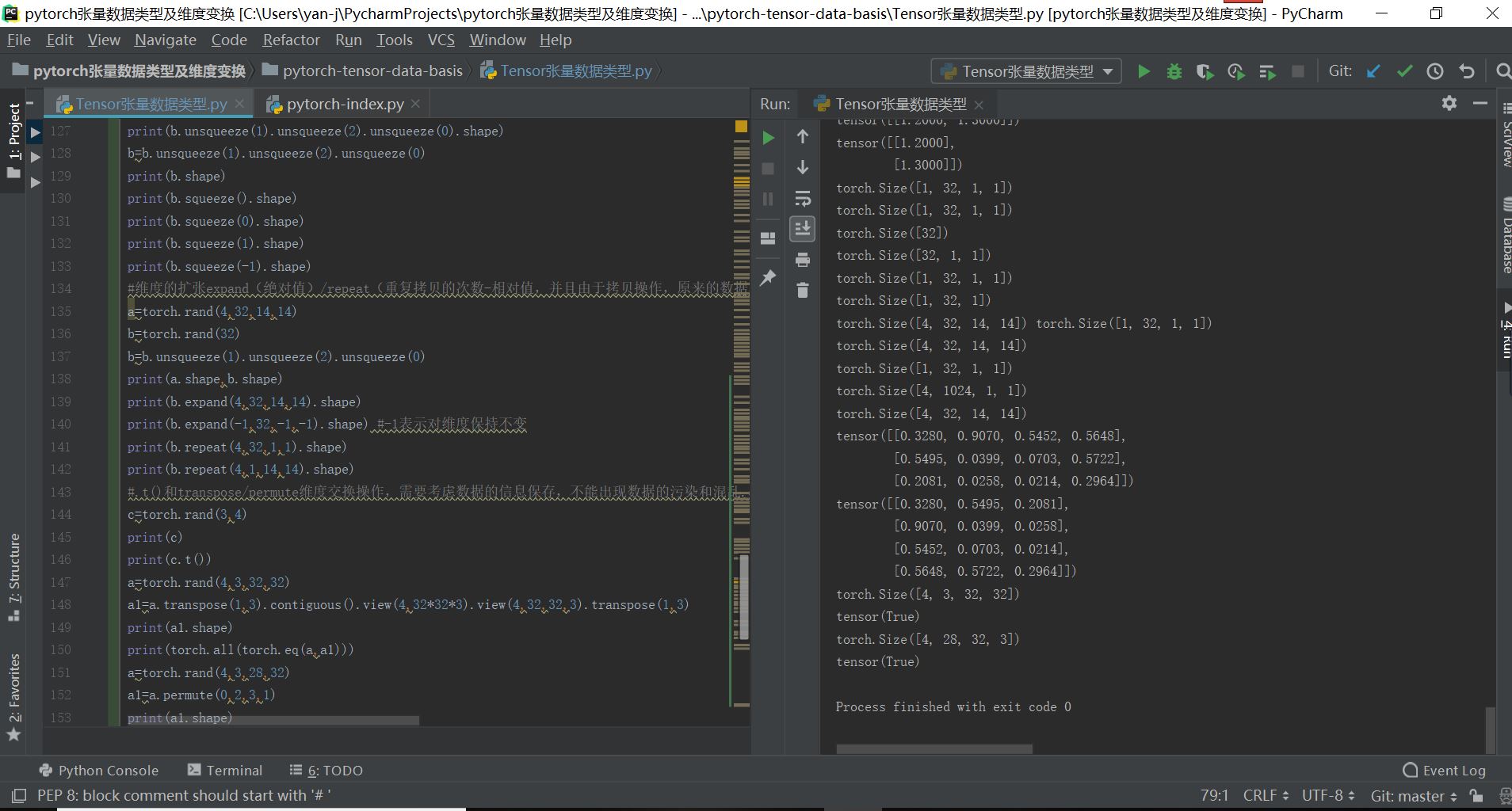
最终的实现结果如下所示:
pytorch张量数据索引切片与维度变换操作大全(非常全)的更多相关文章
- [深度学习] pytorch学习笔记(1)(数据类型、基础使用、自动求导、矩阵操作、维度变换、广播、拼接拆分、基本运算、范数、argmax、矩阵比较、where、gather)
一.Pytorch安装 安装cuda和cudnn,例如cuda10,cudnn7.5 官网下载torch:https://pytorch.org/ 选择下载相应版本的torch 和torchvisio ...
- pytorch中tensor张量数据基础入门
pytorch张量数据类型入门1.对于pytorch的深度学习框架,其基本的数据类型属于张量数据类型,即Tensor数据类型,对于python里面的int,float,int array,flaot ...
- Pytorch 张量维度
Tensor类的成员函数dim()可以返回张量的维度,shape属性与成员函数size()返回张量的具体维度分量,如下代码定义了一个两行三列的张量: f = torch.randn(2, 3) pri ...
- 从头学pytorch(一):数据操作
跟着Dive-into-DL-PyTorch.pdf从头开始学pytorch,夯实基础. Tensor创建 创建未初始化的tensor import torch x = torch.empty(5,3 ...
- numpy和pandas的基础索引切片
Numpy的索引切片 索引 In [72]: arr = np.array([[[1,1,1],[2,2,2]],[[3,3,3],[4,4,4]]]) In [73]: arr Out[73]: a ...
- Pytorch——张量 Tensors
张量 Tensors 1.torch.is_tensor torch.is_tensor(obj) 用法:判断是否为张量,如果是 pytorch 张量,则返回 True. 参数:obj (Object ...
- Python array,list,dataframe索引切片操作 2016年07月19日——智浪文档
array,list,dataframe索引切片操作 2016年07月19日——智浪文档 list,一维,二维array,datafrme,loc.iloc.ix的简单探讨 Numpy数组的索引和切片 ...
- SAS︱数据索引、数据集常用操作(set、where、merge、append)
代码部分大多来源于姚志勇老师的<SAS编程与数据挖掘商业案例>. 每每以为攀得众山小,可.每每又切实来到起点,大牛们,缓缓脚步来俺笔记葩分享一下吧,please~ ------------ ...
- python之路day03--数据类型分析,转换,索引切片,str常用操作方法
数据类型整体分析 int :用于计算bool:True False 用户判断str:少量数据的存储 list:列表 储存大量数据 上亿数据[1,2,3,'zzy',[aa]] 元组:只读列表(1,23 ...
随机推荐
- 【PAT甲级】1079 Total Sales of Supply Chain (25 分)
题意: 输入一个正整数N(<=1e5),表示共有N个结点,接着输入两个浮点数分别表示商品的进货价和每经过一层会增加的价格百分比.接着输入N行每行包括一个非负整数X,如果X为0则表明该结点为叶子结 ...
- 网络基础:ARP 协议、IP协议、路由协议 均属于网络层协议
ARP协议 ARP--地址解析协议(Address Resolution Protocol),实现通过 对方的IP地址(域名) 寻找对方的 MAC地址 ARP的功能 本地电脑查看 IP 和 MAC 对 ...
- Ubuntu各个版本的镜像下载地址
http://mirrors.melbourne.co.uk/ubuntu-releases/
- 【C#】图解如何添加引用using MySql.Data.MySqlClient;
使用C#连接MySQL时,经常会用到命名空间using MySql.Data.MySqlClient; 这说明VS中没有添加引用,解决方法如下: 1,可点击以下两个链接的其中任何一个,下载MySQL. ...
- SpringBoot与Mybatis整合(包含generate自动生成代码工具,数据库表一对一,一对多,关联关系中间表的查询)
链接:https://blog.csdn.net/YonJarLuo/article/details/81187239 自动生成工具只是生成很单纯的表,复杂的一对多,多对多的情况则是在建表的时候就建立 ...
- ANSYS初始残余应力赋值
目录 1.建模 2.划分网格并分组 3.所有节点固定约束 4.施加初始残余应力 5.结果 1.建模 建立有限元模型,采用SOLID185单元,模型尺寸0.050.050.02 材料为钢 !程序头 FI ...
- CDH 搭建 问题
1. 问题描述: java.sql.SQLException: Access denied for user 'xxx'@'xxx.xxx.xxx.xxx' (using password: YES ...
- 通过js检测浏览器支持的字体,从而显示支持的字体,让用户选择。
http://www.zhangxinxu.com/wordpress/2018/02/js-detect-suppot-font-family/ 本文根据张鑫旭文章. 字体函数: var dataF ...
- [运维] 如何将 Linux 上的 nginx 变成 静态资源服务器 (二)
环境 虚拟机上运行 Linux centos 7 64 已经安装 nginx-1.16.1.tar.gz 具体的安装过程可以参考 https://www.cnblogs.com/unityworld ...
- 「JSOI2014」支线剧情2
「JSOI2014」支线剧情2 传送门 不难发现原图是一个以 \(1\) 为根的有根树,所以我们考虑树形 \(\text{DP}\). 设 \(f_i\) 表示暴力地走完以 \(i\) 为根的子树的最 ...