
Netty(二):数据在ChannelPipeline中的流经
本文目的:测试数据在ChannelPipeline中的流经顺序及状态。
先看本文的测试代码:
AdditionalInBoundHandler:入站处理器,不做任何处理,只是在响应读事件时打印用来观察,并继续通过fireChannelRead传递读事件。
public class AdditionalInBoundHandler extends ChannelInboundHandlerAdapter {

    private String name;

    public AdditionalInBoundHandler(String name){

        this.name = name;

    }

    @Override

    public void channelRead(ChannelHandlerContext ctx, Object msg){

        System.out.println("go through additional InBoundHandler[" + name + "]; msg type[" + msg.getClass() + "]");

        ctx.fireChannelRead(msg);

    }

}
BigIntegerDecoder:解码器,用来读取Bytebuf中的字节数据,解码成BigInter对象。
public class BigIntegerDecoder extends ByteToMessageDecoder {

    @Override

    protected void decode(ChannelHandlerContext ctx, ByteBuf in, List<Object> out) {

        System.out.println("BigIntegerDecoder");

        // Wait until the length prefix is available.

        if (in.readableBytes() < 4) {

            return;

        }

        in.markReaderIndex();

        int length = in.readInt();

        if (in.readableBytes() < length){

            in.resetReaderIndex();

            return;

        }

        byte[] data = new byte[length];

        in.readBytes(data);

        out.add(new BigInteger(data));

    }
NettyServerHandler:将读到的BigInteger加1并写出。
public class NettyServerHandler extends SimpleChannelInboundHandler<BigInteger> {

    @Override

    public void channelRead0(ChannelHandlerContext ctx, BigInteger msg) throws Exception {

        System.out.println("NettyServerHandler");

        ctx.writeAndFlush(msg.add(BigInteger.ONE));

    }

    @Override

    public void exceptionCaught(ChannelHandlerContext ctx, Throwable cause) throws Exception {

        cause.printStackTrace();

        ctx.close();

    }

}
NumberEncoder:将BigInteger对象编码成字节数字,由ByteBuf写出。
public class NumberEncoder extends MessageToByteEncoder<Number> {

    @Override

    protected void encode(ChannelHandlerContext ctx, Number msg, ByteBuf out) {

        System.out.println("NumberEncoder");

        // Convert to a BigInteger first for easier implementation.

        BigInteger v;

        if (msg instanceof BigInteger) {

            v = (BigInteger) msg;

        } else {

            v = new BigInteger(String.valueOf(msg));

        }

        // Convert the number into a byte array.

        byte[] data = v.toByteArray();

        int dataLength = data.length;

        // Write a message.

        out.writeInt(dataLength);  // data length

        out.writeBytes(data);      // data

    }

}
AdditionalOutboundHandler:出站处理器,不对数据做任何处理,直接写出,只是简单增加了打印功能,方便测试。
public class AdditionalOutBoundHandler extends ChannelOutboundHandlerAdapter {

    private String name;

    public AdditionalOutBoundHandler(String name) {

        this.name = name;

    }

    @Override

    public void write(ChannelHandlerContext ctx, Object msg, ChannelPromise promise) throws Exception {

        System.out.println("go through additional outbound handler[" + name + "];msg type [" + msg.getClass() + "]");

        ctx.write(msg, promise);

    }

}
测试代码:channelHandlerTest。通过EmbeddedChannel进行测试。
public class ChannelHandlerTest {

    @Test

    public void channelHandlerTest(){

        ByteBuf buf = Unpooled.buffer();

        EmbeddedChannel embeddedChannel = new EmbeddedChannel();

        ChannelPipeline pipeline = embeddedChannel.pipeline();

        pipeline.addLast(new AdditionalInBoundHandler("in handler 1"));

        pipeline.addLast(new AdditionalInBoundHandler("in handler 2"));

        pipeline.addLast(new BigIntegerDecoder());

        pipeline.addLast(new NumberEncoder());

        pipeline.addLast(new AdditionalOutBoundHandler("out handler 1"));

        pipeline.addLast(new AdditionalInBoundHandler("in handler 3"));

        pipeline.addLast(new NettyServerHandler());

        pipeline.addLast(new AdditionalInBoundHandler("in handler 4"));

        pipeline.addLast(new AdditionalOutBoundHandler("out handler 2"));

        byte[] bytes = new byte[]{0x01, 0x02, 0x03, 0x04};

        BigInteger bi = new BigInteger(bytes);

        buf.writeInt(4);

        buf.writeBytes(bytes);

        //因为nettyServerHandler fire了写事件,因此channelpipeline尾部没数据可读

        assertTrue(!embeddedChannel.writeInbound(buf));

        ByteBuf readBuf = embeddedChannel.readOutbound();

        int length = readBuf.readInt();

        bytes = new byte[length];

        readBuf.readBytes(bytes);

        System.out.println(new BigInteger(bytes));

    }

}
我们可以看到ChannelPipeline中的顺序是头到尾:InBound1(入) -> InBound2(入) -> BigIntegerDecoder(入) -> NumberEncoder(出) -> OutBound1(出) -> InBound3(入) -> NettyServerHandler(入) -> InBound4(入) -> OutBound2(出)。
执行测试代码,我们可以看到控制台中的输出是:

我们通过一张流程图片更清晰的看一下整个流经过程以及数据的状态:
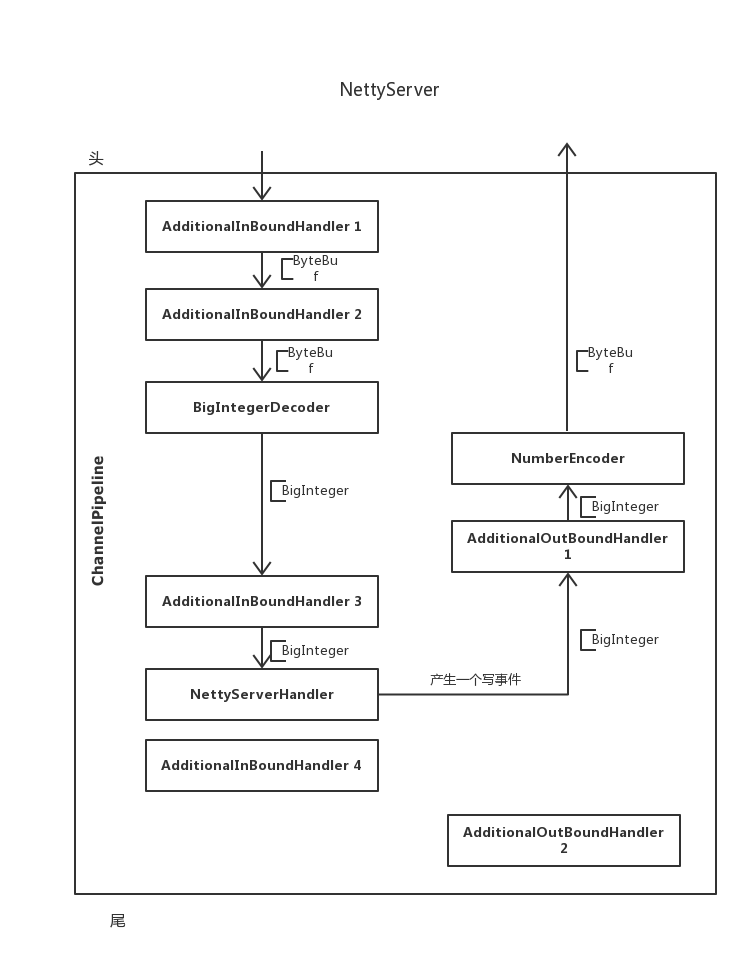
图上的箭头很清楚的表示了数据流经的过程,[XXX则注释出了此时的数据对象。
入站数据沿着ChannelPipeline的头至尾依次寻找下一个可以处理对应消息的处理器。
出战数据则会沿着ChannelPipeline的尾至头依次寻找下一个可以处理对应消息的处理器。
比如为什么数据没有流经InBoundHandler4和OutBoundHandler2?
因为NettyServerHandler发出了一个写事件,因此数据从尾至头的方法找下一个可以处理写消息的处理器,即OutBoundHandler1,在顺延下去。
Netty(二):数据在ChannelPipeline中的流经的更多相关文章
- SpringMVC(二)返回值设置、数据在域中的保存与SpringMVC案例
个人博客网:https://wushaopei.github.io/ (你想要这里多有) 一.返回值的设置 1.返回 String [1]返回 String 默认情况 @RequestMappi ...
- Scrapy基础(十二)————异步导出Item数据到Mysql中
异步导出数据到Mysql中 上次说过从Item中同步写入数据库,因为网络的下载速度和数据库的I/O速度是不一样的所以有可能会发生下载快,但是写入数据库速度慢,造成线程的堵塞:关于堵塞和非堵塞,同步和异 ...
- 【Netty】ChannelHandler和ChannelPipeline
一.前言 前面学习了Netty的ByteBuf,接着学习ChannelHandler和ChannelPipeline. 二.ChannelHandler和ChannelPipeline 2.1 Cha ...
- 一个I/O线程可以并发处理N个客户端连接和读写操作 I/O复用模型 基于Buf操作NIO可以读取任意位置的数据 Channel中读取数据到Buffer中或将数据 Buffer 中写入到 Channel 事件驱动消息通知观察者模式
Tomcat那些事儿 https://mp.weixin.qq.com/s?__biz=MzI3MTEwODc5Ng==&mid=2650860016&idx=2&sn=549 ...
- 在dubbo的一端,看Netty处理数据包,揭网络传输原理
如今,我们想要开发一个网络应用,那是相当地方便.不过就是引入一个框架,然后设置些参数,然后写写业务代码就搞定了. 写业务代码自然很重要,但是你知道: 你的数据是怎么来的吗?通过网络传输过来的呗. 你知 ...
- 自顶向下深入分析Netty(七)--ChannelPipeline和ChannelHandler总述
自顶向下深入分析Netty(七)--ChannelPipeline和ChannelHandler总述 自顶向下深入分析Netty(七)--ChannelPipeline源码实现 自顶向下深入分析Net ...
- Netty(二):如何处理io请求?
文接上一篇.上篇讲到netty暴露一个端口出来,acceptor, handler, pipeline, eventloop 都已准备好.但是并没体现其如何处理接入新的网络请求,今天我们就一起来看看吧 ...
- 一文搞懂 Netty 发送数据全流程 | 你想知道的细节全在这里
欢迎关注公众号:bin的技术小屋,如果大家在看文章的时候发现图片加载不了,可以到公众号查看原文 本系列Netty源码解析文章基于 4.1.56.Final版本 在<Netty如何高效接收网络数据 ...
- (转)原始图像数据和PDF中的图像数据
比较原始图像数据和PDF中的图像数据,结果见表1.1.表1.1中各种“解码器”的解释见本文后续的“PDF支持的图像格式”部分,“PDF中的图像数据”各栏中的数据来自开源的PdfView.如果您有兴趣查 ...
随机推荐
- 我去,还在这样读写 excel 这也太低效了吧!
前言 博文地址:https://sourl.cn/SsD3AM 最近读者小 H 给小黑哥发来私信: 小黑哥,最近我在负责公司报表平台开发,需要导出报表到 excel 中.每次使用 POI 开发,都要写 ...
- shell查询目标jvm的perm占比
#查询指定进程号下面的方法区使用率,jdk1.7是perm,jdk1.8是metaspace function get_perm_use_percent() { pid="$1" ...
- 微信小程序--分享功能
微信小程序--分享功能 微信小程序前段时间开放了小程序右上角的分享功能, 可以分享任意一个页面到好友或者群聊, 但是不能分享到朋友圈 这里有微信开发文档链接:点击跳转到微信分享功能API 入口方法: ...
- 给listview添加长时间点击事件(完成删除操作)
出现的问题是:当长时间点击listview的时候,触发长时间点击事件的同时也会触发点击事件,处理的办法是在长时间点击事件中加上return true:这样就可以很好的解决了. 给listview天机长 ...
- Swing组件中URL方法获取 图标
13.3.2 图标的使用 1.创建图标 package lll; import java.awt.*; import javax.swing.*; public class DrawIcon impl ...
- Python Request-学习笔记(1)
#导入Requests模块:import requests # 然后,尝试获取某个网页.返回的是reaponse对象,可以从这个对象中获取所有我们想要的信息.response = requests.g ...
- pgsql的使用
Deepin上面pgsql的启动 service postgresql start 停止 service postgresql stop 查看pgsql的版本 psql --version
- x聊之后,又一波新的诈骗套路
前些天刚看到,x聊勒索诈骗套路,骗子的套路可以说是花样百出,这不又一网友深受其害. 事情经过是这样的 某被骗网友由于工资微薄一直想找副业增加收入,关注和加了很多群. 注意群里都是有偏亮头像的”小姐姐” ...
- AJ学IOS 之CoreLocation基本使用
猫猫分享,必须精品AJ 一:CoreLocation的基本使用 使用步骤: 首先导入头文件#import <CoreLocation/CoreLocation.h> 1.创建CoreLoc ...
- 今日写一篇散文 Textview settext 方法不能放入 int 参数 不然报错!
Textview settext 方法不能放入 int 参数 不然报错!